Auto-Resize Textarea — Free HTML CSS JS Snippet

Auto-Resize Textarea · Forms · Plain HTML, CSS & JS · Live preview

Share & Support

What's included

Features

True auto-resize
Resets height to auto before reading scrollHeight — ensures accurate shrink as well as grow, not just a one-way expand.
Three-threshold counter
Muted grey below 80%, amber warning at 80%, red error at 100%. Both textarea border and counter text change colour in sync.
Connected border design
Textarea and counter bar share a border with matching border-radius corners, appearing as a single component. Border colour transitions propagate via sibling selectors.
Star rating widget
Three-listener pattern: mouseenter previews, mouseleave resets, click commits. State is a simple integer — easy to read on submit.
Success state
On valid submit the form hides and a green success panel with icon and copy appears. "Submit another" resets all state.
Client validation
Textarea is required. Submit handler checks .trim() and adds the error class to focus and highlight the empty field.
Accessible counter
aria-live="polite" on the counter and aria-describedby linking hint + counter to the textarea for screen reader compatibility.
Overflow:hidden on textarea
Prevents a scrollbar flash during the height recalculation. Combined with resize:none it removes all default browser resize affordances.

About this UI Snippet

Auto-Resize Textarea — HTML CSS JavaScript
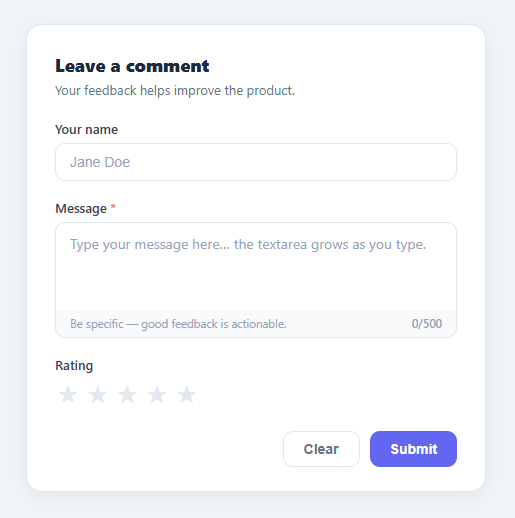
Screenshot of the Auto-Resize Textarea snippet rendered live

Textarea that grows as you type with a live character counter, warning colours at 80%/100%, star rating, and form submit state. Zero dependencies.

An auto-resizing textarea removes one of the most frustrating friction points in form UX: the fixed-height text box that forces users to scroll through their own input while typing. This pattern is used in comment forms, chat inputs, feedback dialogs, and email composers across virtually every modern web product. This snippet builds a complete feedback form with auto-grow behaviour, a live character counter with colour-coded thresholds, a star rating widget, and a success state — all in pure HTML, CSS, and JavaScript.

The auto-resize mechanism

The core auto-grow technique is a two-step height update in the resize() function. First, textarea.style.height = 'auto' collapses the element to its minimum size, allowing the browser to recalculate scrollHeight accurately. Second, textarea.style.height = textarea.scrollHeight + 'px' sets the height to the exact content height. Without the reset to auto first, scrollHeight returns the previously set explicit height rather than the natural content height — the element would only grow, never shrink when lines are deleted. The textarea also has overflow: hidden to prevent a scrollbar from briefly appearing during the resize, and resize: none to remove the browser's default drag handle since the element manages its own height.

Character counter with threshold colouring

The counter reads textarea.value.length and textarea.getAttribute('maxlength') on every input event to compute a ratio. Below 80% the counter is a muted grey. At 80% it switches to amber using .warn classes. At 100% it switches to red with .error classes. Both the textarea and the counter row receive these classes so the border and the count text change colour in sync. The counter row below the textarea shares the same border and mirrors the textarea's border-color through CSS class pairing, creating a visually unified component.

Connected border treatment

The textarea and its counter bar are two separate elements that appear as one by sharing a border: the textarea has border-radius: 10px 10px 0 0 with border-bottom: none, and the counter bar has border-radius: 0 0 10px 10px with border-top: none. Both have border: 1.5px solid #e2e8f0. When the textarea receives focus or a warning class, the sibling counter row needs its border to match — CSS handles this via adjacent-sibling selectors like .textarea:focus + .counter-row.

Star rating widget

Each star button has a numeric data-v attribute. mouseenter calls lightStars(n) to visually preview the rating by adding the lit class to all stars with data-v ≤ n. mouseleave resets to lightStars(rating) — the last committed rating. click commits the rating by updating the rating variable. This three-listener pattern (preview, reset, commit) is the canonical star rating implementation.

Accessible counter

The counter span has aria-live="polite" so screen readers announce the count periodically without interrupting typing. The textarea has aria-describedby pointing at both the hint text and the counter span, associating both with the field for assistive technologies.

Step by step

How to Use

  1. 1
    Type in the textareaThe textarea grows downward as you type — no scrollbar, no fixed height. Deleting lines shrinks it back to fit the remaining content.
  2. 2
    Watch the character counterThe counter below the textarea shows current/500 characters. At 400 characters (80%) the border and counter turn amber as a warning.
  3. 3
    Approach the limitAt 500 characters the textarea border and counter turn red and the maxlength attribute prevents further input.
  4. 4
    Click the star ratingHover to preview a rating — stars light up in yellow as you move the mouse. Click to commit the selection.
  5. 5
    Submit the formClick Submit to validate (message is required) and show the green success state. The form hides and a confirmation panel appears.
  6. 6
    Clear or resetClick Clear to empty the textarea and reset the counter without hiding the form. Click "Submit another" on the success screen to start over.

Real-world uses

Common Use Cases

Comment and feedback forms
The primary use case — replace any fixed textarea in a comment box. Pair with a toast notification to confirm submission.
Chat and messaging inputs
Grow the input as messages get longer, exactly like Slack and iMessage. Combine with a chat UI for the full conversation layout.
Issue and bug report forms
Long bug descriptions need room. Pair with a multi-step form for a structured report with title, steps to reproduce, and expected result.
Email composers
Auto-grow the body field in an email compose UI so the layout scales naturally with message length.
Code snippet inputs
Use with a monospace font for multi-line code paste fields. The auto-grow keeps the full snippet visible without an internal scroll.

Got questions?

Frequently Asked Questions

If you only set height to scrollHeight without resetting first, scrollHeight reflects the previously set explicit height rather than the natural content height. The element would grow on each keystroke but never shrink when content is deleted, because the fixed height always equals or exceeds the content.

Add max-height: 300px and overflow-y: auto to the textarea CSS. The auto-resize sets an explicit height up to that maximum, then overflow-y triggers the scrollbar when the content exceeds it.

Replace textarea.value.length with textarea.value.trim().split(/\s+/).filter(Boolean).length for word count. Update the max variable to your word limit and adjust the aria-label on the counter span.

Yes — the height calculation works in any container. The only issue is if the modal uses display:none before opening, which means scrollHeight reads as 0. Call resize() after the modal's open animation completes (e.g. in a transitionend handler).

On every input event, after resize() and updateCounter(), call localStorage.setItem("draft", textarea.value). On page load, read it back with const saved = localStorage.getItem("draft"); and set textarea.value = saved || ""; then call resize().

Yes. Click the React, Vue, Angular, or Tailwind export above the preview. The resize logic is a single handler — set the height to auto, then to scrollHeight: in React attach it to onChange with a useRef on the textarea; in Vue use @input with a template ref; in Angular use (input) with a ViewChild reference. Because the growth is driven by scrollHeight rather than a fixed row count, the behaviour is identical across every framework — only where you attach the listener changes. Remember to call resize once after mount (useEffect / onMounted / ngAfterViewInit) so a pre-filled value sizes correctly. The Tailwind export converts the field, counter, and focus styling into utility classes.

Auto-Resize Textarea — Export as HTML, React, Vue, Angular & Tailwind

HTML
<!DOCTYPE html>
<html lang="en">
<head>
  <meta charset="UTF-8" />
  <meta name="viewport" content="width=device-width, initial-scale=1.0" />
  <title>Auto-Resize Textarea</title>
  <style>
    * { box-sizing: border-box; margin: 0; padding: 0; }
    body { font-family: system-ui, -apple-system, sans-serif; background: #f1f5f9; min-height: 100vh; display: flex; align-items: center; justify-content: center; padding: 24px; }
    
    .page { width: 100%; max-width: 460px; }
    
    .card {
      background: #fff;
      border: 1px solid #e2e8f0;
      border-radius: 16px;
      padding: 28px 28px 24px;
      box-shadow: 0 4px 20px rgba(0,0,0,0.06);
    }
    
    .card-head { margin-bottom: 22px; }
    .card-title { font-size: 18px; font-weight: 800; color: #1e293b; margin-bottom: 4px; }
    .card-sub { font-size: 13px; color: #64748b; }
    
    .form { display: flex; flex-direction: column; gap: 18px; }
    
    .field { display: flex; flex-direction: column; gap: 6px; }
    .label { font-size: 13px; font-weight: 600; color: #374151; }
    .required { color: #ef4444; }
    
    .input {
      width: 100%;
      padding: 10px 14px;
      border: 1.5px solid #e2e8f0;
      border-radius: 10px;
      font-size: 14px; color: #1e293b;
      background: #fff;
      transition: border-color 0.15s, box-shadow 0.15s;
      outline: none;
    }
    .input::placeholder { color: #94a3b8; }
    .input:focus { border-color: #6366f1; box-shadow: 0 0 0 3px rgba(99,102,241,0.12); }
    
    .textarea-wrap { display: flex; flex-direction: column; gap: 0; }
    
    .textarea {
      width: 100%;
      min-height: 88px;
      padding: 10px 14px;
      border: 1.5px solid #e2e8f0;
      border-radius: 10px 10px 0 0;
      border-bottom: none;
      font-size: 14px; color: #1e293b;
      font-family: inherit;
      line-height: 1.55;
      resize: none;
      overflow: hidden;
      background: #fff;
      transition: border-color 0.15s, box-shadow 0.15s;
      outline: none;
    }
    .textarea::placeholder { color: #94a3b8; }
    .textarea:focus { border-color: #6366f1; box-shadow: 0 0 0 3px rgba(99,102,241,0.12); }
    .textarea.warn  { border-color: #f59e0b; }
    .textarea.error { border-color: #ef4444; }
    .textarea.warn:focus  { box-shadow: 0 0 0 3px rgba(245,158,11,0.12); }
    .textarea.error:focus { box-shadow: 0 0 0 3px rgba(239,68,68,0.12); }
    
    .counter-row {
      display: flex; align-items: center; justify-content: space-between;
      padding: 6px 14px;
      background: #f8fafc;
      border: 1.5px solid #e2e8f0;
      border-top: none;
      border-radius: 0 0 10px 10px;
      transition: border-color 0.15s;
    }
    .textarea:focus + .counter-row, .textarea.warn + .counter-row { border-color: #6366f1; }
    .textarea.warn ~ .counter-row,  .textarea.warn + .counter-row  { border-color: #f59e0b; }
    .textarea.error ~ .counter-row, .textarea.error + .counter-row { border-color: #ef4444; }
    
    .hint { font-size: 11.5px; color: #94a3b8; }
    .counter { font-size: 11.5px; color: #94a3b8; font-weight: 600; white-space: nowrap; }
    .counter.warn  { color: #f59e0b; }
    .counter.error { color: #ef4444; }
    
    .stars { display: flex; gap: 4px; }
    .star {
      background: none; border: none; cursor: pointer;
      font-size: 26px; color: #e2e8f0;
      transition: color 0.1s, transform 0.1s;
      line-height: 1; padding: 2px;
    }
    .star:hover, .star.lit { color: #f59e0b; }
    .star:hover { transform: scale(1.15); }
    
    .actions { display: flex; justify-content: flex-end; gap: 10px; margin-top: 4px; }
    .btn-ghost {
      padding: 9px 20px; border-radius: 10px;
      border: 1.5px solid #e2e8f0; background: #fff;
      font-size: 14px; font-weight: 600; color: #64748b;
      cursor: pointer; transition: background 0.15s;
    }
    .btn-ghost:hover { background: #f8fafc; }
    .btn-primary {
      padding: 9px 20px; border-radius: 10px;
      border: none; background: #6366f1;
      font-size: 14px; font-weight: 700; color: #fff;
      cursor: pointer; transition: background 0.15s;
    }
    .btn-primary:hover { background: #4f46e5; }
    .btn-primary:disabled { background: #a5b4fc; cursor: default; }
    
    [hidden] { display: none !important; }
    .success { text-align: center; padding: 28px 0; display: flex; flex-direction: column; align-items: center; gap: 10px; }
    .success-icon { width: 56px; height: 56px; background: #f0fdf4; border-radius: 50%; display: flex; align-items: center; justify-content: center; font-size: 24px; color: #22c55e; }
    .success-title { font-size: 17px; font-weight: 800; color: #1e293b; }
    .success-sub { font-size: 13px; color: #64748b; max-width: 280px; }
  </style>
</head>
<body>
  <div class="page">
    <div class="card">
      <div class="card-head">
        <h2 class="card-title">Leave a comment</h2>
        <p class="card-sub">Your feedback helps improve the product.</p>
      </div>
  
      <form class="form" id="form" novalidate>
        <div class="field">
          <label class="label" for="name">Your name</label>
          <input class="input" id="name" type="text" placeholder="Jane Doe" autocomplete="name" />
        </div>
  
        <div class="field">
          <label class="label" for="msg">Message <span class="required">*</span></label>
          <div class="textarea-wrap">
            <textarea
              class="textarea"
              id="msg"
              placeholder="Type your message here… the textarea grows as you type."
              rows="3"
              maxlength="500"
              aria-describedby="msg-counter msg-hint"
              required
            ></textarea>
            <div class="counter-row">
              <span class="hint" id="msg-hint">Be specific — good feedback is actionable.</span>
              <span class="counter" id="msg-counter" aria-live="polite"><span id="char-count">0</span>/500</span>
            </div>
          </div>
        </div>
  
        <div class="field">
          <label class="label" for="rating">Rating</label>
          <div class="stars" id="stars" role="radiogroup" aria-label="Star rating">
            <button type="button" class="star" data-v="1" aria-label="1 star">★</button>
            <button type="button" class="star" data-v="2" aria-label="2 stars">★</button>
            <button type="button" class="star" data-v="3" aria-label="3 stars">★</button>
            <button type="button" class="star" data-v="4" aria-label="4 stars">★</button>
            <button type="button" class="star" data-v="5" aria-label="5 stars">★</button>
          </div>
        </div>
  
        <div class="actions">
          <button type="button" class="btn-ghost" id="clear-btn">Clear</button>
          <button type="submit" class="btn-primary" id="submit-btn">Submit</button>
        </div>
      </form>
  
      <div class="success" id="success" hidden>
        <div class="success-icon">✓</div>
        <div class="success-title">Thanks for your feedback!</div>
        <div class="success-sub">We read every comment and use it to improve.</div>
        <button class="btn-ghost" id="reset-btn">Submit another</button>
      </div>
    </div>
  </div>
  <script>
    const textarea   = document.getElementById('msg');
    const charCount  = document.getElementById('char-count');
    const counter    = document.getElementById('msg-counter');
    const form       = document.getElementById('form');
    const success    = document.getElementById('success');
    const clearBtn   = document.getElementById('clear-btn');
    const resetBtn   = document.getElementById('reset-btn');
    const stars      = document.querySelectorAll('.star');
    let rating = 0;
    
    /* ── Auto-resize ────────────────────────────────────── */
    function resize() {
      textarea.style.height = 'auto';
      textarea.style.height = textarea.scrollHeight + 'px';
    }
    
    /* ── Character counter ──────────────────────────────── */
    function updateCounter() {
      const len = textarea.value.length;
      const max = +textarea.getAttribute('maxlength');
      charCount.textContent = len;
      const pct = len / max;
      textarea.classList.toggle('warn',  pct >= 0.8 && pct < 1);
      textarea.classList.toggle('error', pct >= 1);
      counter.classList.toggle('warn',   pct >= 0.8 && pct < 1);
      counter.classList.toggle('error',  pct >= 1);
    }
    
    textarea.addEventListener('input', () => { resize(); updateCounter(); });
    
    /* ── Star rating ────────────────────────────────────── */
    function lightStars(n) {
      stars.forEach(s => s.classList.toggle('lit', +s.dataset.v <= n));
    }
    
    stars.forEach(s => {
      s.addEventListener('mouseenter', () => lightStars(+s.dataset.v));
      s.addEventListener('mouseleave', () => lightStars(rating));
      s.addEventListener('click', () => { rating = +s.dataset.v; lightStars(rating); });
    });
    
    /* ── Submit ─────────────────────────────────────────── */
    form.addEventListener('submit', e => {
      e.preventDefault();
      if (!textarea.value.trim()) {
        textarea.focus();
        textarea.classList.add('error');
        return;
      }
      form.hidden = true;
      success.hidden = false;
    });
    
    /* ── Clear / Reset ──────────────────────────────────── */
    clearBtn.addEventListener('click', () => {
      textarea.value = '';
      resize(); updateCounter();
      rating = 0; lightStars(0);
      textarea.classList.remove('warn','error');
      counter.classList.remove('warn','error');
    });
    
    resetBtn.addEventListener('click', () => {
      form.reset();
      textarea.value = '';
      resize(); updateCounter();
      rating = 0; lightStars(0);
      textarea.classList.remove('warn','error');
      counter.classList.remove('warn','error');
      form.hidden = false;
      success.hidden = true;
    });
    
    resize();
  </script>
</body>
</html>
Tailwind
<!DOCTYPE html>
<html lang="en">
<head>
  <meta charset="UTF-8" />
  <meta name="viewport" content="width=device-width, initial-scale=1.0" />
  <title>Auto-Resize Textarea</title>
  <!-- Tailwind CSS v3+ — arbitrary value classes (e.g. bg-[#0f172a]) are valid -->
  <script src="https://cdn.tailwindcss.com"></script>
  <style>
    * {
      box-sizing: border-box; margin: 0; padding: 0;
    }

    body {
      font-family: system-ui, -apple-system, sans-serif; background: #f1f5f9; min-height: 100vh; display: flex; align-items: center; justify-content: center; padding: 24px;
    }

    .form {
      display: flex; flex-direction: column; gap: 18px;
    }

    .input {
      width: 100%;
      padding: 10px 14px;
      border: 1.5px solid #e2e8f0;
      border-radius: 10px;
      font-size: 14px; color: #1e293b;
      background: #fff;
      transition: border-color 0.15s, box-shadow 0.15s;
      outline: none;
    }

    .input::placeholder {
      color: #94a3b8;
    }

    .input:focus {
      border-color: #6366f1; box-shadow: 0 0 0 3px rgba(99,102,241,0.12);
    }

    .textarea::placeholder {
      color: #94a3b8;
    }

    .textarea.warn {
      border-color: #f59e0b;
    }

    .textarea.error {
      border-color: #ef4444;
    }

    .textarea.warn:focus {
      box-shadow: 0 0 0 3px rgba(245,158,11,0.12);
    }

    .textarea.error:focus {
      box-shadow: 0 0 0 3px rgba(239,68,68,0.12);
    }

    .textarea:focus + .counter-row, .textarea.warn + .counter-row {
      border-color: #6366f1;
    }

    .textarea.warn ~ .counter-row,  .textarea.warn + .counter-row {
      border-color: #f59e0b;
    }

    .textarea.error ~ .counter-row, .textarea.error + .counter-row {
      border-color: #ef4444;
    }

    .counter.warn {
      color: #f59e0b;
    }

    .counter.error {
      color: #ef4444;
    }

    .star:hover, .star.lit {
      color: #f59e0b;
    }

    .btn-primary:disabled {
      background: #a5b4fc; cursor: default;
    }

    [hidden] {
      display: none !important;
    }

    .success {
      text-align: center; padding: 28px 0; display: flex; flex-direction: column; align-items: center; gap: 10px;
    }
  </style>
</head>
<body>
  <div class="w-full max-w-[460px]">
    <div class="bg-[#fff] border border-[#e2e8f0] rounded-2xl pt-7 px-7 pb-6 shadow-[0_4px_20px_rgba(0,0,0,0.06)]">
      <div class="mb-[22px]">
        <h2 class="text-lg font-extrabold text-[#1e293b] mb-1">Leave a comment</h2>
        <p class="text-[13px] text-[#64748b]">Your feedback helps improve the product.</p>
      </div>
  
      <form class="form" id="form" novalidate>
        <div class="flex flex-col gap-1.5">
          <label class="text-[13px] font-semibold text-[#374151]" for="name">Your name</label>
          <input class="input" id="name" type="text" placeholder="Jane Doe" autocomplete="name" />
        </div>
  
        <div class="flex flex-col gap-1.5">
          <label class="text-[13px] font-semibold text-[#374151]" for="msg">Message <span class="text-[#ef4444]">*</span></label>
          <div class="flex flex-col gap-0">
            <textarea
              class="textarea w-full min-h-[88px] py-2.5 px-3.5 border rounded-[10px 10px 0 0] border-b-0 text-sm text-[#1e293b] font-[inherit] leading-[1.55] resize-none overflow-hidden bg-[#fff] [transition:border-color_0.15s,_box-shadow_0.15s] outline-none focus:border-[#6366f1] focus:shadow-[0_0_0_3px_rgba(99,102,241,0.12)]"
              id="msg"
              placeholder="Type your message here… the textarea grows as you type."
              rows="3"
              maxlength="500"
              aria-describedby="msg-counter msg-hint"
              required
            ></textarea>
            <div class="counter-row flex items-center justify-between py-1.5 px-3.5 bg-[#f8fafc] border border-t-0 rounded-[0 0 10px 10px] [transition:border-color_0.15s]">
              <span class="text-[11.5px] text-[#94a3b8]" id="msg-hint">Be specific — good feedback is actionable.</span>
              <span class="counter text-[11.5px] text-[#94a3b8] font-semibold whitespace-nowrap" id="msg-counter" aria-live="polite"><span id="char-count">0</span>/500</span>
            </div>
          </div>
        </div>
  
        <div class="flex flex-col gap-1.5">
          <label class="text-[13px] font-semibold text-[#374151]" for="rating">Rating</label>
          <div class="flex gap-1" id="stars" role="radiogroup" aria-label="Star rating">
            <button type="button" class="star bg-transparent border-0 cursor-pointer text-[26px] text-[#e2e8f0] [transition:color_0.1s,_transform_0.1s] leading-none p-0.5 hover:[transform:scale(1.15)]" data-v="1" aria-label="1 star">★</button>
            <button type="button" class="star bg-transparent border-0 cursor-pointer text-[26px] text-[#e2e8f0] [transition:color_0.1s,_transform_0.1s] leading-none p-0.5 hover:[transform:scale(1.15)]" data-v="2" aria-label="2 stars">★</button>
            <button type="button" class="star bg-transparent border-0 cursor-pointer text-[26px] text-[#e2e8f0] [transition:color_0.1s,_transform_0.1s] leading-none p-0.5 hover:[transform:scale(1.15)]" data-v="3" aria-label="3 stars">★</button>
            <button type="button" class="star bg-transparent border-0 cursor-pointer text-[26px] text-[#e2e8f0] [transition:color_0.1s,_transform_0.1s] leading-none p-0.5 hover:[transform:scale(1.15)]" data-v="4" aria-label="4 stars">★</button>
            <button type="button" class="star bg-transparent border-0 cursor-pointer text-[26px] text-[#e2e8f0] [transition:color_0.1s,_transform_0.1s] leading-none p-0.5 hover:[transform:scale(1.15)]" data-v="5" aria-label="5 stars">★</button>
          </div>
        </div>
  
        <div class="flex justify-end gap-2.5 mt-1">
          <button type="button" class="py-[9px] px-5 rounded-[10px] border bg-[#fff] text-sm font-semibold text-[#64748b] cursor-pointer [transition:background_0.15s] hover:bg-[#f8fafc]" id="clear-btn">Clear</button>
          <button type="submit" class="btn-primary py-[9px] px-5 rounded-[10px] border-0 bg-[#6366f1] text-sm font-bold text-[#fff] cursor-pointer [transition:background_0.15s] hover:bg-[#4f46e5]" id="submit-btn">Submit</button>
        </div>
      </form>
  
      <div class="success" id="success" hidden>
        <div class="w-14 h-14 bg-[#f0fdf4] rounded-full flex items-center justify-center text-2xl text-[#22c55e]">✓</div>
        <div class="text-[17px] font-extrabold text-[#1e293b]">Thanks for your feedback!</div>
        <div class="text-[13px] text-[#64748b] max-w-[280px]">We read every comment and use it to improve.</div>
        <button class="py-[9px] px-5 rounded-[10px] border bg-[#fff] text-sm font-semibold text-[#64748b] cursor-pointer [transition:background_0.15s] hover:bg-[#f8fafc]" id="reset-btn">Submit another</button>
      </div>
    </div>
  </div>
  <script>
    const textarea   = document.getElementById('msg');
    const charCount  = document.getElementById('char-count');
    const counter    = document.getElementById('msg-counter');
    const form       = document.getElementById('form');
    const success    = document.getElementById('success');
    const clearBtn   = document.getElementById('clear-btn');
    const resetBtn   = document.getElementById('reset-btn');
    const stars      = document.querySelectorAll('.star');
    let rating = 0;
    
    /* ── Auto-resize ────────────────────────────────────── */
    function resize() {
      textarea.style.height = 'auto';
      textarea.style.height = textarea.scrollHeight + 'px';
    }
    
    /* ── Character counter ──────────────────────────────── */
    function updateCounter() {
      const len = textarea.value.length;
      const max = +textarea.getAttribute('maxlength');
      charCount.textContent = len;
      const pct = len / max;
      textarea.classList.toggle('warn',  pct >= 0.8 && pct < 1);
      textarea.classList.toggle('error', pct >= 1);
      counter.classList.toggle('warn',   pct >= 0.8 && pct < 1);
      counter.classList.toggle('error',  pct >= 1);
    }
    
    textarea.addEventListener('input', () => { resize(); updateCounter(); });
    
    /* ── Star rating ────────────────────────────────────── */
    function lightStars(n) {
      stars.forEach(s => s.classList.toggle('lit', +s.dataset.v <= n));
    }
    
    stars.forEach(s => {
      s.addEventListener('mouseenter', () => lightStars(+s.dataset.v));
      s.addEventListener('mouseleave', () => lightStars(rating));
      s.addEventListener('click', () => { rating = +s.dataset.v; lightStars(rating); });
    });
    
    /* ── Submit ─────────────────────────────────────────── */
    form.addEventListener('submit', e => {
      e.preventDefault();
      if (!textarea.value.trim()) {
        textarea.focus();
        textarea.classList.add('error');
        return;
      }
      form.hidden = true;
      success.hidden = false;
    });
    
    /* ── Clear / Reset ──────────────────────────────────── */
    clearBtn.addEventListener('click', () => {
      textarea.value = '';
      resize(); updateCounter();
      rating = 0; lightStars(0);
      textarea.classList.remove('warn','error');
      counter.classList.remove('warn','error');
    });
    
    resetBtn.addEventListener('click', () => {
      form.reset();
      textarea.value = '';
      resize(); updateCounter();
      rating = 0; lightStars(0);
      textarea.classList.remove('warn','error');
      counter.classList.remove('warn','error');
      form.hidden = false;
      success.hidden = true;
    });
    
    resize();
  </script>
</body>
</html>
React
import React, { useEffect } from 'react';

// CSS — optionally move to AutoResizeTextarea.module.css
const css = `
* { box-sizing: border-box; margin: 0; padding: 0; }
body { font-family: system-ui, -apple-system, sans-serif; background: #f1f5f9; min-height: 100vh; display: flex; align-items: center; justify-content: center; padding: 24px; }

.page { width: 100%; max-width: 460px; }

.card {
  background: #fff;
  border: 1px solid #e2e8f0;
  border-radius: 16px;
  padding: 28px 28px 24px;
  box-shadow: 0 4px 20px rgba(0,0,0,0.06);
}

.card-head { margin-bottom: 22px; }
.card-title { font-size: 18px; font-weight: 800; color: #1e293b; margin-bottom: 4px; }
.card-sub { font-size: 13px; color: #64748b; }

.form { display: flex; flex-direction: column; gap: 18px; }

.field { display: flex; flex-direction: column; gap: 6px; }
.label { font-size: 13px; font-weight: 600; color: #374151; }
.required { color: #ef4444; }

.input {
  width: 100%;
  padding: 10px 14px;
  border: 1.5px solid #e2e8f0;
  border-radius: 10px;
  font-size: 14px; color: #1e293b;
  background: #fff;
  transition: border-color 0.15s, box-shadow 0.15s;
  outline: none;
}
.input::placeholder { color: #94a3b8; }
.input:focus { border-color: #6366f1; box-shadow: 0 0 0 3px rgba(99,102,241,0.12); }

.textarea-wrap { display: flex; flex-direction: column; gap: 0; }

.textarea {
  width: 100%;
  min-height: 88px;
  padding: 10px 14px;
  border: 1.5px solid #e2e8f0;
  border-radius: 10px 10px 0 0;
  border-bottom: none;
  font-size: 14px; color: #1e293b;
  font-family: inherit;
  line-height: 1.55;
  resize: none;
  overflow: hidden;
  background: #fff;
  transition: border-color 0.15s, box-shadow 0.15s;
  outline: none;
}
.textarea::placeholder { color: #94a3b8; }
.textarea:focus { border-color: #6366f1; box-shadow: 0 0 0 3px rgba(99,102,241,0.12); }
.textarea.warn  { border-color: #f59e0b; }
.textarea.error { border-color: #ef4444; }
.textarea.warn:focus  { box-shadow: 0 0 0 3px rgba(245,158,11,0.12); }
.textarea.error:focus { box-shadow: 0 0 0 3px rgba(239,68,68,0.12); }

.counter-row {
  display: flex; align-items: center; justify-content: space-between;
  padding: 6px 14px;
  background: #f8fafc;
  border: 1.5px solid #e2e8f0;
  border-top: none;
  border-radius: 0 0 10px 10px;
  transition: border-color 0.15s;
}
.textarea:focus + .counter-row, .textarea.warn + .counter-row { border-color: #6366f1; }
.textarea.warn ~ .counter-row,  .textarea.warn + .counter-row  { border-color: #f59e0b; }
.textarea.error ~ .counter-row, .textarea.error + .counter-row { border-color: #ef4444; }

.hint { font-size: 11.5px; color: #94a3b8; }
.counter { font-size: 11.5px; color: #94a3b8; font-weight: 600; white-space: nowrap; }
.counter.warn  { color: #f59e0b; }
.counter.error { color: #ef4444; }

.stars { display: flex; gap: 4px; }
.star {
  background: none; border: none; cursor: pointer;
  font-size: 26px; color: #e2e8f0;
  transition: color 0.1s, transform 0.1s;
  line-height: 1; padding: 2px;
}
.star:hover, .star.lit { color: #f59e0b; }
.star:hover { transform: scale(1.15); }

.actions { display: flex; justify-content: flex-end; gap: 10px; margin-top: 4px; }
.btn-ghost {
  padding: 9px 20px; border-radius: 10px;
  border: 1.5px solid #e2e8f0; background: #fff;
  font-size: 14px; font-weight: 600; color: #64748b;
  cursor: pointer; transition: background 0.15s;
}
.btn-ghost:hover { background: #f8fafc; }
.btn-primary {
  padding: 9px 20px; border-radius: 10px;
  border: none; background: #6366f1;
  font-size: 14px; font-weight: 700; color: #fff;
  cursor: pointer; transition: background 0.15s;
}
.btn-primary:hover { background: #4f46e5; }
.btn-primary:disabled { background: #a5b4fc; cursor: default; }

[hidden] { display: none !important; }
.success { text-align: center; padding: 28px 0; display: flex; flex-direction: column; align-items: center; gap: 10px; }
.success-icon { width: 56px; height: 56px; background: #f0fdf4; border-radius: 50%; display: flex; align-items: center; justify-content: center; font-size: 24px; color: #22c55e; }
.success-title { font-size: 17px; font-weight: 800; color: #1e293b; }
.success-sub { font-size: 13px; color: #64748b; max-width: 280px; }
`;

export default function AutoResizeTextarea() {
  // Auto-generated escape hatch: the original snippet's vanilla JS runs once
  // after mount and queries the rendered DOM. For idiomatic React, lift this
  // into state + handlers.
  useEffect(() => {
    const _listeners = [];
    const _originalAddEventListener = EventTarget.prototype.addEventListener;
    EventTarget.prototype.addEventListener = function(type, listener, options) {
      _listeners.push({ target: this, type, listener, options });
      return _originalAddEventListener.call(this, type, listener, options);
    };
    const textarea   = document.getElementById('msg');
    const charCount  = document.getElementById('char-count');
    const counter    = document.getElementById('msg-counter');
    const form       = document.getElementById('form');
    const success    = document.getElementById('success');
    const clearBtn   = document.getElementById('clear-btn');
    const resetBtn   = document.getElementById('reset-btn');
    const stars      = document.querySelectorAll('.star');
    let rating = 0;
    
    /* ── Auto-resize ────────────────────────────────────── */
    function resize() {
      textarea.style.height = 'auto';
      textarea.style.height = textarea.scrollHeight + 'px';
    }
    
    /* ── Character counter ──────────────────────────────── */
    function updateCounter() {
      const len = textarea.value.length;
      const max = +textarea.getAttribute('maxlength');
      charCount.textContent = len;
      const pct = len / max;
      textarea.classList.toggle('warn',  pct >= 0.8 && pct < 1);
      textarea.classList.toggle('error', pct >= 1);
      counter.classList.toggle('warn',   pct >= 0.8 && pct < 1);
      counter.classList.toggle('error',  pct >= 1);
    }
    
    textarea.addEventListener('input', () => { resize(); updateCounter(); });
    
    /* ── Star rating ────────────────────────────────────── */
    function lightStars(n) {
      stars.forEach(s => s.classList.toggle('lit', +s.dataset.v <= n));
    }
    
    stars.forEach(s => {
      s.addEventListener('mouseenter', () => lightStars(+s.dataset.v));
      s.addEventListener('mouseleave', () => lightStars(rating));
      s.addEventListener('click', () => { rating = +s.dataset.v; lightStars(rating); });
    });
    
    /* ── Submit ─────────────────────────────────────────── */
    form.addEventListener('submit', e => {
      e.preventDefault();
      if (!textarea.value.trim()) {
        textarea.focus();
        textarea.classList.add('error');
        return;
      }
      form.hidden = true;
      success.hidden = false;
    });
    
    /* ── Clear / Reset ──────────────────────────────────── */
    clearBtn.addEventListener('click', () => {
      textarea.value = '';
      resize(); updateCounter();
      rating = 0; lightStars(0);
      textarea.classList.remove('warn','error');
      counter.classList.remove('warn','error');
    });
    
    resetBtn.addEventListener('click', () => {
      form.reset();
      textarea.value = '';
      resize(); updateCounter();
      rating = 0; lightStars(0);
      textarea.classList.remove('warn','error');
      counter.classList.remove('warn','error');
      form.hidden = false;
      success.hidden = true;
    });
    
    resize();
    // Cleanup: restore addEventListener and remove all listeners
    return () => {
      EventTarget.prototype.addEventListener = _originalAddEventListener;
      for (const { target, type, listener, options } of _listeners) {
        target.removeEventListener(type, listener, options);
      }
    };
  }, []);

  return (
    <>
      <style>{css}</style>
      <div className="page">
        <div className="card">
          <div className="card-head">
            <h2 className="card-title">Leave a comment</h2>
            <p className="card-sub">Your feedback helps improve the product.</p>
          </div>
      
          <form className="form" id="form" novalidate>
            <div className="field">
              <label className="label" htmlFor="name">Your name</label>
              <input className="input" id="name" type="text" placeholder="Jane Doe" autocomplete="name" />
            </div>
      
            <div className="field">
              <label className="label" htmlFor="msg">Message <span className="required">*</span></label>
              <div className="textarea-wrap">
                <textarea
                  className="textarea"
                  id="msg"
                  placeholder="Type your message here… the textarea grows as you type."
                  rows="3"
                  maxlength="500"
                  aria-describedby="msg-counter msg-hint"
                  required
                ></textarea>
                <div className="counter-row">
                  <span className="hint" id="msg-hint">Be specific — good feedback is actionable.</span>
                  <span className="counter" id="msg-counter" aria-live="polite"><span id="char-count">0</span>/500</span>
                </div>
              </div>
            </div>
      
            <div className="field">
              <label className="label" htmlFor="rating">Rating</label>
              <div className="stars" id="stars" role="radiogroup" aria-label="Star rating">
                <button type="button" className="star" data-v="1" aria-label="1 star">★</button>
                <button type="button" className="star" data-v="2" aria-label="2 stars">★</button>
                <button type="button" className="star" data-v="3" aria-label="3 stars">★</button>
                <button type="button" className="star" data-v="4" aria-label="4 stars">★</button>
                <button type="button" className="star" data-v="5" aria-label="5 stars">★</button>
              </div>
            </div>
      
            <div className="actions">
              <button type="button" className="btn-ghost" id="clear-btn">Clear</button>
              <button type="submit" className="btn-primary" id="submit-btn">Submit</button>
            </div>
          </form>
      
          <div className="success" id="success" hidden>
            <div className="success-icon">✓</div>
            <div className="success-title">Thanks for your feedback!</div>
            <div className="success-sub">We read every comment and use it to improve.</div>
            <button className="btn-ghost" id="reset-btn">Submit another</button>
          </div>
        </div>
      </div>
    </>
  );
}
React + Tailwind
import React, { useEffect } from 'react';
// Requires Tailwind CSS v3+ — https://tailwindcss.com/docs/installation
// Arbitrary value classes (e.g. bg-[#0f172a]) are valid Tailwind v3+

export default function AutoResizeTextarea() {
  // Auto-generated escape hatch: the original snippet's vanilla JS runs once
  // after mount and queries the rendered DOM. For idiomatic React, lift this
  // into state + handlers.
  useEffect(() => {
    const _listeners = [];
    const _originalAddEventListener = EventTarget.prototype.addEventListener;
    EventTarget.prototype.addEventListener = function(type, listener, options) {
      _listeners.push({ target: this, type, listener, options });
      return _originalAddEventListener.call(this, type, listener, options);
    };
    const textarea   = document.getElementById('msg');
    const charCount  = document.getElementById('char-count');
    const counter    = document.getElementById('msg-counter');
    const form       = document.getElementById('form');
    const success    = document.getElementById('success');
    const clearBtn   = document.getElementById('clear-btn');
    const resetBtn   = document.getElementById('reset-btn');
    const stars      = document.querySelectorAll('.star');
    let rating = 0;
    
    /* ── Auto-resize ────────────────────────────────────── */
    function resize() {
      textarea.style.height = 'auto';
      textarea.style.height = textarea.scrollHeight + 'px';
    }
    
    /* ── Character counter ──────────────────────────────── */
    function updateCounter() {
      const len = textarea.value.length;
      const max = +textarea.getAttribute('maxlength');
      charCount.textContent = len;
      const pct = len / max;
      textarea.classList.toggle('warn',  pct >= 0.8 && pct < 1);
      textarea.classList.toggle('error', pct >= 1);
      counter.classList.toggle('warn',   pct >= 0.8 && pct < 1);
      counter.classList.toggle('error',  pct >= 1);
    }
    
    textarea.addEventListener('input', () => { resize(); updateCounter(); });
    
    /* ── Star rating ────────────────────────────────────── */
    function lightStars(n) {
      stars.forEach(s => s.classList.toggle('lit', +s.dataset.v <= n));
    }
    
    stars.forEach(s => {
      s.addEventListener('mouseenter', () => lightStars(+s.dataset.v));
      s.addEventListener('mouseleave', () => lightStars(rating));
      s.addEventListener('click', () => { rating = +s.dataset.v; lightStars(rating); });
    });
    
    /* ── Submit ─────────────────────────────────────────── */
    form.addEventListener('submit', e => {
      e.preventDefault();
      if (!textarea.value.trim()) {
        textarea.focus();
        textarea.classList.add('error');
        return;
      }
      form.hidden = true;
      success.hidden = false;
    });
    
    /* ── Clear / Reset ──────────────────────────────────── */
    clearBtn.addEventListener('click', () => {
      textarea.value = '';
      resize(); updateCounter();
      rating = 0; lightStars(0);
      textarea.classList.remove('warn','error');
      counter.classList.remove('warn','error');
    });
    
    resetBtn.addEventListener('click', () => {
      form.reset();
      textarea.value = '';
      resize(); updateCounter();
      rating = 0; lightStars(0);
      textarea.classList.remove('warn','error');
      counter.classList.remove('warn','error');
      form.hidden = false;
      success.hidden = true;
    });
    
    resize();
    // Cleanup: restore addEventListener and remove all listeners
    return () => {
      EventTarget.prototype.addEventListener = _originalAddEventListener;
      for (const { target, type, listener, options } of _listeners) {
        target.removeEventListener(type, listener, options);
      }
    };
  }, []);

  return (
    <>
      <style>{`
* {
  box-sizing: border-box; margin: 0; padding: 0;
}

body {
  font-family: system-ui, -apple-system, sans-serif; background: #f1f5f9; min-height: 100vh; display: flex; align-items: center; justify-content: center; padding: 24px;
}

.form {
  display: flex; flex-direction: column; gap: 18px;
}

.input {
  width: 100%;
  padding: 10px 14px;
  border: 1.5px solid #e2e8f0;
  border-radius: 10px;
  font-size: 14px; color: #1e293b;
  background: #fff;
  transition: border-color 0.15s, box-shadow 0.15s;
  outline: none;
}

.input::placeholder {
  color: #94a3b8;
}

.input:focus {
  border-color: #6366f1; box-shadow: 0 0 0 3px rgba(99,102,241,0.12);
}

.textarea::placeholder {
  color: #94a3b8;
}

.textarea.warn {
  border-color: #f59e0b;
}

.textarea.error {
  border-color: #ef4444;
}

.textarea.warn:focus {
  box-shadow: 0 0 0 3px rgba(245,158,11,0.12);
}

.textarea.error:focus {
  box-shadow: 0 0 0 3px rgba(239,68,68,0.12);
}

.textarea:focus + .counter-row, .textarea.warn + .counter-row {
  border-color: #6366f1;
}

.textarea.warn ~ .counter-row,  .textarea.warn + .counter-row {
  border-color: #f59e0b;
}

.textarea.error ~ .counter-row, .textarea.error + .counter-row {
  border-color: #ef4444;
}

.counter.warn {
  color: #f59e0b;
}

.counter.error {
  color: #ef4444;
}

.star:hover, .star.lit {
  color: #f59e0b;
}

.btn-primary:disabled {
  background: #a5b4fc; cursor: default;
}

[hidden] {
  display: none !important;
}

.success {
  text-align: center; padding: 28px 0; display: flex; flex-direction: column; align-items: center; gap: 10px;
}
      `}</style>
      <div className="w-full max-w-[460px]">
        <div className="bg-[#fff] border border-[#e2e8f0] rounded-2xl pt-7 px-7 pb-6 shadow-[0_4px_20px_rgba(0,0,0,0.06)]">
          <div className="mb-[22px]">
            <h2 className="text-lg font-extrabold text-[#1e293b] mb-1">Leave a comment</h2>
            <p className="text-[13px] text-[#64748b]">Your feedback helps improve the product.</p>
          </div>
      
          <form className="form" id="form" novalidate>
            <div className="flex flex-col gap-1.5">
              <label className="text-[13px] font-semibold text-[#374151]" htmlFor="name">Your name</label>
              <input className="input" id="name" type="text" placeholder="Jane Doe" autocomplete="name" />
            </div>
      
            <div className="flex flex-col gap-1.5">
              <label className="text-[13px] font-semibold text-[#374151]" htmlFor="msg">Message <span className="text-[#ef4444]">*</span></label>
              <div className="flex flex-col gap-0">
                <textarea
                  className="textarea w-full min-h-[88px] py-2.5 px-3.5 border rounded-[10px 10px 0 0] border-b-0 text-sm text-[#1e293b] font-[inherit] leading-[1.55] resize-none overflow-hidden bg-[#fff] [transition:border-color_0.15s,_box-shadow_0.15s] outline-none focus:border-[#6366f1] focus:shadow-[0_0_0_3px_rgba(99,102,241,0.12)]"
                  id="msg"
                  placeholder="Type your message here… the textarea grows as you type."
                  rows="3"
                  maxlength="500"
                  aria-describedby="msg-counter msg-hint"
                  required
                ></textarea>
                <div className="counter-row flex items-center justify-between py-1.5 px-3.5 bg-[#f8fafc] border border-t-0 rounded-[0 0 10px 10px] [transition:border-color_0.15s]">
                  <span className="text-[11.5px] text-[#94a3b8]" id="msg-hint">Be specific — good feedback is actionable.</span>
                  <span className="counter text-[11.5px] text-[#94a3b8] font-semibold whitespace-nowrap" id="msg-counter" aria-live="polite"><span id="char-count">0</span>/500</span>
                </div>
              </div>
            </div>
      
            <div className="flex flex-col gap-1.5">
              <label className="text-[13px] font-semibold text-[#374151]" htmlFor="rating">Rating</label>
              <div className="flex gap-1" id="stars" role="radiogroup" aria-label="Star rating">
                <button type="button" className="star bg-transparent border-0 cursor-pointer text-[26px] text-[#e2e8f0] [transition:color_0.1s,_transform_0.1s] leading-none p-0.5 hover:[transform:scale(1.15)]" data-v="1" aria-label="1 star">★</button>
                <button type="button" className="star bg-transparent border-0 cursor-pointer text-[26px] text-[#e2e8f0] [transition:color_0.1s,_transform_0.1s] leading-none p-0.5 hover:[transform:scale(1.15)]" data-v="2" aria-label="2 stars">★</button>
                <button type="button" className="star bg-transparent border-0 cursor-pointer text-[26px] text-[#e2e8f0] [transition:color_0.1s,_transform_0.1s] leading-none p-0.5 hover:[transform:scale(1.15)]" data-v="3" aria-label="3 stars">★</button>
                <button type="button" className="star bg-transparent border-0 cursor-pointer text-[26px] text-[#e2e8f0] [transition:color_0.1s,_transform_0.1s] leading-none p-0.5 hover:[transform:scale(1.15)]" data-v="4" aria-label="4 stars">★</button>
                <button type="button" className="star bg-transparent border-0 cursor-pointer text-[26px] text-[#e2e8f0] [transition:color_0.1s,_transform_0.1s] leading-none p-0.5 hover:[transform:scale(1.15)]" data-v="5" aria-label="5 stars">★</button>
              </div>
            </div>
      
            <div className="flex justify-end gap-2.5 mt-1">
              <button type="button" className="py-[9px] px-5 rounded-[10px] border bg-[#fff] text-sm font-semibold text-[#64748b] cursor-pointer [transition:background_0.15s] hover:bg-[#f8fafc]" id="clear-btn">Clear</button>
              <button type="submit" className="btn-primary py-[9px] px-5 rounded-[10px] border-0 bg-[#6366f1] text-sm font-bold text-[#fff] cursor-pointer [transition:background_0.15s] hover:bg-[#4f46e5]" id="submit-btn">Submit</button>
            </div>
          </form>
      
          <div className="success" id="success" hidden>
            <div className="w-14 h-14 bg-[#f0fdf4] rounded-full flex items-center justify-center text-2xl text-[#22c55e]">✓</div>
            <div className="text-[17px] font-extrabold text-[#1e293b]">Thanks for your feedback!</div>
            <div className="text-[13px] text-[#64748b] max-w-[280px]">We read every comment and use it to improve.</div>
            <button className="py-[9px] px-5 rounded-[10px] border bg-[#fff] text-sm font-semibold text-[#64748b] cursor-pointer [transition:background_0.15s] hover:bg-[#f8fafc]" id="reset-btn">Submit another</button>
          </div>
        </div>
      </div>
    </>
  );
}
Vue
<template>
  <div class="page">
    <div class="card">
      <div class="card-head">
        <h2 class="card-title">Leave a comment</h2>
        <p class="card-sub">Your feedback helps improve the product.</p>
      </div>
  
      <form class="form" id="form" novalidate>
        <div class="field">
          <label class="label" for="name">Your name</label>
          <input class="input" id="name" type="text" placeholder="Jane Doe" autocomplete="name" />
        </div>
  
        <div class="field">
          <label class="label" for="msg">Message <span class="required">*</span></label>
          <div class="textarea-wrap">
            <textarea
              class="textarea"
              id="msg"
              placeholder="Type your message here… the textarea grows as you type."
              rows="3"
              maxlength="500"
              aria-describedby="msg-counter msg-hint"
              required
            ></textarea>
            <div class="counter-row">
              <span class="hint" id="msg-hint">Be specific — good feedback is actionable.</span>
              <span class="counter" id="msg-counter" aria-live="polite"><span id="char-count">0</span>/500</span>
            </div>
          </div>
        </div>
  
        <div class="field">
          <label class="label" for="rating">Rating</label>
          <div class="stars" id="stars" role="radiogroup" aria-label="Star rating">
            <button type="button" class="star" data-v="1" aria-label="1 star">★</button>
            <button type="button" class="star" data-v="2" aria-label="2 stars">★</button>
            <button type="button" class="star" data-v="3" aria-label="3 stars">★</button>
            <button type="button" class="star" data-v="4" aria-label="4 stars">★</button>
            <button type="button" class="star" data-v="5" aria-label="5 stars">★</button>
          </div>
        </div>
  
        <div class="actions">
          <button type="button" class="btn-ghost" id="clear-btn">Clear</button>
          <button type="submit" class="btn-primary" id="submit-btn">Submit</button>
        </div>
      </form>
  
      <div class="success" id="success" hidden>
        <div class="success-icon">✓</div>
        <div class="success-title">Thanks for your feedback!</div>
        <div class="success-sub">We read every comment and use it to improve.</div>
        <button class="btn-ghost" id="reset-btn">Submit another</button>
      </div>
    </div>
  </div>
</template>

<script setup>
import { onMounted } from 'vue';

let textarea;
let charCount;
let counter;
let form;
let success;
let clearBtn;
let resetBtn;
let stars;
let rating = 0;
/* ── Auto-resize ────────────────────────────────────── */
function resize() {
  textarea.style.height = 'auto';
  textarea.style.height = textarea.scrollHeight + 'px';
}
/* ── Character counter ──────────────────────────────── */
function updateCounter() {
  const len = textarea.value.length;
  const max = +textarea.getAttribute('maxlength');
  charCount.textContent = len;
  const pct = len / max;
  textarea.classList.toggle('warn',  pct >= 0.8 && pct < 1);
  textarea.classList.toggle('error', pct >= 1);
  counter.classList.toggle('warn',   pct >= 0.8 && pct < 1);
  counter.classList.toggle('error',  pct >= 1);
}
/* ── Star rating ────────────────────────────────────── */
function lightStars(n) {
  stars.forEach(s => s.classList.toggle('lit', +s.dataset.v <= n));
}

onMounted(() => {
  textarea = document.getElementById('msg');
  charCount = document.getElementById('char-count');
  counter = document.getElementById('msg-counter');
  form = document.getElementById('form');
  success = document.getElementById('success');
  clearBtn = document.getElementById('clear-btn');
  resetBtn = document.getElementById('reset-btn');
  stars = document.querySelectorAll('.star');
  textarea.addEventListener('input', () => { resize(); updateCounter(); });
  stars.forEach(s => {
    s.addEventListener('mouseenter', () => lightStars(+s.dataset.v));
    s.addEventListener('mouseleave', () => lightStars(rating));
    s.addEventListener('click', () => { rating = +s.dataset.v; lightStars(rating); });
  });
  /* ── Submit ─────────────────────────────────────────── */
  form.addEventListener('submit', e => {
    e.preventDefault();
    if (!textarea.value.trim()) {
      textarea.focus();
      textarea.classList.add('error');
      return;
    }
    form.hidden = true;
    success.hidden = false;
  });
  /* ── Clear / Reset ──────────────────────────────────── */
  clearBtn.addEventListener('click', () => {
    textarea.value = '';
    resize(); updateCounter();
    rating = 0; lightStars(0);
    textarea.classList.remove('warn','error');
    counter.classList.remove('warn','error');
  });
  resetBtn.addEventListener('click', () => {
    form.reset();
    textarea.value = '';
    resize(); updateCounter();
    rating = 0; lightStars(0);
    textarea.classList.remove('warn','error');
    counter.classList.remove('warn','error');
    form.hidden = false;
    success.hidden = true;
  });
  resize();
});
</script>

<style scoped>
* { box-sizing: border-box; margin: 0; padding: 0; }
body { font-family: system-ui, -apple-system, sans-serif; background: #f1f5f9; min-height: 100vh; display: flex; align-items: center; justify-content: center; padding: 24px; }

.page { width: 100%; max-width: 460px; }

.card {
  background: #fff;
  border: 1px solid #e2e8f0;
  border-radius: 16px;
  padding: 28px 28px 24px;
  box-shadow: 0 4px 20px rgba(0,0,0,0.06);
}

.card-head { margin-bottom: 22px; }
.card-title { font-size: 18px; font-weight: 800; color: #1e293b; margin-bottom: 4px; }
.card-sub { font-size: 13px; color: #64748b; }

.form { display: flex; flex-direction: column; gap: 18px; }

.field { display: flex; flex-direction: column; gap: 6px; }
.label { font-size: 13px; font-weight: 600; color: #374151; }
.required { color: #ef4444; }

.input {
  width: 100%;
  padding: 10px 14px;
  border: 1.5px solid #e2e8f0;
  border-radius: 10px;
  font-size: 14px; color: #1e293b;
  background: #fff;
  transition: border-color 0.15s, box-shadow 0.15s;
  outline: none;
}
.input::placeholder { color: #94a3b8; }
.input:focus { border-color: #6366f1; box-shadow: 0 0 0 3px rgba(99,102,241,0.12); }

.textarea-wrap { display: flex; flex-direction: column; gap: 0; }

.textarea {
  width: 100%;
  min-height: 88px;
  padding: 10px 14px;
  border: 1.5px solid #e2e8f0;
  border-radius: 10px 10px 0 0;
  border-bottom: none;
  font-size: 14px; color: #1e293b;
  font-family: inherit;
  line-height: 1.55;
  resize: none;
  overflow: hidden;
  background: #fff;
  transition: border-color 0.15s, box-shadow 0.15s;
  outline: none;
}
.textarea::placeholder { color: #94a3b8; }
.textarea:focus { border-color: #6366f1; box-shadow: 0 0 0 3px rgba(99,102,241,0.12); }
.textarea.warn  { border-color: #f59e0b; }
.textarea.error { border-color: #ef4444; }
.textarea.warn:focus  { box-shadow: 0 0 0 3px rgba(245,158,11,0.12); }
.textarea.error:focus { box-shadow: 0 0 0 3px rgba(239,68,68,0.12); }

.counter-row {
  display: flex; align-items: center; justify-content: space-between;
  padding: 6px 14px;
  background: #f8fafc;
  border: 1.5px solid #e2e8f0;
  border-top: none;
  border-radius: 0 0 10px 10px;
  transition: border-color 0.15s;
}
.textarea:focus + .counter-row, .textarea.warn + .counter-row { border-color: #6366f1; }
.textarea.warn ~ .counter-row,  .textarea.warn + .counter-row  { border-color: #f59e0b; }
.textarea.error ~ .counter-row, .textarea.error + .counter-row { border-color: #ef4444; }

.hint { font-size: 11.5px; color: #94a3b8; }
.counter { font-size: 11.5px; color: #94a3b8; font-weight: 600; white-space: nowrap; }
.counter.warn  { color: #f59e0b; }
.counter.error { color: #ef4444; }

.stars { display: flex; gap: 4px; }
.star {
  background: none; border: none; cursor: pointer;
  font-size: 26px; color: #e2e8f0;
  transition: color 0.1s, transform 0.1s;
  line-height: 1; padding: 2px;
}
.star:hover, .star.lit { color: #f59e0b; }
.star:hover { transform: scale(1.15); }

.actions { display: flex; justify-content: flex-end; gap: 10px; margin-top: 4px; }
.btn-ghost {
  padding: 9px 20px; border-radius: 10px;
  border: 1.5px solid #e2e8f0; background: #fff;
  font-size: 14px; font-weight: 600; color: #64748b;
  cursor: pointer; transition: background 0.15s;
}
.btn-ghost:hover { background: #f8fafc; }
.btn-primary {
  padding: 9px 20px; border-radius: 10px;
  border: none; background: #6366f1;
  font-size: 14px; font-weight: 700; color: #fff;
  cursor: pointer; transition: background 0.15s;
}
.btn-primary:hover { background: #4f46e5; }
.btn-primary:disabled { background: #a5b4fc; cursor: default; }

[hidden] { display: none !important; }
.success { text-align: center; padding: 28px 0; display: flex; flex-direction: column; align-items: center; gap: 10px; }
.success-icon { width: 56px; height: 56px; background: #f0fdf4; border-radius: 50%; display: flex; align-items: center; justify-content: center; font-size: 24px; color: #22c55e; }
.success-title { font-size: 17px; font-weight: 800; color: #1e293b; }
.success-sub { font-size: 13px; color: #64748b; max-width: 280px; }
</style>
Angular
// @ts-nocheck
// Note: vanilla JS DOM manipulation is preserved as-is inside ngAfterViewInit().
// For idiomatic Angular, replace document.getElementById() with @ViewChild() refs
// and move state into component properties with two-way binding.
import { Component, AfterViewInit, ViewEncapsulation } from '@angular/core';
import { CommonModule } from '@angular/common';

@Component({
  selector: 'app-auto-resize-textarea',
  standalone: true,
  imports: [CommonModule],
  encapsulation: ViewEncapsulation.None,
  template: `
    <div class="page">
      <div class="card">
        <div class="card-head">
          <h2 class="card-title">Leave a comment</h2>
          <p class="card-sub">Your feedback helps improve the product.</p>
        </div>
    
        <form class="form" id="form" novalidate>
          <div class="field">
            <label class="label" for="name">Your name</label>
            <input class="input" id="name" type="text" placeholder="Jane Doe" autocomplete="name" />
          </div>
    
          <div class="field">
            <label class="label" for="msg">Message <span class="required">*</span></label>
            <div class="textarea-wrap">
              <textarea
                class="textarea"
                id="msg"
                placeholder="Type your message here… the textarea grows as you type."
                rows="3"
                maxlength="500"
                aria-describedby="msg-counter msg-hint"
                required
              ></textarea>
              <div class="counter-row">
                <span class="hint" id="msg-hint">Be specific — good feedback is actionable.</span>
                <span class="counter" id="msg-counter" aria-live="polite"><span id="char-count">0</span>/500</span>
              </div>
            </div>
          </div>
    
          <div class="field">
            <label class="label" for="rating">Rating</label>
            <div class="stars" id="stars" role="radiogroup" aria-label="Star rating">
              <button type="button" class="star" data-v="1" aria-label="1 star">★</button>
              <button type="button" class="star" data-v="2" aria-label="2 stars">★</button>
              <button type="button" class="star" data-v="3" aria-label="3 stars">★</button>
              <button type="button" class="star" data-v="4" aria-label="4 stars">★</button>
              <button type="button" class="star" data-v="5" aria-label="5 stars">★</button>
            </div>
          </div>
    
          <div class="actions">
            <button type="button" class="btn-ghost" id="clear-btn">Clear</button>
            <button type="submit" class="btn-primary" id="submit-btn">Submit</button>
          </div>
        </form>
    
        <div class="success" id="success" hidden>
          <div class="success-icon">✓</div>
          <div class="success-title">Thanks for your feedback!</div>
          <div class="success-sub">We read every comment and use it to improve.</div>
          <button class="btn-ghost" id="reset-btn">Submit another</button>
        </div>
      </div>
    </div>
  `,
  styles: [`
    * { box-sizing: border-box; margin: 0; padding: 0; }
    body { font-family: system-ui, -apple-system, sans-serif; background: #f1f5f9; min-height: 100vh; display: flex; align-items: center; justify-content: center; padding: 24px; }
    
    .page { width: 100%; max-width: 460px; }
    
    .card {
      background: #fff;
      border: 1px solid #e2e8f0;
      border-radius: 16px;
      padding: 28px 28px 24px;
      box-shadow: 0 4px 20px rgba(0,0,0,0.06);
    }
    
    .card-head { margin-bottom: 22px; }
    .card-title { font-size: 18px; font-weight: 800; color: #1e293b; margin-bottom: 4px; }
    .card-sub { font-size: 13px; color: #64748b; }
    
    .form { display: flex; flex-direction: column; gap: 18px; }
    
    .field { display: flex; flex-direction: column; gap: 6px; }
    .label { font-size: 13px; font-weight: 600; color: #374151; }
    .required { color: #ef4444; }
    
    .input {
      width: 100%;
      padding: 10px 14px;
      border: 1.5px solid #e2e8f0;
      border-radius: 10px;
      font-size: 14px; color: #1e293b;
      background: #fff;
      transition: border-color 0.15s, box-shadow 0.15s;
      outline: none;
    }
    .input::placeholder { color: #94a3b8; }
    .input:focus { border-color: #6366f1; box-shadow: 0 0 0 3px rgba(99,102,241,0.12); }
    
    .textarea-wrap { display: flex; flex-direction: column; gap: 0; }
    
    .textarea {
      width: 100%;
      min-height: 88px;
      padding: 10px 14px;
      border: 1.5px solid #e2e8f0;
      border-radius: 10px 10px 0 0;
      border-bottom: none;
      font-size: 14px; color: #1e293b;
      font-family: inherit;
      line-height: 1.55;
      resize: none;
      overflow: hidden;
      background: #fff;
      transition: border-color 0.15s, box-shadow 0.15s;
      outline: none;
    }
    .textarea::placeholder { color: #94a3b8; }
    .textarea:focus { border-color: #6366f1; box-shadow: 0 0 0 3px rgba(99,102,241,0.12); }
    .textarea.warn  { border-color: #f59e0b; }
    .textarea.error { border-color: #ef4444; }
    .textarea.warn:focus  { box-shadow: 0 0 0 3px rgba(245,158,11,0.12); }
    .textarea.error:focus { box-shadow: 0 0 0 3px rgba(239,68,68,0.12); }
    
    .counter-row {
      display: flex; align-items: center; justify-content: space-between;
      padding: 6px 14px;
      background: #f8fafc;
      border: 1.5px solid #e2e8f0;
      border-top: none;
      border-radius: 0 0 10px 10px;
      transition: border-color 0.15s;
    }
    .textarea:focus + .counter-row, .textarea.warn + .counter-row { border-color: #6366f1; }
    .textarea.warn ~ .counter-row,  .textarea.warn + .counter-row  { border-color: #f59e0b; }
    .textarea.error ~ .counter-row, .textarea.error + .counter-row { border-color: #ef4444; }
    
    .hint { font-size: 11.5px; color: #94a3b8; }
    .counter { font-size: 11.5px; color: #94a3b8; font-weight: 600; white-space: nowrap; }
    .counter.warn  { color: #f59e0b; }
    .counter.error { color: #ef4444; }
    
    .stars { display: flex; gap: 4px; }
    .star {
      background: none; border: none; cursor: pointer;
      font-size: 26px; color: #e2e8f0;
      transition: color 0.1s, transform 0.1s;
      line-height: 1; padding: 2px;
    }
    .star:hover, .star.lit { color: #f59e0b; }
    .star:hover { transform: scale(1.15); }
    
    .actions { display: flex; justify-content: flex-end; gap: 10px; margin-top: 4px; }
    .btn-ghost {
      padding: 9px 20px; border-radius: 10px;
      border: 1.5px solid #e2e8f0; background: #fff;
      font-size: 14px; font-weight: 600; color: #64748b;
      cursor: pointer; transition: background 0.15s;
    }
    .btn-ghost:hover { background: #f8fafc; }
    .btn-primary {
      padding: 9px 20px; border-radius: 10px;
      border: none; background: #6366f1;
      font-size: 14px; font-weight: 700; color: #fff;
      cursor: pointer; transition: background 0.15s;
    }
    .btn-primary:hover { background: #4f46e5; }
    .btn-primary:disabled { background: #a5b4fc; cursor: default; }
    
    [hidden] { display: none !important; }
    .success { text-align: center; padding: 28px 0; display: flex; flex-direction: column; align-items: center; gap: 10px; }
    .success-icon { width: 56px; height: 56px; background: #f0fdf4; border-radius: 50%; display: flex; align-items: center; justify-content: center; font-size: 24px; color: #22c55e; }
    .success-title { font-size: 17px; font-weight: 800; color: #1e293b; }
    .success-sub { font-size: 13px; color: #64748b; max-width: 280px; }
  `]
})
export class AutoResizeTextareaComponent implements AfterViewInit {
  ngAfterViewInit(): void {
    const textarea   = document.getElementById('msg');
    const charCount  = document.getElementById('char-count');
    const counter    = document.getElementById('msg-counter');
    const form       = document.getElementById('form');
    const success    = document.getElementById('success');
    const clearBtn   = document.getElementById('clear-btn');
    const resetBtn   = document.getElementById('reset-btn');
    const stars      = document.querySelectorAll('.star');
    let rating = 0;
    
    /* ── Auto-resize ────────────────────────────────────── */
    function resize() {
      textarea.style.height = 'auto';
      textarea.style.height = textarea.scrollHeight + 'px';
    }
    
    /* ── Character counter ──────────────────────────────── */
    function updateCounter() {
      const len = textarea.value.length;
      const max = +textarea.getAttribute('maxlength');
      charCount.textContent = len;
      const pct = len / max;
      textarea.classList.toggle('warn',  pct >= 0.8 && pct < 1);
      textarea.classList.toggle('error', pct >= 1);
      counter.classList.toggle('warn',   pct >= 0.8 && pct < 1);
      counter.classList.toggle('error',  pct >= 1);
    }
    
    textarea.addEventListener('input', () => { resize(); updateCounter(); });
    
    /* ── Star rating ────────────────────────────────────── */
    function lightStars(n) {
      stars.forEach(s => s.classList.toggle('lit', +s.dataset.v <= n));
    }
    
    stars.forEach(s => {
      s.addEventListener('mouseenter', () => lightStars(+s.dataset.v));
      s.addEventListener('mouseleave', () => lightStars(rating));
      s.addEventListener('click', () => { rating = +s.dataset.v; lightStars(rating); });
    });
    
    /* ── Submit ─────────────────────────────────────────── */
    form.addEventListener('submit', e => {
      e.preventDefault();
      if (!textarea.value.trim()) {
        textarea.focus();
        textarea.classList.add('error');
        return;
      }
      form.hidden = true;
      success.hidden = false;
    });
    
    /* ── Clear / Reset ──────────────────────────────────── */
    clearBtn.addEventListener('click', () => {
      textarea.value = '';
      resize(); updateCounter();
      rating = 0; lightStars(0);
      textarea.classList.remove('warn','error');
      counter.classList.remove('warn','error');
    });
    
    resetBtn.addEventListener('click', () => {
      form.reset();
      textarea.value = '';
      resize(); updateCounter();
      rating = 0; lightStars(0);
      textarea.classList.remove('warn','error');
      counter.classList.remove('warn','error');
      form.hidden = false;
      success.hidden = true;
    });
    
    resize();

    // Bind inline-handler functions to the component so the template can call them
    Object.assign(this, { resize, updateCounter, lightStars });
  }
}