You Might Also Like
Learn Coding Visually
Learn to code with interactive, live-preview playgrounds — HTML, CSS, JavaScript, React & more.
 HTML Playground42 lessons · Click-based · Live preview
 CSS PlaygroundLearn CSS with a live editor
 JavaScript Playground60 lessons · DOM · Async · Canvas
 React PlaygroundLearn React with a live code editor
 GSAP PlaygroundLearn GSAP animation interactively
 SVG Playground44 lessons · shapes · paths · animation
 SCSS Playground45 lessons · Sass modules · tokens
 Tailwind PlaygroundLearn Tailwind CSS with a live editor
 Bootstrap 5 Playground50 lessons · live preview
NFT Mint Progress — Free Live Minting Card UI
NFT Mint Progress · Cards · Plain HTML, CSS & JS · Live preview
What's included
Features
About this UI Snippet
NFT Mint Progress — Supply Bar, Quantity Stepper & Mint Confirmation
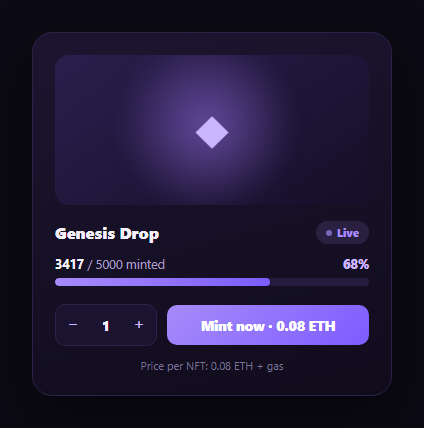
Every NFT mint page needs the same core widget: how much of the collection is gone, how many you're about to mint, and clear feedback that your transaction went through. This snippet builds that mint progress card — a live "minted / total supply" bar, a bounded quantity stepper, and a mint button that walks through a loading spinner into a genuine success confirmation — with no dependency beyond vanilla JS.
Supply progress driven by one number
mintedCount is the single source of truth. renderProgress() derives the displayed count, the percentage, and the bar's fill width all from it, so there's no way for the bar to show 68% while the text says something else. When mintedCount reaches TOTAL_SUPPLY, the same function flips the whole card into a sold-out state — disabling the mint button and swapping its label — rather than requiring a separate sold-out check elsewhere.
A quantity stepper that respects remaining supply
The +/− stepper is bounded not just by a fixed max (10 per transaction, a common anti-bot limit) but by mintedCount + qty > TOTAL_SUPPLY — so a user can never spin the quantity up to mint more NFTs than actually remain. The plus button disables the instant either limit is hit, giving immediate visual feedback instead of letting the user attempt an invalid mint.
Loading, then a genuine success state
Clicking "Mint now" swaps the button's content for a spinning loader and disables it immediately, simulating the wait for a transaction to confirm. Only after that delay does mintedCount actually increase and the progress bar update — mirroring the real sequence where supply shouldn't visually decrement until the mint transaction is confirmed, not just submitted. The success state then holds briefly with a checkmark and the exact quantity minted before resetting.
A pulsing "Live" status badge
A small pulsing dot next to the "Live" badge (built purely in CSS with an opacity keyframe) signals the drop is actively minting, independent of any specific mint action — the same pattern used for a live visitor counter, reused here to communicate an active drop rather than a static listing.
Extending it for a real drop
Swap the simulated setTimeout delay for an actual contract call (e.g. via ethers.js or viem), and read the real minted count from an on-chain totalSupply() view or an indexer instead of the local variable. Pair this card with a wallet connect button to gate minting until a wallet is connected, and a gas fee estimator to show the total cost including network fees.
Build with AI
Build, Understand, Optimize, and Extend It With AI
You don't have to work out the supply-guard logic or the loading-to-success sequencing on your own. Paste this snippet's HTML, CSS, and JS into an AI coding assistant like Claude and ask it to explain exactly how the quantity stepper's plus button checks both a fixed per-transaction cap and remaining supply before allowing an increment, and why the minted count only advances inside the setTimeout callback rather than immediately on click. The same assistant can help optimize it — asking whether the nested setTimeout sequence (spinner, then success, then reset) would be clearer as async/await with a real contract call substituted in, or whether the sold-out state transition handles an edge case where qty was already selected above 1 when the last NFTs are claimed by someone else. It's also useful for extending the card: ask it to wire in a real contract read for live supply via polling or an event listener, add an allowlist-phase countdown before public mint opens, or show a running total cost that includes an estimated gas fee. Treat the code less like a finished artifact and more like a starting point for a conversation.
Prompt to recreate it
Copy this into your AI assistant of choice to build the effect from scratch, or as a jumping-off point for your own variant:
Build an "NFT mint progress" card in plain HTML, CSS, and JavaScript with no library or CDN dependency.

Requirements:
- A card showing placeholder collection artwork, a collection name, a pulsing "Live" status badge (CSS-only animated dot), and a "minted / total supply" progress bar whose fill percentage, percentage text, and minted count text are all derived from one single source-of-truth variable so they can never disagree.
- A bounded quantity stepper (+/- buttons with a numeric display) that disables its increment button once either a fixed per-transaction maximum (e.g. 10) or the remaining supply (total supply minus already-minted minus currently selected quantity) is reached — the user must never be able to select a quantity that exceeds what's actually left to mint.
- A "Mint now" button showing the live total cost (price per NFT times selected quantity) that, on click, disables itself and shows a loading spinner state, then after a short delay transitions to a genuine success state with a checkmark confirming the exact quantity minted, and only THEN increments the minted-supply counter (not immediately on click) — modeling the real gap between submitting and confirming a blockchain transaction — before resetting the button and quantity for the next mint.
- Automatic sold-out handling: once minted count reaches total supply, the mint button must disable itself, its label must change to reflect sold-out status, and the live status badge should update to reflect that the drop has ended.
- Keep all state (minted count, selected quantity, minting-in-progress flag) as simple variables that would be trivial to lift into a React/Vue component's state.
Want to tighten it up first? Run this prompt through the AI Prompt Studio to score it across 8 quality dimensions, catch anti-patterns, and tune the wording for Claude, ChatGPT, or Gemini before you paste it in.
Step by step
How to Use
- 1Paste HTML, CSS, and JSA mint card renders showing 3417 of 5000 minted with a 68% progress bar.
- 2Adjust the quantityUse the +/- stepper — it's capped at 10 per mint and by remaining supply.
- 3Click "Mint now"The button shows a spinner, then a success checkmark with the minted quantity, then resets.
- 4Watch the supply updateAfter a successful mint, the progress bar and minted count advance by the minted quantity.
- 5Reach sold outOnce minted count hits total supply, the button disables and the status badge reads "Sold out".
- 6Connect a real contractReplace the setTimeout delay with an actual mint transaction and read supply from an on-chain call.
Real-world uses
Common Use Cases
Got questions?
Frequently Asked Questions
Both are derived from the single mintedCount variable inside renderProgress() — the percentage, the bar's width, and the displayed count text are all computed from it in one function call, so there is no path where the bar shows a different percentage than the text implies.
The mint button disables and shows a spinner the instant it's clicked, but mintedCount is only incremented inside the setTimeout callback that follows — modeling the real-world gap between submitting a mint transaction and it actually confirming on-chain. Updating supply immediately on click would misrepresent an unconfirmed transaction as a completed mint.
The plus button's click handler and its disabled state both check mintedCount + qty against TOTAL_SUPPLY in addition to a fixed per-transaction cap (10 here, a common anti-bot limit). Once either limit is reached, the button disables so the user cannot spin the quantity past what remains.
Replace the setTimeout delay in the mint handler with an actual contract call (via ethers.js, viem, or your wallet SDK's mint function), and only advance mintedCount and show the success state after the transaction receipt confirms. Read the real minted count from the contract's totalSupply() view function or an indexer on page load and periodically, instead of the hardcoded local variable.
Hold mintedCount, qty, and minting in component state. Derive the bar width, percentage, and disabled states in render from mintedCount and qty exactly as renderProgress()/renderQty() do. Make the mint handler an async function that awaits your real transaction before updating state, showing the spinner while the await is pending.