You Might Also Like
Learn Coding Visually
Learn to code with interactive, live-preview playgrounds — HTML, CSS, JavaScript, React & more.
 HTML Playground42 lessons · Click-based · Live preview
 CSS PlaygroundLearn CSS with a live editor
 JavaScript Playground60 lessons · DOM · Async · Canvas
 React PlaygroundLearn React with a live code editor
 GSAP PlaygroundLearn GSAP animation interactively
 SVG Playground44 lessons · shapes · paths · animation
 SCSS Playground45 lessons · Sass modules · tokens
 Tailwind PlaygroundLearn Tailwind CSS with a live editor
 Bootstrap 5 Playground50 lessons · live preview
Staking Rewards Card — Free Live-Accruing Crypto Rewards UI
Staking Rewards Card · Cards · Plain HTML, CSS & JS · Live preview
What's included
Features
About this UI Snippet
Staking Rewards Card — Real-Time Accrual, Payout Countdown & Claim Flow
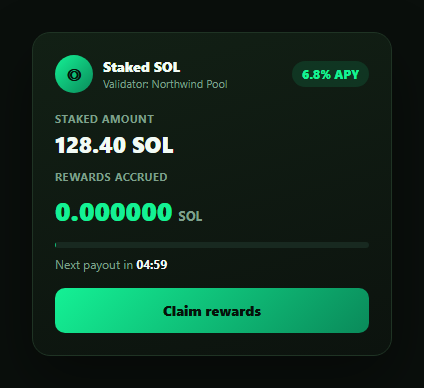
Staking interfaces live or die on one feeling: rewards should look alive, ticking upward in real time rather than sitting static until a page refresh. This snippet builds that staking rewards card — staked amount, APY, a rewards counter that increments every second, a payout-cycle progress bar, a countdown, and a claim button with a genuine success transition — using nothing but setInterval and careful number formatting.
Deriving a per-second rate from APY
Rather than animating an arbitrary number, the accrual is grounded in real inputs: perSecondRate = (stakedAmount * apy) / secondsPerYear. This is the actual per-second yield implied by the displayed APY, so the ticking number represents something real rather than a cosmetic animation — swap in your protocol's actual reward-rate calculation and the rest of the card keeps working unchanged.
Six decimal places, not two
Crypto reward amounts are tiny per second — a two-decimal display would show 0.00 forever. The rewards counter is formatted with toFixed(6), so the increments are visible tick to tick even though the underlying accrual is a fraction of a cent per second. This is the detail that makes the card feel "live" rather than frozen.
A payout cycle, visualized
A progress bar fills over a fixed PAYOUT_PERIOD_SEC window (5 minutes here, representing a compressed simulation of a real payout epoch), paired with a countdown formatted as mm:ss. Both derive from the same secondsIntoPeriod counter, so the bar and the countdown text can never drift out of sync with each other.
Claim: disable, confirm, then reset
Clicking "Claim rewards" freezes further accrual (claimed = true), disables the button so a double-click can't claim twice, and swaps the label to a checkmark confirmation showing the exact claimed amount. After a short delay it resets the counter to zero and re-enables claiming — modeling the real on-chain sequence of a claim transaction settling before the balance can accrue again.
Building a real integration
Replace the simulated accrual with a periodic read of your staking contract or API's actual accrued-rewards value, and wire the claim button to submit a real claim transaction — show the success state only after the transaction confirms, and surface a pending/error state for the in-between. Pair this card with a wallet card for balance context or a crypto price ticker card to convert rewards to a fiat value.
Build with AI
Build, Understand, Optimize, and Extend It With AI
You don't have to work out the accrual math or the claim-guard logic on your own. Paste this snippet's HTML, CSS, and JS into an AI coding assistant like Claude and ask it to explain exactly how perSecondRate is derived from the staked amount and APY, and why six decimal places (rather than the usual two) are necessary for the reward counter to visibly tick rather than appear frozen at small per-second yields. The same assistant can help optimize it — asking whether disabling the claim button synchronously inside the click handler is sufficient protection against a double-claim race, or whether the payout-cycle countdown should instead be computed from a fixed epoch timestamp rather than a client-side counter that resets on refresh. It's also useful for extending the card: ask it to add a pending/error state for a real on-chain claim transaction, show a running fiat-value conversion of the accrued rewards, or add an auto-compound toggle. Treat the code less like a finished artifact and more like a starting point for a conversation.
Prompt to recreate it
Copy this into your AI assistant of choice to build the effect from scratch, or as a jumping-off point for your own variant:
Build a "staking rewards card" in plain HTML, CSS, and JavaScript with no library or CDN dependency.

Requirements:
- A card showing an asset/validator icon and name, a staked amount, an APY badge, and a live-accruing rewards counter formatted to six decimal places so tiny per-second increments remain visible instead of rounding to zero.
- Derive the reward accrual rate mathematically from the staked amount and the APY (rate per second = stakedAmount * apy / secondsPerYear), not an arbitrary hardcoded animation increment, and increment the displayed rewards by that rate once per second using setInterval.
- A progress bar and an mm:ss countdown that both represent the same fixed-length "payout cycle" period (e.g. simulate a 5-minute cycle), driven from one shared counter so the bar fill percentage and the countdown text can never drift out of sync with each other, resetting when the cycle completes.
- A "Claim rewards" button that, on click, immediately disables itself (so rapid double-clicks cannot double-claim), stops further accrual, and shows a success state displaying the exact claimed amount with a checkmark — then after a short delay resets the rewards counter to zero, re-enables the button, and resumes accrual.
- Use tabular/monospaced numeral styling on the staked amount, rewards counter, and countdown so digit changes do not cause horizontal layout shift.
Want to tighten it up first? Run this prompt through the AI Prompt Studio to score it across 8 quality dimensions, catch anti-patterns, and tune the wording for Claude, ChatGPT, or Gemini before you paste it in.
Step by step
How to Use
- 1Paste HTML, CSS, and JSA staking card renders with a staked balance and 0.000000 accrued rewards.
- 2Watch rewards tick upEvery second, the rewards counter increments based on the derived per-second APY rate.
- 3Watch the payout cycleThe progress bar fills and the countdown ticks down over a 5-minute simulated payout period.
- 4Click "Claim rewards"The button disables, shows a checkmark success state with the claimed amount, then resets after a short delay.
- 5Adjust the inputsChange STAKED_AMOUNT and APY to reflect a real position.
- 6Wire a real claimReplace the setTimeout reset with an actual claim transaction call, showing pending/error states as needed.
Real-world uses
Common Use Cases
Got questions?
Frequently Asked Questions
perSecondRate = (stakedAmount * apy) / secondsPerYear. This derives the actual per-second yield implied by the displayed APY from the staked amount, so the ticking counter represents a real number rather than an arbitrary animated increment. Replace stakedAmount and apy with real position data and the same formula produces a correct rate.
Per-second crypto accrual is extremely small — with typical APYs, two decimal places would show 0.00 indefinitely and the card would look frozen. Formatting with toFixed(6) keeps the increments visible tick to tick, which is what makes the card read as "live" rather than static.
The button is disabled immediately inside the click handler, before the success state or reset timeout runs, so a second click while the confirmation is showing has no effect. This models the real-world guard against double-submitting a claim transaction while the first one is still settling.
Replace the setInterval accrual with a periodic read of your contract's or API's actual accrued-rewards value (poll it, or subscribe to relevant events). In the claim handler, submit the real claim transaction and only show the success state once it confirms on-chain — add a pending spinner state for the interval in between, and an error state if the transaction fails or is rejected.
Hold accrued, secondsIntoPeriod, and claimed in component state, update accrued on a setInterval-equivalent effect using the same per-second rate formula, and derive the progress bar width and countdown text from secondsIntoPeriod in render. The claim handler becomes an async action that awaits your real claim call before setting claimed back to false.