Learn Coding Visually
Learn to code with interactive, live-preview playgrounds — HTML, CSS, JavaScript, React & more.
 HTML Playground42 lessons · Click-based · Live preview
 CSS PlaygroundLearn CSS with a live editor
 JavaScript Playground60 lessons · DOM · Async · Canvas
 React PlaygroundLearn React with a live code editor
 GSAP PlaygroundLearn GSAP animation interactively
 SVG Playground44 lessons · shapes · paths · animation
 SCSS Playground45 lessons · Sass modules · tokens
 Tailwind PlaygroundLearn Tailwind CSS with a live editor
 Bootstrap 5 Playground50 lessons · live preview
Currency Converter Widget — HTML CSS JS Snippet
Currency Converter Widget · Dashboards · Plain HTML, CSS & JS · Live preview
What's included
Features
About this UI Snippet
Currency Converter Widget — Cross-Rate Calculation, Swap Rotation & Pair Shortcuts
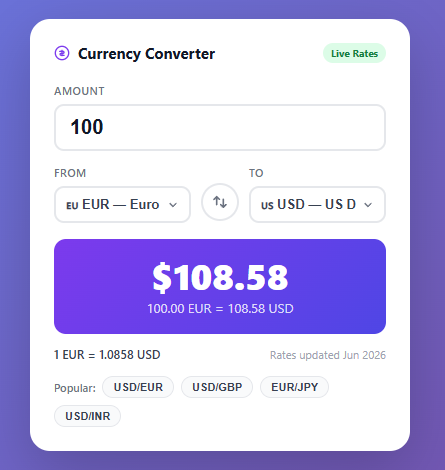
A currency converter widget is a compact tool that lets users instantly convert a monetary amount between two selected currencies. While production converters fetch live exchange rates from APIs like Open Exchange Rates or Frankfurter, this snippet uses a hardcoded rates table keyed to a base currency (USD), which makes it self-contained and ideal for prototyping, embedding in dashboards, or offline use.
How the rate calculation works
All rates in the RATES object are expressed relative to USD (the base currency). To convert from any currency A to any currency B: multiply the amount by RATES[B] / RATES[A]. This two-step cross-rate calculation means you only need N rates (one per currency) rather than N×(N-1) direct pairs. For example, to convert 100 EUR to GBP: 100 * (0.789 / 0.921) = 85.67. This is the same approach used by most financial APIs which return rates relative to a single base.
HTML layout structure
The widget uses a single-column card layout. The amount input sits above the currency row. The currency row is a three-item flex container: left currency selector, swap button, right currency selector. The swap button is centered vertically by aligning it to flex-end of the row and giving it a fixed size with margin adjustment. This three-element flex pattern avoids absolute positioning while keeping the button between the two selects.
Custom select styling
The <select> elements use appearance: none to remove the browser's native dropdown arrow, replaced by an inline SVG chevron injected via background-image: url("data:image/svg+xml,..."). The SVG is URL-encoded inline so no external assets are needed. background-position: right 10px center and padding-right: 28px ensure the arrow is visible and text does not overlap it.
The swap button rotation
The swap button's :hover state applies transform: rotate(180deg). Because a CSS transition: all 0.2s is set on the button, the rotation animates smoothly on hover. This 180-degree rotation is a recognized affordance for swap/exchange actions (used by Google's currency converter and Yahoo Finance) — users intuitively understand the rotated arrows mean the direction has reversed.
Number formatting
The fmt(num, decimals) helper uses Number.toLocaleString('en-US') with explicit minimumFractionDigits and maximumFractionDigits. This formats large numbers with commas (1,234.56) and respects the decimal precision per currency — Japanese Yen and Indian Rupee display 0 decimal places for the result but 2 for the rate, since sub-yen fractions are not meaningful in practice.
Currency symbol lookup
The SYMBOLS object maps currency codes to their common symbols ($ £ € ¥ etc.). The result amount prepends this symbol: (SYMBOLS[to] || '') + fmt(result, decimals). The || '' fallback handles any future currency without a mapped symbol gracefully.
Popular pair shortcuts
The quick-pair buttons at the bottom call setQuick(from, to) which programmatically sets both select values then calls convert(). This is a common UX shortcut in financial widgets — users typically switch between a small set of pairs and the shortcuts eliminate the need to interact with both dropdowns.
React integration
In React, manage amount, fromCurrency, and toCurrency with useState. Derive result and rate with useMemo(() => getRate(fromCurrency, toCurrency), [fromCurrency, toCurrency]). For live rates, use useEffect to fetch from a free API like https://open.er-api.com/v6/latest/USD on mount and cache in state.
Connecting to a real API
Replace the RATES constant with a fetch call to any exchange rate API. Store the response in localStorage with a timestamp and only refetch when the cached data is older than 1 hour — exchange rates typically update once per hour at most, so aggressive polling wastes API quota. Display "Last updated: HH:MM" from the cached timestamp.
See also the usage calculator snippet for another financial calculation widget, the donut chart snippet for visualizing currency composition, and the metric card grid snippet for displaying multiple financial KPIs side by side.
Build with AI
Build, Understand, Optimize, and Extend It With AI
You don't have to work out the cross-rate math by hand. Paste this snippet's HTML, CSS, and JS into an AI coding assistant like Claude and ask it to explain exactly why getRate divides RATES[to] by RATES[from] instead of storing every currency pair directly, and why that only needs N rates instead of N times N-1. The same assistant is useful for optimizing it — ask whether the RATES object should be fetched once and cached in localStorage with a timestamp instead of hardcoded, and how often it's actually safe to refetch given how frequently exchange rates change. It's also a good way to extend the widget: ask it to add a favorites list of pinned currency pairs, an inverse-rate readout beneath the main rate, or a small historical sparkline showing how a pair moved over the past week. Treat the code less like a finished artifact and more like a starting point for a conversation.
Prompt to recreate it
Copy this into your AI assistant of choice to build the effect from scratch, or as a jumping-off point for your own variant:
Build a currency converter widget in plain HTML, CSS, and JavaScript with a hardcoded USD-based rates table — no external API call, no library.

Requirements:
- A RATES object keyed by currency code where every value is that currency's rate relative to a single base currency (USD = 1), and a SYMBOLS object mapping each code to its display symbol.
- A getRate(from, to) function that computes any pair's exchange rate as RATES[to] divided by RATES[from], without ever storing direct pairwise rates.
- An amount input, a "From" currency select, and a "To" currency select, all wired to a single convert() function that recalculates on every input or change event.
- A swap button between the two selects that exchanges their selected values and re-runs the conversion, with a CSS transform: rotate(180deg) transition on hover to visually signal the swap action.
- Currency-aware decimal formatting: use Number.prototype.toLocaleString with explicit minimumFractionDigits and maximumFractionDigits, showing 0 decimal places for currencies like JPY and INR in the result but more precision in the displayed rate line.
- A row of "popular pair" shortcut buttons that set both selects to a specific pair and immediately re-run the conversion.
- Prepend the correct currency symbol to the formatted result amount, falling back gracefully if a currency has no mapped symbol.
Want to tighten it up first? Run this prompt through the AI Prompt Studio to score it across 8 quality dimensions, catch anti-patterns, and tune the wording for Claude, ChatGPT, or Gemini before you paste it in.
Step by step
How to Use
- 1Copy the HTML widget markupThe widget is self-contained. Paste the HTML into your page — all IDs must be preserved as the JavaScript targets them directly.
- 2Add the CSS stylesPaste the CSS block. Change the gradient colors in .result-box and body to match your brand. The purple #7c3aed is used as the accent throughout.
- 3Include the JavaScriptThe JS block defines RATES (USD-based), SYMBOLS, and the convert/swap/setQuick functions. Call convert() at the end to show the initial result on load.
- 4Update the rates tableEdit the RATES object with current exchange rates. All values must be relative to USD (1 USD = X currency). Add or remove entries to expand or shrink the currency list.
- 5Connect to a live APIReplace the RATES constant with a fetch to an exchange rate API endpoint. Cache the response in localStorage with a timestamp to avoid re-fetching on every page load.
Real-world uses
Common Use Cases
Got questions?
Frequently Asked Questions
Replace the RATES object with a fetch call to an API like open.er-api.com. Cache the response in localStorage with a timestamp and only refetch if older than 1 hour.
Use useState for amount, fromCurrency, and toCurrency. Derive result with useMemo. For live rates, use useEffect to fetch on mount and store in state.
Yes — add the currency code to the RATES object (as a USD-relative rate), add its symbol to SYMBOLS, and add an option element to both select elements.
After calculating rate = RATES[to] / RATES[from], also compute inverseRate = 1 / rate and display "1 EUR = 1.086 USD" below the main rate text.
Use the Export menu (or the Test Exports preview) in the toolbar. It generates a Vue 3 single-file component with the convert and swap logic in script setup, an Angular standalone component, a plain React component, and a React + Tailwind version where the card styles become utility classes. Each export maps the inline handlers to the matching framework event bindings and keeps the RATES table and number-formatting helpers intact, so the widget behaves identically across React, Vue, and Angular.
Hardcoded rates keep the snippet self-contained — no API key, network request, or rate limit — which is ideal for prototypes, offline demos, and embedding in dashboards. Because every rate is expressed relative to USD, swapping in a live API later means replacing one RATES object while the cross-rate math and number formatting stay exactly the same.