More Forms Snippets
Email Subscription Widget — HTML CSS JS Snippet
Email Subscription Widget · Forms · Plain HTML, CSS & JS · Live preview
What's included
Features
About this UI Snippet
Email Subscription Widget — Live Validation, Animated Success State & Social Proof
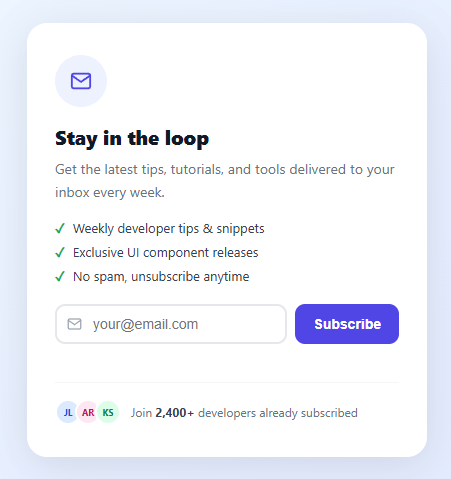
An email subscription widget is the front door to a newsletter or mailing list. Its job is to convert a casual visitor into a subscriber by presenting a clear value proposition, reducing friction in the signup process, and confirming the subscription with positive feedback. This snippet implements all three: benefit bullets explain the value, a single email field minimises friction, and an animated success state provides satisfying confirmation.
Two-state architecture
The component has two HTML blocks side by side inside the card: #stateIdle (the form) and #stateSuccess (the confirmation). Initially, #stateSuccess has display: none. On successful submission, #stateIdle gets the .hide class (sets display: none) and #stateSuccess gets the .show class (sets display: block and triggers the fadeUp animation). The resetForm() function reverses both class changes. This toggle-between-states pattern avoids page navigation and keeps the widget self-contained.
Email validation
The validateEmail() function uses a regex: /^[^s@]+@[^s@]+.[^s@]+$/. This pattern checks for: at least one non-whitespace, non-@ character before the @, a domain segment after the @, and a dot with at least one character after it. It is intentionally simple — RFC 5321 full email validation is thousands of characters of regex and impractical for UI use. The goal is to catch obvious typos (no @, no dot) not to verify deliverability. Deliverability verification belongs server-side via SMTP probing.
Shake animation for invalid input
When validation fails, the input gets the .invalid class which triggers a CSS @keyframes shake animation: four keyframes moving the element ±4px on the X axis over 0.3s. This is a well-established error affordance from iOS and Android — the haptic-like motion draws the eye to the field without needing additional error text color alone. The animation class is removed by clearError() on the oninput event so it can retrigger on the next submission attempt.
Simulated loading state
A setTimeout of 900ms simulates a network request. In production, replace this with a real API call (Mailchimp, ConvertKit, your own endpoint). The button text changes to "Subscribing..." and a .loading class adds opacity: 0.7; pointer-events: none to prevent double-submission. Always disable the button during async operations.
Success ring animation
The green checkmark circle uses @keyframes popIn: it scales from 0 to 1 using a spring-like cubic-bezier (0.175, 0.885, 0.32, 1.275) which slightly overshoots scale(1) before settling — the same easing used in iOS app icon install animations. The surrounding fadeUp animation on the success state slides the entire block up from 16px below its final position with opacity 0, creating a fluid reveal that feels intentional.
Social proof section
The proof strip at the bottom shows three stacked avatars (initials-based) plus a subscriber count. The avatars use margin-left: -6px on all except the first to create the overlapping stack effect. Different background/text colors per avatar add variety. In production, replace the static "2,400+" with a live subscriber count fetched from your mailing list API.
Benefit bullets
Three concise bullet points with green checkmarks (not list-style markers but actual Unicode ✓ characters styled with color: #16a34a) build pre-commitment by naming specific deliverables. The "unsubscribe anytime" bullet reduces anxiety about commitment — studies show this objection-handling increases opt-in rates.
React integration
Manage email, error, loading, and submitted state with useState. The form and success view are conditional renders: {submitted ? <SuccessState /> : <FormState />}. Pass an onSubmit prop for the API call and use the loading flag to disable the button and show spinner text. Validate in a handleSubmit function before calling the prop.
Accessibility
The email input should have type="email" which triggers the @ keyboard on iOS. Add aria-describedby pointing to the #errorMsg element so screen readers announce the error when it appears. The success state should receive focus programmatically (successRef.current.focus()) so keyboard users know the state changed.
See also the newsletter signup snippet for a lighter inline version, the contact form snippet for a full multi-field form, and the glassmorphism login snippet for another card-based form pattern.
Step by step
How to Use
- 1Copy the full HTML cardThe widget needs both #stateIdle and #stateSuccess divs. Both must be present — JavaScript toggles between them. Do not remove either block.
- 2Add the CSS blockPaste the CSS. Change #4f46e5 (indigo) to your brand accent color throughout. The gradient background on body is optional — remove it to use your own page background.
- 3Include the JavaScriptAdd the five JS functions. subscribe() validates, shows loading, then transitions to the success state after 900ms. Replace the setTimeout with your real API call.
- 4Connect to your mailing listReplace the setTimeout in subscribe() with a fetch POST to your email service endpoint (Mailchimp, ConvertKit, etc.). Keep the btn.classList.add("loading") and the success state transition.
- 5Update the social proof numbersChange "2,400+" in the proof-text span to reflect your real subscriber count. Optionally fetch it from your mailing list API and inject it dynamically.
Real-world uses
Common Use Cases
Got questions?
Frequently Asked Questions
Replace the setTimeout in subscribe() with a fetch POST to your mailing list API endpoint. Include the email in the request body and handle the response to show success or error states.
Use useState for email, error, loading, and submitted. Render the form or success state conditionally. Pass an onSubmit handler prop for the actual API call.
Add a second input for name above the email row. Include it in the form-row or as a separate row. Add name validation (non-empty check) in the subscribe() function before the email check.
Yes — wrap the .widget in a modal overlay and control visibility with a class toggle. See the modal snippet at /ui-snippets/modal/ for the overlay pattern.
Open the Export menu (or the Test Exports preview) in the toolbar. It generates a Vue 3 single-file component with the validation and submit logic in script setup, an Angular standalone component, a plain React component, and a React + Tailwind version where the widget styles become utility classes. Each export maps the inline handlers to the matching framework event bindings and keeps the success-state transition intact, so the form behaves the same across React, Vue, and Angular — swap the mock submit for your mailing-list API call afterwards.
Email Subscription Widget — Export as HTML, React, Vue, Angular & Tailwind
<!DOCTYPE html>
<html lang="en">
<head>
<meta charset="UTF-8" />
<meta name="viewport" content="width=device-width, initial-scale=1.0" />
<title>Email Subscription Widget</title>
<style>
* { box-sizing: border-box; margin: 0; padding: 0; }
body { font-family: system-ui, sans-serif; background: linear-gradient(135deg, #f0f9ff 0%, #e0e7ff 100%); display: flex; align-items: center; justify-content: center; min-height: 100vh; padding: 20px; }
.widget-wrap { width: 100%; max-width: 400px; }
.widget { background: #fff; border-radius: 20px; box-shadow: 0 8px 40px rgba(0,0,0,0.1); padding: 32px 28px; overflow: hidden; }
.icon-ring { width: 52px; height: 52px; border-radius: 50%; background: #eef2ff; color: #4f46e5; display: flex; align-items: center; justify-content: center; margin-bottom: 16px; }
.widget-title { font-size: 20px; font-weight: 800; color: #111827; margin-bottom: 8px; }
.widget-sub { font-size: 14px; color: #6b7280; line-height: 1.6; margin-bottom: 16px; }
.benefits { list-style: none; display: flex; flex-direction: column; gap: 7px; margin-bottom: 20px; }
.benefits li { display: flex; align-items: center; gap: 8px; font-size: 13px; color: #374151; }
.check { color: #16a34a; font-weight: 700; }
.form-row { display: flex; gap: 8px; margin-bottom: 6px; }
.input-wrap { flex: 1; position: relative; }
.mail-icon { position: absolute; left: 12px; top: 50%; transform: translateY(-50%); color: #9ca3af; pointer-events: none; }
.email-input { width: 100%; padding: 10px 12px 10px 36px; border: 2px solid #e5e7eb; border-radius: 10px; font-size: 14px; color: #111827; outline: none; transition: border-color 0.2s; }
.email-input:focus { border-color: #4f46e5; }
.email-input.invalid { border-color: #ef4444; animation: shake 0.3s; }
@keyframes shake { 0%,100%{transform:translateX(0)} 25%{transform:translateX(-4px)} 75%{transform:translateX(4px)} }
.sub-btn { padding: 10px 18px; background: #4f46e5; color: #fff; border: none; border-radius: 10px; font-size: 14px; font-weight: 700; cursor: pointer; transition: background 0.15s, transform 0.1s; white-space: nowrap; }
.sub-btn:hover { background: #4338ca; }
.sub-btn:active { transform: scale(0.97); }
.sub-btn.loading { opacity: 0.7; pointer-events: none; }
.error-msg { font-size: 12px; color: #ef4444; min-height: 16px; }
.social-proof { display: flex; align-items: center; gap: 10px; margin-top: 16px; padding-top: 16px; border-top: 1px solid #f3f4f6; }
.proof-avatars { display: flex; }
.pavatar { width: 26px; height: 26px; border-radius: 50%; font-size: 9px; font-weight: 700; display: flex; align-items: center; justify-content: center; border: 2px solid #fff; margin-left: -6px; }
.pavatar:first-child { margin-left: 0; }
.proof-text { font-size: 12px; color: #6b7280; }
.proof-text strong { color: #374151; }
.state-success { display: none; text-align: center; }
.state-success.show { display: block; animation: fadeUp 0.4s ease; }
.state-idle.hide { display: none; }
@keyframes fadeUp { from { opacity: 0; transform: translateY(16px); } to { opacity: 1; transform: none; } }
.success-ring { width: 64px; height: 64px; border-radius: 50%; background: #dcfce7; color: #16a34a; display: flex; align-items: center; justify-content: center; margin: 0 auto 16px; animation: popIn 0.4s cubic-bezier(0.175,0.885,0.32,1.275); }
@keyframes popIn { from { transform: scale(0); } to { transform: scale(1); } }
.success-meta { font-size: 13px; font-weight: 600; color: #4f46e5; margin-top: 8px; margin-bottom: 20px; }
.reset-btn { background: none; border: 1px solid #e5e7eb; color: #6b7280; font-size: 13px; padding: 8px 16px; border-radius: 8px; cursor: pointer; transition: all 0.15s; }
.reset-btn:hover { border-color: #4f46e5; color: #4f46e5; }
</style>
</head>
<body>
<div class="widget-wrap">
<div class="widget" id="subWidget">
<div class="state-idle" id="stateIdle">
<div class="icon-ring">
<svg width="22" height="22" viewBox="0 0 24 24" fill="none" stroke="currentColor" stroke-width="2" stroke-linecap="round"><path d="M4 4h16c1.1 0 2 .9 2 2v12c0 1.1-.9 2-2 2H4c-1.1 0-2-.9-2-2V6c0-1.1.9-2 2-2z"/><polyline points="22,6 12,13 2,6"/></svg>
</div>
<h2 class="widget-title">Stay in the loop</h2>
<p class="widget-sub">Get the latest tips, tutorials, and tools delivered to your inbox every week.</p>
<ul class="benefits">
<li><span class="check">✓</span> Weekly developer tips & snippets</li>
<li><span class="check">✓</span> Exclusive UI component releases</li>
<li><span class="check">✓</span> No spam, unsubscribe anytime</li>
</ul>
<div class="form-row">
<div class="input-wrap" id="inputWrap">
<svg class="mail-icon" width="15" height="15" viewBox="0 0 24 24" fill="none" stroke="currentColor" stroke-width="2" stroke-linecap="round"><path d="M4 4h16c1.1 0 2 .9 2 2v12c0 1.1-.9 2-2 2H4c-1.1 0-2-.9-2-2V6c0-1.1.9-2 2-2z"/><polyline points="22,6 12,13 2,6"/></svg>
<input type="email" class="email-input" id="emailInput" placeholder="[email protected]" onkeydown="handleKey(event)" oninput="clearError()">
</div>
<button class="sub-btn" id="subBtn" onclick="subscribe()">Subscribe</button>
</div>
<div class="error-msg" id="errorMsg"></div>
<div class="social-proof">
<div class="proof-avatars">
<span class="pavatar" style="background:#dbeafe;color:#1d4ed8">JL</span>
<span class="pavatar" style="background:#fce7f3;color:#be185d">AR</span>
<span class="pavatar" style="background:#dcfce7;color:#15803d">KS</span>
</div>
<span class="proof-text">Join <strong>2,400+</strong> developers already subscribed</span>
</div>
</div>
<div class="state-success" id="stateSuccess">
<div class="success-ring">
<svg width="28" height="28" viewBox="0 0 24 24" fill="none" stroke="currentColor" stroke-width="2.5" stroke-linecap="round"><polyline points="20 6 9 17 4 12"/></svg>
</div>
<h2 class="widget-title">You are in!</h2>
<p class="widget-sub" id="confirmMsg">We have sent a confirmation to your email. Check your inbox to complete your subscription.</p>
<div class="success-meta" id="confirmedEmail"></div>
<button class="reset-btn" onclick="resetForm()">Subscribe another email</button>
</div>
</div>
</div>
<script>
function validateEmail(email) {
return /^[^s@]+@[^s@]+.[^s@]+$/.test(email.trim());
}
function clearError() {
document.getElementById('errorMsg').textContent = '';
document.getElementById('emailInput').classList.remove('invalid');
}
function handleKey(e) {
if (e.key === 'Enter') subscribe();
}
function subscribe() {
const input = document.getElementById('emailInput');
const email = input.value.trim();
if (!email) {
document.getElementById('errorMsg').textContent = 'Please enter your email address.';
input.classList.add('invalid');
input.focus();
return;
}
if (!validateEmail(email)) {
document.getElementById('errorMsg').textContent = 'Please enter a valid email address.';
input.classList.add('invalid');
input.focus();
return;
}
const btn = document.getElementById('subBtn');
btn.textContent = 'Subscribing...';
btn.classList.add('loading');
setTimeout(function() {
document.getElementById('stateIdle').classList.add('hide');
const success = document.getElementById('stateSuccess');
success.classList.add('show');
document.getElementById('confirmedEmail').textContent = email;
}, 900);
}
function resetForm() {
document.getElementById('emailInput').value = '';
document.getElementById('errorMsg').textContent = '';
const btn = document.getElementById('subBtn');
btn.textContent = 'Subscribe';
btn.classList.remove('loading');
document.getElementById('stateIdle').classList.remove('hide');
document.getElementById('stateSuccess').classList.remove('show');
}
</script>
</body>
</html><!DOCTYPE html>
<html lang="en">
<head>
<meta charset="UTF-8" />
<meta name="viewport" content="width=device-width, initial-scale=1.0" />
<title>Email Subscription Widget</title>
<!-- Tailwind CSS v3+ — arbitrary value classes (e.g. bg-[#0f172a]) are valid -->
<script src="https://cdn.tailwindcss.com"></script>
<style>
@keyframes shake { 0%,100%{transform:translateX(0)} 25%{transform:translateX(-4px)} 75%{transform:translateX(4px)} }
@keyframes fadeUp { from { opacity: 0; transform: translateY(16px); } to { opacity: 1; transform: none; } }
@keyframes popIn { from { transform: scale(0); } to { transform: scale(1); } }
* {
box-sizing: border-box; margin: 0; padding: 0;
}
body {
font-family: system-ui, sans-serif; background: linear-gradient(135deg, #f0f9ff 0%, #e0e7ff 100%); display: flex; align-items: center; justify-content: center; min-height: 100vh; padding: 20px;
}
.benefits li {
display: flex; align-items: center; gap: 8px; font-size: 13px; color: #374151;
}
.email-input.invalid {
border-color: #ef4444; animation: shake 0.3s;
}
.sub-btn.loading {
opacity: 0.7; pointer-events: none;
}
.pavatar:first-child {
margin-left: 0;
}
.proof-text strong {
color: #374151;
}
.state-success.show {
display: block; animation: fadeUp 0.4s ease;
}
.state-idle.hide {
display: none;
}
</style>
</head>
<body>
<div class="w-full max-w-[400px]">
<div class="bg-[#fff] rounded-[20px] shadow-[0_8px_40px_rgba(0,0,0,0.1)] py-8 px-7 overflow-hidden" id="subWidget">
<div class="state-idle" id="stateIdle">
<div class="w-[52px] h-[52px] rounded-full bg-[#eef2ff] text-[#4f46e5] flex items-center justify-center mb-4">
<svg width="22" height="22" viewBox="0 0 24 24" fill="none" stroke="currentColor" stroke-width="2" stroke-linecap="round"><path d="M4 4h16c1.1 0 2 .9 2 2v12c0 1.1-.9 2-2 2H4c-1.1 0-2-.9-2-2V6c0-1.1.9-2 2-2z"/><polyline points="22,6 12,13 2,6"/></svg>
</div>
<h2 class="text-xl font-extrabold text-[#111827] mb-2">Stay in the loop</h2>
<p class="text-sm text-[#6b7280] leading-[1.6] mb-4">Get the latest tips, tutorials, and tools delivered to your inbox every week.</p>
<ul class="benefits [list-style:none] flex flex-col gap-[7px] mb-5">
<li><span class="text-[#16a34a] font-bold">✓</span> Weekly developer tips & snippets</li>
<li><span class="text-[#16a34a] font-bold">✓</span> Exclusive UI component releases</li>
<li><span class="text-[#16a34a] font-bold">✓</span> No spam, unsubscribe anytime</li>
</ul>
<div class="flex gap-2 mb-1.5">
<div class="flex-1 relative" id="inputWrap">
<svg class="absolute left-3 top-1/2 [transform:translateY(-50%)] text-[#9ca3af] pointer-events-none" width="15" height="15" viewBox="0 0 24 24" fill="none" stroke="currentColor" stroke-width="2" stroke-linecap="round"><path d="M4 4h16c1.1 0 2 .9 2 2v12c0 1.1-.9 2-2 2H4c-1.1 0-2-.9-2-2V6c0-1.1.9-2 2-2z"/><polyline points="22,6 12,13 2,6"/></svg>
<input type="email" class="email-input w-full pt-2.5 pr-3 pb-2.5 pl-9 border-2 border-[#e5e7eb] rounded-[10px] text-sm text-[#111827] outline-none [transition:border-color_0.2s] focus:border-[#4f46e5]" id="emailInput" placeholder="[email protected]" onkeydown="handleKey(event)" oninput="clearError()">
</div>
<button class="sub-btn py-2.5 px-[18px] bg-[#4f46e5] text-[#fff] border-0 rounded-[10px] text-sm font-bold cursor-pointer [transition:background_0.15s,_transform_0.1s] whitespace-nowrap hover:bg-[#4338ca] active:[transform:scale(0.97)]" id="subBtn" onclick="subscribe()">Subscribe</button>
</div>
<div class="text-xs text-[#ef4444] min-h-[16px]" id="errorMsg"></div>
<div class="flex items-center gap-2.5 mt-4 pt-4 border-t border-t-[#f3f4f6]">
<div class="flex">
<span class="pavatar w-[26px] h-[26px] rounded-full text-[9px] font-bold flex items-center justify-center border-2 border-[#fff] -ml-1.5" style="background:#dbeafe;color:#1d4ed8">JL</span>
<span class="pavatar w-[26px] h-[26px] rounded-full text-[9px] font-bold flex items-center justify-center border-2 border-[#fff] -ml-1.5" style="background:#fce7f3;color:#be185d">AR</span>
<span class="pavatar w-[26px] h-[26px] rounded-full text-[9px] font-bold flex items-center justify-center border-2 border-[#fff] -ml-1.5" style="background:#dcfce7;color:#15803d">KS</span>
</div>
<span class="proof-text text-xs text-[#6b7280]">Join <strong>2,400+</strong> developers already subscribed</span>
</div>
</div>
<div class="state-success hidden text-center" id="stateSuccess">
<div class="w-16 h-16 rounded-full bg-[#dcfce7] text-[#16a34a] flex items-center justify-center mt-0 mx-auto mb-4 [animation:popIn_0.4s_cubic-bezier(0.175,0.885,0.32,1.275)]">
<svg width="28" height="28" viewBox="0 0 24 24" fill="none" stroke="currentColor" stroke-width="2.5" stroke-linecap="round"><polyline points="20 6 9 17 4 12"/></svg>
</div>
<h2 class="text-xl font-extrabold text-[#111827] mb-2">You are in!</h2>
<p class="text-sm text-[#6b7280] leading-[1.6] mb-4" id="confirmMsg">We have sent a confirmation to your email. Check your inbox to complete your subscription.</p>
<div class="text-[13px] font-semibold text-[#4f46e5] mt-2 mb-5" id="confirmedEmail"></div>
<button class="bg-transparent border border-[#e5e7eb] text-[#6b7280] text-[13px] py-2 px-4 rounded-lg cursor-pointer [transition:all_0.15s] hover:border-[#4f46e5] hover:text-[#4f46e5]" onclick="resetForm()">Subscribe another email</button>
</div>
</div>
</div>
<script>
function validateEmail(email) {
return /^[^s@]+@[^s@]+.[^s@]+$/.test(email.trim());
}
function clearError() {
document.getElementById('errorMsg').textContent = '';
document.getElementById('emailInput').classList.remove('invalid');
}
function handleKey(e) {
if (e.key === 'Enter') subscribe();
}
function subscribe() {
const input = document.getElementById('emailInput');
const email = input.value.trim();
if (!email) {
document.getElementById('errorMsg').textContent = 'Please enter your email address.';
input.classList.add('invalid');
input.focus();
return;
}
if (!validateEmail(email)) {
document.getElementById('errorMsg').textContent = 'Please enter a valid email address.';
input.classList.add('invalid');
input.focus();
return;
}
const btn = document.getElementById('subBtn');
btn.textContent = 'Subscribing...';
btn.classList.add('loading');
setTimeout(function() {
document.getElementById('stateIdle').classList.add('hide');
const success = document.getElementById('stateSuccess');
success.classList.add('show');
document.getElementById('confirmedEmail').textContent = email;
}, 900);
}
function resetForm() {
document.getElementById('emailInput').value = '';
document.getElementById('errorMsg').textContent = '';
const btn = document.getElementById('subBtn');
btn.textContent = 'Subscribe';
btn.classList.remove('loading');
document.getElementById('stateIdle').classList.remove('hide');
document.getElementById('stateSuccess').classList.remove('show');
}
</script>
</body>
</html>import React, { useEffect } from 'react';
// CSS — optionally move to EmailSubscriptionWidget.module.css
const css = `
* { box-sizing: border-box; margin: 0; padding: 0; }
body { font-family: system-ui, sans-serif; background: linear-gradient(135deg, #f0f9ff 0%, #e0e7ff 100%); display: flex; align-items: center; justify-content: center; min-height: 100vh; padding: 20px; }
.widget-wrap { width: 100%; max-width: 400px; }
.widget { background: #fff; border-radius: 20px; box-shadow: 0 8px 40px rgba(0,0,0,0.1); padding: 32px 28px; overflow: hidden; }
.icon-ring { width: 52px; height: 52px; border-radius: 50%; background: #eef2ff; color: #4f46e5; display: flex; align-items: center; justify-content: center; margin-bottom: 16px; }
.widget-title { font-size: 20px; font-weight: 800; color: #111827; margin-bottom: 8px; }
.widget-sub { font-size: 14px; color: #6b7280; line-height: 1.6; margin-bottom: 16px; }
.benefits { list-style: none; display: flex; flex-direction: column; gap: 7px; margin-bottom: 20px; }
.benefits li { display: flex; align-items: center; gap: 8px; font-size: 13px; color: #374151; }
.check { color: #16a34a; font-weight: 700; }
.form-row { display: flex; gap: 8px; margin-bottom: 6px; }
.input-wrap { flex: 1; position: relative; }
.mail-icon { position: absolute; left: 12px; top: 50%; transform: translateY(-50%); color: #9ca3af; pointer-events: none; }
.email-input { width: 100%; padding: 10px 12px 10px 36px; border: 2px solid #e5e7eb; border-radius: 10px; font-size: 14px; color: #111827; outline: none; transition: border-color 0.2s; }
.email-input:focus { border-color: #4f46e5; }
.email-input.invalid { border-color: #ef4444; animation: shake 0.3s; }
@keyframes shake { 0%,100%{transform:translateX(0)} 25%{transform:translateX(-4px)} 75%{transform:translateX(4px)} }
.sub-btn { padding: 10px 18px; background: #4f46e5; color: #fff; border: none; border-radius: 10px; font-size: 14px; font-weight: 700; cursor: pointer; transition: background 0.15s, transform 0.1s; white-space: nowrap; }
.sub-btn:hover { background: #4338ca; }
.sub-btn:active { transform: scale(0.97); }
.sub-btn.loading { opacity: 0.7; pointer-events: none; }
.error-msg { font-size: 12px; color: #ef4444; min-height: 16px; }
.social-proof { display: flex; align-items: center; gap: 10px; margin-top: 16px; padding-top: 16px; border-top: 1px solid #f3f4f6; }
.proof-avatars { display: flex; }
.pavatar { width: 26px; height: 26px; border-radius: 50%; font-size: 9px; font-weight: 700; display: flex; align-items: center; justify-content: center; border: 2px solid #fff; margin-left: -6px; }
.pavatar:first-child { margin-left: 0; }
.proof-text { font-size: 12px; color: #6b7280; }
.proof-text strong { color: #374151; }
.state-success { display: none; text-align: center; }
.state-success.show { display: block; animation: fadeUp 0.4s ease; }
.state-idle.hide { display: none; }
@keyframes fadeUp { from { opacity: 0; transform: translateY(16px); } to { opacity: 1; transform: none; } }
.success-ring { width: 64px; height: 64px; border-radius: 50%; background: #dcfce7; color: #16a34a; display: flex; align-items: center; justify-content: center; margin: 0 auto 16px; animation: popIn 0.4s cubic-bezier(0.175,0.885,0.32,1.275); }
@keyframes popIn { from { transform: scale(0); } to { transform: scale(1); } }
.success-meta { font-size: 13px; font-weight: 600; color: #4f46e5; margin-top: 8px; margin-bottom: 20px; }
.reset-btn { background: none; border: 1px solid #e5e7eb; color: #6b7280; font-size: 13px; padding: 8px 16px; border-radius: 8px; cursor: pointer; transition: all 0.15s; }
.reset-btn:hover { border-color: #4f46e5; color: #4f46e5; }
`;
export default function EmailSubscriptionWidget() {
// Auto-generated escape hatch: the original snippet's vanilla JS runs once
// after mount and queries the rendered DOM. For idiomatic React, lift this
// into state + handlers.
useEffect(() => {
const _listeners = [];
const _originalAddEventListener = EventTarget.prototype.addEventListener;
EventTarget.prototype.addEventListener = function(type, listener, options) {
_listeners.push({ target: this, type, listener, options });
return _originalAddEventListener.call(this, type, listener, options);
};
function validateEmail(email) {
return /^[^s@]+@[^s@]+.[^s@]+$/.test(email.trim());
}
function clearError() {
document.getElementById('errorMsg').textContent = '';
document.getElementById('emailInput').classList.remove('invalid');
}
function handleKey(e) {
if (e.key === 'Enter') subscribe();
}
function subscribe() {
const input = document.getElementById('emailInput');
const email = input.value.trim();
if (!email) {
document.getElementById('errorMsg').textContent = 'Please enter your email address.';
input.classList.add('invalid');
input.focus();
return;
}
if (!validateEmail(email)) {
document.getElementById('errorMsg').textContent = 'Please enter a valid email address.';
input.classList.add('invalid');
input.focus();
return;
}
const btn = document.getElementById('subBtn');
btn.textContent = 'Subscribing...';
btn.classList.add('loading');
setTimeout(function() {
document.getElementById('stateIdle').classList.add('hide');
const success = document.getElementById('stateSuccess');
success.classList.add('show');
document.getElementById('confirmedEmail').textContent = email;
}, 900);
}
function resetForm() {
document.getElementById('emailInput').value = '';
document.getElementById('errorMsg').textContent = '';
const btn = document.getElementById('subBtn');
btn.textContent = 'Subscribe';
btn.classList.remove('loading');
document.getElementById('stateIdle').classList.remove('hide');
document.getElementById('stateSuccess').classList.remove('show');
}
// Cleanup: restore addEventListener and remove all listeners
return () => {
EventTarget.prototype.addEventListener = _originalAddEventListener;
for (const { target, type, listener, options } of _listeners) {
target.removeEventListener(type, listener, options);
}
};
// Expose handlers used by inline JSX events to the global scope
if (typeof handleKey === 'function') window.handleKey = handleKey;
if (typeof clearError === 'function') window.clearError = clearError;
if (typeof subscribe === 'function') window.subscribe = subscribe;
if (typeof resetForm === 'function') window.resetForm = resetForm;
}, []);
return (
<>
<style>{css}</style>
<div className="widget-wrap">
<div className="widget" id="subWidget">
<div className="state-idle" id="stateIdle">
<div className="icon-ring">
<svg width="22" height="22" viewBox="0 0 24 24" fill="none" stroke="currentColor" strokeWidth="2" strokeLinecap="round"><path d="M4 4h16c1.1 0 2 .9 2 2v12c0 1.1-.9 2-2 2H4c-1.1 0-2-.9-2-2V6c0-1.1.9-2 2-2z"/><polyline points="22,6 12,13 2,6"/></svg>
</div>
<h2 className="widget-title">Stay in the loop</h2>
<p className="widget-sub">Get the latest tips, tutorials, and tools delivered to your inbox every week.</p>
<ul className="benefits">
<li><span className="check">✓</span> Weekly developer tips & snippets</li>
<li><span className="check">✓</span> Exclusive UI component releases</li>
<li><span className="check">✓</span> No spam, unsubscribe anytime</li>
</ul>
<div className="form-row">
<div className="input-wrap" id="inputWrap">
<svg className="mail-icon" width="15" height="15" viewBox="0 0 24 24" fill="none" stroke="currentColor" strokeWidth="2" strokeLinecap="round"><path d="M4 4h16c1.1 0 2 .9 2 2v12c0 1.1-.9 2-2 2H4c-1.1 0-2-.9-2-2V6c0-1.1.9-2 2-2z"/><polyline points="22,6 12,13 2,6"/></svg>
<input type="email" className="email-input" id="emailInput" placeholder="[email protected]" onKeyDown={(event) => { handleKey(event) }} onInput={(event) => { clearError() }} />
</div>
<button className="sub-btn" id="subBtn" onClick={(event) => { subscribe() }}>Subscribe</button>
</div>
<div className="error-msg" id="errorMsg"></div>
<div className="social-proof">
<div className="proof-avatars">
<span className="pavatar" style={{ background: '#dbeafe', color: '#1d4ed8' }}>JL</span>
<span className="pavatar" style={{ background: '#fce7f3', color: '#be185d' }}>AR</span>
<span className="pavatar" style={{ background: '#dcfce7', color: '#15803d' }}>KS</span>
</div>
<span className="proof-text">Join <strong>2,400+</strong> developers already subscribed</span>
</div>
</div>
<div className="state-success" id="stateSuccess">
<div className="success-ring">
<svg width="28" height="28" viewBox="0 0 24 24" fill="none" stroke="currentColor" strokeWidth="2.5" strokeLinecap="round"><polyline points="20 6 9 17 4 12"/></svg>
</div>
<h2 className="widget-title">You are in!</h2>
<p className="widget-sub" id="confirmMsg">We have sent a confirmation to your email. Check your inbox to complete your subscription.</p>
<div className="success-meta" id="confirmedEmail"></div>
<button className="reset-btn" onClick={(event) => { resetForm() }}>Subscribe another email</button>
</div>
</div>
</div>
</>
);
}import React, { useEffect } from 'react';
// Requires Tailwind CSS v3+ — https://tailwindcss.com/docs/installation
// Arbitrary value classes (e.g. bg-[#0f172a]) are valid Tailwind v3+
export default function EmailSubscriptionWidget() {
// Auto-generated escape hatch: the original snippet's vanilla JS runs once
// after mount and queries the rendered DOM. For idiomatic React, lift this
// into state + handlers.
useEffect(() => {
const _listeners = [];
const _originalAddEventListener = EventTarget.prototype.addEventListener;
EventTarget.prototype.addEventListener = function(type, listener, options) {
_listeners.push({ target: this, type, listener, options });
return _originalAddEventListener.call(this, type, listener, options);
};
function validateEmail(email) {
return /^[^s@]+@[^s@]+.[^s@]+$/.test(email.trim());
}
function clearError() {
document.getElementById('errorMsg').textContent = '';
document.getElementById('emailInput').classList.remove('invalid');
}
function handleKey(e) {
if (e.key === 'Enter') subscribe();
}
function subscribe() {
const input = document.getElementById('emailInput');
const email = input.value.trim();
if (!email) {
document.getElementById('errorMsg').textContent = 'Please enter your email address.';
input.classList.add('invalid');
input.focus();
return;
}
if (!validateEmail(email)) {
document.getElementById('errorMsg').textContent = 'Please enter a valid email address.';
input.classList.add('invalid');
input.focus();
return;
}
const btn = document.getElementById('subBtn');
btn.textContent = 'Subscribing...';
btn.classList.add('loading');
setTimeout(function() {
document.getElementById('stateIdle').classList.add('hide');
const success = document.getElementById('stateSuccess');
success.classList.add('show');
document.getElementById('confirmedEmail').textContent = email;
}, 900);
}
function resetForm() {
document.getElementById('emailInput').value = '';
document.getElementById('errorMsg').textContent = '';
const btn = document.getElementById('subBtn');
btn.textContent = 'Subscribe';
btn.classList.remove('loading');
document.getElementById('stateIdle').classList.remove('hide');
document.getElementById('stateSuccess').classList.remove('show');
}
// Cleanup: restore addEventListener and remove all listeners
return () => {
EventTarget.prototype.addEventListener = _originalAddEventListener;
for (const { target, type, listener, options } of _listeners) {
target.removeEventListener(type, listener, options);
}
};
// Expose handlers used by inline JSX events to the global scope
if (typeof handleKey === 'function') window.handleKey = handleKey;
if (typeof clearError === 'function') window.clearError = clearError;
if (typeof subscribe === 'function') window.subscribe = subscribe;
if (typeof resetForm === 'function') window.resetForm = resetForm;
}, []);
return (
<>
<style>{`
@keyframes shake { 0%,100%{transform:translateX(0)} 25%{transform:translateX(-4px)} 75%{transform:translateX(4px)} }
@keyframes fadeUp { from { opacity: 0; transform: translateY(16px); } to { opacity: 1; transform: none; } }
@keyframes popIn { from { transform: scale(0); } to { transform: scale(1); } }
* {
box-sizing: border-box; margin: 0; padding: 0;
}
body {
font-family: system-ui, sans-serif; background: linear-gradient(135deg, #f0f9ff 0%, #e0e7ff 100%); display: flex; align-items: center; justify-content: center; min-height: 100vh; padding: 20px;
}
.benefits li {
display: flex; align-items: center; gap: 8px; font-size: 13px; color: #374151;
}
.email-input.invalid {
border-color: #ef4444; animation: shake 0.3s;
}
.sub-btn.loading {
opacity: 0.7; pointer-events: none;
}
.pavatar:first-child {
margin-left: 0;
}
.proof-text strong {
color: #374151;
}
.state-success.show {
display: block; animation: fadeUp 0.4s ease;
}
.state-idle.hide {
display: none;
}
`}</style>
<div className="w-full max-w-[400px]">
<div className="bg-[#fff] rounded-[20px] shadow-[0_8px_40px_rgba(0,0,0,0.1)] py-8 px-7 overflow-hidden" id="subWidget">
<div className="state-idle" id="stateIdle">
<div className="w-[52px] h-[52px] rounded-full bg-[#eef2ff] text-[#4f46e5] flex items-center justify-center mb-4">
<svg width="22" height="22" viewBox="0 0 24 24" fill="none" stroke="currentColor" strokeWidth="2" strokeLinecap="round"><path d="M4 4h16c1.1 0 2 .9 2 2v12c0 1.1-.9 2-2 2H4c-1.1 0-2-.9-2-2V6c0-1.1.9-2 2-2z"/><polyline points="22,6 12,13 2,6"/></svg>
</div>
<h2 className="text-xl font-extrabold text-[#111827] mb-2">Stay in the loop</h2>
<p className="text-sm text-[#6b7280] leading-[1.6] mb-4">Get the latest tips, tutorials, and tools delivered to your inbox every week.</p>
<ul className="benefits [list-style:none] flex flex-col gap-[7px] mb-5">
<li><span className="text-[#16a34a] font-bold">✓</span> Weekly developer tips & snippets</li>
<li><span className="text-[#16a34a] font-bold">✓</span> Exclusive UI component releases</li>
<li><span className="text-[#16a34a] font-bold">✓</span> No spam, unsubscribe anytime</li>
</ul>
<div className="flex gap-2 mb-1.5">
<div className="flex-1 relative" id="inputWrap">
<svg className="absolute left-3 top-1/2 [transform:translateY(-50%)] text-[#9ca3af] pointer-events-none" width="15" height="15" viewBox="0 0 24 24" fill="none" stroke="currentColor" strokeWidth="2" strokeLinecap="round"><path d="M4 4h16c1.1 0 2 .9 2 2v12c0 1.1-.9 2-2 2H4c-1.1 0-2-.9-2-2V6c0-1.1.9-2 2-2z"/><polyline points="22,6 12,13 2,6"/></svg>
<input type="email" className="email-input w-full pt-2.5 pr-3 pb-2.5 pl-9 border-2 border-[#e5e7eb] rounded-[10px] text-sm text-[#111827] outline-none [transition:border-color_0.2s] focus:border-[#4f46e5]" id="emailInput" placeholder="[email protected]" onKeyDown={(event) => { handleKey(event) }} onInput={(event) => { clearError() }} />
</div>
<button className="sub-btn py-2.5 px-[18px] bg-[#4f46e5] text-[#fff] border-0 rounded-[10px] text-sm font-bold cursor-pointer [transition:background_0.15s,_transform_0.1s] whitespace-nowrap hover:bg-[#4338ca] active:[transform:scale(0.97)]" id="subBtn" onClick={(event) => { subscribe() }}>Subscribe</button>
</div>
<div className="text-xs text-[#ef4444] min-h-[16px]" id="errorMsg"></div>
<div className="flex items-center gap-2.5 mt-4 pt-4 border-t border-t-[#f3f4f6]">
<div className="flex">
<span className="pavatar w-[26px] h-[26px] rounded-full text-[9px] font-bold flex items-center justify-center border-2 border-[#fff] -ml-1.5" style={{ background: '#dbeafe', color: '#1d4ed8' }}>JL</span>
<span className="pavatar w-[26px] h-[26px] rounded-full text-[9px] font-bold flex items-center justify-center border-2 border-[#fff] -ml-1.5" style={{ background: '#fce7f3', color: '#be185d' }}>AR</span>
<span className="pavatar w-[26px] h-[26px] rounded-full text-[9px] font-bold flex items-center justify-center border-2 border-[#fff] -ml-1.5" style={{ background: '#dcfce7', color: '#15803d' }}>KS</span>
</div>
<span className="proof-text text-xs text-[#6b7280]">Join <strong>2,400+</strong> developers already subscribed</span>
</div>
</div>
<div className="state-success hidden text-center" id="stateSuccess">
<div className="w-16 h-16 rounded-full bg-[#dcfce7] text-[#16a34a] flex items-center justify-center mt-0 mx-auto mb-4 [animation:popIn_0.4s_cubic-bezier(0.175,0.885,0.32,1.275)]">
<svg width="28" height="28" viewBox="0 0 24 24" fill="none" stroke="currentColor" strokeWidth="2.5" strokeLinecap="round"><polyline points="20 6 9 17 4 12"/></svg>
</div>
<h2 className="text-xl font-extrabold text-[#111827] mb-2">You are in!</h2>
<p className="text-sm text-[#6b7280] leading-[1.6] mb-4" id="confirmMsg">We have sent a confirmation to your email. Check your inbox to complete your subscription.</p>
<div className="text-[13px] font-semibold text-[#4f46e5] mt-2 mb-5" id="confirmedEmail"></div>
<button className="bg-transparent border border-[#e5e7eb] text-[#6b7280] text-[13px] py-2 px-4 rounded-lg cursor-pointer [transition:all_0.15s] hover:border-[#4f46e5] hover:text-[#4f46e5]" onClick={(event) => { resetForm() }}>Subscribe another email</button>
</div>
</div>
</div>
</>
);
}<template>
<div class="widget-wrap">
<div class="widget" id="subWidget">
<div class="state-idle" id="stateIdle">
<div class="icon-ring">
<svg width="22" height="22" viewBox="0 0 24 24" fill="none" stroke="currentColor" stroke-width="2" stroke-linecap="round"><path d="M4 4h16c1.1 0 2 .9 2 2v12c0 1.1-.9 2-2 2H4c-1.1 0-2-.9-2-2V6c0-1.1.9-2 2-2z"/><polyline points="22,6 12,13 2,6"/></svg>
</div>
<h2 class="widget-title">Stay in the loop</h2>
<p class="widget-sub">Get the latest tips, tutorials, and tools delivered to your inbox every week.</p>
<ul class="benefits">
<li><span class="check">✓</span> Weekly developer tips & snippets</li>
<li><span class="check">✓</span> Exclusive UI component releases</li>
<li><span class="check">✓</span> No spam, unsubscribe anytime</li>
</ul>
<div class="form-row">
<div class="input-wrap" id="inputWrap">
<svg class="mail-icon" width="15" height="15" viewBox="0 0 24 24" fill="none" stroke="currentColor" stroke-width="2" stroke-linecap="round"><path d="M4 4h16c1.1 0 2 .9 2 2v12c0 1.1-.9 2-2 2H4c-1.1 0-2-.9-2-2V6c0-1.1.9-2 2-2z"/><polyline points="22,6 12,13 2,6"/></svg>
<input type="email" class="email-input" id="emailInput" placeholder="[email protected]" @keydown="handleKey($event)" @input="clearError()">
</div>
<button class="sub-btn" id="subBtn" @click="subscribe()">Subscribe</button>
</div>
<div class="error-msg" id="errorMsg"></div>
<div class="social-proof">
<div class="proof-avatars">
<span class="pavatar" style="background:#dbeafe;color:#1d4ed8">JL</span>
<span class="pavatar" style="background:#fce7f3;color:#be185d">AR</span>
<span class="pavatar" style="background:#dcfce7;color:#15803d">KS</span>
</div>
<span class="proof-text">Join <strong>2,400+</strong> developers already subscribed</span>
</div>
</div>
<div class="state-success" id="stateSuccess">
<div class="success-ring">
<svg width="28" height="28" viewBox="0 0 24 24" fill="none" stroke="currentColor" stroke-width="2.5" stroke-linecap="round"><polyline points="20 6 9 17 4 12"/></svg>
</div>
<h2 class="widget-title">You are in!</h2>
<p class="widget-sub" id="confirmMsg">We have sent a confirmation to your email. Check your inbox to complete your subscription.</p>
<div class="success-meta" id="confirmedEmail"></div>
<button class="reset-btn" @click="resetForm()">Subscribe another email</button>
</div>
</div>
</div>
</template>
<script setup>
import { onMounted } from 'vue';
function validateEmail(email) {
return /^[^s@]+@[^s@]+.[^s@]+$/.test(email.trim());
}
function clearError() {
document.getElementById('errorMsg').textContent = '';
document.getElementById('emailInput').classList.remove('invalid');
}
function handleKey(e) {
if (e.key === 'Enter') subscribe();
}
function subscribe() {
const input = document.getElementById('emailInput');
const email = input.value.trim();
if (!email) {
document.getElementById('errorMsg').textContent = 'Please enter your email address.';
input.classList.add('invalid');
input.focus();
return;
}
if (!validateEmail(email)) {
document.getElementById('errorMsg').textContent = 'Please enter a valid email address.';
input.classList.add('invalid');
input.focus();
return;
}
const btn = document.getElementById('subBtn');
btn.textContent = 'Subscribing...';
btn.classList.add('loading');
setTimeout(function() {
document.getElementById('stateIdle').classList.add('hide');
const success = document.getElementById('stateSuccess');
success.classList.add('show');
document.getElementById('confirmedEmail').textContent = email;
}, 900);
}
function resetForm() {
document.getElementById('emailInput').value = '';
document.getElementById('errorMsg').textContent = '';
const btn = document.getElementById('subBtn');
btn.textContent = 'Subscribe';
btn.classList.remove('loading');
document.getElementById('stateIdle').classList.remove('hide');
document.getElementById('stateSuccess').classList.remove('show');
}
</script>
<style scoped>
* { box-sizing: border-box; margin: 0; padding: 0; }
body { font-family: system-ui, sans-serif; background: linear-gradient(135deg, #f0f9ff 0%, #e0e7ff 100%); display: flex; align-items: center; justify-content: center; min-height: 100vh; padding: 20px; }
.widget-wrap { width: 100%; max-width: 400px; }
.widget { background: #fff; border-radius: 20px; box-shadow: 0 8px 40px rgba(0,0,0,0.1); padding: 32px 28px; overflow: hidden; }
.icon-ring { width: 52px; height: 52px; border-radius: 50%; background: #eef2ff; color: #4f46e5; display: flex; align-items: center; justify-content: center; margin-bottom: 16px; }
.widget-title { font-size: 20px; font-weight: 800; color: #111827; margin-bottom: 8px; }
.widget-sub { font-size: 14px; color: #6b7280; line-height: 1.6; margin-bottom: 16px; }
.benefits { list-style: none; display: flex; flex-direction: column; gap: 7px; margin-bottom: 20px; }
.benefits li { display: flex; align-items: center; gap: 8px; font-size: 13px; color: #374151; }
.check { color: #16a34a; font-weight: 700; }
.form-row { display: flex; gap: 8px; margin-bottom: 6px; }
.input-wrap { flex: 1; position: relative; }
.mail-icon { position: absolute; left: 12px; top: 50%; transform: translateY(-50%); color: #9ca3af; pointer-events: none; }
.email-input { width: 100%; padding: 10px 12px 10px 36px; border: 2px solid #e5e7eb; border-radius: 10px; font-size: 14px; color: #111827; outline: none; transition: border-color 0.2s; }
.email-input:focus { border-color: #4f46e5; }
.email-input.invalid { border-color: #ef4444; animation: shake 0.3s; }
@keyframes shake { 0%,100%{transform:translateX(0)} 25%{transform:translateX(-4px)} 75%{transform:translateX(4px)} }
.sub-btn { padding: 10px 18px; background: #4f46e5; color: #fff; border: none; border-radius: 10px; font-size: 14px; font-weight: 700; cursor: pointer; transition: background 0.15s, transform 0.1s; white-space: nowrap; }
.sub-btn:hover { background: #4338ca; }
.sub-btn:active { transform: scale(0.97); }
.sub-btn.loading { opacity: 0.7; pointer-events: none; }
.error-msg { font-size: 12px; color: #ef4444; min-height: 16px; }
.social-proof { display: flex; align-items: center; gap: 10px; margin-top: 16px; padding-top: 16px; border-top: 1px solid #f3f4f6; }
.proof-avatars { display: flex; }
.pavatar { width: 26px; height: 26px; border-radius: 50%; font-size: 9px; font-weight: 700; display: flex; align-items: center; justify-content: center; border: 2px solid #fff; margin-left: -6px; }
.pavatar:first-child { margin-left: 0; }
.proof-text { font-size: 12px; color: #6b7280; }
.proof-text strong { color: #374151; }
.state-success { display: none; text-align: center; }
.state-success.show { display: block; animation: fadeUp 0.4s ease; }
.state-idle.hide { display: none; }
@keyframes fadeUp { from { opacity: 0; transform: translateY(16px); } to { opacity: 1; transform: none; } }
.success-ring { width: 64px; height: 64px; border-radius: 50%; background: #dcfce7; color: #16a34a; display: flex; align-items: center; justify-content: center; margin: 0 auto 16px; animation: popIn 0.4s cubic-bezier(0.175,0.885,0.32,1.275); }
@keyframes popIn { from { transform: scale(0); } to { transform: scale(1); } }
.success-meta { font-size: 13px; font-weight: 600; color: #4f46e5; margin-top: 8px; margin-bottom: 20px; }
.reset-btn { background: none; border: 1px solid #e5e7eb; color: #6b7280; font-size: 13px; padding: 8px 16px; border-radius: 8px; cursor: pointer; transition: all 0.15s; }
.reset-btn:hover { border-color: #4f46e5; color: #4f46e5; }
</style>// @ts-nocheck
// Note: vanilla JS DOM manipulation is preserved as-is inside ngAfterViewInit().
// For idiomatic Angular, replace document.getElementById() with @ViewChild() refs
// and move state into component properties with two-way binding.
import { Component, AfterViewInit, ViewEncapsulation } from '@angular/core';
import { CommonModule } from '@angular/common';
@Component({
selector: 'app-email-subscription-widget',
standalone: true,
imports: [CommonModule],
encapsulation: ViewEncapsulation.None,
template: `
<div class="widget-wrap">
<div class="widget" id="subWidget">
<div class="state-idle" id="stateIdle">
<div class="icon-ring">
<svg width="22" height="22" viewBox="0 0 24 24" fill="none" stroke="currentColor" stroke-width="2" stroke-linecap="round"><path d="M4 4h16c1.1 0 2 .9 2 2v12c0 1.1-.9 2-2 2H4c-1.1 0-2-.9-2-2V6c0-1.1.9-2 2-2z"/><polyline points="22,6 12,13 2,6"/></svg>
</div>
<h2 class="widget-title">Stay in the loop</h2>
<p class="widget-sub">Get the latest tips, tutorials, and tools delivered to your inbox every week.</p>
<ul class="benefits">
<li><span class="check">✓</span> Weekly developer tips & snippets</li>
<li><span class="check">✓</span> Exclusive UI component releases</li>
<li><span class="check">✓</span> No spam, unsubscribe anytime</li>
</ul>
<div class="form-row">
<div class="input-wrap" id="inputWrap">
<svg class="mail-icon" width="15" height="15" viewBox="0 0 24 24" fill="none" stroke="currentColor" stroke-width="2" stroke-linecap="round"><path d="M4 4h16c1.1 0 2 .9 2 2v12c0 1.1-.9 2-2 2H4c-1.1 0-2-.9-2-2V6c0-1.1.9-2 2-2z"/><polyline points="22,6 12,13 2,6"/></svg>
<input type="email" class="email-input" id="emailInput" placeholder="[email protected]" (keydown)="handleKey($event)" (input)="clearError()">
</div>
<button class="sub-btn" id="subBtn" (click)="subscribe()">Subscribe</button>
</div>
<div class="error-msg" id="errorMsg"></div>
<div class="social-proof">
<div class="proof-avatars">
<span class="pavatar" style="background:#dbeafe;color:#1d4ed8">JL</span>
<span class="pavatar" style="background:#fce7f3;color:#be185d">AR</span>
<span class="pavatar" style="background:#dcfce7;color:#15803d">KS</span>
</div>
<span class="proof-text">Join <strong>2,400+</strong> developers already subscribed</span>
</div>
</div>
<div class="state-success" id="stateSuccess">
<div class="success-ring">
<svg width="28" height="28" viewBox="0 0 24 24" fill="none" stroke="currentColor" stroke-width="2.5" stroke-linecap="round"><polyline points="20 6 9 17 4 12"/></svg>
</div>
<h2 class="widget-title">You are in!</h2>
<p class="widget-sub" id="confirmMsg">We have sent a confirmation to your email. Check your inbox to complete your subscription.</p>
<div class="success-meta" id="confirmedEmail"></div>
<button class="reset-btn" (click)="resetForm()">Subscribe another email</button>
</div>
</div>
</div>
`,
styles: [`
* { box-sizing: border-box; margin: 0; padding: 0; }
body { font-family: system-ui, sans-serif; background: linear-gradient(135deg, #f0f9ff 0%, #e0e7ff 100%); display: flex; align-items: center; justify-content: center; min-height: 100vh; padding: 20px; }
.widget-wrap { width: 100%; max-width: 400px; }
.widget { background: #fff; border-radius: 20px; box-shadow: 0 8px 40px rgba(0,0,0,0.1); padding: 32px 28px; overflow: hidden; }
.icon-ring { width: 52px; height: 52px; border-radius: 50%; background: #eef2ff; color: #4f46e5; display: flex; align-items: center; justify-content: center; margin-bottom: 16px; }
.widget-title { font-size: 20px; font-weight: 800; color: #111827; margin-bottom: 8px; }
.widget-sub { font-size: 14px; color: #6b7280; line-height: 1.6; margin-bottom: 16px; }
.benefits { list-style: none; display: flex; flex-direction: column; gap: 7px; margin-bottom: 20px; }
.benefits li { display: flex; align-items: center; gap: 8px; font-size: 13px; color: #374151; }
.check { color: #16a34a; font-weight: 700; }
.form-row { display: flex; gap: 8px; margin-bottom: 6px; }
.input-wrap { flex: 1; position: relative; }
.mail-icon { position: absolute; left: 12px; top: 50%; transform: translateY(-50%); color: #9ca3af; pointer-events: none; }
.email-input { width: 100%; padding: 10px 12px 10px 36px; border: 2px solid #e5e7eb; border-radius: 10px; font-size: 14px; color: #111827; outline: none; transition: border-color 0.2s; }
.email-input:focus { border-color: #4f46e5; }
.email-input.invalid { border-color: #ef4444; animation: shake 0.3s; }
@keyframes shake { 0%,100%{transform:translateX(0)} 25%{transform:translateX(-4px)} 75%{transform:translateX(4px)} }
.sub-btn { padding: 10px 18px; background: #4f46e5; color: #fff; border: none; border-radius: 10px; font-size: 14px; font-weight: 700; cursor: pointer; transition: background 0.15s, transform 0.1s; white-space: nowrap; }
.sub-btn:hover { background: #4338ca; }
.sub-btn:active { transform: scale(0.97); }
.sub-btn.loading { opacity: 0.7; pointer-events: none; }
.error-msg { font-size: 12px; color: #ef4444; min-height: 16px; }
.social-proof { display: flex; align-items: center; gap: 10px; margin-top: 16px; padding-top: 16px; border-top: 1px solid #f3f4f6; }
.proof-avatars { display: flex; }
.pavatar { width: 26px; height: 26px; border-radius: 50%; font-size: 9px; font-weight: 700; display: flex; align-items: center; justify-content: center; border: 2px solid #fff; margin-left: -6px; }
.pavatar:first-child { margin-left: 0; }
.proof-text { font-size: 12px; color: #6b7280; }
.proof-text strong { color: #374151; }
.state-success { display: none; text-align: center; }
.state-success.show { display: block; animation: fadeUp 0.4s ease; }
.state-idle.hide { display: none; }
@keyframes fadeUp { from { opacity: 0; transform: translateY(16px); } to { opacity: 1; transform: none; } }
.success-ring { width: 64px; height: 64px; border-radius: 50%; background: #dcfce7; color: #16a34a; display: flex; align-items: center; justify-content: center; margin: 0 auto 16px; animation: popIn 0.4s cubic-bezier(0.175,0.885,0.32,1.275); }
@keyframes popIn { from { transform: scale(0); } to { transform: scale(1); } }
.success-meta { font-size: 13px; font-weight: 600; color: #4f46e5; margin-top: 8px; margin-bottom: 20px; }
.reset-btn { background: none; border: 1px solid #e5e7eb; color: #6b7280; font-size: 13px; padding: 8px 16px; border-radius: 8px; cursor: pointer; transition: all 0.15s; }
.reset-btn:hover { border-color: #4f46e5; color: #4f46e5; }
`]
})
export class EmailSubscriptionWidgetComponent implements AfterViewInit {
ngAfterViewInit(): void {
function validateEmail(email) {
return /^[^s@]+@[^s@]+.[^s@]+$/.test(email.trim());
}
function clearError() {
document.getElementById('errorMsg').textContent = '';
document.getElementById('emailInput').classList.remove('invalid');
}
function handleKey(e) {
if (e.key === 'Enter') subscribe();
}
function subscribe() {
const input = document.getElementById('emailInput');
const email = input.value.trim();
if (!email) {
document.getElementById('errorMsg').textContent = 'Please enter your email address.';
input.classList.add('invalid');
input.focus();
return;
}
if (!validateEmail(email)) {
document.getElementById('errorMsg').textContent = 'Please enter a valid email address.';
input.classList.add('invalid');
input.focus();
return;
}
const btn = document.getElementById('subBtn');
btn.textContent = 'Subscribing...';
btn.classList.add('loading');
setTimeout(function() {
document.getElementById('stateIdle').classList.add('hide');
const success = document.getElementById('stateSuccess');
success.classList.add('show');
document.getElementById('confirmedEmail').textContent = email;
}, 900);
}
function resetForm() {
document.getElementById('emailInput').value = '';
document.getElementById('errorMsg').textContent = '';
const btn = document.getElementById('subBtn');
btn.textContent = 'Subscribe';
btn.classList.remove('loading');
document.getElementById('stateIdle').classList.remove('hide');
document.getElementById('stateSuccess').classList.remove('show');
}
// Bind inline-handler functions to the component so the template can call them
Object.assign(this, { validateEmail, clearError, handleKey, subscribe, resetForm });
}
}