Learn Coding Visually
Learn to code with interactive, live-preview playgrounds — HTML, CSS, JavaScript, React & more.
 HTML Playground42 lessons · Click-based · Live preview
 CSS PlaygroundLearn CSS with a live editor
 JavaScript Playground60 lessons · DOM · Async · Canvas
 React PlaygroundLearn React with a live code editor
 GSAP PlaygroundLearn GSAP animation interactively
 SVG Playground44 lessons · shapes · paths · animation
 SCSS Playground45 lessons · Sass modules · tokens
 Tailwind PlaygroundLearn Tailwind CSS with a live editor
 Bootstrap 5 Playground50 lessons · live preview
Newsletter Signup Card — Animated Success State HTML CSS JS
Newsletter Signup Card · Forms · Plain HTML, CSS & JS · Live preview
What's included
Features
/^[^s@]+@[^s@]+.[^s@]+$/ catches obvious format errors. role="alert" + aria-live="assertive" announces errors to screen readers immediately..loading class fades out button text and shows a centred CSS spinner, keeping button dimensions fixed to prevent layout shift during the async delay.stroke-dashoffset keyframe animations that draw in sequence — circle first (0.6s), then checkmark (0.4s, delayed 0.65s).hidden attribute toggled on submit. The success state uses animation: fadeIn to slide up, avoiding layout jump.<p role="alert"> below the input and add .error-state class (red border). The input listener clears errors on every keystroke — immediate feedback.confirmedEmail.textContent = val) — a small but high-trust detail that confirms the correct address was saved.About this UI Snippet
Newsletter Signup Card — Form Validation, Animated SVG Check & State Machine Pattern
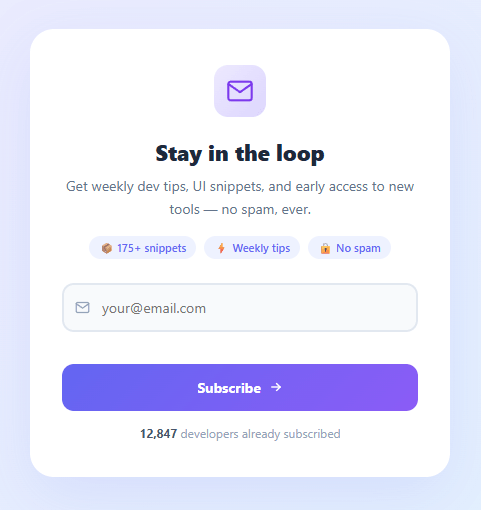
A newsletter signup form is one of the highest-value conversion elements on any website, yet most implementations are a bare <input> and <button> with no success feedback. This snippet builds a polished email signup card: client-side email validation with inline error messages, a loading spinner during the async call, and an animated SVG checkmark success state that slides in after submission — with three confirmation perks and the subscriber's email shown back to them.
The success state is where most implementations fall short. Users who submit a form with no feedback don't know whether it worked. This snippet solves that with a two-state card: an idle state (form) and a success state (animated confirmation). The transition between states uses CSS animation — not a page reload.
Email validation with inline error messages
The form uses novalidate to disable native browser validation, giving us full control over the error UI. The validateEmail function checks the value against /^[^s@]+@[^s@]+.[^s@]+$/ — a pragmatic regex that catches obvious format errors without the complexity of RFC 5322 full compliance (which rejects valid emails). Errors render in a role="alert" aria-live="assertive" paragraph below the input so screen readers announce them immediately. The error state adds a red border to the input via a class toggle.
Loading state with spinner
During the async submission, the button gets a .loading class that fades out the button text and arrow (opacity: 0) and fades in a centred CSS spinner. The spinner is an ::after-style border-radius element with a rotate(360deg) keyframe animation. The button is also disabled to prevent double-submission. This pattern — hiding text but keeping the button the same size — prevents layout shift during loading.
Animated SVG checkmark
The success state shows an SVG circle and checkmark path drawn with CSS stroke-dashoffset animation. The circle stroke is set to stroke-dasharray: 151 (its circumference) and stroke-dashoffset: 151 (fully hidden). A keyframe animation drives it to 0 — drawing the circle. The check path follows 200ms later with the same technique. This two-step sequence (circle then check) creates a satisfying "confirmation" feeling that flat success messages lack.
Two-state card pattern
The idle and success states are both in the DOM, one hidden with the hidden attribute. Submission hides the idle state and removes hidden from the success state. CSS animation: fadeIn .5s ease slides the success state up from 12px below. This is simpler and more reliable than injecting HTML on success, and it means the success state can be styled independently without JavaScript string templates. Pair with a toast notification for site-wide signup confirmation that appears on other pages after redirect.
Build with AI
Build, Understand, Optimize, and Extend It With AI
Instead of tracing the two-state DOM swap by hand, paste this snippet's HTML, CSS, and JS into an AI coding assistant like Claude and ask it to explain exactly how the success checkmark's stroke-dashoffset animations are timed so the circle finishes drawing before the checkmark path starts, and why both the idle and success states stay mounted in the DOM with the hidden attribute instead of one being injected via innerHTML on success. The same assistant can help optimize it, for instance asking whether the simulated 1400ms setTimeout delay is a reasonable stand-in for a real API round trip or whether it should show a differently-timed skeleton, or whether the email regex is too permissive for production use. It's also useful for extending the form: ask it to add real error handling for a duplicate-subscriber API response that returns the user to the idle state with an inline message, add a first-name field with its own validation, or wire in a double opt-in confirmation flow. Treat the code less like a finished artifact and more like a starting point for a conversation.
Prompt to recreate it
Copy this into your AI assistant of choice to build the effect from scratch, or as a jumping-off point for your own variant:
Build a "newsletter signup card" in plain HTML, CSS, and JavaScript with client-side validation, a loading state, and an animated SVG success confirmation — no form library.

Requirements:
- A card containing an idle state (icon, headline, description, feature badge pills, an email input with an inline icon, a submit button, and a social-proof subscriber count) and a separate success state, both present in markup but with only one visible at a time via the hidden attribute — no innerHTML injection to show the success state.
- Disable native browser validation (novalidate) and implement your own: on submit, check for a non-empty value first, then validate the format with a practical (not RFC-perfect) email regex; show a distinct message for each failure case in a paragraph with role="alert" and aria-live="assertive" below the input, and add a red-border error class to the input.
- Clear the error state and styling the moment the user starts typing again in the field, not only on the next submit attempt.
- On a valid submit, disable the button, add a loading class that fades out the button's label/icon and fades in a spinning CSS-only spinner (an animated bordered circle, not an image or SVG animation) without changing the button's size, then simulate an async delay before proceeding.
- After the simulated delay, hide the idle state and reveal the success state, echoing the submitted email address back to the user inside the confirmation copy.
- The success state's checkmark must be an SVG circle and check path animated in sequence using stroke-dasharray and stroke-dashoffset keyframes — the circle must finish drawing before the checkmark begins — plus a list of a few confirmation "perks" styled distinctly from the main confirmation text.
Want to tighten it up first? Run this prompt through the AI Prompt Studio to score it across 8 quality dimensions, catch anti-patterns, and tune the wording for Claude, ChatGPT, or Gemini before you paste it in.
Step by step
How to Use
- 1Paste HTML, CSS, and JSA newsletter card appears with an email icon, headline, feature badges, email input, and subscribe button on a purple gradient background.
- 2Try submitting emptyClick Subscribe without an email — an inline error message appears below the input with a red border on the field. The error clears as you start typing.
- 3Try an invalid emailEnter "test" and submit — a validation error appears. Enter "test@test.com" and submit to proceed.
- 4Watch the loading stateA spinner appears inside the button for ~1.4 seconds (simulating an API call). The button disables to prevent double submission.
- 5See the success stateAn animated SVG circle draws itself, then a checkmark path draws inside it. The success card slides up with the subscriber's email confirmed and three benefit perks.
- 6Connect your email APIReplace the
await new Promise(r => setTimeout(r, 1400))with your real API call (fetch('/api/subscribe', { method: 'POST', body: ... })). Show the success state in thethenhandler, or re-show the form with an error message if the call fails.
Real-world uses
Common Use Cases
Got questions?
Frequently Asked Questions
Replace the setTimeout with a fetch call to their API endpoint. For Mailchimp: fetch(https://us1.api.mailchimp.com/3.0/lists/{listId}/members, { method:'POST', headers:{Authorization:'apikey ${key}',...}, body: JSON.stringify({email_address:val,status:'subscribed'}) }). For ConvertKit: POST to https://api.convertkit.com/v3/forms/{formId}/subscribe with {api_key, email}.
Add a try/catch around the fetch. On error, re-enable the button, remove the .loading class, and call showError('This email is already subscribed.'). This keeps the user in the idle state with the error inline rather than losing their input.
Add <input type="text" placeholder="First name" /> above the email input. In JS, collect both values and include the name in the API call body. The validation step adds a check that the name field is non-empty.
Use useState for { email, error, loading, success }. The form onSubmit sets loading: true, awaits the API call, then sets success: true or error: 'message'. Conditionally render the idle or success JSX based on the success flag.