You Might Also Like
Learn Coding Visually
Learn to code with interactive, live-preview playgrounds — HTML, CSS, JavaScript, React & more.
 HTML Playground42 lessons · Click-based · Live preview
 CSS PlaygroundLearn CSS with a live editor
 JavaScript Playground60 lessons · DOM · Async · Canvas
 React PlaygroundLearn React with a live code editor
 GSAP PlaygroundLearn GSAP animation interactively
 SVG Playground44 lessons · shapes · paths · animation
 SCSS Playground45 lessons · Sass modules · tokens
 Tailwind PlaygroundLearn Tailwind CSS with a live editor
 Bootstrap 5 Playground50 lessons · live preview
Collaborator Presence Bar — Free HTML CSS JS Snippet
Collaborator Presence Bar · Cards · Plain HTML, CSS & JS · Live preview
What's included
Features
About this UI Snippet
Collaborator Presence Bar — Animated Avatar Stack With Per-User Color Rings and Per-Person Typing Indicators
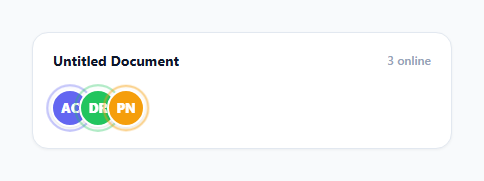
Most "someone is typing" indicators show one generic message for the whole document or thread, which tells you almost nothing when three people are editing at once. Google Docs and Figma solve this differently: presence is shown per person, at all times — every active collaborator gets their own avatar, their own consistently-colored ring, and their own typing indicator attached directly to their face, not funneled into one shared status line. This snippet rebuilds that per-person presence model: a horizontally overlapping avatar stack where users animate in and out as they join and leave, each active user carries a distinct, consistently-reused ring color, and a typing indicator appears as a small animated dot cluster attached to the specific avatar of whoever is typing.
Why color assignment lives on the data, not on join order
The most common bug in an avatar-stack implementation is assigning colors based on array index or join order — which silently breaks the moment membership changes, because the third person to join today might be a different actual user than the third person to join tomorrow, yet they would render with the same ring color. This snippet avoids that entirely by storing each person's color directly on their static PEOPLE record at definition time, so colorFor(id) always looks up a fixed, permanent property rather than computing anything from the current online list. The result: Diego Ruiz is always the green ring, whether he is the first person online or the fifth, whether he just rejoined for the third time or has been present the whole session — consistency comes from the color living on the person, not on their position in a list.
The enter animation: why it needs two nested requestAnimationFrame calls
When a new avatar joins, join() creates the element already styled at transform: scale(0); opacity: 0 (via its base CSS class, before .enter is added) and appends it to the DOM. Simply adding the .enter class in the same synchronous call would not animate anything, because the browser would batch the initial style and the transitioning style into the same paint and never render the "before" state at all. The fix is two nested requestAnimationFrame calls: the first guarantees the browser has committed a frame with the element still at its starting scale/opacity, and the second (scheduled from inside the first) then adds .enter, guaranteeing the transition has a genuine starting point to animate from. This is the same "force a layout, then change the class" problem every CSS-transition-triggered-by-JS implementation has to solve, just solved with rAF instead of reading offsetHeight to force a synchronous reflow.
The exit animation: waiting for transitionend before touching the DOM
leave() does the mirror image correctly too, and this is where a lot of "avatar leaves the stack" implementations get subtly wrong: they remove the element from the DOM immediately, which cancels any in-flight CSS transition instantly and makes the user just vanish with no shrink or fade at all. This snippet instead adds a .leave class (triggering the shrink-and-fade transition) and only calls removeChild inside a transitionend listener, filtered to e.propertyName === 'transform' so it does not fire early from the parallel opacity transition finishing at a different time. The DOM node genuinely stays alive, still transitioning, for the full 320ms of its exit animation.
The ring pulse as a distinct signal from color alone
Every active avatar's colored ring (an absolutely positioned pseudo-ring sized slightly larger than the avatar itself, using border-color matched to the person's assigned color) runs a continuous, gentle scale-and-fade animation, independent of hover state or typing state. This is deliberately separate from the typing indicator — the ring pulse says "this person is currently present," while the typing dots say "this specific person is producing input right now." Overloading one visual signal to mean both would make it impossible to tell "online but idle" apart from "actively typing," which is exactly the distinction a collaboration tool's presence bar needs to communicate.
Per-person typing indicators, not a shared banner
setTyping(id) adds a .typing class to exactly one avatar at a time (clearing it from whoever had it previously), which reveals a small absolutely-positioned dot cluster anchored to that avatar's own bottom-right corner using ::after-style layered <span> elements with staggered animation delays. Because the indicator is a child of the specific avatar element rather than a page-level "X is typing" message, it scales naturally to any number of simultaneous collaborators without needing string concatenation logic like "Amara and 2 others are typing" — each person's status is simply visible or not, directly on their own face.
Build with AI
Build, Understand, Optimize, and Extend It With AI
Hand this snippet's JS to an AI assistant like Claude and ask it to explain why join() needs two nested requestAnimationFrame calls rather than one, and why leave() waits for a transitionend event instead of removing the element immediately — both are common, easy-to-miss bugs in DOM enter/exit animations, and understanding the fix here will save you from re-discovering them the hard way. It's also worth asking whether storing each person's color on their data record (rather than deriving it from a hash of their id or name) is the right tradeoff for this use case versus a real backend-driven system with far more users than fixed colors. For extending the snippet: ask for a "+N more" overflow avatar when the stack exceeds a max visible count, cursor-position dots synced to each collaborator's typing indicator, or a click-to-expand view that lists every active collaborator's name and status in a dropdown.
Prompt to recreate it
Copy this into your AI assistant of choice to build the effect from scratch, or as a jumping-off point for your own variant:
Build a collaborator presence bar in plain HTML, CSS, and JavaScript showing an animated, overlapping avatar stack for simulated online users, no libraries.

Requirements:
- A row of circular avatar chips that overlap slightly (negative margin "avatar stack" look), each showing a person's initials on a colored background.
- Simulate users joining and leaving on a randomized interval so the row's actual membership changes over time, not a static fixed list — new avatars must animate in with a scale-and-fade entrance, and leaving avatars must animate out with a scale-and-fade exit rather than disappearing or being removed from the DOM instantly.
- Assign each person a distinct color that is stored on their identity (not derived from join order or array position), so the same simulated user always gets the same ring color every time they appear, across multiple join/leave cycles.
- Every currently active avatar must show a colored ring (matching that person's assigned color) with a continuous, gentle pulsing animation to signal "present," independent of any typing state.
- Simulate one active user "typing" at a time on an interval, showing a small animated dot cluster attached directly to that specific person's avatar (not a single generic "someone is typing" message elsewhere on the page), and clear it automatically after a few seconds.
- On hover, the hovered avatar should lift slightly and separate from its neighbors, revealing a name tooltip above it.
- Use two nested requestAnimationFrame calls to reliably trigger the CSS enter transition, and a transitionend listener (filtered to a specific CSS property) to only remove a leaving avatar from the DOM after its exit animation has actually finished.
Want to tighten it up first? Run this prompt through the AI Prompt Studio to score it across 8 quality dimensions, catch anti-patterns, and tune the wording for Claude, ChatGPT, or Gemini before you paste it in.
Step by step
How to Use
- 1Watch collaborators join the stack automaticallyEvery couple of seconds a new avatar animates in with a springy scale-and-fade pop, overlapping the previous avatars in the classic negative-margin avatar-stack look.
- 2Notice each active avatar has its own colored ringThe ring color is consistently tied to that specific person — the same collaborator always gets the same ring color, even after leaving and rejoining later.
- 3Watch the ring gently pulse on every active avatarA slow scale-and-opacity animation runs continuously on the ring to signal "currently present," independent of whether that person is actively typing.
- 4Watch for a small dot cluster appearing on a specific avatarWhen a collaborator is simulated as typing, three animated dots appear attached to their individual avatar in the bottom-right corner, not as a generic shared banner.
- 5Hover any avatar in the stackThe hovered avatar lifts slightly and separates from its neighbors, and a name tooltip appears above it, letting you identify exactly who is in the overlapping stack.
- 6Watch collaborators leave the stackAn avatar shrinks and fades out in place rather than disappearing instantly, and the online count in the header updates to reflect the new total.
Real-world uses
Common Use Cases
Got questions?
Frequently Asked Questions
Each person's color is stored directly as a property on their static record in the PEOPLE array at definition time, not computed from their position in the currently-online list or the order they joined in. Every place that needs a color calls colorFor(id), which looks up that fixed property. Because the color is tied to the person's identity rather than to any runtime state, the same user renders with the same ring color whether they are the first person online or the last, and whether this is their first join or their fifth.
A newly created element is appended to the DOM already at its starting styles (scale(0), opacity 0) via its base CSS class. If the .enter class that triggers the transition were added in the very same synchronous function call, the browser could batch both style states into a single paint and skip the transition entirely, since it never got a chance to render the "before" state. The first requestAnimationFrame callback runs after the browser has committed a frame with the starting styles still in effect; the second one, scheduled from inside the first, then adds .enter, guaranteeing the transition has an actual starting point to animate away from.
Removing an element from the DOM immediately cancels any CSS transition on it instantly, which would make a leaving collaborator simply vanish with no shrink or fade animation at all. Instead, leave() adds a .leave class to start the exit transition and only calls removeChild() inside a transitionend listener, filtered specifically to the transform property so it fires exactly once even though opacity is transitioning in parallel at a slightly different duration.
Yes. Replace the setInterval(simulateTick, 2200) call with your WebSocket message handler, calling join(userId) when a "user_joined" event arrives and leave(userId) on "user_left", using the same functions this snippet already defines. For typing status, call setTyping(userId) when a "typing" event arrives for that user; the existing 2200ms auto-clear timeout can either stay as a fallback or be replaced with an explicit "stopped_typing" event from your backend.
Yes. Model activeIds as component state (a Set or array of user ids) so React/Vue/Angular re-render the avatar list declaratively, but keep the two-frame enter animation and the transitionend-gated exit animation as imperative DOM effects — in React, trigger the enter class inside a useLayoutEffect keyed on the newly added id, and for exit, keep the leaving user's data around in a separate "leaving" state slice until its transitionend fires before removing it from render output entirely. Clear the setInterval driving the simulation, and any pending setTimeout from setTyping, inside the component's cleanup function (useEffect return, onUnmounted, or ngOnDestroy) to avoid updating state after unmount.