You Might Also Like
Learn Coding Visually
Learn to code with interactive, live-preview playgrounds — HTML, CSS, JavaScript, React & more.
 HTML Playground42 lessons · Click-based · Live preview
 CSS PlaygroundLearn CSS with a live editor
 JavaScript Playground60 lessons · DOM · Async · Canvas
 React PlaygroundLearn React with a live code editor
 GSAP PlaygroundLearn GSAP animation interactively
 SVG Playground44 lessons · shapes · paths · animation
 SCSS Playground45 lessons · Sass modules · tokens
 Tailwind PlaygroundLearn Tailwind CSS with a live editor
 Bootstrap 5 Playground50 lessons · live preview
Now Playing Mini Player — Free HTML CSS JS Snippet
Now Playing Mini Player · Cards · Plain HTML, CSS & JS · Live preview
What's included
Features
About this UI Snippet
Now Playing Mini Player — FLIP Shared-Element Morph, Live Scrubber & Pulsing Equalizer in Vanilla JS
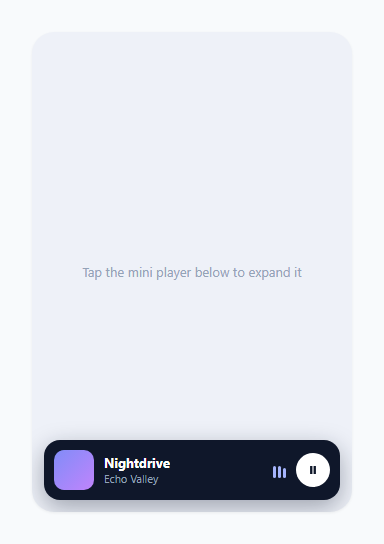
Music apps like Spotify and Apple Music do not open their full player as a plain modal that fades in from nowhere — the mini bar at the bottom of the screen visibly grows into the full-screen player, so the album art you were just looking at stays the same object the whole time, just bigger. That continuity is what makes the transition feel physical instead of like two disconnected screens. This snippet reproduces that exact effect using the FLIP technique (First, Last, Invert, Play), the same general approach behind iOS and Android "hero" transitions between a list item and its detail view, built with nothing but getBoundingClientRect(), CSS transforms, and one requestAnimationFrame-driven loop for the animated equalizer bars.
What FLIP actually stands for and why each step exists
FLIP is a sequence, not a single trick. First: before anything changes, measure the mini player's exact position and size on screen with getBoundingClientRect(). Last: make the destination element (the full sheet) visible at its natural, final layout — full-screen, no transform — and measure ITS rect too. Invert: compute the delta between those two rects (how far left/up the sheet's top-left corner needs to shift, and what scale factor would shrink its width/height down to the mini player's dimensions) and apply that as a transform immediately, with transitions disabled, so the sheet is technically full-size in the DOM but visually rendered exactly where the mini player was. Play: on the very next frame, remove the inverted transform and re-enable transitions, so the browser animates the transform from "shrunk down to mini-player size and position" to "none" (its natural full-size state) — which reads as the sheet growing out of the mini player.
Why the transform has to be computed, not guessed
The delta values are never hardcoded pixel numbers. expand() reads miniRect.left - sheetRect.left and miniRect.top - sheetRect.top for the translate offset, and miniRect.width / sheetRect.width plus the same ratio for height as the scale factor. This means the morph works correctly regardless of where the mini player happens to sit or how large the sheet is at any given viewport size — the same code that works in a 320px-wide mobile mockup would work identically if the container were resized, because the transform is derived from live measurements taken at the moment of the click rather than a fixed guess.
Why the transform-origin matters
sheet.style.transformOrigin is set to top left to match how the translate+scale math is computed — the delta values describe how the sheet's own top-left corner needs to move and shrink to land on the mini player's top-left corner. If the transform-origin were left at its default of center, the same translate/scale numbers would scale the sheet from its middle outward, producing a transform that visually drifts away from the mini player's actual position instead of growing cleanly out of it.
Reversing the morph on collapse
collapse() runs the identical FLIP math in the opposite direction: it measures the sheet's current (full-size) rect as the starting point, temporarily reveals the still-hidden mini player to read its target rect, then re-hides it, computes the same translate/scale delta, and animates the sheet's transform FROM none TO that inverted position — shrinking the sheet back down onto the mini player rather than just fading it away. A transitionend listener (checked against e.propertyName === 'transform' so it does not fire early on the opacity or border-radius transitions running in parallel) finally sets display: none on the sheet and restores the mini player's visibility once the shrink animation has actually finished.
The equalizer bars and progress loop
A single requestAnimationFrame loop drives two unrelated things every frame: it advances progress (a 0-1 float) by dt / DURATION seconds elapsed, which updates the scrubber fill width and handle position and the current-time label — and, only while playing is true, it assigns each equalizer bar a fresh randomized height, capped higher in the expanded sheet view (32px) than in the compact mini bar (15px). When paused, the bars simply stop being reassigned and freeze at whatever height they last had, rather than resetting to zero, which reads as "sound stopped" more naturally than an abrupt flatline.
Build with AI
Build, Understand, Optimize, and Extend It With AI
Give this snippet's JS to an AI assistant like Claude and ask it to trace through exactly why the transform has to be computed from live getBoundingClientRect() calls rather than hardcoded, and why transform-origin: top left has to match how the delta is derived — it is easy to copy the FLIP pattern without understanding why those two details are load-bearing. It is also worth asking whether the mini-player "briefly show, measure, re-hide" trick in collapse() could be replaced with a cleaner approach, like keeping the mini player permanently in the layout at opacity: 0 with pointer-events: none instead of toggling a hidden class, so its rect is always measurable without a flash. For extending the snippet, ask for a swipe-down-to-collapse gesture using pointer events, a queue/playlist drawer that slides up from the bottom of the expanded sheet, or wiring the equalizer to real frequency data via the Web Audio API AnalyserNode instead of randomized bar heights.
Prompt to recreate it
Copy this into your AI assistant of choice to build the effect from scratch, or as a jumping-off point for your own variant:
Build a "now playing" mini music player in plain HTML, CSS, and JavaScript that expands into a full player sheet using a FLIP shared-element transition — no animation library, no framework.

Requirements:
- A compact mini player bar fixed near the bottom of its container showing album art, title, artist, a small pulsing equalizer, and a play/pause button.
- Clicking the mini bar must expand it into a full-size player sheet using the FLIP technique: measure the mini bar's getBoundingClientRect() BEFORE anything changes, make the full sheet visible at its natural full-size layout and measure that rect too, compute the translate offset and width/height scale ratio between the two rects, apply that as an instant (no-transition) transform so the sheet is technically full-size but visually sits exactly on top of the mini bar, then on the next animation frame remove the transform with a transition enabled so it animates smoothly from "shrunk to mini-bar size" to its natural full size.
- Set transform-origin to top left on the sheet, consistent with how the translate/scale delta is computed from the two rects' top-left corners.
- Reverse the exact same FLIP math when collapsing, so the sheet visibly shrinks back down into the mini bar's position and size before being hidden, with a transitionend listener (filtered to the transform property specifically) that swaps display back only once the shrink animation has actually finished.
- A working scrubber/progress bar in the expanded sheet: click-to-seek and drag-to-seek, both updating a numeric current-time label, driven by a single requestAnimationFrame loop.
- Play/pause button whose icon morphs between a play triangle and a pause icon, synced between the mini bar and the expanded sheet.
- A small set of equalizer bars that get randomized heights every animation frame while playing, and freeze in place (not reset to zero) when paused.
Want to tighten it up first? Run this prompt through the AI Prompt Studio to score it across 8 quality dimensions, catch anti-patterns, and tune the wording for Claude, ChatGPT, or Gemini before you paste it in.
Step by step
How to Use
- 1Watch the mini bar at the bottomThe compact player shows album art, title, artist, three small equalizer bars pulsing at random heights, and a play/pause button — all inside a 60px-tall dark bar pinned to the bottom of the stage.
- 2Click anywhere on the mini bar to expand itThe full player sheet visibly grows out of the mini bar's exact position and size using a FLIP transform, landing at full-screen size roughly 420ms later with an eased deceleration curve.
- 3Drag or click the scrubber in the expanded sheetClick anywhere on the progress track to seek instantly, or press and drag the circular handle to scrub continuously — both update the current-time label in real time.
- 4Press play/pause in either viewToggling from the mini bar or the full sheet stays in sync between both — the icon morphs between a play triangle and a pause double-bar, and the equalizer bars freeze in place when paused.
- 5Tap the chevron to collapse the sheetThe full player shrinks back down using the reverse FLIP transform, visually retreating into the exact mini-bar position it grew from, and the mini bar fades back in once the shrink finishes.
Real-world uses
Common Use Cases
Got questions?
Frequently Asked Questions
FLIP stands for First, Last, Invert, Play — measure the starting rect, measure the natural ending rect, invert the difference into a transform applied instantly with no transition, then remove that transform on the next frame so the browser animates from the inverted position to the natural one. A plain fade-in modal has no visual connection to where the trigger element was, which reads as two disconnected screens. FLIP keeps the album art, title, and general shape visually continuous, which is what makes the morph feel like the same object growing rather than a new screen appearing.
The translate and scale deltas in this snippet are computed from the two rects' top-left corners (miniRect.left - sheetRect.left, etc). That math only produces a visually correct morph if the browser also scales the element from its top-left corner — with the default center origin, the same numbers would scale the sheet outward from its middle, causing it to visibly drift away from the mini player's actual position instead of growing cleanly out of it.
To compute the shrink target, the code needs the mini player's real on-screen rect via getBoundingClientRect() — but that only returns meaningful, non-zero dimensions if the element is actually laid out and visible. The mini player is briefly un-hidden just long enough to measure it, then hidden again immediately so it does not double up visually with the still-shrinking sheet, and its .hidden class is only permanently removed once the sheet's shrink transition genuinely finishes.
Yes. In React, keep expanded as component state, and run the getBoundingClientRect() measurement plus the inverted-transform assignment inside a useLayoutEffect that fires synchronously after the expanded state changes but before the browser paints (useEffect alone can flash the unanimated final state for one frame). Cancel the shared requestAnimationFrame loop in the cleanup function of the useEffect that starts it. In Vue, do the measurement in a watcher on expanded using nextTick, and stop the rAF loop in onUnmounted. In Angular, trigger it from ngOnChanges or a signal effect and cancel the frame in ngOnDestroy. In every framework, keep the rAF-driven equalizer and scrubber loop outside the framework's render cycle for smoothness, same as in this vanilla version.
Replace the DURATION constant and the progress variable's manual increment with an actual HTMLAudioElement: listen for its timeupdate event to set progress = audio.currentTime / audio.duration instead of advancing it manually in the rAF loop, and in seek(), set audio.currentTime = pct * audio.duration instead of just updating the visual progress variable. The rAF loop can keep driving the equalizer bars independently since real audio has no built-in frequency data unless you also wire up the Web Audio API's AnalyserNode.