You Might Also Like
Learn Coding Visually
Learn to code with interactive, live-preview playgrounds — HTML, CSS, JavaScript, React & more.
 HTML Playground42 lessons · Click-based · Live preview
 CSS PlaygroundLearn CSS with a live editor
 JavaScript Playground60 lessons · DOM · Async · Canvas
 React PlaygroundLearn React with a live code editor
 GSAP PlaygroundLearn GSAP animation interactively
 SVG Playground44 lessons · shapes · paths · animation
 SCSS Playground45 lessons · Sass modules · tokens
 Tailwind PlaygroundLearn Tailwind CSS with a live editor
 Bootstrap 5 Playground50 lessons · live preview
Motion One Spring Card Expand — FLIP Detail View
Motion One Spring Card Expand · Cards · Plain HTML, CSS & JS · Live preview
What's included
Features
About this UI Snippet
Motion One Spring Card Expand — Shared-Element Transition Without a Framework
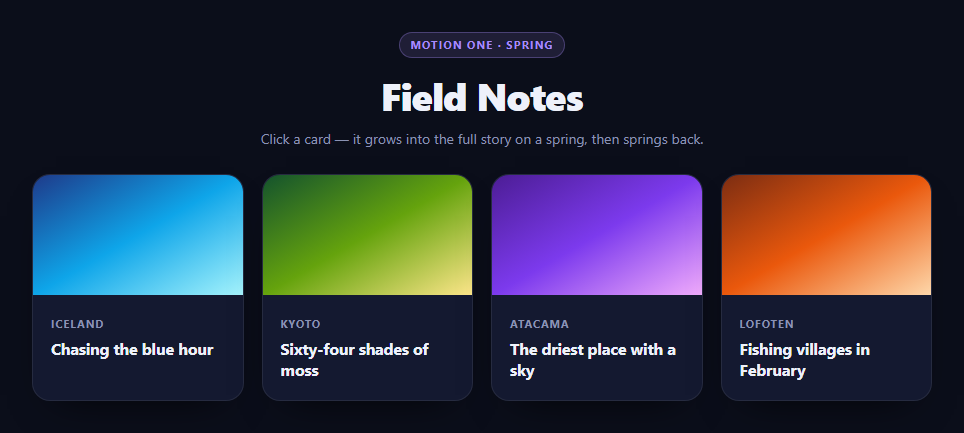
The "card grows into a detail view" transition is the single most recognizable interaction in modern app design — it is how iOS opens an App Store listing and how Framer Motion's layoutId made its name. It is also the one most people give up on outside React, because doing it properly means measuring live geometry and animating between two layouts that never exist at the same time.
This snippet does it in plain JavaScript with Motion One, a ~4kb library that drives the native Web Animations API and — critically for this effect — ships a real spring() easing function.
Why a spring, not a cubic-bezier
A card growing to five times its size on ease-out looks like a video being scrubbed. It arrives at its destination and stops dead. A spring settles:
spring({ stiffness: 210, damping: 24, mass: 1 })
Those three numbers describe a physical system rather than a curve. stiffness is how hard the spring pulls toward the target, damping is how much energy is bled off each oscillation, and mass is inertia. At damping 24 against stiffness 210 the card overshoots its final size by a hair and settles back — the tiny bit of overshoot is what the eye reads as *weight*. Notably, spring animations have no duration: the physics decides when it is finished, which is why the open and close feel consistent even though they cover different distances.
The placeholder problem
The moment the card becomes position: fixed so it can escape the grid, its slot in the grid vanishes and every sibling card jumps left to fill the gap. That reflow is jarring, and it also breaks the close animation, because the geometry you want to return to no longer exists.
The fix is four lines:
placeholder = document.createElement('div'); placeholder.style.width = first.width + 'px'; ...
An empty div of exactly the card's measured size is inserted into the grid before the card is lifted out of flow. The grid never notices the card left. On close, the placeholder's getBoundingClientRect() is what the animation targets — so the card flies back to wherever its slot ended up, even if the window was resized or the layout reflowed while the detail view was open. That is the detail most implementations miss: they cache the original rect at open time, and a mid-transition resize sends the card back to the wrong place.
Measuring first, animating second
open() follows the FLIP discipline. first = card.getBoundingClientRect() captures the card's real position before anything changes. Those values are immediately written back as explicit top, left, width, and height on the fixed element, so visually nothing moves at the instant the card leaves flow — the user sees no jump. Only then does the animation run from those literal values to the target rect.
targetRect() computes the destination from the viewport rather than hard-coding it: Math.min(560, window.innerWidth - 40) keeps the panel comfortable on desktop and inset on a phone, and the centering math is derived from the same numbers.
What each animation is for
Four properties animate together on the card (top, left, width, height), and three more run alongside on different elements — the backdrop fades, the close button fades in slightly later at delay: 0.1, and the hidden body copy rises with y: [12, 0] at delay: 0.14. Staggering those by a tenth of a second is what makes the transition feel choreographed rather than simultaneous.
Animating layout properties rather than transform is a deliberate trade here. transform: scale() is cheaper, but non-uniform scaling distorts the text inside the card — the classic squashed-headline artifact — and correcting it requires counter-scaling every child. For a single element, animating width and height keeps the type crisp at every frame, and one element's layout cost is not what will slow a page down.
Closing cleanly
animate() returns an object with a finished promise, which is what lets the teardown wait for the spring to actually settle:
anim.finished.then(function () { card.removeAttribute('style'); ... })
Stripping the entire inline style attribute in one call is cleaner than resetting six properties individually, and it guarantees no stale position: fixed survives into the next open. The placeholder is removed in the same callback, so the grid closes its gap exactly as the card lands in it.
Reusing it
The detail copy already lives inside each card and is simply display: none until .is-open — so there is no second template to keep in sync and no fetch to wait for. Escape, backdrop click, and the close button all route through the same close(). Pair it with an expandable card for the in-flow variant, or a modal when the content has no origin element to grow from.
Build with AI
Build, Understand, Optimize, and Extend It With AI
The interesting decisions here are all about measurement order, which is exactly the kind of thing worth having explained back to you. Paste the HTML, CSS, and JS into an AI assistant like Claude and ask it to walk through why open() writes the measured first rect back as inline top/left/width/height before starting the animation, and what the user would see if that step were skipped. Then ask why close() reads placeholder.getBoundingClientRect() fresh instead of reusing the rect captured at open time — resize the window while a card is open to see the bug that avoids. Ask it to explain what stiffness 210 and damping 24 do physically, and have it show what damping 8 versus damping 40 would feel like. For optimization, ask whether animating width and height on one element is genuinely a problem, and at what point you would switch to transform with counter-scaled children. To extend it: add a drag-to-dismiss gesture, animate between two open cards without closing first, use Motion One's inView to stagger the grid on load, or add a View Transitions API fallback. Treat the code less like a finished artifact and more like a starting point for a conversation.
Prompt to recreate it
Copy this into your AI assistant of choice to build the effect from scratch, or as a jumping-off point for your own variant:
Build a "card expands into a detail panel" shared-element transition using Motion One (from a CDN, global Motion) in plain HTML, CSS, and JavaScript — no React, no Framer Motion.

Requirements:
- A responsive grid of cards, each already containing its own detail copy in an element that is display:none until the card opens, so there is no second template to keep in sync.
- Clicking a card must follow the FLIP discipline: capture its live geometry with getBoundingClientRect FIRST, then set the card to position:fixed and immediately write those exact measured values back as inline top, left, width and height — so the card does not visually jump at the instant it leaves normal flow — and only then animate to the target rect.
- Before lifting the card out of flow, insert an empty placeholder div sized to the card's measured width and height into the grid, so the grid does not collapse and reflow when the card becomes fixed.
- Animate the card's top, left, width and height (NOT transform: scale) using Motion One's spring easing: spring({ stiffness: 210, damping: 24, mass: 1 }). Explain in a comment or the code why layout properties are used instead of scale — non-uniform scale distorts the text inside the card and would require counter-scaling every child.
- Compute the target rect from the viewport rather than hard-coding it: a width of min(560, innerWidth - 40) and height of min(520, innerHeight - 60), centered.
- Choreograph supporting animations on offset delays rather than simultaneously: a blurred backdrop fades in, a fixed close button fades in around 0.1s later, and the revealed body copy fades and rises (y from 12 to 0) around 0.14s later.
- On close, animate back to the PLACEHOLDER's rect read fresh at close time — not a rect cached when the card opened — so the card returns to the correct position even if the window was resized while the panel was open.
- Use the promise returned by Motion One (anim.finished) to run teardown only after the spring settles: remove the open class, strip all inline styles in one call with removeAttribute('style'), remove the placeholder, and clear the open state.
- Support closing via the Escape key, a backdrop click, and the close button, all routed through a single close function, and make cards keyboard-openable with Enter or Space.
Want to tighten it up first? Run this prompt through the AI Prompt Studio to score it across 8 quality dimensions, catch anti-patterns, and tune the wording for Claude, ChatGPT, or Gemini before you paste it in.
Step by step
How to Use
- 1Add the Motion One CDNInclude motion from the CDN panel — it exposes a global Motion object.
- 2Paste HTML, CSS, and JSA four-card grid renders with hidden detail copy inside each card.
- 3Click a cardIt lifts out of the grid and springs into a centered detail panel.
- 4Close itEscape, the backdrop, or the close button all spring the card back to its slot.
- 5Tune the springRaise stiffness for a snappier open, lower damping for more overshoot.
- 6Add your contentPut the detail copy in .mfe-more — it reveals as the card expands.
Real-world uses
Common Use Cases
Got questions?
Frequently Asked Questions
A bezier arrives at the target and stops dead, which reads as a scrub rather than a movement. A spring is defined by stiffness, damping, and mass, so it overshoots slightly and settles — that overshoot is what the eye interprets as weight. Springs also have no fixed duration; the physics decides when the motion ends, so opens and closes over different distances stay consistent.
When the card becomes position: fixed it leaves the grid, so its slot would collapse and every sibling would jump. An empty div sized to the card measurement holds that slot. It also gives the close animation a live target — reading the placeholder rect at close time means the card returns correctly even if the window was resized while the panel was open.
Non-uniform scaling distorts the card contents, producing stretched headlines that only look right at the start and end frames. Fixing that requires counter-scaling every child. Animating layout properties on a single element keeps the type crisp throughout, and one element reflowing is not what makes a page slow.
That is the FLIP discipline. The rect is captured before the card leaves flow, then immediately applied as explicit top, left, width, and height on the fixed element. Visually nothing changes at the moment the card is lifted out, so there is no jump — the animation then runs from those literal starting values to the target.
Motion One returns an object with a finished promise. The teardown runs in .then(), after the spring has actually settled, and calls card.removeAttribute("style") to strip every inline property in one go rather than resetting six of them by hand — so no position: fixed can survive into the next open.
Keep the open card id in state and refs to the card elements. Run the measurement and Motion One calls in an effect that fires after the state change commits, since you need post-layout geometry. Await the finished promise before clearing the open state. In React, a portal is unnecessary because the card is position: fixed, but make sure the effect cleanup cancels any in-flight animation on unmount.