You Might Also Like
Learn Coding Visually
Learn to code with interactive, live-preview playgrounds — HTML, CSS, JavaScript, React & more.
 HTML Playground42 lessons · Click-based · Live preview
 CSS PlaygroundLearn CSS with a live editor
 JavaScript Playground60 lessons · DOM · Async · Canvas
 React PlaygroundLearn React with a live code editor
 GSAP PlaygroundLearn GSAP animation interactively
 SVG Playground44 lessons · shapes · paths · animation
 SCSS Playground45 lessons · Sass modules · tokens
 Tailwind PlaygroundLearn Tailwind CSS with a live editor
 Bootstrap 5 Playground50 lessons · live preview
Hand-Drawn Annotation Card — Rough Notation Snippet
Hand-Drawn Annotation Card · Cards · Plain HTML, CSS & JS · Live preview
What's included
Features
About this UI Snippet
Hand-Drawn Annotation Card — Sketchy Emphasis That Draws Itself
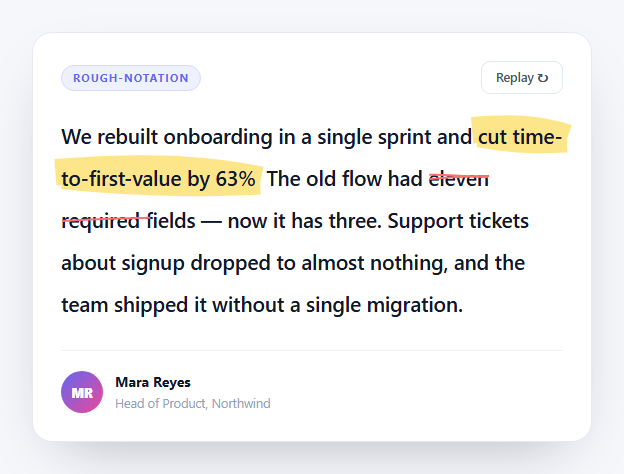
Bolding a phrase says "this matters." Drawing a wobbly circle around it by hand says "this is the bit I would have pointed at if we were in the same room." That difference in tone is why hand-drawn annotation has become a signature of well-designed marketing pages — and why faking it with CSS never quite lands.
This snippet uses rough-notation, a tiny library built on top of Rough.js, which generates genuinely irregular SVG paths using the same algorithms that make hand-drawn diagrams look hand-drawn. Every stroke is procedurally imperfect. Reload the page and the wobble is different, because the paths are regenerated rather than replayed from a fixed asset.
Markup drives the annotations
The critical design decision is that nothing is hard-coded in JavaScript. Every annotated phrase declares its own treatment as data attributes directly in the HTML:
<span data-annot="highlight" data-color="#fde68a">cut time-to-first-value by 63%</span>
The script queries [data-annot], maps over the results, and reads el.dataset.annot and el.dataset.color to configure each annotation. That means a copywriter can add, remove, or restyle emphasis by editing the sentence — no JS changes at all. The snippet demonstrates five of the six available types: highlight, strike-through, circle, underline, and box (the sixth, bracket, works identically).
Per-type configuration, and why highlight is special
The options object is not uniform across types, and getting this wrong is what makes most implementations look off:
strokeWidth: el.dataset.annot === 'highlight' ? 12 : 2
A highlight simulates a marker pen — it needs a very wide stroke (12) to cover the text's x-height, and rough-notation automatically inserts it behind the text rather than in front, so the words stay readable through the ink. Every other type is a thin pen line (2) drawn over the text. Using stroke width 2 for a highlight produces a thin stripe through the middle of the words; using 12 for an underline produces an unreadable smear.
Padding is likewise conditional. A box needs breathing room (6) or the rectangle crowds the letters, while an underline sits better tight to the baseline (3).
iterations: 2 means each stroke is drawn twice with different randomization — the way a person naturally goes over a circle a second time. One iteration looks tentative; three looks scribbled.
Sequencing with annotationGroup
Showing five annotations at once is visual noise. RoughNotation.annotationGroup(annotations) wraps them into a group whose show() plays them in array order, one after another, each waiting for the previous to finish. Since the array comes from querySelectorAll, that order is document order — so the annotations appear in exactly the sequence a reader encounters them. The effect reads as someone marking up the paragraph as they read it aloud.
Playing on scroll, exactly once
An IntersectionObserver with threshold: 0.4 waits until 40% of the card is visible before calling group.show(). The played boolean guard is what keeps it from restarting every time the card re-enters the viewport — without it, scrolling up and down retriggers the whole sequence repeatedly, which is the single most irritating way to ship this effect.
The replay gotcha
The replay button cannot simply call show() again — the annotations are already shown, so nothing happens. It must hide() first, and crucially, re-show on the next animation frame:
group.hide(); requestAnimationFrame(function () { group.show(); });
hide() removes the generated SVG elements synchronously. Calling show() immediately afterward in the same tick can have the browser coalesce the removal and re-insertion, so the paths appear fully drawn with no animation. Deferring by one frame guarantees the browser registers the removal first, and the strokes draw from zero length again.
Reusing it
Wrap any phrase in a span with data-annot and data-color and it joins the sequence automatically. multiline: true is already set, so annotations survive text wrapping and reflow correctly on mobile — a wrapped highlight becomes two ink strokes rather than one impossibly wide box. It sits naturally beside a testimonial card as its more opinionated cousin, or a pull quote when the emphasis is the whole point.
Build with AI
Build, Understand, Optimize, and Extend It With AI
This snippet's subtleties are all in configuration rather than algorithm, which makes it a good one to interrogate rather than just read. Paste the HTML, CSS, and JS into an AI assistant like Claude and ask it to explain why strokeWidth is branched on the annotation type — and what a highlight at width 2 and an underline at width 12 would each actually look like. Then ask why the replay handler wraps group.show() in a requestAnimationFrame instead of calling it directly after group.hide(), and reproduce the bug by removing it so you can see the paths appear fully drawn with no animation. For optimization, ask what happens to the annotation geometry when the container resizes after the SVGs are generated, and whether you need to re-run the annotations on a ResizeObserver. To extend it: have it add the sixth type (bracket), stagger the group with a custom delay between marks, randomize the seed so each replay wobbles differently, or drive the annotated phrases from a CMS field so marketing can mark up copy without a deploy. Treat the code less like a finished artifact and more like a starting point for a conversation.
Prompt to recreate it
Copy this into your AI assistant of choice to build the effect from scratch, or as a jumping-off point for your own variant:
Build a testimonial/marketing card whose key phrases get hand-drawn sketchy annotations that draw themselves in sequence, using the rough-notation library from a CDN (IIFE build, global RoughNotation).

Requirements:
- Annotations must be configured entirely from the MARKUP, not hard-coded in JS: wrap each emphasized phrase in a span carrying data-annot (the annotation type) and data-color attributes. The script queries all [data-annot] elements and reads el.dataset to build each annotation, so editing the copy is enough to change the emphasis.
- Demonstrate at least five types across one paragraph: highlight, strike-through, circle, underline, and box.
- Branch the options per type rather than using one uniform config: a highlight needs a very wide strokeWidth (around 12) because it simulates marker ink covering the text x-height and is drawn behind the text, while pen-style types need a thin stroke (around 2) drawn over the text. A box needs more padding than an underline. Add a comment explaining the highlight/behind-the-text distinction.
- Use iterations: 2 so each stroke is drawn over twice with different randomization, mimicking how a person naturally retraces a circle, and multiline: true so annotations remain correct when text wraps on narrow screens.
- Combine all annotations with RoughNotation.annotationGroup() so calling show() plays them one after another in document order, rather than all firing simultaneously.
- Trigger the sequence with an IntersectionObserver at roughly a 0.4 threshold, guarded by a boolean so it plays exactly once and does not restart every time the card re-enters the viewport.
- Add a replay button that calls group.hide() and then group.show() inside a requestAnimationFrame — explain in a comment that calling show() synchronously after hide() can let the browser coalesce the SVG removal and re-insertion, making the strokes appear already drawn instead of animating from zero length.
- Style it as a clean light card: white surface, soft border, generous line-height (around 2) so the annotations have room to breathe, and an author row with an avatar.
Want to tighten it up first? Run this prompt through the AI Prompt Studio to score it across 8 quality dimensions, catch anti-patterns, and tune the wording for Claude, ChatGPT, or Gemini before you paste it in.
Step by step
How to Use
- 1Add the rough-notation CDNInclude the IIFE build from the CDN panel — it exposes a global RoughNotation.
- 2Paste HTML, CSS, and JSThe card renders and annotations draw themselves once it scrolls into view.
- 3Watch the sequenceEach mark waits for the previous one, following document order.
- 4Press ReplayAnnotations are cleared and redrawn with fresh randomized wobble.
- 5Annotate your own copyWrap a phrase in a span with data-annot and data-color — no JS edits needed.
- 6Pick a typeUse highlight, underline, circle, box, strike-through, or bracket.
Real-world uses
Common Use Cases
Got questions?
Frequently Asked Questions
A highlight simulates a marker pen, so its stroke has to be wide enough to cover the text x-height — 12 here — and rough-notation places it behind the text so the words stay legible. Every other type is a pen line drawn over the text at width 2. Using 2 for a highlight gives a thin stripe through the middle of the words; using 12 for an underline smears them.
Each annotated phrase carries data-annot and data-color attributes in the markup. The script queries all [data-annot] elements and reads el.dataset.annot and el.dataset.color to build each annotation, so adding or restyling emphasis is a pure copy edit.
It plays the annotations in sequence, each waiting for the previous to finish, rather than all at once. Because the array comes from querySelectorAll it is in document order, so the marks appear in the same order a reader meets them.
hide() removes the generated SVGs synchronously. Calling show() in the same tick lets the browser coalesce the removal and re-insertion, so the paths can appear already drawn with no animation. Deferring the show by one requestAnimationFrame guarantees the removal is registered first and the strokes animate from zero length.
Yes, because multiline: true is set. A highlight spanning a line break becomes two separate ink strokes rather than one impossibly wide box, and the annotation recalculates against the wrapped geometry.
Render the copy with spans carrying the data attributes, then build the annotations in a mount effect using refs, not during render — the library measures live DOM geometry. Keep the group in a ref, call group.hide() in the cleanup so unmounting removes the SVGs, and rebuild the group if the copy changes. Tailwind styles the card while the annotation logic stays in JS.