Source Code
<div class="mc-stage" id="mcStage">
  <div class="mc-hint">Move your mouse — simulated teammates follow along</div>
</div>*{box-sizing:border-box;margin:0;padding:0}
body{font-family:system-ui,-apple-system,sans-serif;background:#0f172a;min-height:100vh}
.mc-stage{position:relative;width:100%;height:100vh;overflow:hidden;cursor:default;
background-image:radial-gradient(circle,#1e293b 1px,transparent 1px);background-size:24px 24px}
.mc-hint{position:absolute;top:50%;left:50%;transform:translate(-50%,-50%);color:#475569;font-size:14px;font-weight:600;text-align:center;pointer-events:none;user-select:none}
.mc-cursor{position:absolute;top:0;left:0;pointer-events:none;will-change:transform;z-index:5}
.mc-cursor svg{display:block;filter:drop-shadow(0 2px 4px rgba(0,0,0,.35))}
.mc-tag{position:absolute;left:14px;top:18px;padding:3px 9px;border-radius:6px 6px 6px 2px;font-size:11px;font-weight:700;color:#fff;white-space:nowrap;box-shadow:0 2px 8px rgba(0,0,0,.25)}
.mc-self{z-index:6}
.mc-self svg path{fill:#f8fafc}var stage = document.getElementById('mcStage');
var NAMES = [
{ name: 'Priya', color: '#6366f1' },
{ name: 'Marcus', color: '#22c55e' },
{ name: 'Yuki', color: '#f59e0b' },
];
var cursorSvg = '<svg width="20" height="22" viewBox="0 0 20 22" fill="none"><path d="M1 1l7.2 18.7 2.4-7.6 7.6-2.4z" fill="currentColor" stroke="#0f172a" stroke-width="1.2" stroke-linejoin="round"/></svg>';
function makeCursor(person) {
var el = document.createElement('div');
el.className = 'mc-cursor';
el.style.color = person.color;
el.innerHTML = cursorSvg + '<span class="mc-tag" style="background:' + person.color + '">' + person.name + '</span>';
stage.appendChild(el);
return el;
}
var bots = NAMES.map(function (person) {
return {
el: makeCursor(person),
x: Math.random() * window.innerWidth,
y: Math.random() * window.innerHeight,
tx: Math.random() * window.innerWidth,
ty: Math.random() * window.innerHeight,
speed: 0.02 + Math.random() * 0.02,
};
});
var mouseX = window.innerWidth / 2, mouseY = window.innerHeight / 2;
var selfEl = null;
stage.addEventListener('mousemove', function (e) {
mouseX = e.clientX; mouseY = e.clientY;
document.querySelector('.mc-hint').style.opacity = '0';
if (!selfEl) { selfEl = makeCursor({ name: 'You', color: '#0ea5e9' }); selfEl.classList.add('mc-self'); }
});
function pickNewTarget(bot) {
bot.tx = 40 + Math.random() * (window.innerWidth - 80);
bot.ty = 40 + Math.random() * (window.innerHeight - 80);
}
function animate() {
bots.forEach(function (bot) {
bot.x += (bot.tx - bot.x) * bot.speed;
bot.y += (bot.ty - bot.y) * bot.speed;
if (Math.abs(bot.tx - bot.x) < 4 && Math.abs(bot.ty - bot.y) < 4) pickNewTarget(bot);
bot.el.style.transform = 'translate(' + bot.x + 'px,' + bot.y + 'px)';
});
if (selfEl) selfEl.style.transform = 'translate(' + mouseX + 'px,' + mouseY + 'px)';
requestAnimationFrame(animate);
}
bots.forEach(pickNewTarget);
requestAnimationFrame(animate);
window.addEventListener('resize', function () {
bots.forEach(pickNewTarget);
});Learn Coding Visually
Learn to code with interactive, live-preview playgrounds — HTML, CSS, JavaScript, React & more.
 HTML Playground42 lessons · Click-based · Live preview
 CSS PlaygroundLearn CSS with a live editor
 JavaScript Playground60 lessons · DOM · Async · Canvas
 React PlaygroundLearn React with a live code editor
 GSAP PlaygroundLearn GSAP animation interactively
 SVG Playground44 lessons · shapes · paths · animation
 SCSS Playground45 lessons · Sass modules · tokens
 Tailwind PlaygroundLearn Tailwind CSS with a live editor
 Bootstrap 5 Playground50 lessons · live preview
Multiplayer Cursors — Live Collaboration HTML CSS JS
Multiplayer Cursors · Animations · Plain HTML, CSS & JS · Live preview
What's included
Features
About this UI Snippet
Multiplayer Cursors — Simulated Presence, Custom Pointers & Smooth Cursor Easing
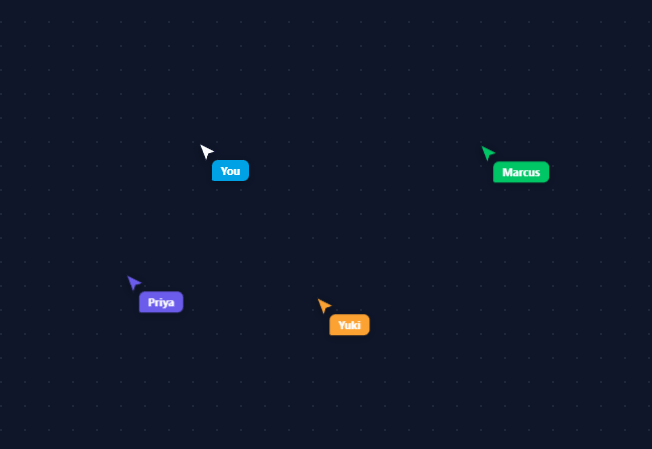
Seeing a colleague's cursor move across your screen in real time is the single visual cue that makes tools like Figma, Google Docs, and Linear feel "multiplayer" — and it's a deceptively fun thing to build. This snippet simulates that presence layer entirely client-side: a few "teammate" cursors drift around the page on their own, and your real mouse becomes a styled, named cursor of its own, so the effect can be dropped into a portfolio or product demo with zero backend.
Bots that wander, not teleport
Each simulated teammate has a current position and a random target position; every animation frame, bot.x/bot.y ease toward bot.tx/bot.ty by a fraction of the remaining distance ((target - current) * speed) — classic exponential easing, the same technique behind smooth camera-follow and cursor-trailing effects. Once a bot gets within 4px of its target, pickNewTarget() assigns a new random point inside the viewport, so the motion never repeats identically and never snaps.
A real custom cursor for "you"
The page's actual cursor stays the native arrow until you move the mouse for the first time — then a styled "You" cursor (sky blue, with its own name tag) appears and tracks clientX/clientY exactly, no easing, since your own cursor should feel instant and 1:1 with your hand. This lazy creation also means the hint text ("Move your mouse…") only fades out once you've actually engaged with the demo.
One cursor element, two parts
Each cursor is a single absolutely positioned <div> containing an SVG arrow (colored via currentColor so each bot just sets one CSS color) and a small name-tag <span> positioned relative to the arrow's tip. Moving the whole div with one transform: translate() keeps the arrow and its label locked together with a single style write per frame — far cheaper than animating two separate elements' left/top.
Why transform, not left/top
Every cursor's position updates via style.transform = 'translate(x, y)' rather than left/top. Transform changes are compositor-only (no layout recalculation), which matters here because this snippet updates four-plus elements every single animation frame — at 60fps, the difference between a transform write and a layout-triggering left/top write is the difference between buttery and janky.
Resilient to viewport changes
A resize listener immediately reassigns every bot's wander target to a point inside the new viewport bounds, so a teammate cursor never gets stranded chasing a target that's now off-screen after the window is resized.
Build with AI
Build, Understand, Optimize, and Extend It With AI
Instead of working out the easing math on your own, paste this snippet's HTML, CSS, and JS into an AI coding assistant like Claude and ask it to explain exactly why each bot's position update uses (target minus current) times speed rather than a fixed-duration tween, and why every cursor writes to transform instead of left and top inside the animate() loop. The same assistant is useful for optimizing it, for example checking whether the per-frame forEach over the bots array would still perform well with dozens of simulated cursors instead of three, or whether the 4px arrival threshold in pickNewTarget is tight enough to avoid visible jitter at the target. It's also a great way to extend the effect: ask it to wire the bot positions to real messages coming over a WebSocket instead of random wander targets, add a fading trail behind each cursor, or show a small "typing" or "selecting" indicator bubble near a cursor. Treat the code less like a finished artifact and more like a starting point for a conversation.
Prompt to recreate it
Copy this into your AI assistant of choice to build the effect from scratch, or as a jumping-off point for your own variant:
Build a "simulated multiplayer cursors" effect in plain HTML, CSS, and JavaScript using only requestAnimationFrame and CSS transform — no canvas, no WebSocket required for the base demo.

Requirements:
- A full-viewport stage on which several simulated "teammate" cursors continuously wander: each one is a single absolutely positioned element containing an SVG arrow pointer and a small name-tag label anchored near the arrow's tip, with the pointer's color set via a single CSS color value that the label background also reads from.
- Every animation frame, each wandering cursor's position must ease toward a random target point using an exponential approach (add a fraction of the remaining distance to the current position every frame, not a fixed-duration CSS transition), and once a cursor gets within a few pixels of its target, immediately assign it a new random target inside the current viewport bounds so the wandering never visibly pauses or repeats identically.
- The real user's mouse must control its own cursor element that is created lazily on the first mousemove (not present before that), tracks the raw clientX/clientY with no easing or smoothing (unlike the simulated ones), and is styled distinctly from the simulated cursors.
- All position updates, for both simulated and real cursors, must be written via a single CSS transform: translate() per element per frame rather than left/top, to avoid triggering layout recalculation at 60fps.
- A window resize listener must immediately reassign every simulated cursor's wander target to a point within the new viewport dimensions so none get stuck animating toward an now off-screen coordinate.
- Include a hint message that is visible before the user's first mouse movement and fades out permanently once they've moved the mouse.
Want to tighten it up first? Run this prompt through the AI Prompt Studio to score it across 8 quality dimensions, catch anti-patterns, and tune the wording for Claude, ChatGPT, or Gemini before you paste it in.
Step by step
How to Use
- 1Paste HTML, CSS, and JSA dark dotted-grid stage appears with hint text and three simulated teammate cursors drifting around.
- 2Move your mouseYour own cursor appears as a labeled "You" pointer that tracks your real mouse position exactly, and the hint fades out.
- 3Watch the bots wanderEach simulated cursor eases toward a random point, then picks a new one once it arrives — never moving in a straight repeating loop.
- 4Resize the windowBot targets immediately reassign inside the new viewport bounds so no cursor gets stuck chasing an off-screen point.
- 5Customize the teammatesEdit the NAMES array's name and color values, or change the array length to show more or fewer simulated collaborators.
- 6Wire in real collaboratorsReplace the bot wander logic with positions received over a WebSocket, keeping the same makeCursor() and transform-update pattern per remote user.
Real-world uses
Common Use Cases
Got questions?
Frequently Asked Questions
On each incoming position message, find or create that user's cursor with makeCursor(), then set its bot.tx/bot.ty (or directly its transform, skipping the easing) to the received x/y — keep the same per-frame transform write so rendering logic doesn't change.
Adjust each bot's speed value (0.02–0.04 by default) — it's the fraction of the remaining distance covered each frame, so a larger value reaches its target faster and a smaller value drifts more slowly.
Add a small absolutely positioned circle or highlight box inside each cursor's div, toggled visible on a simulated or real click event, and position it the same way the name tag is positioned relative to the arrow tip.
Attach the mousemove listener to that element instead of the stage/document, and clamp each bot's wander target to that element's getBoundingClientRect() bounds instead of window.innerWidth/innerHeight.
In React, keep bot positions in a ref (not state, to avoid a re-render every frame) and run the rAF loop in useEffect, writing transform directly to each cursor's DOM node; in Vue, use a ref array with onMounted; in Angular, run the loop via ngZone.runOutsideAngular for the same reason — direct DOM writes outperform framework re-renders for 60fps animation.