You Might Also Like
Learn Coding Visually
Learn to code with interactive, live-preview playgrounds — HTML, CSS, JavaScript, React & more.
 HTML Playground42 lessons · Click-based · Live preview
 CSS PlaygroundLearn CSS with a live editor
 JavaScript Playground60 lessons · DOM · Async · Canvas
 React PlaygroundLearn React with a live code editor
 GSAP PlaygroundLearn GSAP animation interactively
 SVG Playground44 lessons · shapes · paths · animation
 SCSS Playground45 lessons · Sass modules · tokens
 Tailwind PlaygroundLearn Tailwind CSS with a live editor
 Bootstrap 5 Playground50 lessons · live preview
Zdog Pseudo-3D Orbit Scene — Flat-Shaded 3D Canvas
Zdog Pseudo-3D Orbit Scene · Animations · Plain HTML, CSS & JS · Live preview
What's included
Features
About this UI Snippet
Zdog Pseudo-3D Orbit Scene — 3D Without a Single Polygon
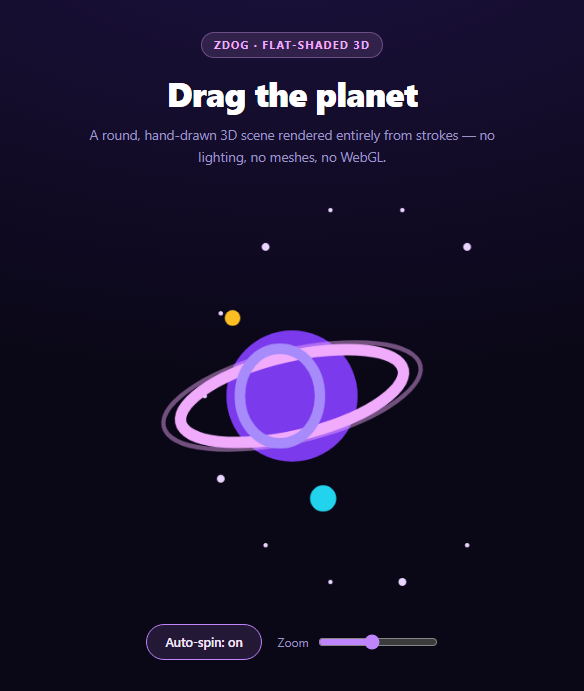
There is a large gap between a flat SVG illustration and a full Three.js scene. Three.js means meshes, materials, lights, a camera, and a WebGL context — a lot of machinery when all you want is a small illustrated object that turns. Zdog occupies exactly that gap: a 2.5kb library that renders genuine 3D geometry into a plain 2D canvas, with a deliberately flat, rounded, hand-illustrated look.
The trick that defines the library
The planet in this scene is created like this:
new Zdog.Shape({ addTo: scene, stroke: 150, color: '#7c3aed' })
That is a Shape with no path at all, which means it is a single point in 3D space. It renders as a sphere because stroke: 150 gives that point a 150-unit-thick round cap. Zdog draws every shape as a stroked path with round line caps and joins, so a point becomes a ball, a line becomes a capsule, and a rectangle becomes a rounded slab.
Understanding that one idea explains the entire library. There is no lighting model, no shading, and no depth buffer — Zdog sorts shapes by their z position and paints them in order. That is also why its aesthetic is so consistent: everything looks like it was drawn with a very fat marker, because it was.
Anchors, and why the scene has a hierarchy
Zdog.Anchor is an invisible transform node — the same idea as an empty group in a 3D editor. Children inherit its rotation and translation, which is what makes the moons work:
var moonOrbit = new Zdog.Anchor({ addTo: scene, rotate: { x: TAU / 4 - 0.9 } });
Both moons are added to moonOrbit and simply translated outward on the x axis. Rotating that anchor on z in the animation loop sweeps them both around a shared orbital plane — no trigonometry per moon, no per-frame position math. Tilting the anchor once on x tilts the entire orbit.
The same principle nests further: the light band on the planet is added to planet rather than scene, so it travels with the planet automatically.
Zdog.TAU is a full turn in radians (2π). Zdog exposes it because virtually every rotation in a 3D scene is naturally expressed as a fraction of a full turn — TAU / 4 for a quarter turn is far more legible than 1.5707963.
The render loop is manual, and cheaper than it looks
illo.updateRenderGraph() does two things: it walks the scene graph applying transforms, and it re-sorts every shape by depth before painting. Nothing appears until it is called, which means a completely static Zdog scene costs zero frames — you call it once and stop. Only because this scene animates does it need a requestAnimationFrame loop.
Drag rotation, and yielding to the user
dragRotate: true gives pointer and touch orbiting for free. The interesting part is the callback:
onDragStart: function () { spinning = false; syncSpinBtn(); }
Auto-spin turns itself off the moment the user grabs the scene. Without this, the object keeps rotating underneath the drag and fights whatever the user is trying to look at — a small courtesy that separates a toy from a control. The button label updates in the same handler so the UI never claims spin is on while it is not.
touch-action: none on the canvas is the CSS half of this. Without it, a touch drag scrolls the page instead of rotating the scene, since the browser claims the gesture before Zdog sees it.
Sizing and sharpness
The canvas carries explicit width and height attributes (480×480) while CSS scales it down with width: min(100%, 420px); height: auto. Rendering at a larger backing size than the display size is a simple way to get crisp edges on high-DPI screens without configuring device pixel ratio manually. Zdog also supports resize: true for a canvas that fills its container, but a fixed backing size keeps the scene's proportions predictable.
The zoom slider writes straight to illo.zoom, which scales the whole illustration around its origin — useful, and something that would require moving a camera in a real 3D engine.
Reusing it
Build scenes from the primitives: Shape for points and paths, Ellipse, Rect, RoundedRect, Polygon, Box, Cylinder, Cone, and Hemisphere. Group anything that should move together under an Anchor. Keep stroke widths generous — thin strokes lose the illustrated character that is the whole reason to choose Zdog over a real 3D engine. When you outgrow it and need lighting or textures, a Three.js product viewer is the next step up; for flat rotation only, CSS 3D cube needs no library at all.
Build with AI
Build, Understand, Optimize, and Extend It With AI
Zdog's core idea is unusual enough that it is worth having spelled out rather than inferred. Paste the HTML, CSS, and JS into an AI assistant like Claude and ask it to explain exactly why a Zdog.Shape with no path and a stroke of 150 renders as a sphere, and what that implies about how Zdog draws every other primitive. Then ask it to trace the scene graph and explain why rotating moonOrbit on its z axis moves both moons together, and what would have to change if each moon were added directly to the scene instead. Ask why updateRenderGraph must be called manually and what that saves for a static illustration. For optimization, ask whether the depth re-sort inside updateRenderGraph becomes a bottleneck as shape count grows, and roughly where that limit sits. To extend it: have it add a Zdog.Cone rocket on a tilted anchor, animate a moon's stroke to suggest a phase change, add a second illustration sharing one rAF loop, or gate the auto-spin behind prefers-reduced-motion. Treat the code less like a finished artifact and more like a starting point for a conversation.
Prompt to recreate it
Copy this into your AI assistant of choice to build the effect from scratch, or as a jumping-off point for your own variant:
Build a draggable pseudo-3D space scene using the Zdog library (from a CDN, global Zdog) rendering into a plain 2D canvas — no WebGL, no Three.js.

Requirements:
- Create a Zdog.Illustration bound to a canvas element with dragRotate: true so pointer and touch orbiting work with no gesture code of your own.
- Build the planet as a Zdog.Shape with NO path and a very large stroke (around 150), and comment on why this works: Zdog renders every shape as a stroked path with round caps, so a pathless Shape is a single point that a thick stroke paints as a sphere. There are no meshes and no lighting — shapes are simply depth-sorted and painted.
- Add a lighter band to the planet as a Zdog.Ellipse whose addTo target is the PLANET rather than the scene, so it inherits the planet's transform automatically.
- Add a tilted ring system: two Zdog.Ellipse instances of different diameters and stroke widths, both rotated on x by roughly TAU/4 minus a small offset so the ring reads as tilted rather than edge-on. Use Zdog.TAU and express rotations as fractions of a full turn rather than raw radian literals.
- Create a Zdog.Anchor to act as an orbital plane, add two moon Shapes to it translated outward on the x axis, and rotate ONLY that anchor in the animation loop so both moons sweep together — explain that an Anchor is an invisible transform node whose children inherit its rotation, which removes any need for per-moon trigonometry.
- Scatter a ring of small background star Shapes positioned with cos/sin around a circle at a negative z so they sit behind the planet, varying stroke sizes slightly.
- Drive animation with a requestAnimationFrame loop that increments rotations and then calls illo.updateRenderGraph() — note that nothing renders until that call, which means a static scene costs zero frames.
- Add an auto-spin toggle button, and wire the Illustration's onDragStart callback to turn auto-spin OFF and update the button label, so the scene never keeps rotating underneath a user's drag.
- Add a zoom range input writing directly to illo.zoom.
- Set touch-action: none on the canvas and explain that without it a touch drag is claimed by the browser as a page scroll before Zdog sees it, so rotation silently fails on mobile. Give the canvas explicit width/height attributes larger than its CSS display size so it stays crisp on high-DPI screens.
Want to tighten it up first? Run this prompt through the AI Prompt Studio to score it across 8 quality dimensions, catch anti-patterns, and tune the wording for Claude, ChatGPT, or Gemini before you paste it in.
Step by step
How to Use
- 1Add the Zdog CDNInclude the zdog dist build from the CDN panel — global Zdog.
- 2Paste HTML, CSS, and JSA planet with rings, moons, and a star field renders and spins.
- 3Drag the scenePointer and touch orbiting work out of the box, and auto-spin yields.
- 4Toggle auto-spinThe button reflects state, including when a drag turned it off.
- 5Zoom in and outThe slider writes directly to illo.zoom — no camera needed.
- 6Build your ownGroup shapes under an Anchor and rotate the anchor, not each shape.
Real-world uses
Common Use Cases
Got questions?
Frequently Asked Questions
The planet is a Shape with no path, which makes it a single point in 3D space. Zdog renders every shape as a stroked path with round caps, so a 150-unit stroke on a single point paints as a filled circle that behaves like a ball. The same principle turns a line into a capsule and a rectangle into a rounded slab — there is no geometry beyond strokes.
It is an invisible transform node, like an empty group in a 3D editor. Children inherit its rotation and translation, so adding both moons to one anchor and rotating that anchor sweeps them around a shared orbital plane with no per-moon trigonometry. Tilting the anchor once tilts the whole orbit.
It applies the scene transforms and re-sorts every shape by depth before painting, and nothing renders until it runs. That means a static Zdog scene costs zero frames — you call it once and stop. Only animated scenes need a requestAnimationFrame loop, which is a meaningful saving over engines that always render continuously.
The Illustration is given an onDragStart callback that clears the spinning flag and updates the button label. Without it the scene keeps rotating underneath the drag and fights whatever the user is trying to look at. Routing the label update through the same handler keeps the UI from claiming spin is on when it is not.
Without it, a touch drag on the canvas is claimed by the browser as a page scroll before Zdog ever sees the gesture, so rotation simply does not work on mobile. Setting touch-action: none tells the browser that element handles its own gestures.
Build the illustration and scene graph in a mount effect against a canvas ref, and keep the illo and animated anchors in refs rather than state since they mutate every frame. Cancel the requestAnimationFrame handle in cleanup. Drive the zoom slider from state and write it to illo.zoom in a small effect, and keep the spinning flag in state so the button label stays declarative.