Learn Coding Visually
Learn to code with interactive, live-preview playgrounds — HTML, CSS, JavaScript, React & more.
 HTML Playground42 lessons · Click-based · Live preview
 CSS PlaygroundLearn CSS with a live editor
 JavaScript Playground60 lessons · DOM · Async · Canvas
 React PlaygroundLearn React with a live code editor
 GSAP PlaygroundLearn GSAP animation interactively
 SVG Playground44 lessons · shapes · paths · animation
 SCSS Playground45 lessons · Sass modules · tokens
 Tailwind PlaygroundLearn Tailwind CSS with a live editor
 Bootstrap 5 Playground50 lessons · live preview
App Splash Screen — Free Launch Loading UI Snippet
App Splash Screen · Mobile · Plain HTML, CSS & JS · Live preview
What's included
Features
About this UI Snippet
App Splash Screen — Animated Launch Loading Screen
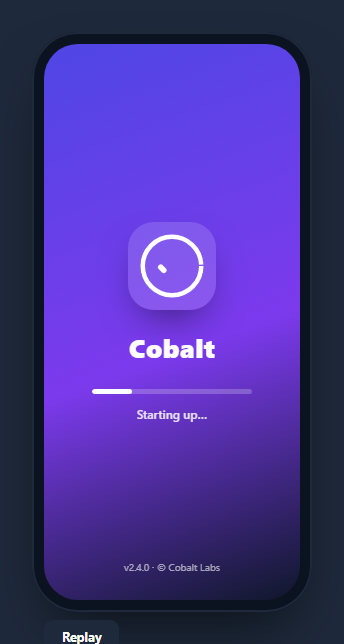
A splash screen is the branded launch screen an app shows while it boots — a centered logo, the app name, and often a progress indicator that fills as assets load. This snippet builds a polished one inside a CSS phone frame, with a self-drawing SVG logo, a staged progress bar with changing status text, and a fade-out hand-off, in HTML, CSS, and vanilla JavaScript with no dependency.
A logo that draws itself
The logo animates on with the stroke-dasharray line-drawing technique: the ring's stroke-dasharray equals its circumference and its stroke-dashoffset starts fully offset (invisible), then animates to 0 so the circle draws clockwise; the checkmark follows with its own delayed draw. Layered over a frosted, rounded badge, it gives a premium "assembling" entrance with no images — just two SVG paths and keyframes.
Staged progress, not a fake bar
Rather than a meaningless looping animation, the progress reflects discrete boot stages held in a STEPS array — "Loading assets", "Restoring session", "Syncing data", "Ready" — each with a target percentage and label. An interval advances through them, growing the fill (transitioned for smoothness) and updating the status line, so it reads like a real startup sequence. In production you'd advance a stage as each real task resolves instead of on a timer.
The fade-out hand-off
When loading completes, the splash content fades and scales up slightly before resetting — simulating the transition where a splash dismisses and reveals the app. This dismissal is the defining moment of a splash screen, and animating it (rather than cutting) makes the launch feel smooth.
Entrance and layout
The whole center block rises and fades in with a spRise keyframe on load, the background is a rich gradient, and a version/copyright line is pinned to the bottom — the conventional splash layout. Everything is centered with flexbox inside the device frame.
Reusing it
Swap the logo, name, and gradient for your brand, and drive the progress from real load events by calling the stage advance as each resource finishes. Lift it out of the phone frame to use as a web app's initial loading screen, or keep it framed beside a phone mockup for store assets.
Build with AI
Build, Understand, Optimize, and Extend It With AI
You don't have to trace the stroke-dasharray draw-on effect by hand. Paste this snippet's HTML, CSS, and JS into an AI coding assistant like Claude and ask it to explain exactly why the ring's stroke-dasharray is set to its own circumference while its stroke-dashoffset starts at that same value, and how animating that offset toward zero produces the appearance of the circle drawing itself. The same assistant can help optimize it, for instance checking whether the STEPS-driven setInterval could be replaced with actual promise resolution hooks (asset load, session restore, data sync) so the progress bar reflects real work instead of a fixed timer. It is just as useful for extending the splash screen: ask it to add a fallback path if a real loading stage takes far longer than expected (a "still working" message after N seconds), swap the checkmark for a different draw-on icon per brand, or make the fade-out hand-off transition into a specific first screen of the app instead of resetting back to the splash. Treat the code less like a finished artifact and more like a starting point for a conversation.
Prompt to recreate it
Copy this into your AI assistant of choice to build the effect from scratch, or as a jumping-off point for your own variant:
Build an animated app "splash screen" inside a CSS phone frame in plain HTML, CSS, and JavaScript — no libraries, no images.

Requirements:
- A phone-shaped frame (rounded outer body, inset rounded screen) containing a centered logo badge, an app name, a progress bar, and a status text line, with a version/copyright line pinned near the bottom of the screen.
- The logo must be built from inline SVG paths (a ring and a checkmark) and must draw itself on: give each path a stroke-dasharray equal to its own path length/circumference and a starting stroke-dashoffset equal to that same value (fully hidden), then animate the offset down to zero via a CSS keyframe so the shape appears to trace itself in, with the checkmark's draw-on delayed to start after the ring's finishes.
- Model the loading sequence as a fixed array of discrete stage objects, each with a target percentage and a status label (e.g. "Loading assets", "Restoring session", "Syncing data", "Ready") — not a single meaningless looping animation. Step through them on an interval, updating both a CSS width-based progress fill (transitioned smoothly, not snapping) and the status text together at each stage.
- When the final stage completes, animate the entire splash content fading out and scaling up slightly (not just disappearing instantly) to represent the hand-off moment where the splash reveals the underlying app, then reset the state so the sequence can be replayed.
- The whole center content block (logo, name, bar, status) must animate in with a rise-and-fade entrance on initial page load, separate from the per-stage progress animation.
- Provide a replay control that resets progress to zero and re-runs the entire staged sequence including the logo's draw-on animation and the entrance rise.
Want to tighten it up first? Run this prompt through the AI Prompt Studio to score it across 8 quality dimensions, catch anti-patterns, and tune the wording for Claude, ChatGPT, or Gemini before you paste it in.
Step by step
How to Use
- 1Paste HTML, CSS, and JSA splash screen renders inside a phone frame and starts loading.
- 2Watch the logo drawThe ring and checkmark draw themselves on load.
- 3Follow the progressThe bar advances through staged status messages.
- 4See the hand-offAt 100% the splash fades and scales out.
- 5Replay itClick Replay to run the launch sequence again.
- 6Drive real loadingAdvance a stage as each real boot task resolves.
Real-world uses
Common Use Cases
Got questions?
Frequently Asked Questions
It uses the stroke-dasharray line-drawing technique. The ring's dash array equals its circumference and its dash offset starts fully offset so nothing shows, then a keyframe animates the offset to zero, drawing the circle. The checkmark has its own delayed draw. Two SVG paths and keyframes produce the assembling entrance with no images.
It models discrete boot stages from a STEPS array — loading assets, restoring session, syncing data, ready — each with a target percentage and status label. An interval advances through them. It's a realistic startup sequence, and in a real app you'd advance a stage as each actual task completes rather than on a timer.
When loading reaches the final stage, the splash content fades its opacity and scales up slightly before resetting, simulating the moment a splash screen dismisses to reveal the app. Animating the hand-off instead of cutting abruptly makes the launch feel smooth and intentional.
Yes. The phone frame is just a wrapper; the splash content is independent. Lift it out and show it as your web app's initial loading screen, then remove it once your app has hydrated. Drive the progress from real readiness events for an accurate bar.
Render it while an isLoading flag is true and unmount it when your data and assets are ready. Replace the timer with stage advances tied to real promises resolving, updating progress in state. Put the fade-out on the unmount transition. In Tailwind, center with flex, build the bar from a track and a width-bound fill, and animate the SVG with a small style block.