You Might Also Like
Learn Coding Visually
Learn to code with interactive, live-preview playgrounds — HTML, CSS, JavaScript, React & more.
 HTML Playground42 lessons · Click-based · Live preview
 CSS PlaygroundLearn CSS with a live editor
 JavaScript Playground60 lessons · DOM · Async · Canvas
 React PlaygroundLearn React with a live code editor
 GSAP PlaygroundLearn GSAP animation interactively
 SVG Playground44 lessons · shapes · paths · animation
 SCSS Playground45 lessons · Sass modules · tokens
 Tailwind PlaygroundLearn Tailwind CSS with a live editor
 Bootstrap 5 Playground50 lessons · live preview
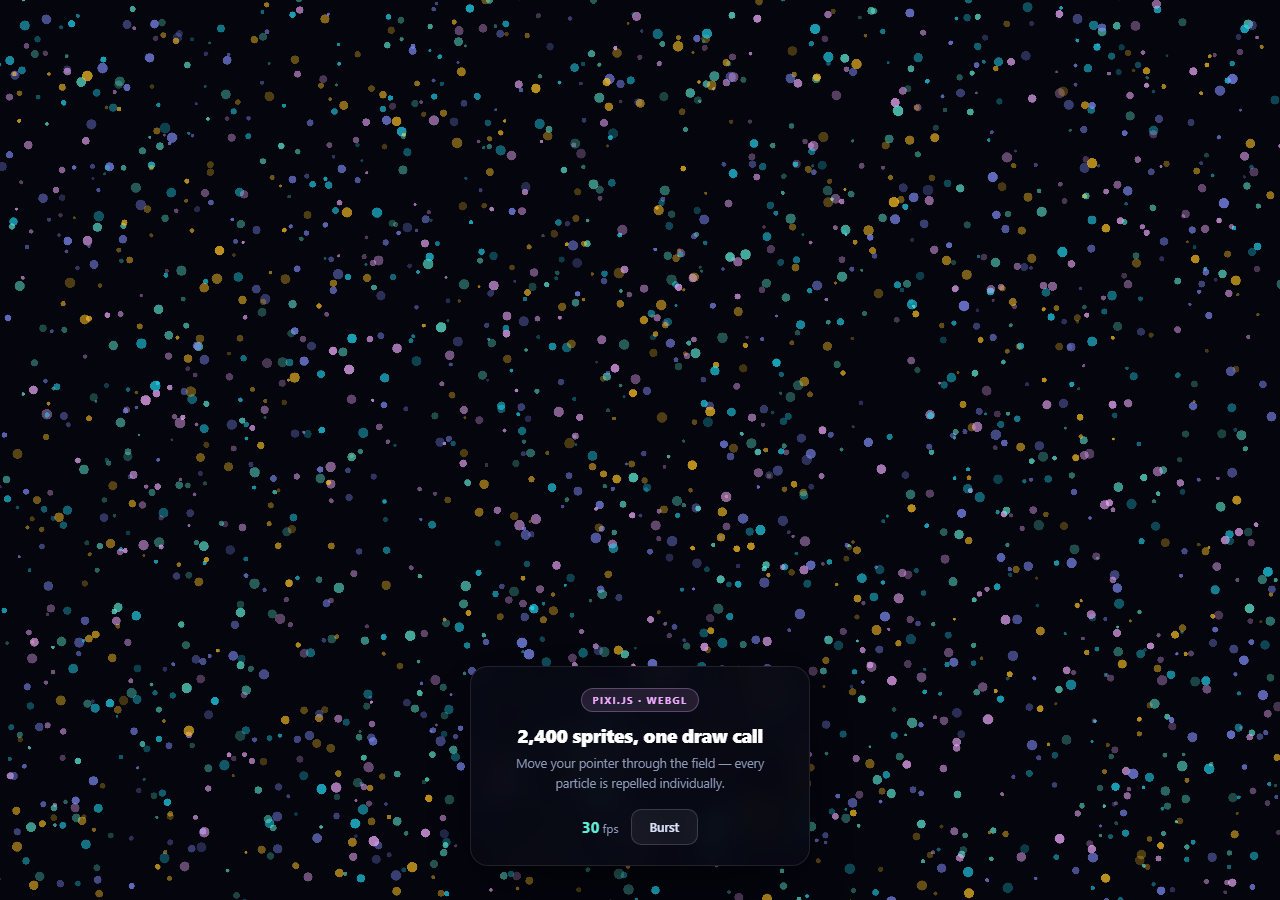
Pixi.js Particle Field — WebGL Sprite Background
Pixi.js Particle Field · Animations · Plain HTML, CSS & JS · Live preview
What's included
Features
About this UI Snippet
Pixi.js Particle Field — Why WebGL Beats Canvas 2D at Scale
A canvas 2D particle background is fine at a few hundred particles. Past roughly a thousand it starts costing frames, because every particle is a separate arc() and fill() and the CPU is issuing every one of those calls individually.
Pixi.js is a WebGL renderer, and it changes the economics completely: sprites that share a texture and blend mode are batched into a single draw call and rasterized by the GPU in parallel. This field runs 2,400 particles with pointer physics comfortably at 60fps, and the interesting part is the handful of decisions that make that possible.
One texture, generated once
Every particle is the same white circle:
var g = new PIXI.Graphics(); g.beginFill(0xffffff); g.drawCircle(0, 0, 24); g.endFill(); var texture = app.renderer.generateTexture(g, { resolution: 2 }); g.destroy();
The circle is drawn once into a GPU texture, and all 2,400 sprites reference that same texture. The Graphics object is destroyed immediately afterward — it was scaffolding, and keeping it alive would leak its geometry.
Crucially the circle is white, because color comes from sprite.tint. Tinting is a per-sprite multiply applied in the shader, so five different colors do not mean five textures and five draw calls. If each color were its own texture, batching would break into five batches — the exact mistake that makes people conclude WebGL "isn't faster."
Drawing the source circle at radius 24 and then scaling sprites down to 0.06–0.22 is deliberate: scaling a texture *down* stays sharp, scaling *up* goes soft.
ParticleContainer, and what it gives up
new PIXI.ParticleContainer(COUNT, { position: true, scale: true, tint: true, alpha: true })
ParticleContainer is a stripped-down Container built for exactly this case. Its children cannot have their own children, filters, or masks, and it only uploads the properties you explicitly enable. That is why the options object is a whitelist — declaring rotation when nothing rotates means uploading 2,400 unused floats to the GPU every frame.
That is the trade: fewer features, dramatically less per-frame work.
The optimization that matters most
Inside the ticker, the pointer repulsion uses squared distances:
var d2 = dx * dx + dy * dy; if (d2 < RADIUS_SQ && d2 > 0.01) { var d = Math.sqrt(d2); ... }
Math.sqrt is comparatively expensive and, more importantly, completely unnecessary for a *comparison*. If d² < r² then d < r — so the square root is only computed for particles actually within the radius, which is usually a small fraction of the field. At 2,400 particles across 60 frames that avoids roughly 140,000 square roots per second. This is the single most transferable idea in the file and it applies to any distance check in any language.
Additive blending
sp.blendMode = PIXI.BLEND_MODES.ADD makes overlapping particles sum their color values rather than paint over each other. Dense regions blow out toward white and sparse ones stay dim, which produces the glowing, energetic look without any bloom filter. It also means low per-sprite alpha (0.25–0.75) is intentional: with additive blending, brightness comes from *overlap*, so starting particles dim leaves headroom for clusters to glow.
Velocity, damping, and delta
Each particle carries its own velocity, gets pushed away from the pointer proportionally to how close it is ((1 - d / RADIUS), so the force falls off to zero at the edge rather than cutting off abruptly), then has that velocity damped by 0.96 each frame. Damping is what makes the field settle instead of accumulating energy forever.
app.ticker.add(function (delta) { ... }) supplies a delta multiplier normalized so 1.0 means 60fps. Multiplying movement by it keeps the field moving at the same real-world speed on a 30fps laptop and a 144Hz monitor.
Retina without the cost blowup
resolution: Math.min(window.devicePixelRatio, 2) with autoDensity: true renders crisply on high-DPI screens while capping the pixel count. A phone reporting DPR 3 would otherwise ask the GPU to shade nine times as many pixels as DPR 1 for a difference nobody can see. resizeTo: stage keeps the renderer matched to its container with no resize handler to write.
Reusing it
COUNT is the main dial — 2,400 is comfortable on a desktop; halve it on mobile. Change TINTS for your brand, and keep the source texture white so tinting continues to batch. For a connection-based look instead of a free field, compare particle network; for a noise-steered variant, p5.js flow field uses the same particle count on canvas 2D and shows exactly where that approach runs out.
Build with AI
Build, Understand, Optimize, and Extend It With AI
Almost every line in this ticker is a performance decision, which makes it a genuinely useful thing to have explained. Paste the HTML, CSS, and JS into an AI assistant like Claude and ask it to explain why sprites sharing one texture and blend mode collapse into a single WebGL draw call, and what would happen to batching if you created five separately colored textures instead of tinting one white one. Then ask it to justify the squared-distance comparison — have it count roughly how many Math.sqrt calls per second that avoids at this particle count — and explain why the same trick applies to any distance check. Ask what ParticleContainer gives up in exchange for its throughput, and what declaring rotation: true in its options would cost per frame. For optimization, ask where the real ceiling is: at what COUNT does the JavaScript loop rather than the GPU become the bottleneck, and whether moving the physics into a shader would help. To extend it: have it add attract mode on click, drive the repulsion radius from audio, halve COUNT on small screens, or add a proper destroy path for single-page apps. Treat the code less like a finished artifact and more like a starting point for a conversation.
Prompt to recreate it
Copy this into your AI assistant of choice to build the effect from scratch, or as a jumping-off point for your own variant:
Build a WebGL particle field using Pixi.js v7 (from a CDN, global PIXI) with pointer repulsion, in plain HTML, CSS, and JavaScript.

Requirements:
- Create a PIXI.Application with resizeTo pointing at a container element, antialias on, resolution set to Math.min(window.devicePixelRatio, 2) and autoDensity true. Explain that capping the resolution matters because a phone reporting DPR 3 would otherwise make the GPU shade nine times as many pixels for no visible gain.
- Generate ONE texture at startup: draw a white circle with PIXI.Graphics, call renderer.generateTexture() on it, then destroy the Graphics object. The source circle must be WHITE — explain that color comes from per-sprite tint (a shader multiply), so one white texture tinted several ways stays a single batch, whereas creating separately colored textures would split rendering into multiple draw calls and lose the performance benefit entirely.
- Draw the source circle at a larger radius than sprites will display at, and scale sprites down, since scaling a texture down stays sharp while scaling up goes soft.
- Add roughly 2,400 sprites to a PIXI.ParticleContainer whose options object whitelists ONLY position, scale, tint and alpha. Explain that ParticleContainer children cannot have children, filters or masks, and that it only uploads the properties you enable — so declaring rotation when nothing rotates would push thousands of unused floats to the GPU every frame.
- Set every sprite's blendMode to ADD and give each a low starting alpha (roughly 0.25 to 0.75). Explain that with additive blending brightness comes from overlap, so low alpha leaves headroom for dense clusters to sum toward white and glow.
- In the ticker, repel particles from the pointer: compute dx and dy, then compare SQUARED distance against a squared radius and only call Math.sqrt for particles actually within range. Comment on why — a square root is unnecessary for a comparison since d² < r² implies d < r, and skipping it avoids on the order of a hundred thousand square roots per second at this particle count.
- Make the repulsion force fall off with distance using (1 - d / RADIUS) so it reaches zero at the edge rather than cutting off abruptly. Give each particle its own velocity, damp it by about 0.96 each frame so the field settles, and multiply movement by the ticker's delta so speed is identical at 30fps and 144Hz.
- Wrap particles around the screen edges rather than bouncing, track the pointer with pointermove on the container (converting client coordinates via getBoundingClientRect) and reset it far off-screen on pointerleave.
- Add a live FPS readout sampled from app.ticker.FPS on an interval, and a Burst button that re-seeds every particle at the center with a random radial velocity. Overlay a frosted-glass control panel above the canvas.
Want to tighten it up first? Run this prompt through the AI Prompt Studio to score it across 8 quality dimensions, catch anti-patterns, and tune the wording for Claude, ChatGPT, or Gemini before you paste it in.
Step by step
How to Use
- 1Add the Pixi.js CDNInclude pixi.js v7 from the CDN panel — global PIXI.
- 2Paste HTML, CSS, and JSA full-viewport WebGL particle field starts immediately.
- 3Move your pointerParticles within 150px are pushed away with falloff.
- 4Watch the FPS readoutLive from app.ticker.FPS, sampled twice a second.
- 5Press BurstEvery particle is re-seeded at center with radial velocity.
- 6Tune the countAdjust COUNT and TINTS — keep the source texture white.
Real-world uses
Common Use Cases
Got questions?
Frequently Asked Questions
Canvas 2D issues a separate arc and fill call per particle from the CPU. Pixi batches every sprite that shares a texture and blend mode into a single WebGL draw call, and the GPU rasterizes them in parallel. That is why 2,400 particles run comfortably here where the same count in canvas 2D would start costing frames.
Because color comes from sprite.tint, which is a per-sprite multiply applied in the shader. A white texture tinted five ways stays one texture and therefore one batch. Creating five colored textures instead would split rendering into five draw calls and lose most of the benefit — a common mistake that leads people to conclude WebGL is not faster.
Its children cannot have their own children, filters, or masks. In exchange it only uploads the properties you explicitly enable in its options object, so declaring rotation when nothing rotates would mean pushing 2,400 unused floats to the GPU every frame. It is a deliberate feature-for-throughput trade.
A square root is expensive and unnecessary for a comparison: if d squared is less than r squared, then d is less than r. Computing sqrt only for particles actually inside the radius avoids roughly 140,000 square roots per second at 2,400 particles and 60fps. The technique applies to any distance check anywhere.
Because additive blending means brightness comes from overlap. Starting each sprite at 0.25 to 0.75 alpha leaves headroom so dense clusters sum toward white and glow while sparse regions stay dim. Fully opaque particles would saturate immediately and the field would lose all its depth.
Create the Application in a mount effect against a container ref and append app.view there. In cleanup call app.destroy(true, { children: true, texture: true }) — otherwise every remount leaks a WebGL context, and browsers cap how many can exist, so after a dozen navigations the canvas simply goes blank. Keep the particle array in a ref, never state, since it mutates every frame.