You Might Also Like
Learn Coding Visually
Learn to code with interactive, live-preview playgrounds — HTML, CSS, JavaScript, React & more.
 HTML Playground42 lessons · Click-based · Live preview
 CSS PlaygroundLearn CSS with a live editor
 JavaScript Playground60 lessons · DOM · Async · Canvas
 React PlaygroundLearn React with a live code editor
 GSAP PlaygroundLearn GSAP animation interactively
 SVG Playground44 lessons · shapes · paths · animation
 SCSS Playground45 lessons · Sass modules · tokens
 Tailwind PlaygroundLearn Tailwind CSS with a live editor
 Bootstrap 5 Playground50 lessons · live preview
p5.js Perlin Flow Field — Generative Canvas Background
p5.js Perlin Flow Field · Animations · Plain HTML, CSS & JS · Live preview
What's included
Features
About this UI Snippet
p5.js Perlin Flow Field — Coherent Motion From One Noise Call
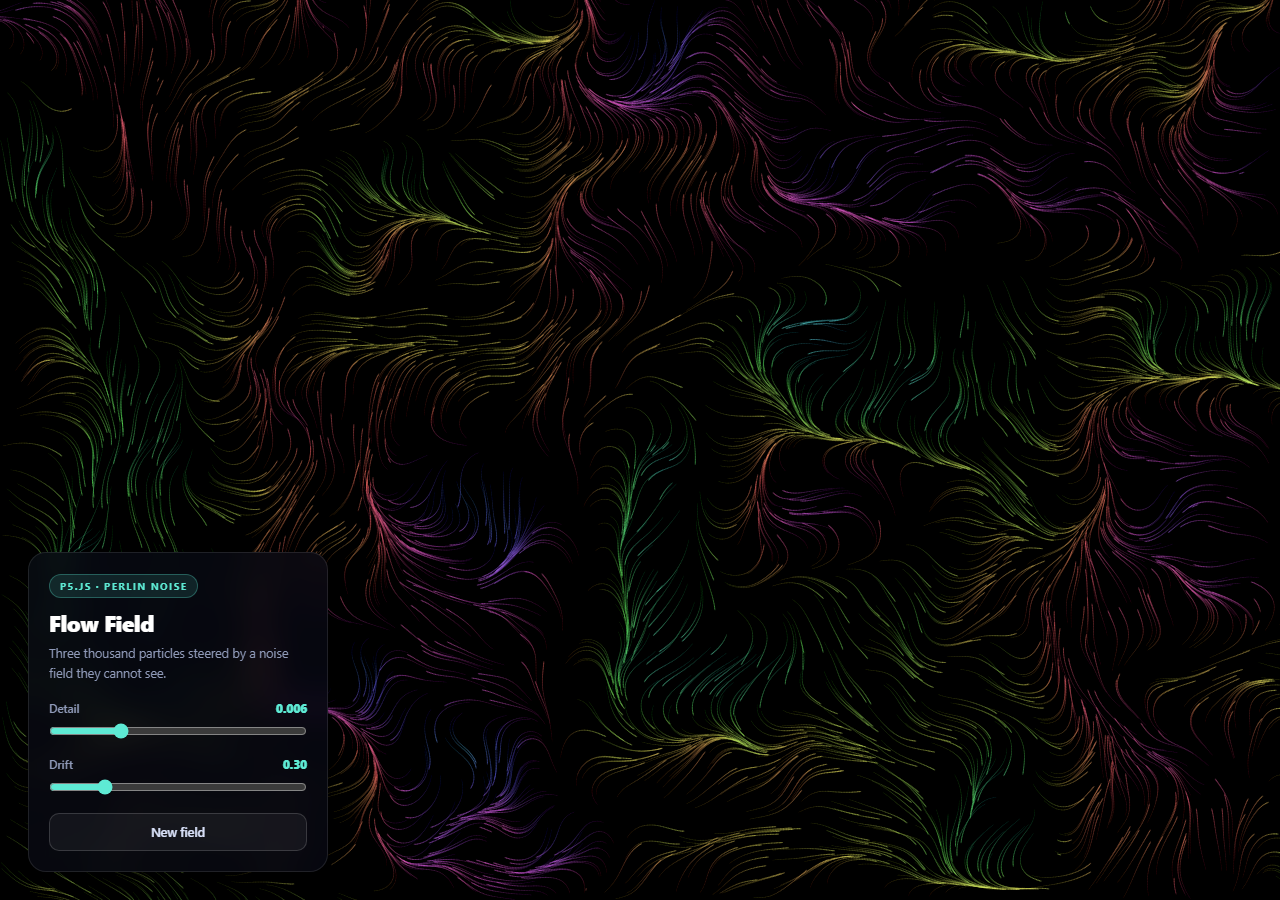
A flow field is the classic piece of generative art, and it is worth building once because it demonstrates something counter-intuitive: thousands of particles that never communicate can still move as one system. There is no flocking logic here, no neighbor lookups, no shared state. Every particle independently asks the same invisible field which way to go, and coherence falls out for free.
Why Perlin noise and not Math.random()
Everything rests on the difference between random and *smooth* random:
var angle = p.noise(pt.x * noiseScale, pt.y * noiseScale, zoff) * p.TWO_PI * 2;
Math.random() has no relationship between consecutive values — sample it per particle and you get static. Perlin noise is spatially continuous: two nearby inputs return two nearby outputs. So a particle at (100, 100) and one at (102, 100) read almost the same value, get almost the same angle, and travel almost the same direction. Follow that across the canvas and the particles trace out smooth, continuous streams.
That is the entire algorithm. One noise sample becomes one angle, the angle becomes a unit vector via cos/sin, and the particle steps along it.
The third dimension is time
p.noise() is called with three arguments, and the third — zoff — is the interesting one. Rather than moving through a static 2D field, the particles are moving through a slice of a 3D noise volume, and incrementing zoff each frame slides that slice forward. The field itself morphs continuously.
This is why the drift control feels so different from a speed control. Speed would move particles faster through a fixed landscape; drift changes the landscape underneath them. At zero the field is frozen and particles settle into permanent channels; turn it up and the streams reorganize as you watch.
Noise scale is a zoom, not a strength
noiseScale multiplies the coordinates before sampling, so it controls how far apart in noise-space two adjacent pixels are:
- Small values (0.001) sample a tiny patch of noise stretched over the whole canvas — vast, sweeping currents. - Large values (0.02) sample a wide area compressed into the same space — tight, turbulent eddies.
Thinking of it as zoom rather than intensity makes the slider predictable. The other line worth knowing is p.noiseDetail(3, 0.5), which sets how many octaves of noise are layered and how quickly each contributes less. Fewer octaves means smoother, more abstract flow; more adds fine texture at the cost of computation.
The canvas is never cleared
p.fill(5, 6, 13, 9); p.rect(0, 0, p.width, p.height);
Each frame paints a nearly transparent rectangle over everything instead of clearing it. Old strokes fade a little more every frame and eventually disappear, so each particle leaves a tail — and thousands of overlapping tails accumulate into the visible field lines. The flow field is never drawn directly; it emerges from the record of where particles have been.
The alpha value is the single most sensitive number in the file. Higher, and trails vanish before they can build into structure. Lower, and the canvas saturates into a solid smear. Nine out of 255 is roughly a two-second memory.
Because the field only exists as accumulated paint, every control that changes the field also calls p.background() to wipe the canvas — otherwise the old field lines stay burned in underneath the new ones.
Particle lifespans, and why they matter
Each particle carries a life counter and respawns at a random position when it expires or leaves the canvas. Without lifespans, every particle eventually gets trapped in a noise attractor — a spot where the field converges — and after twenty seconds the canvas is a few bright dots and nothing else. Randomizing the initial life (p.random(60, 260)) staggers respawns so the field refreshes continuously rather than pulsing.
Instance mode
The sketch is written as new p5(function (p) { ... }, host) rather than p5's global mode. Global mode attaches setup, draw, and around 200 other names to window, which collides with almost anything else on a real page — text, line, and filter are all p5 globals. Instance mode namespaces everything behind p and mounts the canvas into a specific element, which is the only sane choice for a component embedded in an existing site.
Reusing it
The tunable numbers are COUNT, the step size of 1.6, and the background alpha. Lower COUNT on mobile — 3000 particles is comfortable on a desktop and heavy on a low-end phone. Hue is derived from the angle, so particles moving the same direction share a color and the field reads as banded rather than noisy. Compare with a particle network for connection-based motion, or physics balls when particles should collide rather than flow.
Build with AI
Build, Understand, Optimize, and Extend It With AI
This sketch is short but every line encodes a decision about emergent behavior, which makes it excellent material for a conversation. Paste the HTML, CSS, and JS into an AI assistant like Claude and ask it to explain precisely why Perlin noise produces coherent streams where Math.random would produce static, and what "spatially continuous" means in terms of the actual values returned for two nearby inputs. Then ask what the third noise() argument does and why changing it feels different from changing particle speed. Ask it to explain the background alpha of 9 out of 255 as a memory duration, and try 2 and 40 to see the field either saturate or fail to form. For optimization, ask at what particle count the per-frame noise sampling becomes the bottleneck, and whether precomputing the field into a grid and looking it up would be faster than sampling per particle per frame. To extend it: have it drive the drift from audio amplitude, add pointer repulsion, reduce COUNT on small screens, or write the field into a lookup grid so the same field can be reused across frames. Treat the code less like a finished artifact and more like a starting point for a conversation.
Prompt to recreate it
Copy this into your AI assistant of choice to build the effect from scratch, or as a jumping-off point for your own variant:
Build a generative Perlin flow field with p5.js (from a CDN) in INSTANCE MODE — new p5(sketch, hostElement), not global mode — in plain HTML, CSS, and JavaScript.

Requirements:
- Use instance mode specifically and explain why: p5 global mode attaches setup, draw and roughly 200 other names to window (including text, line and filter), which collides with almost anything else on a real page. Instance mode namespaces everything behind the sketch argument and mounts the canvas into a chosen host element.
- Create around 3000 particles, each holding an x, y position and a randomized life counter.
- Every frame, for each particle: sample p.noise(x * noiseScale, y * noiseScale, zoff), map that value to an angle across a couple of full turns, convert it to a unit vector with cos/sin, draw a short line from the particle's current position to its next position, then advance the particle along that vector.
- Explain in comments why Perlin noise rather than Math.random is essential: noise is spatially continuous, so nearby particles receive nearly identical angles and travel together, which is what creates coherent streams from particles that never communicate with each other.
- Pass a THIRD argument to noise() (a z offset) and increment it every frame, so the particles sample a moving slice of a 3D noise volume and the whole field morphs over time. Expose this as a "drift" slider and note it is different from a speed control — it changes the landscape rather than how fast particles cross it.
- Do NOT clear the canvas each frame. Instead paint a very low-alpha rectangle (around 9/255) over the whole canvas so old strokes fade slowly and each particle leaves a trail. Explain that the visible field lines are accumulated trails — the field is never drawn directly — and that this alpha value is the most sensitive number in the sketch.
- Give each particle a randomized lifespan and respawn it at a random position when it expires or leaves the canvas, and explain that without lifespans particles collect in noise attractors and the canvas decays to a few static dots.
- Derive each stroke's hue from its angle so particles travelling the same direction share a color and the field reads as banded.
- Add live controls: a noise scale slider (framed as zoom — small values give sweeping currents, large values tight turbulence), the drift slider, and a reseed button calling p.noiseSeed with a new random seed. Any control that changes the field must also call p.background() to wipe the canvas, or the previous field stays burned in underneath.
- Call p.noiseDetail to set octaves, handle windowResized by resizing the canvas and respawning, and overlay a frosted-glass control panel above the full-viewport canvas.
Want to tighten it up first? Run this prompt through the AI Prompt Studio to score it across 8 quality dimensions, catch anti-patterns, and tune the wording for Claude, ChatGPT, or Gemini before you paste it in.
Step by step
How to Use
- 1Add the p5.js CDNInclude p5 from the CDN panel — the sketch uses instance mode.
- 2Paste HTML, CSS, and JSA full-viewport flow field starts drawing immediately.
- 3Watch it buildField lines emerge from accumulated trails, not from drawing the field.
- 4Change the detailLow values give sweeping currents, high values tight turbulence.
- 5Add driftAdvancing the noise z axis makes the whole field morph over time.
- 6Reseed itA new noise seed produces a completely different field.
Real-world uses
Common Use Cases
Got questions?
Frequently Asked Questions
Math.random has no relationship between consecutive values, so sampling it per particle produces static. Perlin noise is spatially continuous — nearby inputs return nearby outputs — so particles standing close together receive almost the same angle and travel in almost the same direction. That local agreement is what makes thousands of independent particles trace coherent streams.
It is a z offset, so the particles are sampling a 2D slice of a 3D noise volume. Incrementing it every frame slides that slice forward, which makes the entire field morph over time. That is different from a speed control: speed moves particles faster through a fixed landscape, while drift changes the landscape underneath them.
As zoom rather than strength. It multiplies coordinates before sampling, so small values stretch a tiny patch of noise across the whole canvas and produce vast sweeping currents, while large values compress a wide area into the same space and produce tight turbulent eddies.
Each frame paints a nearly transparent rectangle over everything instead of clearing, so old strokes fade slowly and every particle leaves a tail. Thousands of overlapping tails accumulate into the visible field lines — the flow field is never drawn directly, it emerges from the record of where particles have been. The alpha value is the most sensitive number in the sketch.
Without one, particles drift into noise attractors — points where the field converges — and after a while the canvas is a handful of bright dots and nothing else. Randomizing each initial lifetime staggers respawns so the field keeps refreshing continuously instead of pulsing all at once.
Keep instance mode and construct the sketch in a mount effect with a ref as the parent element, storing the p5 instance in a ref. Call instance.remove() in cleanup — otherwise every remount leaves another draw loop running against a detached canvas, which is the classic p5-in-React memory leak. Drive the controls from state and write them into sketch-scoped variables via the instance.