
Learn Coding Visually
Learn to code with interactive, live-preview playgrounds — HTML, CSS, JavaScript, React & more.
 HTML Playground42 lessons · Click-based · Live preview
 CSS PlaygroundLearn CSS with a live editor
 JavaScript Playground60 lessons · DOM · Async · Canvas
 React PlaygroundLearn React with a live code editor
 GSAP PlaygroundLearn GSAP animation interactively
 SVG Playground44 lessons · shapes · paths · animation
 SCSS Playground45 lessons · Sass modules · tokens
 Tailwind PlaygroundLearn Tailwind CSS with a live editor
 Bootstrap 5 Playground50 lessons · live preview
Physics Balls HTML CSS JS — Canvas Gravity Simulation
Physics Balls · Animations · Plain HTML, CSS & JS · Live preview
What's included
Features
About this UI Snippet
How to Build a Canvas Physics Simulation with Gravity and Collisions
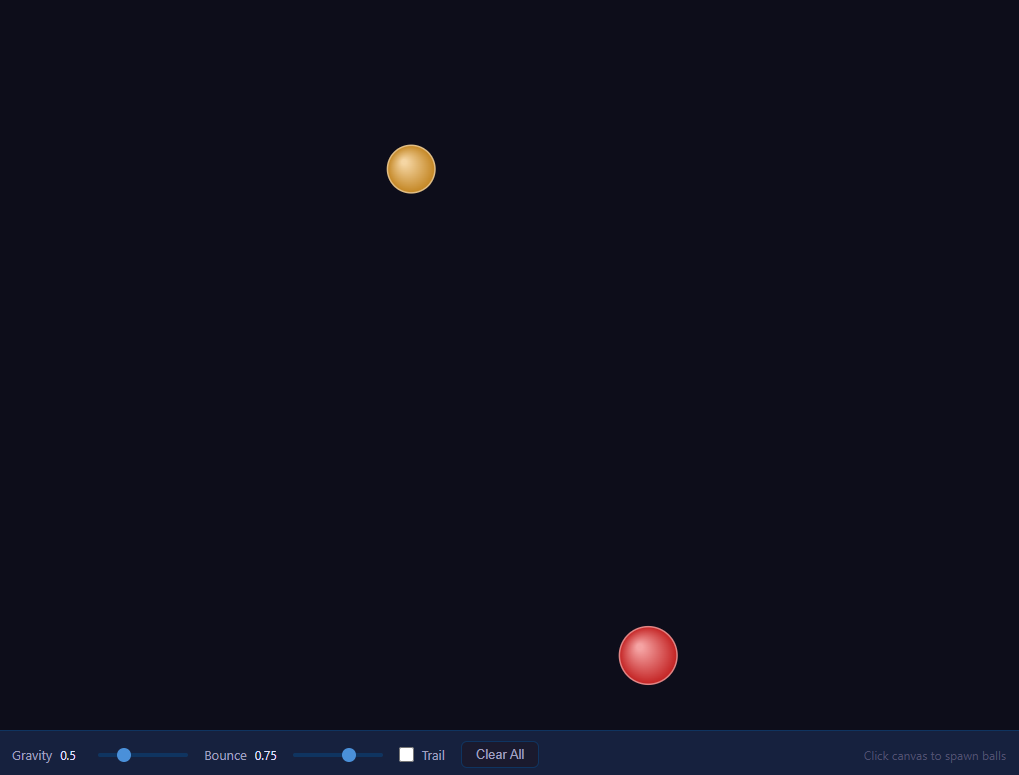
A physics balls simulation drops colorful spheres onto a canvas where they fall under gravity, bounce off the walls, and collide elastically with one another. Click anywhere to launch a new ball upward. It is one of the clearest ways to learn real-time animation, vector math and 2D collision response in the browser using nothing but the HTML5 Canvas 2D API and requestAnimationFrame. This walkthrough explains every piece.
The animation loop
At the heart of the simulation is a fixed-step loop driven by requestAnimationFrame. The loop function calls update() to advance the physics, then draw() to render the frame, then schedules itself again. requestAnimationFrame synchronizes with the display refresh (typically 60Hz), pauses automatically in background tabs to save battery, and gives smooth, tear-free motion. Using a constant per-frame step (rather than scaling by elapsed time) keeps the math simple and stable for a demo, though a production engine would normalize by delta-time.
The ball model
Each ball is a plain object holding position (x, y), velocity (vx, vy), radius r, a hue for color, and a mass. The mass is set to r * r — proportional to area — so larger balls carry more momentum and shove smaller ones aside realistically. When you click, spawnBall reads getBoundingClientRect to convert the click into canvas coordinates, assigns a random radius, a small random horizontal velocity, and a strong upward velocity (vy = -8 - random) so the ball leaps before gravity pulls it down. A MAX_BALLS cap shifts the oldest ball off the array to bound the per-frame collision cost.
Gravity and integration
In update, every ball first has gravity applied: b.vy += GRAVITY. This constant downward acceleration is the discrete form of v = v + a*t. Then position is integrated with b.x += b.vx; b.y += b.vy — semi-implicit (symplectic) Euler integration, which uses the freshly updated velocity and stays stable for gravity-driven motion far better than naive explicit Euler.
Wall collisions and restitution
After moving, each ball is tested against the four canvas edges. If a ball's edge crosses a wall — for example b.x - b.r < 0 — its position is clamped back inside (b.x = b.r) and its velocity component is reflected and scaled by the restitution coefficient BOUNCE: b.vx = Math.abs(b.vx) * BOUNCE. Restitution below 1 means energy is lost on each bounce, so balls gradually settle; a value of 1 would bounce forever. Using Math.abs and forcing the correct sign guarantees the ball moves away from the wall even if floating-point drift left it slightly embedded.
Ball-to-ball elastic collisions
The most educational part is the pairwise collision response. A double loop checks every unique pair (i, j). Two circles overlap when the distance between centers is less than the sum of their radii: sqrt(dx*dx + dy*dy) < a.r + b.r. When they do, resolveCollision runs.
It first computes the collision normal — the unit vector along the line connecting the two centers: nx = dx/dist, ny = dy/dist. It then finds the relative velocity along that normal via the dot product dot = (a.vx - b.vx)*nx + (a.vy - b.vy)*ny. If dot > 0 the balls are already separating, so it returns to avoid sticking. Otherwise it applies the 1D elastic collision impulse projected onto the normal: impulse = 2 * dot / (a.mass + b.mass). Each ball's velocity is adjusted by the impulse weighted by the other ball's mass — a.vx -= impulse * b.mass * nx and b.vx += impulse * a.mass * nx. This is the standard conservation-of-momentum-and-energy formula for equal-restitution collisions, exchanging velocity in proportion to mass.
Finally it resolves overlap. Because discrete steps let balls interpenetrate, the code pushes them apart by half the overlap each along the normal: overlap = (a.r + b.r - dist) / 2. Without this positional correction, balls would jitter or sink into each other.
Rendering and the trail effect
draw offers two modes. Normally it clears the canvas each frame with clearRect and repaints the dark background. With the trail toggle on, instead of clearing it paints a translucent rectangle over the whole canvas: fillStyle = 'rgba(13,13,26,0.15)' then fillRect. Each frame slightly darkens the previous one, so old positions fade out gradually, leaving comet-like motion trails. This is a classic and cheap canvas technique — never clearing, only fading.
Each ball is drawn with a createRadialGradient offset toward the top-left to fake a light source, giving a glossy 3D sphere look, with the two gradient stops derived from the ball's hue in HSL color space. HSL makes it trivial to generate visually distinct, evenly spaced colors by spacing hues — here (hueCounter * 37) % 360 walks around the color wheel.
Controls
Sliders bound to GRAVITY and BOUNCE let you feel how acceleration and restitution change the behavior live, the checkbox toggles trails, and Clear empties the array. Because all state lives in the balls array and two scalars, the controls simply mutate those values and the next animation frame reflects them.
Put together, this simulation demonstrates the core loop of every 2D physics engine: integrate forces, detect collisions, resolve them with impulses and positional correction, and render — all in a couple hundred lines with no dependencies.
Build with AI
Build, Understand, Optimize, and Extend It With AI
You don't have to derive the collision impulse formula from scratch. Paste this snippet's HTML, CSS, and JS into an AI coding assistant like Claude and ask it to explain exactly how resolveCollision computes the collision normal and impulse from the dot product of relative velocity, and why mass is set to radius squared instead of radius itself. The same assistant can help optimize it, for example checking whether the O(n squared) pairwise collision loop needs a spatial partitioning scheme once MAX_BALLS is raised well past 40, or whether semi-implicit Euler integration is accurate enough here versus a more precise integrator for fast-moving balls. It's also useful for extending the effect: ask it to add ball-to-ball friction so spinning balls roll realistically, support balls of different densities instead of a fixed area-based mass, or add a "black hole" attractor point that balls orbit instead of just falling. Treat the code less like a finished artifact and more like a starting point for a conversation.
Prompt to recreate it
Copy this into your AI assistant of choice to build the effect from scratch, or as a jumping-off point for your own variant:
Build a canvas physics simulation of bouncing, colliding balls in plain HTML, CSS, and vanilla JavaScript using the Canvas 2D API and requestAnimationFrame — no physics library.

Requirements:
- Clicking or tapping the canvas spawns a new ball at the pointer position with a random radius, a small random horizontal velocity, and a strong initial upward velocity, converting the click coordinates into canvas space via getBoundingClientRect. Cap the total number of balls by removing the oldest one once a maximum is reached.
- Each ball must have a mass proportional to the square of its radius (mass scales with area, not radius directly), so that in collisions larger balls visibly push smaller ones around rather than exchanging velocity equally.
- Every frame, apply a constant gravity acceleration to each ball's vertical velocity, then integrate position using semi-implicit Euler (update velocity first, then use the updated velocity to move position) rather than naive explicit Euler.
- Detect and resolve wall collisions on all four canvas edges by clamping the ball's position back inside the boundary and reflecting the relevant velocity component, scaled by an adjustable restitution (bounce) coefficient strictly less than 1 so balls lose energy and eventually settle.
- Detect every unique pair of overlapping balls each frame (distance between centers less than the sum of their radii) and resolve the collision using the mass-weighted 1D elastic collision formula projected onto the collision normal: compute the normal vector between the two centers, the relative velocity's dot product along that normal, skip resolution if the balls are already separating, otherwise apply an impulse to both velocities weighted by the other ball's mass, and push the two balls apart by half their overlap distance along the normal to prevent visual sinking.
- Provide UI sliders for gravity strength and bounce restitution that update the simulation live, a checkbox that switches the render loop from clearing the canvas each frame to painting a low-alpha rectangle over it instead (creating fading motion trails), and a button that empties the ball array.
- Render each ball with a radial gradient offset toward one corner to fake a light source, using a distinct hue per ball spaced out in HSL color space.
Want to tighten it up first? Run this prompt through the AI Prompt Studio to score it across 8 quality dimensions, catch anti-patterns, and tune the wording for Claude, ChatGPT, or Gemini before you paste it in.
Source Code
<div class="app">
  <canvas id="canvas"></canvas>
  <div class="controls">
    <label>Gravity <span id="gravVal">0.5</span>
      <input type="range" id="gravSlider" min="0" max="2" step="0.05" value="0.5">
    </label>
    <label>Bounce <span id="bounceVal">0.75</span>
      <input type="range" id="bounceSlider" min="0.3" max="1.0" step="0.05" value="0.75">
    </label>
    <label class="toggle-label">
      <input type="checkbox" id="trailToggle"> Trail
    </label>
    <button id="clearBtn">Clear All</button>
    <span class="hint">Click canvas to spawn balls</span>
  </div>
</div>
* { margin: 0; padding: 0; box-sizing: border-box; }
body { background: #0d0d1a; font-family: system-ui, sans-serif; height: 100vh; overflow: hidden; }
.app { display: flex; flex-direction: column; height: 100vh; }
#canvas { flex: 1; display: block; cursor: crosshair; }
.controls {
display: flex; align-items: center; gap: 16px; padding: 10px 16px;
background: #16213e; border-top: 1px solid #0f3460; flex-wrap: wrap;
}
.controls label {
display: flex; align-items: center; gap: 8px;
font-size: 13px; color: #a0a0c0;
}
.controls label span { min-width: 30px; color: #e0e0ff; font-size: 12px; }
input[type=range] {
-webkit-appearance: none; width: 90px; height: 4px;
border-radius: 2px; background: #0f3460; accent-color: #4a90d9; cursor: pointer;
}
input[type=range]::-webkit-slider-thumb {
-webkit-appearance: none; width: 14px; height: 14px;
border-radius: 50%; background: #4a90d9;
}
.toggle-label { cursor: pointer; user-select: none; }
input[type=checkbox] { accent-color: #4a90d9; width: 15px; height: 15px; cursor: pointer; }
#clearBtn {
padding: 5px 14px; background: #1a1a2e; border: 1px solid #0f3460;
border-radius: 6px; color: #a0a0c0; cursor: pointer; font-size: 13px; transition: all 0.15s;
}
#clearBtn:hover { background: #0f3460; color: #e0e0ff; border-color: #4a90d9; }
.hint { font-size: 12px; color: #505070; margin-left: auto; }const canvas = document.getElementById('canvas');
const ctx = canvas.getContext('2d');
let GRAVITY = 0.5;
let BOUNCE = 0.75;
let trail = false;
let balls = [];
let hueCounter = 0;
const MAX_BALLS = 40;
function resize() {
canvas.width = canvas.offsetWidth;
canvas.height = canvas.offsetHeight;
}
resize();
window.addEventListener('resize', resize);
function spawnBall(x, y) {
if (balls.length >= MAX_BALLS) balls.shift();
const r = 15 + Math.random() * 20;
balls.push({
x, y, r,
vx: (Math.random() - 0.5) * 6,
vy: -8 - Math.random() * 4,
hue: (hueCounter * 37) % 360,
mass: r * r,
});
hueCounter++;
}
canvas.addEventListener('pointerdown', e => {
const rect = canvas.getBoundingClientRect();
spawnBall(e.clientX - rect.left, e.clientY - rect.top);
});
function resolveCollision(a, b) {
const dx = b.x - a.x;
const dy = b.y - a.y;
const dist = Math.sqrt(dx*dx + dy*dy);
if (dist === 0) return;
const nx = dx/dist, ny = dy/dist;
const dvx = a.vx - b.vx, dvy = a.vy - b.vy;
const dot = dvx*nx + dvy*ny;
if (dot > 0) return;
const totalMass = a.mass + b.mass;
const impulse = 2 * dot / totalMass;
a.vx -= impulse * b.mass * nx;
a.vy -= impulse * b.mass * ny;
b.vx += impulse * a.mass * nx;
b.vy += impulse * a.mass * ny;
const overlap = (a.r + b.r - dist) / 2;
a.x -= overlap * nx; a.y -= overlap * ny;
b.x += overlap * nx; b.y += overlap * ny;
}
function update() {
for (const b of balls) {
b.vy += GRAVITY;
b.x += b.vx; b.y += b.vy;
if (b.x - b.r < 0) { b.x = b.r; b.vx = Math.abs(b.vx) * BOUNCE; }
if (b.x + b.r > canvas.width) { b.x = canvas.width - b.r; b.vx = -Math.abs(b.vx) * BOUNCE; }
if (b.y - b.r < 0) { b.y = b.r; b.vy = Math.abs(b.vy) * BOUNCE; }
if (b.y + b.r > canvas.height) { b.y = canvas.height - b.r; b.vy = -Math.abs(b.vy) * BOUNCE; }
}
for (let i = 0; i < balls.length; i++) {
for (let j = i+1; j < balls.length; j++) {
const a = balls[i], b = balls[j];
const dx = b.x - a.x, dy = b.y - a.y;
if (Math.sqrt(dx*dx + dy*dy) < a.r + b.r) resolveCollision(a, b);
}
}
}
function draw() {
if (trail) {
ctx.fillStyle = 'rgba(13,13,26,0.15)';
ctx.fillRect(0, 0, canvas.width, canvas.height);
} else {
ctx.clearRect(0, 0, canvas.width, canvas.height);
ctx.fillStyle = '#0d0d1a';
ctx.fillRect(0, 0, canvas.width, canvas.height);
}
for (const b of balls) {
const grd = ctx.createRadialGradient(b.x - b.r*0.3, b.y - b.r*0.3, b.r*0.1, b.x, b.y, b.r);
grd.addColorStop(0, `hsl(${b.hue},80%,80%)`);
grd.addColorStop(1, `hsl(${b.hue},70%,45%)`);
ctx.beginPath();
ctx.arc(b.x, b.y, b.r, 0, Math.PI*2);
ctx.fillStyle = grd;
ctx.fill();
ctx.strokeStyle = `hsl(${b.hue},60%,70%)`;
ctx.lineWidth = 1.5;
ctx.stroke();
}
}
function loop() {
update();
draw();
requestAnimationFrame(loop);
}
loop();
const gravSlider = document.getElementById('gravSlider');
const gravVal = document.getElementById('gravVal');
gravSlider.addEventListener('input', () => {
GRAVITY = +gravSlider.value;
gravVal.textContent = GRAVITY.toFixed(2);
});
const bounceSlider = document.getElementById('bounceSlider');
const bounceVal = document.getElementById('bounceVal');
bounceSlider.addEventListener('input', () => {
BOUNCE = +bounceSlider.value;
bounceVal.textContent = BOUNCE.toFixed(2);
});
document.getElementById('trailToggle').addEventListener('change', e => {
trail = e.target.checked;
});
document.getElementById('clearBtn').addEventListener('click', () => {
balls = [];
});Step by step
How to Use
- 1Spawn ballsClick anywhere on the canvas to launch a new ball upward with a random size and color.
- 2Adjust gravityDrag the gravity slider to change how strongly balls accelerate downward each frame.
- 3Tune the bounceDrag the bounce slider to set the restitution coefficient — lower values lose more energy on impact.
- 4Enable trailsToggle the trail checkbox to fade old frames instead of clearing them, leaving motion trails.
- 5Watch collisionsSpawn several balls and watch them collide elastically, exchanging velocity based on their mass.
- 6Clear the sceneClick Clear All to empty the simulation and start fresh.
Real-world uses
Common Use Cases
Got questions?
Frequently Asked Questions
Mass proportional to area (radius squared) makes the collision response feel right — larger balls have more momentum and push smaller ones around, while equal-size balls exchange velocity symmetrically.
It sets the restitution coefficient applied on every wall hit. The reflected velocity is multiplied by this value, so below 1 the ball loses energy and eventually settles, and at 1 it would bounce indefinitely.
The dot of relative velocity and the collision normal tells whether the balls are approaching or separating. If they are already moving apart, applying an impulse would incorrectly pull them back together, so the function returns early.
Instead of clearing the canvas each frame, it paints a low-alpha rectangle over everything. Previous frames are darkened a little each time, so older positions fade out smoothly, producing motion trails.
With discrete time steps a fast ball can move past the contact point before collision is detected. The code corrects this by pushing overlapping balls apart by half the penetration depth along the normal each frame.
Yes. Export with the JSX, Vue, Angular, or Tailwind buttons. In React, run the requestAnimationFrame physics loop inside useEffect and cancel it in the cleanup return; keep the ball array in a ref rather than state, since it mutates 60 times per second without needing re-renders.