You Might Also Like
Learn Coding Visually
Learn to code with interactive, live-preview playgrounds — HTML, CSS, JavaScript, React & more.
 HTML Playground42 lessons · Click-based · Live preview
 CSS PlaygroundLearn CSS with a live editor
 JavaScript Playground60 lessons · DOM · Async · Canvas
 React PlaygroundLearn React with a live code editor
 GSAP PlaygroundLearn GSAP animation interactively
 SVG Playground44 lessons · shapes · paths · animation
 SCSS Playground45 lessons · Sass modules · tokens
 Tailwind PlaygroundLearn Tailwind CSS with a live editor
 Bootstrap 5 Playground50 lessons · live preview
Asteroids Blaster Game — Free HTML CSS JS Snippet
Asteroids Blaster Game · Games · Plain HTML, CSS & JS · Live preview
What's included
Features
About this UI Snippet
Asteroids Blaster — Inertia Physics, Screen Wrap and Splitting Rocks on Canvas
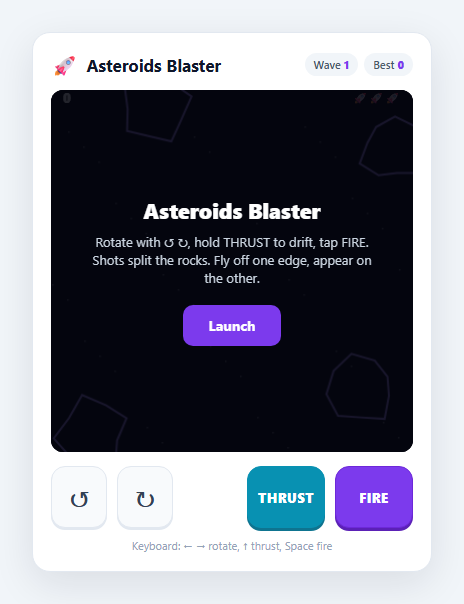
The original Asteroids is the canonical example of *momentum-based* control: you don't steer the ship, you steer its acceleration. That single idea — rotate to aim a thrust vector, then coast on the velocity you've built up — makes it a perfect demonstration of vector movement, and it maps cleanly onto touch as two rotate buttons plus a thrust and a fire button. This snippet builds a complete version on one HTML5 <canvas>: inertia, screen wrapping, procedurally shaped rocks that split into smaller ones when shot, lives with a respawn-invulnerability window, and wave progression.
Rotate the heading, thrust along it, coast on the velocity
The ship stores a heading angle and a velocity vector (vx, vy) that are deliberately independent. The rotate buttons only change the angle; the THRUST button adds a small acceleration *along the current heading* (vx += cos(angle) * THRUST), and every frame the velocity is multiplied by a DRAG factor slightly below 1 so the ship gradually slows but never stops on its own. That decoupling of facing from motion is the entire feel of the game — you can drift backwards while firing forwards — and it's why the control scheme needs a separate thrust button rather than a directional pad. Speed is capped by normalising the velocity vector when it exceeds MAX_V.
Toroidal screen wrapping
Everything that moves — ship, bullets, rocks — passes through the same wrap() function, which teleports an object that crosses one edge to the opposite edge. This makes the play field a torus: there are no walls, and the tactical wrinkle is that a rock (or your own bullet) leaving the right edge reappears on the left. Because bullets have a limited BULLET_LIFE, they don't wrap forever and circle back to hit you.
Procedural rocks that split
Each rock is built by makeRock() with a ring of randomised radii, so no two are the same lumpy shape, and it carries a size class (3, 2 or 1). When a bullet is within a rock's radius, splitRock() awards size-scaled points and — if the rock isn't already the smallest — replaces it with two smaller rocks launched in new directions. That one rule produces the escalating swarm the game is known for: one big slow rock becomes two, then four, then eight fast small ones.
Lives, invulnerability and waves
Colliding with a rock costs a life and respawns the ship at centre with a blinking INVULN window so you aren't instantly killed again by an overlapping rock. Clearing every rock advances the wave, which spawns more and larger rocks. Movement is delta-time scaled so the physics runs at the same rate on any display, and the best score persists to localStorage.
Build with AI
Build, Understand, Optimize, and Extend It With AI
Paste this snippet's HTML, CSS and JS into an AI assistant like Claude and ask it to explain how the independent heading angle and velocity vector, the drag-and-cap on speed, and the shared wrap() function combine into Asteroids-style momentum flight. It is a strong base to extend: ask for a hyperspace teleport button, UFO enemies that shoot at you, a shield or extra-life pickup, thrust particles that persist as a trail, or shot power-ups (spread, rapid fire). You could also ask it to add gentle screen-relative aiming assist for touch, or to port the loop into a React component using useRef and useEffect. Treat it as a working prototype to question and rebuild rather than a finished game.
Prompt to recreate it
Copy this into your AI assistant of choice to build the effect from scratch, or as a jumping-off point for your own variant:
Build a mobile-friendly Asteroids-style vector shooter on an HTML5 canvas in plain HTML, CSS and JavaScript — no frameworks.

Requirements:
- A ship controlled by rotation and thrust with momentum: store an independent heading angle and a velocity vector. Rotate buttons change only the angle; a thrust button accelerates along the heading; apply a drag factor each frame and cap the maximum speed. Provide on-screen rotate-left, rotate-right, THRUST and FIRE buttons for touch AND keyboard controls (arrows + Space). Both drive one shared input-state object read once per frame.
- Use Pointer Events for the buttons with press-and-hold released on pointerup/pointercancel/pointerleave. Scale all motion by delta-time so physics is frame-rate-independent, and rate-limit firing with a timestamp cooldown.
- Wrap the ship, bullets and asteroids around the screen edges (toroidal field) using one shared wrap function. Give bullets a limited lifetime so they expire instead of wrapping forever.
- Generate procedurally shaped asteroids with a size class. When a bullet hits a rock, award size-scaled points and split it into two smaller, faster rocks unless it is already the smallest.
- Give the ship three lives; a rock collision costs a life and respawns it at centre with a brief blinking invulnerability window. Clearing all rocks advances the wave and spawns more, larger rocks. Persist the high score in localStorage with defensive try/catch, and show start / game-over overlays with particle bursts.
Want to tighten it up first? Run this prompt through the AI Prompt Studio to score it across 8 quality dimensions, catch anti-patterns, and tune the wording for Claude, ChatGPT, or Gemini before you paste it in.
Step by step
How to Use
- 1LaunchTap "Launch" to call startGame(), which places the ship at centre, spawns wave 1 of large rocks away from the middle, and starts the delta-time requestAnimationFrame loop.
- 2Rotate to aimHold ↺ or ↻ (or the Left/Right arrow keys) to spin the ship. Rotation only changes the heading angle — it does not move you — so aim first, then thrust.
- 3Thrust to build momentumHold THRUST (or ↑) to accelerate along the current heading. Release and you keep coasting on the velocity you built; a slight drag bleeds it off over time. You can drift one way while facing another.
- 4Fire to split rocksTap or hold FIRE (or Space) to shoot along your heading, rate-limited by a cooldown. Hitting a large rock splits it into two smaller, faster rocks; the smallest ones vanish for the most points.
- 5Use the wrap-around edgesFly off any edge and you reappear on the opposite side — and so do the rocks. Use wrapping to escape a crowded corner, but watch for rocks coming back around behind you.
- 6Survive and clear wavesA rock collision costs one of three lives and respawns you with a brief blinking invulnerability. Clearing all rocks advances the wave. Your best score persists in localStorage under asteroids-blaster-best; tune THRUST, DRAG and MAX_V for a different feel.
Real-world uses
Common Use Cases
Got questions?
Frequently Asked Questions
Asteroids is momentum-based: the ship stores a velocity vector that persists between frames. Thrusting only adds acceleration along the heading; when you release, the velocity remains and is multiplied by a DRAG factor just below 1 each frame, so the ship slowly coasts to a stop rather than halting instantly. That inertia is the defining feel of the game and the reason steering is about anticipation, not direct control.
Every moving object passes through a single wrap() function that checks whether it has crossed an edge and, if so, adds or subtracts the canvas width or height to move it to the opposite side. Applying the same function to the ship, bullets and rocks makes the whole field behave like a torus with no walls. Bullets have a limited lifetime so they expire instead of wrapping around forever and hitting you.
Each rock carries a size class. When a bullet is within a rock's radius, splitRock() removes it and, unless it is already the smallest size, spawns two smaller rocks moving in fresh random directions. This is the classic Asteroids mechanic: destroying one large rock creates more targets, so the field gets busier and faster as you clear it, and the smallest rocks award the most points.
That is intentional — the control scheme separates facing from motion. The rotate buttons change only the heading angle, and thrust accelerates along that angle. This is why the game uses dedicated rotate and thrust buttons instead of a four-way pad: you are piloting acceleration and momentum, not directly setting a position, which is a fundamentally different (and more physical) control model.
Yes. The best score is written to localStorage under asteroids-blaster-best and read on load, so it survives reloads and browser restarts on the same browser and origin. The read and write are wrapped in try/catch so the game still runs in sandboxed or private contexts where storage access can throw.