You Might Also Like
Learn Coding Visually
Learn to code with interactive, live-preview playgrounds — HTML, CSS, JavaScript, React & more.
 HTML Playground42 lessons · Click-based · Live preview
 CSS PlaygroundLearn CSS with a live editor
 JavaScript Playground60 lessons · DOM · Async · Canvas
 React PlaygroundLearn React with a live code editor
 GSAP PlaygroundLearn GSAP animation interactively
 SVG Playground44 lessons · shapes · paths · animation
 SCSS Playground45 lessons · Sass modules · tokens
 Tailwind PlaygroundLearn Tailwind CSS with a live editor
 Bootstrap 5 Playground50 lessons · live preview
Sky Hopper Game — Free HTML CSS JS Snippet
Sky Hopper Game · Games · Plain HTML, CSS & JS · Live preview
What's included
Features
About this UI Snippet
Sky Hopper — Auto-Bounce Physics, a Scrolling Camera and Recycled Platforms
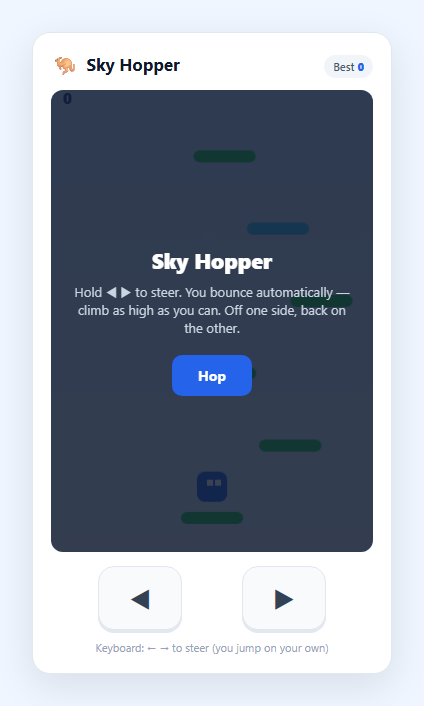
A vertical platform-hopper is the purest possible action game: the character bounces on its own, so the *entire* input surface is left and right. That makes it an ideal demonstration of a two-button touch game, and of the two systems that make an "endless climb" work — a camera that scrolls with the player and a platform pool that recycles as you rise. This snippet builds the whole thing on one HTML5 <canvas>: hold ◀ or ▶ to steer, and the hopper bounces automatically off every platform it lands on, climbing forever through normal, breakable, moving and spring platforms.
Automatic bouncing, with a one-way landing test
The player is always under gravity, so vy grows each step and the character falls until it meets a platform. The landing test only fires *while falling* (vy > 0) and only when the character's feet cross the platform's top surface between this frame and the next — the same one-way collision idea as a platformer, which lets the hopper rise straight up through a platform and only bounce when coming down onto it. A bounce simply sets vy to a fixed upward velocity, so the character launches to a consistent height every time without any jump button at all. Spring platforms set a much larger upward velocity for a super-bounce.
A camera that only scrolls up
The camera tracks the player's height but is deliberately one-directional: when the hopper climbs above a line at 42% of the canvas height, the camera moves up to keep it there; when the hopper falls, the camera stays put. That asymmetry is what turns a bounce into *progress* — you never scroll back down, so falling below the bottom of the view means you missed a platform and the run ends. The whole world is drawn through a single ctx.translate(0, -cam), so every platform is stored in world coordinates and the camera math lives in one place.
A recycling platform pool
An endless climb can't keep every platform ever generated. Each step, platforms that have scrolled below the view are filtered out, and new ones are spawned above the current topmost platform at a fixed vertical gap until the pool is refilled — so there is always a ladder of platforms ahead and a bounded number in memory. makePlatform() rolls a type on spawn: mostly normal, with a chance of a *breakable* platform that gives way after one bounce, a *moving* platform that slides side to side and reverses at the walls, or a *spring* platform. Horizontal movement wraps around the screen edges, so steering off one side brings you back on the other.
Scoring and persistence
The score is how high you've climbed, shown live, and the best height persists to localStorage. The simulation runs on a fixed 1/60-second timestep so the bounce height and fall speed are identical across refresh rates.
Build with AI
Build, Understand, Optimize, and Extend It With AI
Paste this snippet's HTML, CSS and JS into an AI assistant like Claude and ask it to explain the automatic-bounce landing test, the one-directional follow camera, and the recycling platform pool that keeps memory bounded. It is a strong base to extend: ask for a jetpack or propeller-hat power-up that carries you up a screen, enemies you must steer around or land on, breakable platforms that crumble in stages, a shooting mechanic aimed downward, or themed biomes that change as your height increases. You could also ask it to add device-tilt steering via the DeviceOrientation API as an alternative to the buttons, or to port the loop into a React component with useRef and useEffect. Treat it as a working prototype to question and rebuild.
Prompt to recreate it
Copy this into your AI assistant of choice to build the effect from scratch, or as a jumping-off point for your own variant:
Build a mobile-friendly Doodle-Jump-style vertical platform climber on an HTML5 canvas in plain HTML, CSS and JavaScript — no frameworks.

Requirements:
- A character permanently under gravity that bounces automatically to a fixed upward velocity whenever it lands on a platform — there is NO jump button. The only controls are steer-left and steer-right: provide two on-screen hold buttons for touch AND keyboard arrows, both driving one shared input state. Wrap horizontal movement around the screen edges.
- The landing test must only fire while the character is falling and only when its feet cross a platform's top edge, so the character rises up through platforms and bounces only when coming down onto them.
- Add a one-directional camera that scrolls up when the player climbs above a line partway up the screen but never scrolls back down, drawn with ctx.translate. Falling below the bottom of the view ends the run.
- Use a recycling platform pool: remove platforms that scroll below the view and spawn new ones above the current highest platform at a fixed vertical gap, keeping a bounded number in memory. Include platform types: normal, breakable (gives way after one bounce), moving (slides side to side and reverses at walls), and spring (much larger bounce).
- Run the simulation on a fixed 1/60-second timestep so bounce height and fall speed are frame-rate-independent. Score by height climbed, shown live, and persist the best in localStorage with defensive try/catch. Show start and game-over overlays.
Want to tighten it up first? Run this prompt through the AI Prompt Studio to score it across 8 quality dimensions, catch anti-patterns, and tune the wording for Claude, ChatGPT, or Gemini before you paste it in.
Step by step
How to Use
- 1Start hoppingTap "Hop" to call startGame(), which builds a starting stack of platforms, drops the hopper onto the solid one at the bottom, and starts the fixed-timestep loop. The character bounces on its own from the first frame.
- 2Steer with two buttonsHold ◀ or ▶ (or the Left/Right arrow keys / A and D) to move horizontally. There is no jump button — the hopper bounces automatically whenever it lands on a platform. Steering off one side of the screen wraps you to the other.
- 3Aim for the next platformBecause you only bounce when you land, steering is about lining up the next platform above you while you are in the air. Miss them all and you fall past the bottom of the view.
- 4Learn the platform typesGreen platforms are normal. Amber ones break and give way after a single bounce, so do not linger. Blue ones slide side to side. Purple spring platforms launch you much higher — use them to skip a gap.
- 5Climb as high as you canThe camera only ever scrolls up, so every bounce is progress and there is no going back down. Your height is the score, shown top-left; the best persists in localStorage under sky-hopper-best.
- 6Tune the feelAdjust GRAV, JUMP_V and SPRING_V for bounce feel, GAP for platform spacing, and the probabilities in makePlatform() to change how often special platforms appear.
Real-world uses
Common Use Cases
Got questions?
Frequently Asked Questions
In a vertical hopper the jump is automatic: the character is always under gravity and bounces to a fixed upward velocity every time it lands on a platform. That reduces the entire control surface to horizontal steering, which is why the game needs only two buttons. It is a deliberate design choice that makes the game trivially playable with one thumb on a phone.
The landing test only runs while the character is falling (vy > 0) and only when its feet cross the top edge of the platform between the current frame and the next. When rising, vy is negative so the test is skipped and the character moves straight up through the platform; on the way down the test becomes true and it bounces. This is the same one-way collision technique used in side-scrolling platformers.
The camera is one-directional on purpose: it moves up when the player climbs above a line partway up the screen, but it never moves down when the player falls. That asymmetry is what makes every bounce count as progress and creates the fail condition — if you miss the platforms and drop below the bottom of the current view, the run ends because there is nothing to scroll back to.
No. Each step, platforms that have scrolled below the visible area are removed from the array, and new ones are generated above the current highest platform until the pool is refilled to a fixed size. This object-pooling approach keeps a constant, small number of platforms in memory no matter how high you climb, which is essential for an endless game.
Yes. The best height is stored in localStorage under sky-hopper-best and read on load, so it survives reloads and browser restarts on the same browser and origin. The read and write are wrapped in try/catch so the game still runs in sandboxed or private contexts where storage access can throw.