You Might Also Like
Learn Coding Visually
Learn to code with interactive, live-preview playgrounds — HTML, CSS, JavaScript, React & more.
 HTML Playground42 lessons · Click-based · Live preview
 CSS PlaygroundLearn CSS with a live editor
 JavaScript Playground60 lessons · DOM · Async · Canvas
 React PlaygroundLearn React with a live code editor
 GSAP PlaygroundLearn GSAP animation interactively
 SVG Playground44 lessons · shapes · paths · animation
 SCSS Playground45 lessons · Sass modules · tokens
 Tailwind PlaygroundLearn Tailwind CSS with a live editor
 Bootstrap 5 Playground50 lessons · live preview
Cave Flyer Game — Free HTML CSS JS Snippet
Cave Flyer Game · Games · Plain HTML, CSS & JS · Live preview
What's included
Features
About this UI Snippet
Cave Flyer — One-Button Thrust Physics and a Procedural Scrolling Cave
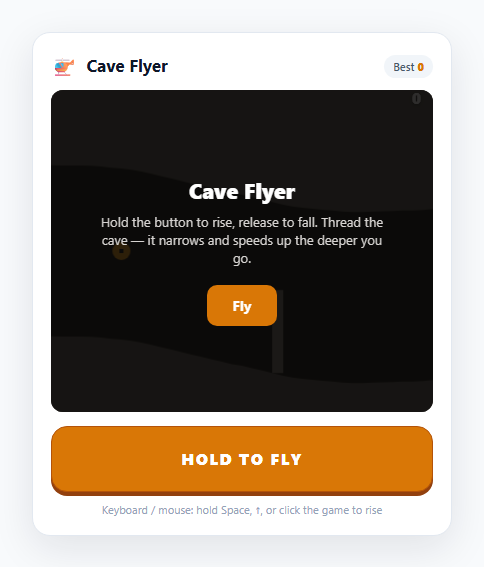
The one-button "helicopter" game is a masterclass in doing the most with the least: a single input — hold to go up, release to go down — against an ever-narrowing tunnel. There's no simpler control scheme, which makes it the purest demonstration of hold-to-thrust physics and of the procedural, recycling terrain that an endless side-scroller needs. This snippet builds it on one HTML5 <canvas>: hold the button (or Space, or a tap on the game) to fire the craft's lift, release to let gravity take it, and thread a meandering cave that tightens and accelerates the further you fly.
Hold-to-thrust: gravity versus lift on one axis
The craft only moves vertically, driven by a single boolean. Every frame, if flying is true a negative (upward) LIFT acceleration is added to the velocity; if it's false a positive (downward) GRAV is added instead. The velocity is clamped to MAX_VY and integrated into the position. That's the entire control model — the craft is never *set* to a height, it's constantly accelerating one way or the other, so flying smoothly means feathering the button to hover, exactly like a real helicopter game. Because it's a single flag, the same input works from a hold button, the keyboard, and a press on the canvas without any extra logic.
One input, four surfaces
The flying flag is set true on pointerdown and false on pointerup/pointercancel/pointerleave — bound to the dedicated FLY button, to the canvas itself (so a tap anywhere on the game works), and to Space/↑ on the keyboard. Routing every surface through one setFly() call means the physics never knows or cares where the press came from, and releasing is handled everywhere so the thrust can't get stuck on.
A procedural cave built from recycled slices
The cave is a list of thin vertical *slices*, each storing a ceiling height and a floor height. makeSlice() meanders the cave's centre with a bounded random walk (so the tunnel curves naturally instead of jittering), narrows the vertical gap as distance grows, and occasionally juts a stalactite or stalagmite into the passage. As the world scrolls, slices that pass off the left edge are shifted out of the array and fresh ones pushed on the right — a constant, small number of slices in memory no matter how far you fly. The walls are drawn as two filled polygons traced along the slice tops and bottoms.
Collision, difficulty and persistence
Collision is cheap: only the single slice directly under the craft's fixed x-position is tested, against the ceiling, the floor, and any obstacle in that slice. Both the scroll speed and the cave's narrowing are continuous functions of distance, so the game gets relentlessly harder. The score is distance flown, shown live, and the best persists to localStorage; all motion is delta-time scaled for consistent speed across refresh rates.
Build with AI
Build, Understand, Optimize, and Extend It With AI
Paste this snippet's HTML, CSS and JS into an AI assistant like Claude and ask it to explain the gravity-vs-lift one-axis physics, the single flying flag shared across button/keyboard/canvas, and the recycling random-walk cave. It is a strong base to extend: ask for collectible fuel or coins in the gap, a cave that occasionally forks into two paths, moving gates you must time, a parallax rock background, or a gentle screen shake on near-misses. You could also ask it to add a difficulty select that tunes gravity and the narrowing rate, or to port the loop into a React component using useRef and useEffect. Treat it as a working prototype to question and rebuild.
Prompt to recreate it
Copy this into your AI assistant of choice to build the effect from scratch, or as a jumping-off point for your own variant:
Build a mobile-friendly one-button cave-flying game on an HTML5 canvas in plain HTML, CSS and JavaScript — no frameworks.

Requirements:
- The craft moves only vertically and is controlled by a single hold input: while held, add an upward lift acceleration to its velocity each frame; while released, add a downward gravity acceleration. Clamp the velocity and integrate into position so the feel is analog (feather to hover), not fixed up/down speed.
- Route the single control through one boolean flag set true on press and false on release, bound to a dedicated hold button, to the canvas itself (tap anywhere), AND to Space/Up on the keyboard. Release on pointerup, pointercancel and pointerleave everywhere so thrust never sticks on.
- Generate the cave as a list of thin vertical slices, each with a ceiling and floor height. Meander the cave centre with a bounded random walk so the tunnel curves smoothly, and occasionally add a stalactite/stalagmite obstacle jutting into the gap. As the world scrolls, remove slices off the left and append new ones on the right so memory stays bounded.
- Test collision only against the single slice under the craft's fixed x — ceiling, floor and any obstacle. Make the scroll speed increase and the gap narrow continuously with distance flown.
- Use requestAnimationFrame with delta-time scaling. Score by distance, shown live, and persist the best in localStorage with defensive try/catch. Show start and game-over overlays, and draw the cave walls as filled polygons traced along the slice tops and bottoms.
Want to tighten it up first? Run this prompt through the AI Prompt Studio to score it across 8 quality dimensions, catch anti-patterns, and tune the wording for Claude, ChatGPT, or Gemini before you paste it in.
Step by step
How to Use
- 1Start flyingTap "Fly" to call startGame(), which generates the starting cave, places the craft mid-screen, and starts the delta-time loop. The craft immediately begins to fall under gravity.
- 2Hold to rise, release to fallHold the HOLD TO FLY button — or Space / ↑, or press anywhere on the game — to apply upward thrust; release to let gravity pull the craft down. The craft is always accelerating one way, so feather the button to hover level.
- 3Thread the caveKeep the craft between the ceiling and the floor. Touching either wall — or an obstacle jutting into the passage — ends the run instantly.
- 4Watch it narrowThe vertical gap shrinks and the scroll speed rises continuously with distance, so the later cave demands finer control than the open early stretch.
- 5Dodge the stalactitesOccasional stone spikes jut from the ceiling or floor into the gap. They only occupy one slice, so a small, well-timed altitude change slips past them.
- 6Beat your distanceThe score is distance flown, shown top-right, and persists in localStorage under cave-flyer-best. Tune GRAV, LIFT, the starting gap and its narrowing rate to change the difficulty.
Real-world uses
Common Use Cases
Got questions?
Frequently Asked Questions
The craft only moves on the vertical axis and is always accelerating: while the button is held, an upward lift acceleration is added to its velocity each frame; while released, a downward gravity acceleration is added instead. The velocity is clamped and integrated into position. Because it is continuous acceleration rather than a fixed up/down speed, tapping and feathering the button lets you hover and make fine adjustments — the same analog feel as a classic helicopter game.
All three surfaces call the same setFly() function that toggles one flying flag — true on press, false on release. The physics reads only that flag and has no idea where the input came from, so a hold button, a tap on the game area, and Space/Up all behave identically. Release is bound on pointerup, pointercancel and pointerleave everywhere, so the thrust can never get stuck on if a finger slides off.
The cave is a list of thin vertical slices, each with a ceiling and floor height. As the world scrolls, slices that move off the left edge are removed from the front of the array and new ones are appended at the right. This keeps a constant, small number of slices in memory regardless of how far you fly, and the new slices are generated on the fly by meandering the cave centre with a bounded random walk.
Two values scale continuously with distance flown: the scroll speed increases, so the cave rushes past faster, and the vertical gap between ceiling and floor shrinks toward a minimum, so there is less room to manoeuvre. Together they make the late cave demand much finer button control than the wide, slow opening stretch, which is what gives a one-button game a difficulty curve.
Yes. The best distance is stored in localStorage under cave-flyer-best and read on load, so it survives reloads and browser restarts on the same browser and origin. The read and write are wrapped in try/catch so the game still runs in sandboxed or private contexts where storage access can throw.