You Might Also Like
Learn Coding Visually
Learn to code with interactive, live-preview playgrounds — HTML, CSS, JavaScript, React & more.
 HTML Playground42 lessons · Click-based · Live preview
 CSS PlaygroundLearn CSS with a live editor
 JavaScript Playground60 lessons · DOM · Async · Canvas
 React PlaygroundLearn React with a live code editor
 GSAP PlaygroundLearn GSAP animation interactively
 SVG Playground44 lessons · shapes · paths · animation
 SCSS Playground45 lessons · Sass modules · tokens
 Tailwind PlaygroundLearn Tailwind CSS with a live editor
 Bootstrap 5 Playground50 lessons · live preview
Canvas Pixelate Image Reveal — Free Scroll/Hover Sharpen Effect
Canvas Pixelate Image Reveal · Animations · Plain HTML, CSS & JS · Live preview
What's included
Features
About this UI Snippet
Canvas Pixelate Image Reveal — From Mosaic to Full Detail
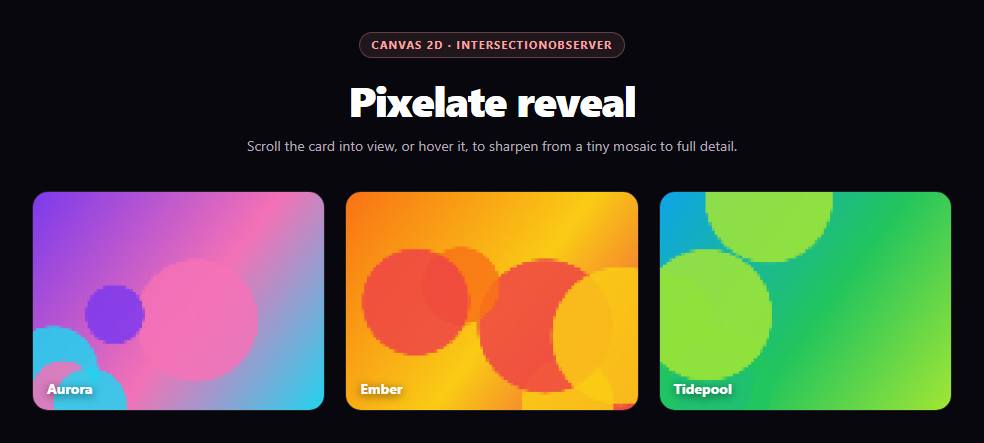
The pixelate reveal is the "developing photograph" effect: a card starts as a chunky, low-resolution mosaic and sharpens smoothly into full detail as it scrolls into view or is hovered. The whole trick lives in two canvas properties — drawing at a tiny resolution, then reading that tiny canvas back at full size with imageSmoothingEnabled = false.
Why downscale-then-upscale produces pixel blocks
drawAtResolution(cells) first draws the full-detail source image onto a tiny offscreen canvas only cells pixels wide — at cells = 6, an entire 320px-wide card is represented by six columns of pixels. That tiny canvas is then drawn back onto the visible canvas at full size. With ctx.imageSmoothingEnabled = false on the destination context, the browser's own scaling algorithm switches from bilinear interpolation to nearest-neighbor, so each of those six source pixels becomes one crisp, hard-edged block rather than a blurry smear. Toggling that single boolean is the entire difference between a "pixelated" look and a "blurry" one.
A source that's never redrawn small
The full-detail image is painted once, at native resolution, onto its own offscreen src canvas via paintSource() (a gradient plus a few soft circular blooms, since there's no external image to load). Every reveal frame downsamples fresh from that same source — it's never progressively degraded by repeatedly scaling an already-scaled canvas, which is what keeps the "full detail" end state actually sharp instead of soft after a few reveal cycles.
Easing resolution instead of jumping to it
Rather than snapping straight from 6 cells to 96, animate() eases current toward a target cell count with current += (target - current) * 0.12 every frame — the same simple spring-like approach used for numeric tweens throughout this library. Because cells is rounded before each redraw, the visible result is a smooth, discrete step-up in resolution rather than a single hard cut, which reads as "sharpening" instead of "swapping images."
Two triggers, one animation function
Both card.addEventListener('mouseenter', reveal) and an IntersectionObserver calling the same reveal() on first scroll-into-view drive the identical animation path — there's no duplicated logic for "reveal by hover" versus "reveal by scroll." The observer uses a WeakSet to reveal each card only once on its first appearance, while hover continues to work afterward via mouseleave re-pixelating and mouseenter re-sharpening.
Extending it
Swap paintSource for a real ctx.drawImage(yourImg, 0, 0, W, H) once an image has loaded; tie target's cell count to scroll progress instead of a boolean for a scrubbable reveal; or pair the technique with image blur-up for a hybrid loading placeholder, or scroll reveal grid for the surrounding entrance choreography.
Build with AI
Build, Understand, Optimize, and Extend It With AI
Paste this snippet's HTML, CSS, and JS into an AI coding assistant like Claude and ask it to explain exactly why setting imageSmoothingEnabled to false on the destination canvas is what turns an upscaled tiny image into crisp pixel blocks instead of a blurry smear, and why the code always downsamples fresh from an untouched source canvas rather than repeatedly resizing the same visible canvas in place. It's also useful for reasoning about the easing — ask how changing the 0.12 interpolation factor in animate() would affect how quickly a card sharpens, and whether a duration-based tween (easing over a fixed number of milliseconds) would behave more predictably across different frame rates than the current per-frame-fraction approach. For extensions, ask it to wire in a real image via drawImage once loaded, tie the target cell count to scroll progress within the viewport for a scrubbable reveal instead of a boolean trigger, or add a subtle chromatic-aberration offset at low resolutions for a glitchier look. Treat the code less like a finished artifact and more like a starting point for a conversation.
Prompt to recreate it
Copy this into your AI assistant of choice to build the effect from scratch, or as a jumping-off point for your own variant:
Build a "canvas pixelate image reveal" effect in plain HTML, CSS, and JavaScript using only the Canvas 2D API — a card that starts heavily pixelated and sharpens on scroll-into-view or hover, no external image required and no libraries.

Requirements:
- Since there is no external image to load, paint a procedural "source image" once at native resolution onto its own separate offscreen canvas (a gradient plus a few soft filled circles is enough) — this source canvas must never be redrawn or resized in place; every reveal step should re-sample from this same pristine source.
- Implement a function that renders the card at a given "resolution" by first drawing the source canvas down onto a tiny intermediate canvas only N pixels wide (N being the current resolution, as low as ~6), then drawing that tiny canvas back onto the visible destination canvas at full display size with the destination context's imageSmoothingEnabled explicitly set to false, so the upscale uses nearest-neighbor scaling and produces visible hard-edged pixel blocks rather than a blur.
- Animate the resolution value smoothly from a low starting value (heavily pixelated) up to a high target value (effectively full detail) using a simple per-frame easing approach — interpolate the current value toward a target by a fixed fraction of the remaining distance each animation frame, round it, and redraw — rather than jumping directly to the final resolution in one step.
- Trigger the reveal both on hover (mouseenter sharpens, mouseleave re-pixelates back down, so it is fully reversible) and automatically the first time each card scrolls into the viewport using an IntersectionObserver, with both triggers calling the same shared reveal function/animation path rather than duplicating logic — track which cards have already auto-revealed (e.g. with a WeakSet) so the scroll trigger only fires once per card.
- Build this for a grid of at least 3 cards, each with a different procedurally generated color scheme, and support touch by also triggering the reveal on touchstart.
Want to tighten it up first? Run this prompt through the AI Prompt Studio to score it across 8 quality dimensions, catch anti-patterns, and tune the wording for Claude, ChatGPT, or Gemini before you paste it in.
Step by step
How to Use
- 1Paste HTML, CSS, and JSThree cards render heavily pixelated on load.
- 2Scroll them into viewEach sharpens once automatically via IntersectionObserver.
- 3Hover a cardIt sharpens further; move away and it re-pixelates.
- 4Watch the easingResolution steps up smoothly, not in one jump.
- 5Swap the sourceReplace paintSource with ctx.drawImage(yourImg, 0, 0, W, H).
- 6Tune the rangeChange MIN_CELLS and MAX_CELLS for a coarser or finer effect.
Real-world uses
Common Use Cases
Got questions?
Frequently Asked Questions
The source image is first drawn onto a tiny offscreen canvas only a handful of pixels wide, then that tiny canvas is drawn back onto the visible canvas at full size with the destination context's imageSmoothingEnabled set to false. That single property switches the browser's scaling from smooth bilinear interpolation to nearest-neighbor, so each source pixel becomes one crisp, hard-edged block instead of a blurry gradient — which is the difference between "pixelated" and simply "blurry."
Keeping a single untouched, full-detail source canvas means every reveal frame downsamples fresh from that original rather than repeatedly scaling an already-scaled canvas. If the code instead progressively resized the same visible canvas in place, quality would degrade with each cycle and the "full detail" end state would end up soft after a few reveals; sampling from a pristine source avoids that entirely.
animate() moves a current cell-count value toward a target value by a fixed fraction of the remaining distance each frame (current += (target - current) * 0.12), the same simple spring-like tween used elsewhere in this library. Because that value is rounded and redrawn every frame, the card visibly steps up through several intermediate pixelation levels, which reads as "sharpening" rather than a single abrupt image swap.
Both triggers call the exact same reveal() function, which just changes the target cell count and kicks off the shared animate() loop if it is not already running. The IntersectionObserver additionally tracks which cards have already been revealed in a WeakSet so the scroll trigger only fires once per card, while mouseenter and mouseleave continue to call reveal() and hide() freely afterward for a fully reversible hover interaction.
Yes — replace the body of paintSource with sctx.drawImage(yourLoadedImageElement, 0, 0, W, H) once the image has finished loading (listen for its load event, or use an already-decoded Image object). Everything downstream, including the downscale/upscale pixelation and the scroll/hover triggers, works unchanged because it only ever reads pixels from the src offscreen canvas.