You Might Also Like
Learn Coding Visually
Learn to code with interactive, live-preview playgrounds — HTML, CSS, JavaScript, React & more.
 HTML Playground42 lessons · Click-based · Live preview
 CSS PlaygroundLearn CSS with a live editor
 JavaScript Playground60 lessons · DOM · Async · Canvas
 React PlaygroundLearn React with a live code editor
 GSAP PlaygroundLearn GSAP animation interactively
 SVG Playground44 lessons · shapes · paths · animation
 SCSS Playground45 lessons · Sass modules · tokens
 Tailwind PlaygroundLearn Tailwind CSS with a live editor
 Bootstrap 5 Playground50 lessons · live preview
Canvas Rope Physics — Free Verlet Integration Drag Toy Snippet
Canvas Rope Physics · Animations · Plain HTML, CSS & JS · Live preview
What's included
Features
About this UI Snippet
Canvas Rope Physics — A Verlet Rope With No Physics Library
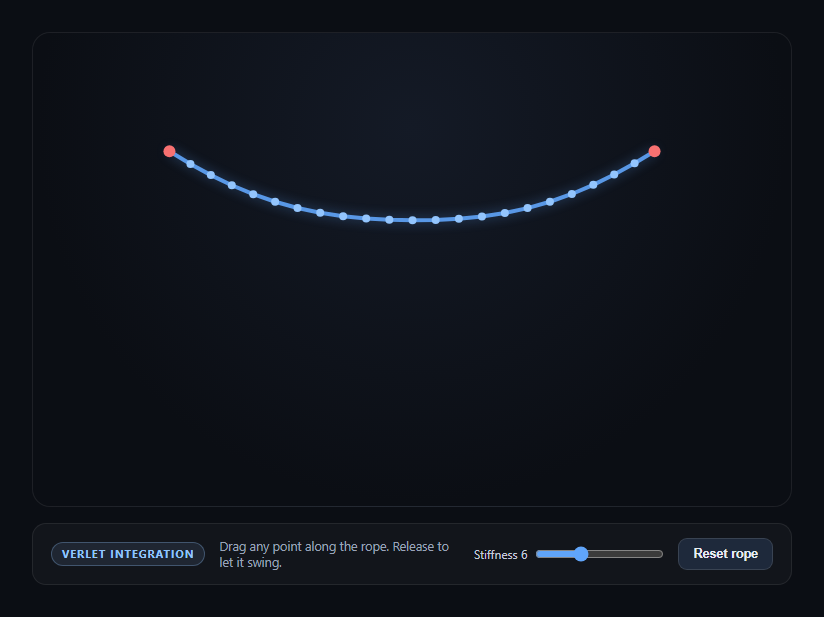
This snippet simulates a hanging, draggable rope entirely with the Canvas 2D API and a from-scratch implementation of Verlet integration — the same class of technique used in cloth and rope simulations in games, minus any external physics engine.
Position-based dynamics instead of force-based velocity
Each rope point stores its current position and its *previous* position, not an explicit velocity. Every frame, updatePoints() computes an implicit velocity as (x - px), applies friction to it, and projects the point forward by that amount plus gravity. This is Verlet integration: it's numerically stable and trivially easy to constrain, which is exactly why it's the standard technique for rope, cloth, and soft-body demos rather than a spring-force model.
Stiffness comes from iteration count, not a spring constant
Every stick between two adjacent points is a rigid-distance constraint: satisfyConstraints() measures the current distance between its two points, compares it to the stick's rest length, and nudges both points toward the correct separation. Running that correction pass multiple times per frame — controlled by the Stiffness slider, which maps directly to iteration count — is what makes the rope feel taut rather than stretchy. Few iterations produce a soft, elastic-feeling rope; many iterations converge closer to a rigid rope, all using the exact same constraint code.
Pinned points versus free points
The first and last points are flagged pinned and are skipped in both the integration and constraint-correction steps, anchoring the rope's ends in place while every interior point is free to swing under gravity and be pulled taut by its neighbors.
Dragging without breaking the simulation
While a point is being dragged, it's flagged dragging and both its position and previous position are set to the pointer position every move event — this is what prevents the rope from "flinging" the point once you release it, since with matching previous/current positions its implicit velocity is zero at release.
Pair this with canvas fireworks physics or canvas metaball blobs for other from-scratch canvas physics demos.
Build with AI
Build, Understand, Optimize, and Extend It With AI
Paste this snippet's HTML, CSS, and JS into an AI coding assistant like Claude and ask it to explain why Verlet integration stores previous position instead of velocity, and how that choice makes the iterative constraint solver in satisfyConstraints() so simple compared to a force-based spring model. It's a great snippet to extend with an assistant — ask for a version with wind (a sideways force applied per frame), multiple independent ropes connected at a shared pin, or a cloth grid built from the same points/sticks pattern generalized to two dimensions. You can also ask it to explain the floor-collision clamp and how you'd replace it with collision against an arbitrary shape.
Prompt to recreate it
Copy this into your AI assistant of choice to build the effect from scratch, or as a jumping-off point for your own variant:
Build a "rope physics" toy in plain HTML, CSS, and JavaScript using only the Canvas 2D API and hand-rolled Verlet integration — no physics or animation library.

Requirements:
- A rope made of a fixed number of connected points (e.g. 22 segments), rendered as a smooth glowing line with small circles at each joint. The first and last points are pinned in fixed positions; every other point is free.
- Each point stores its current x/y position and its previous x/y position instead of an explicit velocity. Each frame, derive an implicit velocity as (current - previous), apply a friction multiplier just under 1, then advance the point's position by that damped velocity plus a constant downward gravity value.
- Model each connection between adjacent points as a rigid distance ("stick") constraint with a fixed rest length. Implement an iterative constraint-solving pass that, for every stick, measures the current distance between its two points, compares it to the rest length, and moves both points proportionally toward the correct separation (skipping pinned or actively-dragged points). Run this pass multiple times per frame — expose the iteration count as a "stiffness" slider so the user can see the rope go from stretchy/elastic at low iteration counts to taut/rigid at high counts.
- Support dragging: on pointer down, find the nearest rope point within a small radius (excluding pinned points) and mark it as dragging; on pointer move, set both its current AND previous position to the pointer position (so it has zero implicit velocity and doesn't fling on release); on release, clear the dragging flag so gravity and constraints take back over.
- Clamp any point's y position so it can't fall through the bottom of the canvas.
- Support both mouse and touch input, handle window resize by rebuilding the rope, and scale for devicePixelRatio so rendering stays crisp on high-DPI screens.
Want to tighten it up first? Run this prompt through the AI Prompt Studio to score it across 8 quality dimensions, catch anti-patterns, and tune the wording for Claude, ChatGPT, or Gemini before you paste it in.
Step by step
How to Use
- 1Paste HTML, CSS, and JSA rope renders, pinned at both ends, sagging under gravity.
- 2Drag any pointClick or touch near a rope segment and drag it around.
- 3ReleaseThe point swings freely, pulled taut by its neighboring constraints.
- 4Adjust stiffnessThe slider changes constraint-solving iterations per frame.
- 5Low stiffnessThe rope feels soft and elastic, stretching visibly.
- 6High stiffnessThe rope feels closer to rigid, holding its length tightly.
- 7ResetThe Reset rope button rebuilds the simulation from scratch.
Real-world uses
Common Use Cases
Got questions?
Frequently Asked Questions
Verlet integration derives velocity implicitly from the difference between a point's current and previous position, rather than storing velocity as its own variable. It is numerically stable and makes distance constraints trivial to apply directly to position, which is why it is the standard technique behind most rope and cloth simulations rather than a force-and-velocity spring model.
It changes how many times per frame the distance-constraint correction pass runs over every stick in the rope. Each pass nudges connected points toward the correct rest length; running it once produces a soft, stretchy rope, while running it many times converges the rope's segments closer to their exact rest length, reading as stiffer and more rope-like.
The first and last points are flagged pinned and are explicitly skipped in both the position-update step and the constraint-correction step. Every other point in the rope is fully free to move, so gravity and dragging only ever affect the interior of the rope, exactly like a rope hung between two fixed hooks.
While dragging, both the point's current position and its previous position are set to the pointer's position on every move event. Since Verlet's implicit velocity is the difference between those two values, keeping them equal means the point has zero velocity at the moment of release, so it starts swinging from rest instead of inheriting a large flick velocity.
Yes — the underlying technique is the same. Extend the points array into a 2D grid instead of a line, add horizontal, vertical, and optionally diagonal stick constraints between neighboring grid points, and pin whichever row or points you want fixed. The integration and constraint-solving functions need no changes; only the topology of points and sticks differs between a rope and a cloth.