You Might Also Like
Learn Coding Visually
Learn to code with interactive, live-preview playgrounds — HTML, CSS, JavaScript, React & more.
 HTML Playground42 lessons · Click-based · Live preview
 CSS PlaygroundLearn CSS with a live editor
 JavaScript Playground60 lessons · DOM · Async · Canvas
 React PlaygroundLearn React with a live code editor
 GSAP PlaygroundLearn GSAP animation interactively
 SVG Playground44 lessons · shapes · paths · animation
 SCSS Playground45 lessons · Sass modules · tokens
 Tailwind PlaygroundLearn Tailwind CSS with a live editor
 Bootstrap 5 Playground50 lessons · live preview
Canvas Water Ripple Simulation — Free Wave-Equation Physics Snippet
Canvas Water Ripple Simulation · Animations · Plain HTML, CSS & JS · Live preview
What's included
Features
About this UI Snippet
Canvas Water Ripple Simulation — A Real Finite-Difference Wave Equation
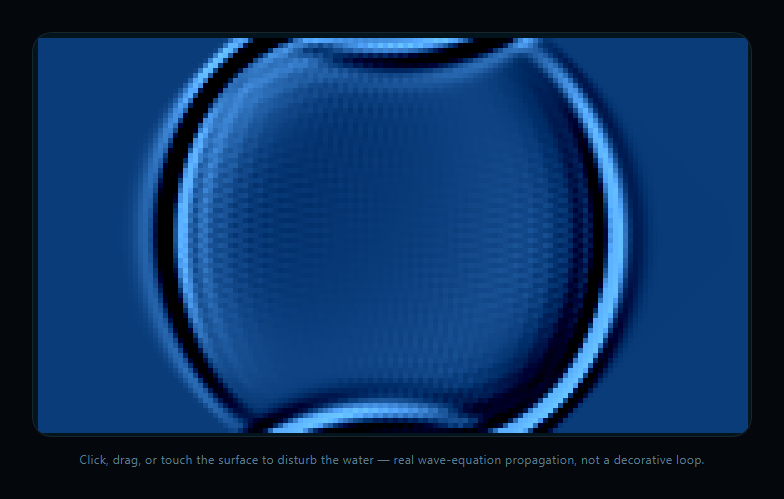
Most "ripple" web effects are an expanding circle with fading opacity — a fake that looks fine for one ripple but can't handle interference between multiple overlapping ripples. This snippet instead simulates an actual discretized wave equation on a height-field grid, so overlapping ripples genuinely interfere, reflect, and combine the way real water does.
Two height buffers, stepped with a discrete Laplacian
The water surface is represented as two Float32Array grids — current and previous — one cell per small block of the canvas. Every frame, stepWave() computes each interior cell's new height from the average of its four neighbors in the previous frame, combined with the cell's own prior value and a damping factor. This is the standard finite-difference discretization of the 2D wave equation (∂²h/∂t² = c²∇²h), the same family of numerical method used in real fluid and acoustic simulations — just simplified to keep it fast enough for real-time canvas rendering.
Damping bleeds off energy so ripples settle
Without damping, a disturbed wave equation grid oscillates forever, accumulating numerical noise. Multiplying every cell's new value by a DAMPING constant just under 1 each step causes ripples to visibly lose energy and flatten out over time — exactly like real water settling back to stillness after a splash, rather than an animation that has to be manually faded or timed out.
Disturbances are radius-falloff nudges to the height field
Clicking, dragging, or touching the canvas calls disturb(), which adds a positive value to a small neighborhood of grid cells around the pointer, weighted by distance from center — a soft "poke" rather than a hard single-cell spike. Because this nudge feeds directly into the same simulation grid the wave equation steps forward, every disturbance genuinely propagates outward and interacts with any other disturbances already rippling across the surface.
Rendering treats the height gradient as a light-bending surface
Rather than mapping height directly to a color, render() computes the local height gradient between each cell and its horizontal/vertical neighbors and uses that gradient to brighten or darken the base water color — approximating how a real water surface refracts light depending on its local slope. That gradient-based shading, not the raw height value, is what makes the ripples look like they have real depth and caustic-like glints instead of a flat contour map.
Compare with canvas fluid cursor trail, which fakes an organic look with blended gradients rather than solving an actual PDE on a grid.
Build with AI
Build, Understand, Optimize, and Extend It With AI
Paste this snippet's HTML, CSS, and JS into an AI coding assistant like Claude and ask it to explain how the discrete Laplacian in stepWave() approximates the real wave equation, why damping is necessary for the simulation to look physically plausible rather than oscillating forever, and how the gradient-based shading in render() turns raw height values into a convincing sense of light and depth. It's a great snippet to extend with an assistant — ask for reflective "walls" at the canvas edges instead of open boundaries, a version with a fixed obstacle in the middle of the pool that waves bounce off of, or moving the simulation step into a WebGL fragment shader for much higher resolution at the same frame rate.
Prompt to recreate it
Copy this into your AI assistant of choice to build the effect from scratch, or as a jumping-off point for your own variant:
Build an interactive "water ripple simulation" in plain HTML, CSS, and JavaScript using only the Canvas 2D API, manual ImageData rendering, and a hand-rolled discretized 2D wave equation — no physics or fluid-simulation library.

Requirements:
- Represent the water surface as two same-sized Float32Array grids ("current" and "previous" height fields), one value per grid cell, where the grid is coarser than actual device pixels (e.g. a 4-6px cell size scaled by devicePixelRatio) for performance.
- Implement a wave-equation simulation step that runs every animation frame: for every interior grid cell, compute a new height as approximately the average of its four immediate neighbors' previous heights combined with the cell's own prior value, then multiply the result by a damping constant just under 1 (e.g. 0.986) so energy dissipates over time and the surface naturally settles back toward flat rather than oscillating forever. Swap the two buffers (or otherwise rotate frame history) each step rather than allocating new arrays.
- Implement a disturb(x, y, strength) function that adds a positive value to a small neighborhood of grid cells around a given canvas position, weighted by distance from the center (a soft radius falloff, not a single-cell spike), directly into the height field the simulation reads from.
- Wire disturb() to mousedown/mousemove-while-dragging and touchstart/touchmove events so clicking, dragging, and touching the canvas injects ripples that propagate outward and interfere with any other ripples already active on the shared grid. Also fire an occasional random ambient disturbance (e.g. roughly every 2 seconds) when the surface would otherwise sit idle.
- Render the height field every frame by computing, for each grid cell, the height difference to its horizontal and vertical neighbors (an approximate surface gradient/slope), and use that gradient — not the raw height value — to brighten or darken a base water color before writing the result into an ImageData buffer as a block of pixels per cell, simulating how a real water surface refracts light depending on local slope. Push the buffer to the canvas with putImageData once per frame.
- Handle window resize by reallocating the grid and ImageData buffer at the new dimensions, and support both mouse and touch input throughout.
Want to tighten it up first? Run this prompt through the AI Prompt Studio to score it across 8 quality dimensions, catch anti-patterns, and tune the wording for Claude, ChatGPT, or Gemini before you paste it in.
Step by step
How to Use
- 1Paste HTML, CSS, and JSA still water surface renders with a gentle initial ripple.
- 2Click or touch the surfaceA disturbance is injected and propagates outward as real waves.
- 3Drag across the surfaceA continuous trail of overlapping ripples spreads and interferes.
- 4Watch multiple ripples meetOverlapping waves genuinely combine, not just visually overlap.
- 5Wait and observeDamping settles the surface back to stillness over a few seconds.
- 6Occasional auto-dropsA random ambient disturbance fires periodically if left alone.
Real-world uses
Common Use Cases
Got questions?
Frequently Asked Questions
A typical ripple effect draws an expanding, fading circle per click — it looks fine in isolation but has no real physical model, so multiple overlapping ripples just draw on top of each other rather than genuinely interacting. This snippet instead solves a discretized 2D wave equation on a height-field grid every frame, so multiple disturbances physically add together, interfere, and propagate exactly like real overlapping water waves.
Every interior grid cell's new height is computed as roughly the average of its four immediate neighbors' previous heights, combined with the cell's own prior value, then scaled by a damping factor just under 1. This is a standard finite-difference discretization of the wave equation (∂²h/∂t² proportional to the Laplacian of height) — the same family of numerical technique used in real fluid, acoustic, and seismic simulations, simplified enough to run at 60fps in plain JavaScript.
Every simulation step multiplies each cell's new value by a DAMPING constant just under 1 (0.986). Applied every frame across the whole grid, that small per-step energy loss compounds until the surface flattens back toward zero, which is what makes the water visibly settle to stillness after a disturbance rather than oscillating indefinitely — matching how energy dissipates in a real water surface through friction and viscosity.
Instead of mapping each cell\'s raw height to a color, render() computes the difference in height between each cell and its horizontal and vertical neighbors — an approximation of the local surface slope — and uses that gradient to brighten or darken the base water color. Sloped regions (the sides of a ripple) render lighter or darker than flat regions, approximating how a real water surface refracts and reflects light differently depending on its local angle, which is what gives the simulation a sense of physical depth rather than looking like a flat contour map.
The grid resolution (cellSize) directly trades detail for performance, since the simulation and render cost both scale with the number of grid cells. For a larger or higher-resolution surface, you would either increase cellSize\'s divisor for a bigger grid (at a performance cost you would need to test), move the simulation step into a Web Worker or WebGL shader to parallelize it, or reduce simulation resolution while still rendering at a higher visual resolution via interpolation between grid cells.