You Might Also Like
Learn Coding Visually
Learn to code with interactive, live-preview playgrounds — HTML, CSS, JavaScript, React & more.
 HTML Playground42 lessons · Click-based · Live preview
 CSS PlaygroundLearn CSS with a live editor
 JavaScript Playground60 lessons · DOM · Async · Canvas
 React PlaygroundLearn React with a live code editor
 GSAP PlaygroundLearn GSAP animation interactively
 SVG Playground44 lessons · shapes · paths · animation
 SCSS Playground45 lessons · Sass modules · tokens
 Tailwind PlaygroundLearn Tailwind CSS with a live editor
 Bootstrap 5 Playground50 lessons · live preview
Canvas Metaball Blobs — Free Organic Merging Blob Field Snippet
Canvas Metaball Blobs · Animations · Plain HTML, CSS & JS · Live preview
What's included
Features
About this UI Snippet
Canvas Metaball Blobs — A Scalar Field Rendered Pixel by Pixel
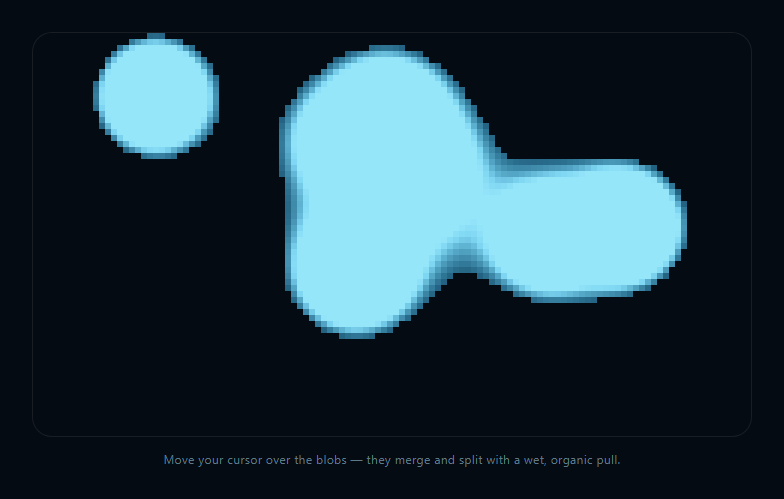
Metaballs are a classic technique for organic, liquid-looking shapes: instead of drawing each blob as an independent circle, every blob contributes an influence value to a shared scalar field, and the final shape is wherever that combined field crosses a threshold. This snippet implements that from scratch against ImageData, with no WebGL and no shader.
Inverse-square influence, summed per sample point
For every point on a coarse sampling grid, render() sums each ball's contribution as radius^2 / distance^2 — an inverse-square falloff, the same shape used for gravitational and electrostatic fields. A point close to one ball has a huge value from that ball alone; a point roughly equidistant between two nearby balls gets meaningful contributions from both, which is exactly what causes their fields to visually fuse into a single connected shape as they approach each other.
A grid, not per-pixel, for performance
Sampling every single device pixel with a per-ball inverse-square calculation would be far too slow at 60fps. Instead the field is computed on a coarse grid (cell px per sample) and each grid cell is filled as a small flat-colored block in ImageData — a deliberate resolution trade-off that keeps the blob edges looking soft rather than pixelated, without paying per-pixel field-evaluation cost.
Threshold and edge glow
A field value below 1.0 is treated as empty space and skipped entirely. Just above threshold, edge ramps from 0 to 1 over a narrow band, brightening the color near a blob's boundary — this soft threshold band is what gives the merged shapes a glowing, liquid rim instead of a flat silhouette.
Cursor as a soft attractor
Rather than the cursor pushing blobs away, updateBalls() nudges each ball's velocity toward the pointer when it's within 220px, with the pull strength independent of distance beyond normalizing the direction vector — a gentle, constant tug rather than an inverse-square force, which reads as playful rather than physically simulated.
Compare with canvas fluid cursor trail, which uses additive-blended gradients for a different kind of organic look without a scalar field.
Build with AI
Build, Understand, Optimize, and Extend It With AI
Paste this snippet's HTML, CSS, and JS into an AI coding assistant like Claude and ask it to explain why summing an inverse-square influence value per ball, per sample point, is what makes overlapping blobs visually fuse rather than simply overlap like transparent circles — and why the field is sampled on a coarse grid instead of per device pixel. It's a great snippet to extend with an assistant — ask for a marching-squares contour pass for smooth vector edges instead of blocky grid cells, a version where blobs repel instead of attract near the cursor, or a version that renders the field as an actual gradient-shaded surface instead of flat-colored cells for a glossier look.
Prompt to recreate it
Copy this into your AI assistant of choice to build the effect from scratch, or as a jumping-off point for your own variant:
Build an interactive "metaball blobs" effect in plain HTML, CSS, and JavaScript using only the Canvas 2D API and manual ImageData manipulation — no WebGL, no shaders, no external library.

Requirements:
- A full-panel canvas containing several (e.g. 7) circular "balls," each with its own position, velocity, radius, and drifting motion that bounces off the canvas edges with slight velocity damping.
- Implement a true metaball scalar field: on a coarse sampling grid (not every device pixel — e.g. every 6 CSS pixels, scaled by devicePixelRatio), compute for every grid cell the sum, over all balls, of (ball radius squared) divided by (squared distance from the sample point to that ball's center) — an inverse-square falloff. This sum is the field value at that point.
- Render the field into an ImageData buffer directly: for every grid cell whose summed field value is below a threshold (e.g. 1.0), leave it transparent/empty; for cells above threshold, fill that cell's block of pixels with a color, and add a brightness ramp for field values just above the threshold so blob edges get a soft glowing rim rather than a flat cutoff. Push the buffer to the canvas with putImageData once per frame.
- Do NOT implement merging as a special case — it must emerge naturally from two nearby balls' fields overlapping and their summed value crossing the threshold across a wider connected region.
- Track the pointer (mouse and touch) and, for any ball within a fixed radius (e.g. 220px) of the pointer, nudge that ball's velocity a small constant amount toward the pointer's direction each frame, creating a gentle organic "pull" toward the cursor without a physically accurate inverse-square attraction force.
- Handle window resize by recomputing the sampling grid dimensions and reallocating the ImageData buffer, and scale for devicePixelRatio so the field renders crisply on high-DPI screens.
Want to tighten it up first? Run this prompt through the AI Prompt Studio to score it across 8 quality dimensions, catch anti-patterns, and tune the wording for Claude, ChatGPT, or Gemini before you paste it in.
Step by step
How to Use
- 1Paste HTML, CSS, and JSSeven drifting blobs render and begin merging and separating.
- 2Move the cursor over the canvasNearby blobs are gently pulled toward the pointer.
- 3Watch blobs approach each otherTheir fields fuse into one connected, glowing shape.
- 4Watch blobs separateThe merged shape splits back into distinct blobs.
- 5Leave the canvasBlobs drift and bounce off the edges undisturbed.
- 6Resize the windowThe sampling grid and canvas rebuild to fit.
- 7Tune itAdjust NUM_BALLS, cell size, or the threshold for a different look.
Real-world uses
Common Use Cases
Got questions?
Frequently Asked Questions
A metaball is one contributor to a shared scalar field rather than an independently drawn shape. Each ball adds an inverse-square-falloff value (radius squared over distance squared) to every point in space; the rendered shape is wherever the summed field from all balls crosses a chosen threshold, which is why overlapping influence fields visually fuse into one connected blob instead of drawing as separate overlapping circles.
Evaluating the field (a loop over every ball) at every single device pixel at 60fps would be far too expensive for a full canvas. Instead the field is sampled on a coarser grid (6px cells by default) and each cell is filled as a small flat block, trading a small amount of edge smoothness for a rendering cost low enough to sustain real-time animation.
No special-case merge logic exists at all. As two blobs move closer, the sample points between them receive growing contributions from both balls' fields simultaneously, pushing the combined value above the 1.0 threshold across a wider area. The connected region that results is a direct, automatic consequence of summing two influence fields — not a separate shape-blending step.
updateBalls() checks the distance from each ball to the pointer and, when within 220px, nudges the ball's velocity toward the pointer's direction by a small constant amount. That constant (non-inverse-square) pull was chosen deliberately over a physically accurate force falloff because it reads as a gentle, playful "wet pull" rather than a sharp snap toward the cursor.
Yes — reduce the cell size for finer sampling (at a performance cost), or keep the coarse grid but run marching-squares contour extraction on the field values to generate an actual smooth vector outline you stroke/fill instead of coloring flat blocks. The field-computation logic in render() stays identical either way; only how you turn field values into pixels changes.