You Might Also Like
Learn Coding Visually
Learn to code with interactive, live-preview playgrounds — HTML, CSS, JavaScript, React & more.
 HTML Playground42 lessons · Click-based · Live preview
 CSS PlaygroundLearn CSS with a live editor
 JavaScript Playground60 lessons · DOM · Async · Canvas
 React PlaygroundLearn React with a live code editor
 GSAP PlaygroundLearn GSAP animation interactively
 SVG Playground44 lessons · shapes · paths · animation
 SCSS Playground45 lessons · Sass modules · tokens
 Tailwind PlaygroundLearn Tailwind CSS with a live editor
 Bootstrap 5 Playground50 lessons · live preview
Document E-Signature Flow — Free Canvas Signature Pad + Sign Flow
Document E-Signature Flow · Forms · Plain HTML, CSS & JS · Live preview
What's included
Features
About this UI Snippet
Document E-Signature Flow — Real Freehand Signing, Start to Confirmation
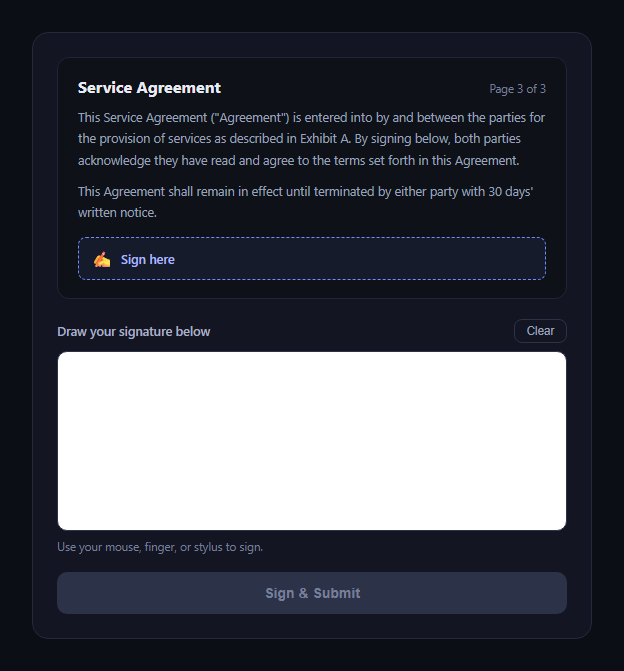
The document e-signature flow is the pattern behind every "sign this contract in your browser" experience: a document preview with a marked signing location, a pad to actually draw a signature, and a confirmation once it's submitted. This snippet implements genuine freehand drawing with the Canvas 2D API and Pointer Events — not a placeholder image or a typed-name stand-in.
A document preview with a clear signing target
The top of the card shows a mock agreement excerpt with a dashed "Sign here" marker, so the pad below has visible context for what it's attached to — mirroring how real e-signature tools (like DocuSign) anchor a signature to a specific spot in a document.
Real strokes via Pointer Events
The pad listens for pointerdown, pointermove, and pointerup (plus pointercancel/pointerleave for robustness) rather than separate mouse and touch handlers — Pointer Events unify mouse, touch, and stylus input into one API, and canvas.setPointerCapture(e.pointerId) keeps the stroke tracking even if the pointer briefly leaves the canvas bounds mid-drag.
Coordinate mapping, not just raw pixels
getCanvasPoint() converts a pointer's clientX/clientY into the canvas's internal coordinate space by scaling against canvas.getBoundingClientRect() — necessary because the canvas's CSS display size (width: 100%) and its internal drawing resolution (width="600" height="180") aren't the same, and drawing without this conversion would misalign the ink from the cursor on any non-1:1 scaling.
Segment-by-segment stroke drawing
Each pointermove draws a line segment from the last recorded point to the current one (ctx.moveTo → ctx.lineTo → ctx.stroke()) with round line caps and joins, which is what produces a smooth continuous signature rather than disconnected dots.
Submit disabled until something is actually drawn
hasDrawn only flips true on the first real stroke segment, and the Sign & Submit button stays disabled until then — so an empty signature can't be submitted. Clear resets both the canvas pixels and this flag together.
A real captured image in the confirmation
On submit, canvas.toDataURL('image/png') captures the actual drawn strokes as a PNG data URL and displays it in the confirmation view alongside a formatted timestamp — so what's shown afterward is the literal signature the user drew, not a mock.
Customizing it
Change stroke color/width, add a typed-name fallback for accessibility, or send the toDataURL() output to a real document-signing backend instead of just displaying it. Pair it with signature pad or terms acceptance checkbox as a pre-step.
Build with AI
Build, Understand, Optimize, and Extend It With AI
Paste this snippet's HTML, CSS, and JS into an AI coding assistant like Claude and ask it to explain why getCanvasPoint() maps clientX/clientY through getBoundingClientRect() and a scale factor instead of using the raw pointer coordinates directly, and why Pointer Events with setPointerCapture are the right choice over separate mouse/touch handlers for a signature pad. It can help you add signature smoothing (e.g. quadratic curve interpolation between points for a less jagged line), support multiple document pages with a signature required on each, or wire the toDataURL() output to a real signing backend with proper consent logging alongside the timestamp.
Prompt to recreate it
Copy this into your AI assistant of choice to build the effect from scratch, or as a jumping-off point for your own variant:
Build a "document e-signature flow" in plain HTML, CSS, and JavaScript (no dependencies).

Requirements:
- A document preview area showing a short mock agreement excerpt with a visually distinct "Sign here" marker indicating where the signature applies.
- A REAL freehand signature pad implemented with an HTML5 <canvas> element and the Canvas 2D drawing API, driven by pointerdown/pointermove/pointerup (and pointercancel/pointerleave for robustness) Pointer Events — not mouse-only events, not a static placeholder image, and not a typed-name substitute.
- Correctly map pointer client coordinates into the canvas's internal drawing coordinate space (accounting for the canvas's CSS display size potentially differing from its width/height attributes) so strokes align precisely under the cursor/finger/stylus at any scale.
- Use canvas.setPointerCapture on pointerdown so a stroke keeps tracking smoothly even during a fast drag near the canvas edge.
- A Clear button that resets the canvas pixels and any "has the user drawn something" state together.
- A "Sign & Submit" button that stays disabled until at least one real stroke has been drawn (guard against submitting an empty signature), and on click captures the canvas content via toDataURL('image/png'), then transitions to a confirmation view showing that captured image and a real formatted timestamp (e.g. via toLocaleString) of when it was signed.
- A way to return to the signing view and sign again, resetting the canvas and button state cleanly.
Want to tighten it up first? Run this prompt through the AI Prompt Studio to score it across 8 quality dimensions, catch anti-patterns, and tune the wording for Claude, ChatGPT, or Gemini before you paste it in.
Step by step
How to Use
- 1Paste HTML, CSS, and JSThe document preview and empty pad render.
- 2Draw on the padMouse, touch, or stylus — pointer events handle all.
- 3Clear if neededResets the canvas and disables Submit again.
- 4Click "Sign & Submit"Enabled only once a real stroke was drawn.
- 5View the confirmationThe captured PNG and a real timestamp appear.
- 6Sign another documentResets the pad and returns to the sign view.
Real-world uses
Common Use Cases
Got questions?
Frequently Asked Questions
It's real freehand drawing on an HTML5 canvas using pointerdown/pointermove/pointerup events. Every stroke you see is drawn segment-by-segment as the pointer moves, captured with canvas.toDataURL('image/png') on submit — there's no placeholder image involved.
Pointer Events (pointerdown/pointermove/pointerup/pointercancel) unify mouse, touch, and stylus input into a single API, so one set of handlers works across input types without duplicating logic for MouseEvent and TouchEvent separately. setPointerCapture also keeps a stroke tracking smoothly even if the pointer moves faster than the canvas bounds during a fast drag.
The canvas has a CSS display size (width: 100% of its container) that can differ from its internal drawing resolution (width="600" height="180"). getCanvasPoint() scales clientX/clientY from getBoundingClientRect() into the canvas's actual coordinate space, so the ink lands exactly under the cursor regardless of how the canvas is scaled by CSS.
No — hasDrawn only becomes true the first time a real stroke segment is drawn, and Sign & Submit stays disabled until then. Clicking Clear resets both the canvas and hasDrawn together, re-disabling the button.
In the submit handler, instead of (or in addition to) setting signedImg.src to the toDataURL() output, POST that data URL (or convert it to a Blob first) to your document-signing API along with the document ID and signer identity, then update the confirmation view once the server confirms it was recorded.