You Might Also Like
Learn Coding Visually
Learn to code with interactive, live-preview playgrounds — HTML, CSS, JavaScript, React & more.
 HTML Playground42 lessons · Click-based · Live preview
 CSS PlaygroundLearn CSS with a live editor
 JavaScript Playground60 lessons · DOM · Async · Canvas
 React PlaygroundLearn React with a live code editor
 GSAP PlaygroundLearn GSAP animation interactively
 SVG Playground44 lessons · shapes · paths · animation
 SCSS Playground45 lessons · Sass modules · tokens
 Tailwind PlaygroundLearn Tailwind CSS with a live editor
 Bootstrap 5 Playground50 lessons · live preview
One-Time vs Monthly Donation Toggle — Recurring Gift Form HTML CSS JS
One-Time vs Monthly Donation Toggle · Forms · Plain HTML, CSS & JS · Live preview
What's included
Features
About this UI Snippet
One-Time vs Monthly Donation Toggle — Presets and Framing That Adapt to Frequency
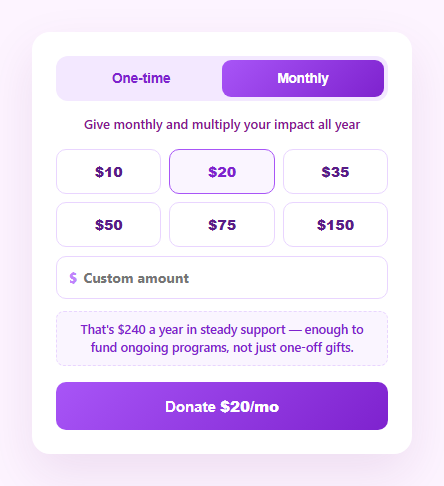
Recurring donors are worth dramatically more to a nonprofit than one-time givers, but most donation forms treat "monthly" as an afterthought checkbox next to the real decision. This snippet flips that: a sliding pill toggle switches the entire form's context — different preset amounts, different framing copy, and a live annual-impact number — so monthly giving feels like the natural default rather than an upsell.
Two preset ladders, not one
A one-time gift and a monthly gift at the same dollar figure mean very different things, so this form uses separate preset arrays: PRESETS_ONCE runs $25–$1,000, while PRESETS_MONTHLY runs $10–$150 — smaller numbers that feel sustainable as an ongoing commitment. Switching frequency swaps the whole grid and lands on a sensible mid-range default rather than leaving a now-irrelevant amount selected.
Framing copy that matches the commitment
Above the amounts, a single line of copy changes with the toggle — "Give monthly and multiply your impact all year" versus "Every one-time gift helps right now" — reinforcing why someone would pick each option rather than just labeling it.
The annual-impact number is the real payoff
The centerpiece is the box below the custom field: for monthly giving, it recalculates amount × 12 live as you change the amount, turning an abstract "$20/month" into a concrete "$240 a year in steady support." That reframing is one of the most effective levers in recurring-gift design — donors chronically underestimate their own annual commitment until it's spelled out, and seeing the yearly total tends to *increase* completions rather than scare people off, because it makes the value of sustained giving tangible.
Mutually exclusive presets and custom field
As in a standard amount picker, a custom boolean keeps the preset grid and the custom input from both appearing selected — picking a preset clears the custom field, typing in the custom field deselects every preset — and the annual-impact math runs off whichever is currently the source of truth, custom values included.
One sync(), every visual consistent
The toggle thumb position, active preset, framing copy, annual-impact text, and submit button label are all derived inside a single sync() call from three plain variables: freq, amount, and custom. Nothing can drift out of sync because nothing is set directly outside that function.
Customizing it
Tune both preset ladders to your donor base, adjust the annual-impact copy, or add a second framing line about compounding impact. Pair it with a donation thermometer to show campaign progress, or a progress bar for a goal tracker.
Build with AI
Build, Understand, Optimize, and Extend It With AI
Rather than tracing the frequency-dependent state by hand, paste this snippet's HTML, CSS, and JS into an AI coding assistant like Claude and ask it to explain exactly how switching the toggle swaps both the preset amount array and the framing copy from the same freq variable, and why the annual-impact calculation only appears for the monthly path. The same assistant can help optimize it — for example asking whether the smart default (landing on the second preset after a frequency switch) is the right choice versus remembering the last amount per frequency. It's also useful for extending the form: ask it to add a "how many people you'll help" impact translation like the donation-amount-picker snippet, a subtle incentive badge for monthly givers, or per-frequency validation minimums. Treat the code less like a finished artifact and more like a starting point for a conversation.
Prompt to recreate it
Copy this into your AI assistant of choice to build the effect from scratch, or as a jumping-off point for your own variant:
Build a "one-time vs monthly" donation frequency toggle form in plain HTML, CSS, and JavaScript with no library.

Requirements:
- A sliding pill-style toggle with two buttons (One-time, Monthly) where an absolutely positioned thumb element visually slides behind the active button using a CSS transform transition, and the buttons' text color changes to reflect which is active.
- Two separate arrays of preset dollar amounts, one for one-time gifts (larger figures) and one for monthly gifts (smaller, sustainable figures), where switching the toggle regenerates the preset button grid from the array matching the newly selected frequency and resets the selection to a sensible default from that new array.
- A line of framing copy above the amounts that changes text depending on the selected frequency (for example emphasizing sustained impact for monthly versus immediate impact for one-time).
- A custom amount input that behaves as the mutually exclusive alternative to the preset buttons (a single boolean flag tracks which is the active source, matching a standard preset/custom pattern), whose value participates in all the same calculations as a selected preset.
- A live "annual impact" display that, only when the Monthly frequency is selected, multiplies the current amount by 12 and displays it as a concrete yearly total, recalculating instantly as the amount changes via either presets or the custom field; when One-time is selected this area instead shows a simple one-line acknowledgment of the single gift.
- A single synchronization function that is the only place allowed to update the DOM, deriving the toggle thumb position, active preset highlighting, framing copy, annual-impact text, and the submit button's displayed amount-and-frequency label purely from the current frequency, amount, and custom-flag state.
Want to tighten it up first? Run this prompt through the AI Prompt Studio to score it across 8 quality dimensions, catch anti-patterns, and tune the wording for Claude, ChatGPT, or Gemini before you paste it in.
Step by step
How to Use
- 1Paste HTML, CSS, and JSA donation form loads with Monthly selected and $20/mo as the default.
- 2Toggle to One-timeThe thumb slides, presets swap to larger one-time amounts, and framing copy changes.
- 3Pick a preset or type a custom amountThe submit button and annual-impact box update live.
- 4Toggle back to MonthlyWatch the annual-impact figure recalculate as amount × 12.
- 5Tune PRESETS_ONCE and PRESETS_MONTHLYSet amount ladders that fit your donor base for each frequency.
- 6Wire the submit handlerReplace the demo confirmation with your payment processor call.
Real-world uses
Common Use Cases
Got questions?
Frequently Asked Questions
A one-time gift and a recurring monthly gift at the same number mean very different commitments, so anchoring donors with the same ladder for both undersells monthly giving or oversells one-time giving. PRESETS_MONTHLY uses smaller, sustainable-feeling numbers ($10–$150) while PRESETS_ONCE uses larger one-off amounts ($25–$1,000), so each ladder anchors appropriately for its context.
It is simply the current monthly amount multiplied by 12, recalculated on every sync() call — so it updates live whether the amount came from a preset click or typing in the custom field. This reframes an easy-to-dismiss "$20 a month" into its real yearly total, which research on recurring giving shows tends to make the commitment feel more concrete and worthwhile rather than deterring signups.
Switching frequency resets both the custom flag and the amount to the second preset in the new ladder (a moderate default), rather than keeping a now out-of-context number selected — for example switching from a $500 one-time amount to Monthly would not carry over as $500/month. The amount grid and framing copy re-render immediately.
A single custom boolean is the source of truth: clicking a preset sets it false and clears the custom input; typing in the custom field sets it true. The active class on every preset button is only applied when custom is false and its value matches amount, so exactly one input method is ever highlighted.
Hold freq, amount, and custom in component state and derive the preset list, framing copy, annual-impact text, and button label with a memoized/computed value keyed to those three. The renderAmounts() and sync() functions map directly to that derived-state pattern — only the DOM-writing lines change to framework bindings.