You Might Also Like
Learn Coding Visually
Learn to code with interactive, live-preview playgrounds — HTML, CSS, JavaScript, React & more.
 HTML Playground42 lessons · Click-based · Live preview
 CSS PlaygroundLearn CSS with a live editor
 JavaScript Playground60 lessons · DOM · Async · Canvas
 React PlaygroundLearn React with a live code editor
 GSAP PlaygroundLearn GSAP animation interactively
 SVG Playground44 lessons · shapes · paths · animation
 SCSS Playground45 lessons · Sass modules · tokens
 Tailwind PlaygroundLearn Tailwind CSS with a live editor
 Bootstrap 5 Playground50 lessons · live preview
Petition Signature Counter — Live Count-Up Signature Widget HTML CSS JS
Petition Signature Counter · Dashboards · Plain HTML, CSS & JS · Live preview
What's included
Features
About this UI Snippet
Petition Signature Counter — A Count-Up Signature Widget With a Sign Form
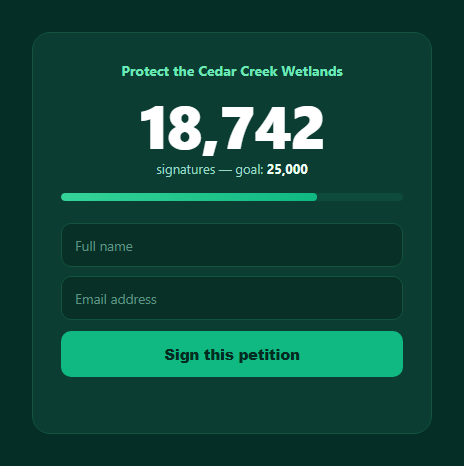
A petition page lives or dies on momentum — a big, satisfying counter that visibly climbs when someone signs does more to encourage the next signature than any amount of persuasive copy. This snippet builds that: a large tabular-number counter, a name-and-email sign form, and a progress bar toward a stated goal, all in plain HTML, CSS, and vanilla JavaScript.
A real count-up, not an instant jump
The core interaction detail is that signing doesn't just set textContent to the new number — it runs countUp(), a requestAnimationFrame loop that eases from the old count to the new one over 900ms using a cubic ease-out. Even though a single signature only moves the number by one, the animated climb (paired with font-variant-numeric: tabular-nums so digits don't jitter sideways) is what makes the moment feel rewarding rather than a flat form-submit confirmation. For a reusable version of this pattern by itself, see count-up.
Goal-relative progress bar
Beneath the counter, a thin bar fills to count / GOAL, giving a second, complementary signal to the raw number — useful once a petition is past the point where the count alone is legible at a glance (25,000 versus 25,001 doesn't visually register, but a bar creeping toward full does).
A form that commits before it counts
Signing requires a name and email, validated with the browser's native required attributes plus a JS guard, before the counter increments — so the animation only fires on a genuine submission, and the confirmation message personalizes with the signer's first name. After signing, the form disables and the button locks to "Signed ✓" so a signer can't accidentally double-submit and inflate the count.
Accessible confirmation
The confirmation line carries aria-live="polite", so screen reader users hear the thank-you message as soon as it appears, without needing to navigate back to find it — important since the visual counter animation itself isn't announced.
Starting from a realistic in-progress count
The demo seeds count at 18,742 rather than zero, because that's how petitions actually look when someone lands on them — mid-campaign, with visible momentum already built. Swap it for zero if you're launching fresh.
Customizing it
Swap GOAL and the starting count for your real numbers, replace the demo submit handler with a call to your petition backend, and adjust the count-up duration and easing to taste. Pair it with a progress bar or live visitor counter for a companion widget.
Build with AI
Build, Understand, Optimize, and Extend It With AI
Rather than reverse-engineering the animation timing by hand, paste this snippet's HTML, CSS, and JS into an AI coding assistant like Claude and ask it to explain exactly how the requestAnimationFrame loop in countUp() computes elapsed-time progress and applies the cubic ease-out to interpolate the displayed number, and why tabular-nums matters for a rapidly changing counter. The same assistant can help optimize it — for example asking whether 900ms is the right duration if many signatures come in close together, or how to queue multiple count-up animations without them fighting over the same DOM element. It's also useful for extending the widget: ask it to add a live polling loop that periodically fetches the real signature count from a backend and animates to it, a milestone celebration at round numbers, or social-proof text like "247 people signed in the last hour." Treat the code less like a finished artifact and more like a starting point for a conversation.
Prompt to recreate it
Copy this into your AI assistant of choice to build the effect from scratch, or as a jumping-off point for your own variant:
Build a "petition signature counter" widget in plain HTML, CSS, and JavaScript with no library.

Requirements:
- A large, prominently styled number display using font-variant-numeric: tabular-nums so digit widths stay fixed during animation, plus a thin progress bar beneath it filled to the current count divided by a stated numeric goal.
- A sign-this-petition form with required name and email inputs, validated both by native HTML required attributes and a JavaScript guard before allowing a submission to count.
- A reusable count-up function that takes a starting number, an ending number, and a duration in milliseconds, and uses requestAnimationFrame (not setInterval or an instant text swap) with an eased progress curve (for example a cubic ease-out) to animate the displayed number smoothly from start to end over that duration.
- On successful form submission, increment the total signature count by one and trigger the count-up animation from the old total to the new total, update the progress bar's width to match, disable every input plus the submit button so the same session cannot sign twice, and show a personalized confirmation message that includes the signer's first name.
- The confirmation message element must use aria-live="polite" so screen reader users are notified of the successful signature without needing to navigate to it.
- Seed the demo with a realistic in-progress starting count (not zero) and a stated goal larger than that starting count, so the progress bar shows a petition already underway.
Want to tighten it up first? Run this prompt through the AI Prompt Studio to score it across 8 quality dimensions, catch anti-patterns, and tune the wording for Claude, ChatGPT, or Gemini before you paste it in.
Step by step
How to Use
- 1Paste HTML, CSS, and JSThe counter loads at 18,742 with a filled progress bar toward the 25,000 goal.
- 2Fill in name and emailBoth fields are required before the form can submit.
- 3Click "Sign this petition"The counter animates up by one with an eased count-up, and the bar advances.
- 4Read the confirmationA personalized thank-you message appears and the form locks to prevent double-signing.
- 5Set GOAL and the starting countMatch them to your real petition's numbers.
- 6Wire the submit handlerReplace the demo logic with a real API call, then trigger countUp() on success.
Real-world uses
Common Use Cases
Got questions?
Frequently Asked Questions
countUp() runs a requestAnimationFrame loop that tracks elapsed time against a fixed duration (900ms), computes a 0-to-1 progress value, applies a cubic ease-out curve to it, and renders the interpolated number on every frame until progress reaches 1. This produces a smooth climb from the old total to the new one rather than an instant text swap, which is what makes signing feel like an event.
Most fonts render digits at slightly different widths (a "1" is narrower than an "8"), which makes a rapidly changing number visually jitter left and right as digits swap. tabular-nums forces every digit to the same fixed width, so the counter's overall width stays stable and the count-up animation reads as a smooth climb rather than a wobbling one.
After a successful submission, every input in the form is disabled and the submit button is disabled and relabeled "Signed ✓", so the same browser session cannot submit again. This is a client-side UX safeguard, not a security measure — a real petition backend should also deduplicate by email or account server-side.
Replace the body of the submit handler: instead of just incrementing the local count variable, POST the name and email to your API, and on a successful response call countUp(count, newCount, 900) with the authoritative count your backend returns (which also protects against the count drifting if multiple people sign concurrently).
Keep count in component state and trigger the requestAnimationFrame loop inside an effect/lifecycle hook whenever a new target count is set (rather than re-rendering instantly), updating a separate "displayed count" state variable each frame. The form validation and confirmation logic map directly to controlled inputs and conditional rendering.