Source Code
<div class="scene">
  <div class="grid">
    <div class="stat"><div class="number" data-target="98.7" data-suffix="%" data-decimal="1">0%</div><div class="label">Uptime SLA</div></div>
    <div class="stat"><div class="number" data-target="2400000" data-prefix="$">$0</div><div class="label">Revenue processed</div></div>
    <div class="stat"><div class="number" data-target="142" data-suffix="ms">0ms</div><div class="label">Avg response time</div></div>
    <div class="stat"><div class="number" data-target="50000" data-suffix="+">0+</div><div class="label">Active users</div></div>
  </div>
  <button class="btn" onclick="runAll()">Replay ↺</button>
</div>
* { box-sizing: border-box; margin: 0; padding: 0; }
body { font-family: system-ui, sans-serif; background: #0f172a; display: flex; align-items: center; justify-content: center; min-height: 100vh; padding: 20px; }
.scene { display: flex; flex-direction: column; align-items: center; gap: 32px; }
.grid { display: grid; grid-template-columns: repeat(2, 1fr); gap: 2px; background: rgba(255,255,255,0.05); border-radius: 18px; overflow: hidden; border: 1px solid rgba(255,255,255,0.06); }
.stat { background: #1e293b; padding: 32px 28px; text-align: center; }
.number { font-size: 36px; font-weight: 800; background: linear-gradient(135deg, #6366f1, #8b5cf6); -webkit-background-clip: text; -webkit-text-fill-color: transparent; background-clip: text; line-height: 1; margin-bottom: 8px; }
.label { font-size: 12px; color: #475569; text-transform: uppercase; letter-spacing: 0.5px; font-weight: 600; }
.btn { padding: 9px 20px; background: none; color: #475569; border: 1px solid #334155; border-radius: 8px; font-size: 13px; font-weight: 600; cursor: pointer; font-family: inherit; }
.btn:hover { border-color: #6366f1; color: #6366f1; }function countUp(el) {
const target = parseFloat(el.dataset.target);
const prefix = el.dataset.prefix || '';
const suffix = el.dataset.suffix || '';
const decimal = parseInt(el.dataset.decimal || '0');
const start = performance.now();
(function frame(now) {
const p = Math.min((now - start) / 1600, 1);
const val = target * (1 - Math.pow(1 - p, 4));
const fmt = target >= 1000000 ? (val/1000000).toFixed(1)+'M' : target >= 1000 ? Math.floor(val).toLocaleString() : val.toFixed(decimal);
el.textContent = prefix + fmt + suffix;
if (p < 1) requestAnimationFrame(frame);
})(performance.now());
}
function runAll() { document.querySelectorAll('.number').forEach(countUp); }
runAll();Learn Coding Visually
Learn to code with interactive, live-preview playgrounds — HTML, CSS, JavaScript, React & more.
 HTML Playground42 lessons · Click-based · Live preview
 CSS PlaygroundLearn CSS with a live editor
 JavaScript Playground60 lessons · DOM · Async · Canvas
 React PlaygroundLearn React with a live code editor
 GSAP PlaygroundLearn GSAP animation interactively
 SVG Playground44 lessons · shapes · paths · animation
 SCSS Playground45 lessons · Sass modules · tokens
 Tailwind PlaygroundLearn Tailwind CSS with a live editor
 Bootstrap 5 Playground50 lessons · live preview
Count Up Animation — Free HTML CSS JS Snippet
Count Up Animation · Animations · Plain HTML, CSS & JS · Live preview
What's included
Features
About this UI Snippet
Count Up Animation — requestAnimationFrame, Quartic Ease-Out & Smart Number Formatting
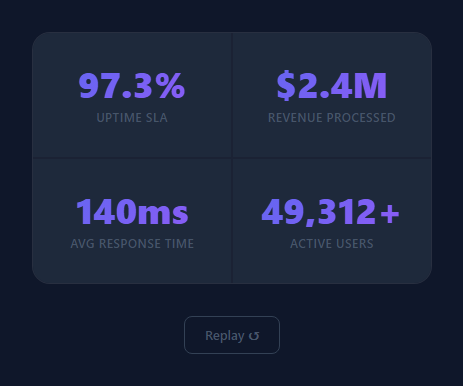
A count-up animation makes numbers appear to count from zero to their final value — revenue, user counts, uptime, conversion rates. The animation transforms a static number into a moment that draws attention and makes metrics feel earned. This snippet is a more advanced version of the Stats Card count-up, with configurable prefix/suffix, multiple decimal places, and automatic M/K formatting. For a slot-machine roll instead of a smooth count, see the number slot machine.
The animation engine
countUp(el) reads four data attributes from the element: data-target (the final number), data-prefix (e.g. "$"), data-suffix (e.g. "%"), and data-decimal (decimal places to show). It uses performance.now() as the start time and requestAnimationFrame for smooth frame-by-frame updates over 1600ms.
The quartic ease-out function
const val = target * (1 - Math.pow(1 - p, 4)) is a quartic ease-out (power of 4). Compared to the cubic ease-out in the Stats Card, the quartic version accelerates harder at the start and decelerates more sharply near the end. This gives numbers a more dramatic "slamming into place" quality, which works well for hero section metrics.
Smart number formatting
The formatter auto-selects the right format: numbers 1,000,000+ show as 1.2M, numbers 1,000–999,999 use toLocaleString() for commas (24,891), and numbers below 1,000 use toFixed(decimal) for decimal precision. The prefix and suffix are applied from data attributes, so data-prefix="$" data-target="24891" displays as $24,891` without any code changes.
The replay button
A Replay button at the bottom calls runAll() which re-runs countUp() on all .number elements. Since countUp re-reads data-target and restarts performance.now(), each replay is independent with no state to reset.
Combining with IntersectionObserver
Wrap countUp(el) in an IntersectionObserver (as in the Stats Card snippet) to trigger the animation only when the stat enters the viewport. This prevents the animation from finishing before the user scrolls to see it.
The easing function
The count-up uses a quartic ease-out: at time t (0 to 1), progress = 1 - Math.pow(1 - t, 4). This function starts very fast (close to linear near t=0) and decelerates sharply near t=1. The dramatic deceleration makes the number feel like it's "settling" on its final value, creating a satisfying landing effect. Linear interpolation (just t) creates a mechanical feel; ease-out feels earned.
The M/K auto-formatter
Numbers over 999,999 display as "X.XM"; numbers over 999 display as "XK". The formatter runs on each animation frame: function fmt(n) { return n >= 1e6 ? (n/1e6).toFixed(1)+'M' : n >= 1e3 ? Math.round(n/1e3)+'K' : Math.round(n)+''; }. This ensures the displayed number never looks awkward at large values like "1,200,000" — it shows "1.2M" instead.
IntersectionObserver for scroll trigger
The count-up animation fires when the element scrolls into view using IntersectionObserver with threshold: 0.5. The observer disconnects after the first trigger to prevent re-animation on scroll back. This is a key UX decision — once a metric has counted up, it should stay at its target value to communicate stability.
Build with AI
Build, Understand, Optimize, and Extend It With AI
You don't have to work out the easing math yourself to see why the numbers feel like they "slam" into place. Paste this snippet's HTML, CSS, and JS into an AI coding assistant like Claude and ask it to explain exactly what raising (1 - progress) to the fourth power does to the animation curve compared to a lower exponent, and why the formatter branches on the final target value rather than the currently animated value when deciding between M-suffix, comma, and decimal formatting. The same assistant can help optimize it — for instance asking whether performance.now() timestamps could ever drift across many simultaneous counters on one page, or whether the formatter's branching logic could be simplified into a single reusable function. It's also useful for extending the effect: ask it to wrap countUp in an IntersectionObserver so counters only animate once scrolled into view, support negative numbers or numbers that count down instead of up, or add a subtle overshoot-and-settle bounce at the very end of the animation. Treat the code less like a finished artifact and more like a starting point for a conversation.
Prompt to recreate it
Copy this into your AI assistant of choice to build the effect from scratch, or as a jumping-off point for your own variant:
Build a "count up" number animation in plain HTML, CSS, and JavaScript driven entirely by data attributes on each target element, using only requestAnimationFrame — no animation library, no tweening package.

Requirements:
- Each animated number element must read its configuration purely from its own data attributes: a target final value, an optional prefix string, an optional suffix string, and an optional number of decimal places to display.
- The animation function must record a start timestamp using performance.now(), then on each animation frame compute progress as elapsed time divided by a fixed duration (clamped to a maximum of 1), and must stop re-queuing itself once progress reaches 1.
- Apply a quartic ease-out easing curve to the raw linear progress before using it to compute the currently displayed value, so the number accelerates quickly at first and decelerates sharply as it approaches its target, rather than moving at a constant rate.
- On every frame, format the currently displayed value based on the target's final magnitude (not the in-progress animated value): numbers a million or above should compress to one decimal place with an "M" suffix, numbers in the thousands should use locale-formatted comma grouping, and numbers below a thousand should show the configured number of decimal places.
- Apply the prefix and suffix strings from the data attributes around the formatted number on every single frame update, so a currency or percentage value stays correctly formatted throughout the whole animation, not just at the end.
- Provide a single function that re-runs the animation on every matching element at once (for a "replay" control), and make sure re-running it correctly restarts each element's own timer independently rather than reusing stale start times.
Want to tighten it up first? Run this prompt through the AI Prompt Studio to score it across 8 quality dimensions, catch anti-patterns, and tune the wording for Claude, ChatGPT, or Gemini before you paste it in.
Step by step
How to Use
- 1Load the snippetClick "Count Up Animation" in the sidebar. The preview runs the count-up immediately on load. Click Replay to restart all counters.
- 2Update the target valuesIn the HTML panel, change the data-target attribute on each .number span. The animation reads it on each run.
- 3Add prefix and suffixAdd data-prefix="$" for currency or data-suffix="%" for percentages. The animation applies them to each frame output.
- 4Change the animation durationIn the JS panel, update 1600 to change the animation duration in milliseconds.
- 5Add IntersectionObserver triggerWrap countUp(el) in an IntersectionObserver to fire the animation when the stat enters the viewport instead of on page load.
- 6Export in your formatClick "HTML" for a standalone file, "JSX" for a React component, or "Tailwind" for a React + Tailwind version.
Real-world uses
Common Use Cases
Got questions?
Frequently Asked Questions
This snippet uses a quartic ease-out (power of 4) vs the Stats Card cubic ease-out (power of 3) — it decelerates more sharply. It also has configurable data-prefix and data-suffix attributes, M/K auto-formatting for large numbers, and a Replay button. The Stats Card uses IntersectionObserver; this one runs on load.
The formatter checks the target value: if 1,000,000 or above, it divides by 1,000,000 and adds "M". If 1,000–999,999, it uses toLocaleString() for comma formatting. If below 1,000, it uses toFixed(decimal). The comparison uses the final target, not the animated value.
Add data-prefix="$" to the element for a prefix (appears before the number). Add data-suffix="%" for a suffix (appears after). Both are read as strings and concatenated with the formatted number on every animation frame.
The quartic ease-out is 1 - Math.pow(1-p, 4). Change 4 to 2 for quadratic ease-out (gentle deceleration), 3 for cubic, or 6+ for a very dramatic snap. Higher powers decelerate faster.
Wrap countUp(el) in an IntersectionObserver: const obs = new IntersectionObserver(entries => { entries.forEach(e => { if (e.isIntersecting) { countUp(e.target); obs.unobserve(e.target); } }); }); Then observe all .number elements. The Stats Card snippet shows the exact implementation.
Yes. Click "JSX" for a React component. In React, call the countUp logic in a useEffect and use a ref to access the DOM element. Or manage the animated value in useState, updating it on each requestAnimationFrame tick.