You Might Also Like
Learn Coding Visually
Learn to code with interactive, live-preview playgrounds — HTML, CSS, JavaScript, React & more.
 HTML Playground42 lessons · Click-based · Live preview
 CSS PlaygroundLearn CSS with a live editor
 JavaScript Playground60 lessons · DOM · Async · Canvas
 React PlaygroundLearn React with a live code editor
 GSAP PlaygroundLearn GSAP animation interactively
 SVG Playground44 lessons · shapes · paths · animation
 SCSS Playground45 lessons · Sass modules · tokens
 Tailwind PlaygroundLearn Tailwind CSS with a live editor
 Bootstrap 5 Playground50 lessons · live preview
Donation Thermometer — Free Fundraising Progress Bar HTML CSS JS
Donation Thermometer · Charts · Plain HTML, CSS & JS · Live preview
What's included
Features
About this UI Snippet
Donation Thermometer — A Vertical Fundraising Gauge With Milestone Ticks
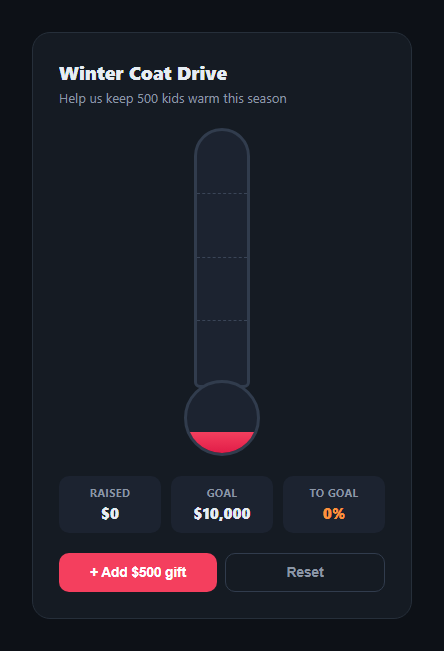
The donation thermometer is the oldest fundraising visual in the book — a mercury-style tube that rises as gifts come in, instantly communicating "how close are we" without anyone reading a number. This snippet rebuilds it in plain HTML, CSS, and vanilla JavaScript: a tube-and-bulb fill, milestone tick marks at 25/50/75/100%, and a live stats row.
Tube plus bulb, like the real thing
The visual is two parts: a tall .dt-tube and a rounded .dt-bulb beneath it, each with its own fill layer whose height is driven by the raised-to-goal ratio. The bulb fill is offset 30 points ahead of the tube's percentage so it never reads as empty at $0 — a small realism touch borrowed from actual glass thermometers, where the bulb always holds some mercury.
Milestone ticks that light up
Four dashed tick lines sit at 25%, 50%, 75%, and 100% of the tube's height, each labeled with its dollar amount. As raised crosses a threshold, that tick's .dt-passed class turns its line and label amber — a lightweight way to celebrate progress at a glance without a separate animation for every milestone.
One render() function, one source of truth
raised is a single number. Every visual — the fill heights, the raised/goal/percent stat row, and the milestone tick states — is derived from it inside one render() call, the same pattern as the rest of this library: change the number, call render(), and everything stays consistent.
Smooth, physical-feeling rise
The fill's height transitions over 1.1s with a custom cubic-bezier that overshoots slightly before settling, so each new gift feels like a real rise in liquid rather than an instant jump — pair this with a count-up on the raised figure for an even more tactile update.
Accessible by default
The tube carries role="progressbar" with live aria-valuenow, so screen readers announce the current percentage as it changes — important for a widget whose entire point is otherwise visual.
Customizing it
Swap GOAL and STEP for your campaign's real numbers, wire dtAdd to your donation webhook instead of a demo button, and change the milestone percentages or add more ticks. Pair it with a donation amount picker or a progress bar for a flatter alternative.
Build with AI
Build, Understand, Optimize, and Extend It With AI
Rather than reverse-engineering the tube-and-bulb math by hand, paste this snippet's HTML, CSS, and JS into an AI coding assistant like Claude and ask it to explain exactly how the bulb's fill offset keeps it looking full at low percentages, and how the milestone tick comparison logic decides when to add the dt-passed class. The same assistant can help optimize it — asking whether the 1.1s transition duration feels right for very large or very frequent donation batches, or whether the tick threshold check should debounce for rapid successive gifts. It's also useful for extending the widget: ask it to add a count-up animation on the raised figure, a confetti burst when the goal is reached, or a horizontal thermometer variant for narrow layouts. Treat the code less like a finished artifact and more like a starting point for a conversation.
Prompt to recreate it
Copy this into your AI assistant of choice to build the effect from scratch, or as a jumping-off point for your own variant:
Build a "donation thermometer" fundraising progress gauge in plain HTML, CSS, and JavaScript with no library.

Requirements:
- A vertical tube element and a circular bulb element beneath it, each with its own fill layer whose height is set by a percentage derived from a raised amount divided by a goal amount, both fills transitioning smoothly rather than jumping instantly.
- The bulb's fill should read as visually full even when the raised amount is zero or very low (for example, by offsetting its percentage ahead of the tube's), so the gauge never looks broken at the start of a campaign.
- Four milestone tick marks positioned at 25%, 50%, 75%, and 100% of the tube's height, each labeled with its corresponding dollar amount, that visually highlight (a distinct color for both the line and label) once the current percentage reaches or passes that threshold.
- A stats row showing the raised amount, the goal amount, and the percent-to-goal, all formatted with thousands separators, updating together whenever the raised amount changes.
- A single function that is the only place allowed to update the DOM: given the current raised number, it recalculates the fill heights, the stat text, and every milestone tick's highlighted state, so there is one source of truth and no way for the visuals to drift out of sync.
- A demo control that adds a fixed increment to the raised amount (simulating an incoming gift) and a reset control, plus an accessible progressbar role with a live aria-valuenow reflecting the current percentage.
Want to tighten it up first? Run this prompt through the AI Prompt Studio to score it across 8 quality dimensions, catch anti-patterns, and tune the wording for Claude, ChatGPT, or Gemini before you paste it in.
Step by step
How to Use
- 1Paste HTML, CSS, and JSA tube-and-bulb thermometer renders at $0 of a $10,000 goal.
- 2Click "Add $500 gift"The fill rises smoothly and the stats update.
- 3Watch the milestonesTick lines at 25/50/75/100% turn amber once passed.
- 4Click ResetThe thermometer empties back to $0.
- 5Change GOAL and STEPSet your real campaign goal and gift increment.
- 6Wire it to real donationsCall render() after adding to raised from your payment webhook.
Real-world uses
Common Use Cases
Got questions?
Frequently Asked Questions
The bulb's fill height is set to the tube's percentage plus a fixed 30-point offset, capped at 100%. That means even at 0% overall progress the bulb shows some fill, matching how a real thermometer's bulb always holds mercury — purely a visual realism choice, not tied to any real minimum amount.
Each tick element is checked against the current percentage on every render: if the raised percentage is at or above the tick's threshold (25, 50, 75, or 100), a dt-passed class is added, which switches its dashed line and label color to amber via CSS transitions. No separate timers or animations are needed — it is a direct comparison recalculated each render.
Replace the demo dtAdd button handler with your payment webhook or polling logic: whenever a new gift is confirmed, add its amount to the raised variable and call render(). Everything else — fill heights, stats, and milestone highlighting — updates automatically from that one number.
Yes. GOAL controls the denominator for every percentage calculation, so changing it rescales the whole gauge. The milestone percentages are a plain array (25, 50, 75, 100) inside the forEach loop — add, remove, or change values there, and add matching .dt-tick elements with the corresponding bottom offset in CSS.
Hold raised in component state (useState, ref(), or a component field) and derive the percentage in a computed value; bind it to the fill and bulb heights and the stat text. The render() function's logic maps directly to a computed/derived value in any framework — only the DOM-writing lines change to framework bindings.