You Might Also Like
Learn Coding Visually
Learn to code with interactive, live-preview playgrounds — HTML, CSS, JavaScript, React & more.
 HTML Playground42 lessons · Click-based · Live preview
 CSS PlaygroundLearn CSS with a live editor
 JavaScript Playground60 lessons · DOM · Async · Canvas
 React PlaygroundLearn React with a live code editor
 GSAP PlaygroundLearn GSAP animation interactively
 SVG Playground44 lessons · shapes · paths · animation
 SCSS Playground45 lessons · Sass modules · tokens
 Tailwind PlaygroundLearn Tailwind CSS with a live editor
 Bootstrap 5 Playground50 lessons · live preview
Donation Amount Picker — Give Form HTML CSS JS
Donation Amount Picker · Forms · Plain HTML, CSS & JS · Live preview
What's included
Features
About this UI Snippet
Donation Amount Picker — Preset + Custom Amounts with Impact Messaging
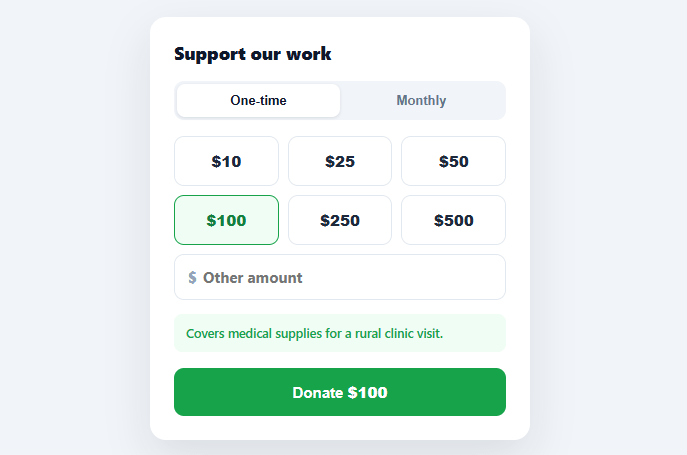
The amount-selection step is where most donation forms succeed or fail. Ask for a freeform number and people freeze or give the minimum; offer well-chosen presets with a clear custom option and a sense of impact, and average gifts rise. This snippet builds a conversion-focused donation picker in plain HTML, CSS, and vanilla JavaScript: preset amount tiles, a custom-amount field, a one-time/monthly toggle, and a live "here's what your gift does" impact message.
Presets anchor the decision
Six preset tiles ($10 through $500) give donors a fast, low-effort choice and quietly anchor expectations — seeing $50 and $100 as options nudges the typical gift upward versus a blank field where many default to the smallest round number they can justify. Selecting a preset highlights it in green and updates the donate button's total. The presets are a simple array, so you tune them to your audience: the right ladder for a small grassroots cause differs from a major nonprofit.
A custom field that doesn't fight the presets
Donors who want to give a specific amount need an obvious path, but the custom field and the presets must stay mutually exclusive — selecting a preset clears the custom input, and typing (or focusing) the custom field deselects every preset. This custom flag is the detail that prevents the confusing state where both a preset and a custom number look active. Focusing the custom field immediately treats it as the active amount, so there's no extra click.
One-time vs. monthly, framed clearly
A frequency toggle switches between a one-time gift and a recurring monthly donation — and recurring donors are dramatically more valuable to a nonprofit over time, so making monthly a prominent, equal option (not a buried checkbox) matters. The donate button reflects the choice exactly: "Donate $25" or "Donate $25 / month", so the commitment is never ambiguous at the point of action.
Impact messaging that makes the gift tangible
Below the amount, a live message translates the dollar figure into concrete impact ("Supplies school materials for a child for a month"), keyed to the nearest preset at or below the chosen amount. Connecting money to outcome is one of the most reliable ways to increase giving — "$50" is abstract, but "a day of meals for a family of four" is a decision someone can feel good about. The message updates instantly as the amount changes, including for custom values, which fall to the appropriate tier's message.
Validation and submission
The donate button disables for an empty or sub-$1 custom amount, and the impact line prompts the donor to enter a value — so the form never lets someone submit a meaningless gift. On submit you proceed to payment with the { amount, freq } pair; the demo shows a thank-you confirmation, but in production this is where you'd hand off to Stripe, PayPal, or your payment processor. Because the amount and frequency are plain state, wiring that handoff is trivial.
Accessible and adaptable
The frequency control is a role="radiogroup", amounts are real buttons, and the whole form is driven by one sync() function that keeps every visual — active states, total, frequency label, impact, and the submit gate — consistent with the current selection. Re-theme the green to your brand and adjust the presets and impact copy, and it fits any cause.
Build with AI
Build, Understand, Optimize, and Extend It With AI
Rather than tracing the state flags by hand, paste this snippet's HTML, CSS, and JS into an AI coding assistant like Claude and ask it to explain exactly how the custom boolean keeps the preset tiles and the custom input mutually exclusive across the focus, input, and click handlers, and why impactFor() sorts PRESETS descending before its nearest-at-or-below lookup. The same assistant can help optimize it, for example checking whether calling sync() on every keystroke in the custom field is too aggressive or whether it should debounce for very rapid typing. It is also useful for extending the form: ask it to add a recurring-donation discount incentive, a currency selector that reformats amounts and impact copy together, or a progress bar toward a campaign's fundraising goal. Treat the code less like a finished artifact and more like a starting point for a conversation.
Prompt to recreate it
Copy this into your AI assistant of choice to build the effect from scratch, or as a jumping-off point for your own variant:
Build a donation amount picker form in plain HTML, CSS, and JavaScript with no library.

Requirements:
- A one-time versus monthly frequency toggle built from two real buttons in a role="radiogroup" container, where clicking one visually marks it active and the other inactive.
- A grid of preset amount buttons generated from a single array of numbers, with the currently selected preset visually distinguished, and a separate custom amount input field with a currency symbol prefix.
- A single boolean flag that tracks whether the custom field or a preset is the active source of the amount: clicking a preset must set that flag false and clear the custom input's value; focusing or typing into the custom field must set the flag true and visually deselect every preset button, so the two input methods can never both appear selected at once.
- A lookup that maps each preset amount to a specific, concrete impact sentence, and a function that finds the impact message for the nearest preset at or below whatever amount is currently selected, including custom amounts that fall between or above the presets.
- A single synchronization function that is the only place allowed to update the DOM: it reads the current amount, frequency, and custom flag and from those values alone updates every active/inactive class, the submit button's displayed total and frequency suffix, the impact message text, and whether the submit button is disabled for an invalid amount.
- A submit handler that prevents default page navigation and, instead of actually charging a card, logs or displays the final { amount, frequency } pair as a placeholder for handing off to a real payment processor.
Want to tighten it up first? Run this prompt through the AI Prompt Studio to score it across 8 quality dimensions, catch anti-patterns, and tune the wording for Claude, ChatGPT, or Gemini before you paste it in.
Step by step
How to Use
- 1Paste HTML, CSS, and JSA donation form renders with a one-time/monthly toggle, six preset amounts ($25 pre-selected), a custom field, and an impact message.
- 2Pick a presetClick an amount tile — it highlights green, the donate button total updates, and the impact message reflects the gift.
- 3Enter a custom amountType in the "Other amount" field — every preset deselects, and the total, impact, and validation update live.
- 4Switch frequencyToggle Monthly — the donate button shows "/ month" so the recurring commitment is explicit.
- 5Tune the presets and impactEdit the PRESETS array and the IMPACT messages to fit your cause and donor base.
- 6Connect a payment processorOn submit, hand off { amount, freq } to Stripe, PayPal, or your processor instead of the demo confirmation.
Real-world uses
Common Use Cases
Got questions?
Frequently Asked Questions
On submit, take the { amount, freq } and hand off to your processor: for Stripe, create a Checkout Session (one-time mode for "once", subscription mode for "monthly") and redirect, or use Payment Elements for an embedded flow; for PayPal, use their Donate SDK with the amount. Keep the selection in your form state and pass it to the processor's amount and recurrence parameters.
Tune the PRESETS array to your audience and historical average gift — a common approach places your current average in the middle of the ladder so it's a comfortable, anchored choice, with higher options that gently raise expectations. Test different ladders; the right presets for a grassroots cause differ from a large nonprofit. Avoid too many options (six is plenty) to prevent choice paralysis.
Connecting a dollar figure to a concrete outcome ("a day of meals for a family of four") makes an abstract number feel meaningful and consistently increases giving. Keying the message to the nearest preset at or below the chosen amount means even custom values get a relevant, motivating message rather than a blank space.
Track a "custom" boolean: clicking a preset sets it false (and clears the custom input), while focusing or typing in the custom field sets it true (and deselects all presets). Drive the active highlight and the effective amount from that flag, so exactly one of the two is ever active — this prevents the confusing state where both a preset and a custom number appear selected.
In React, hold amount, freq, and custom in useState and derive the total, impact, and validity with useMemo; in Vue, use ref()/computed(); in Angular, use component fields with getters. The impactFor() lookup and the preset/custom exclusivity logic are plain functions that port unchanged — only the per-interaction re-render moves into the framework.