Learn Coding Visually
Learn to code with interactive, live-preview playgrounds — HTML, CSS, JavaScript, React & more.
 HTML Playground42 lessons · Click-based · Live preview
 CSS PlaygroundLearn CSS with a live editor
 JavaScript Playground60 lessons · DOM · Async · Canvas
 React PlaygroundLearn React with a live code editor
 GSAP PlaygroundLearn GSAP animation interactively
 SVG Playground44 lessons · shapes · paths · animation
 SCSS Playground45 lessons · Sass modules · tokens
 Tailwind PlaygroundLearn Tailwind CSS with a live editor
 Bootstrap 5 Playground50 lessons · live preview
Waitlist Signup — Early Access Form HTML CSS JS
Waitlist Signup · Forms · Plain HTML, CSS & JS · Live preview
What's included
Features
About this UI Snippet
Waitlist Signup — Email Capture with Queue Position & Referral Sharing
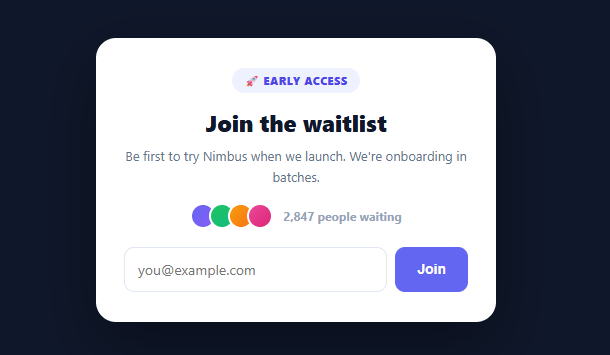
A waitlist does two jobs before you've launched: it captures demand as a list of warm leads, and — done well — it turns each signup into a promoter through referral mechanics. This snippet builds the complete modern waitlist in plain HTML, CSS, and vanilla JavaScript: a signup card with social proof and email validation, then a confirmation that reveals the user's queue position and a referral link they can share to move up the line.
Social proof before the ask
Above the email field sits a small stack of avatars and a live count ("2,847 people waiting"). Showing that others have already joined is one of the most effective ways to increase signups — a waitlist nobody's on feels risky to join, while one with thousands already waiting signals the product is worth waiting for. The avatar stack uses overlapping circles (the standard "people" motif) built purely with CSS gradients, so it needs no images.
Validation before commitment
Submitting validates the email against a pragmatic regex and shows an inline error for an invalid address before anything else happens — there's no point sending someone to the confirmation state with a typo'd email that can never be contacted. The validation is intentionally simple (catching the common mistakes, not chasing full RFC compliance), which is the right trade-off for a low-friction signup.
The position reveal — why it works
On success, the card swaps to a confirmation showing "You're #1,284 in line." A concrete position transforms an abstract "you're signed up" into something the user has a stake in — and crucially, sets up the referral mechanic. Seeing a number they'd like to lower is exactly what motivates sharing, far more than a generic "tell your friends" plea. The position should come from your backend (the demo simulates it); it's the anchor the whole referral loop hangs on.
Referral sharing to skip ahead
Below the position is a unique referral link and a copy button, framed with the incentive: "Each friend who joins moves you up." This is the viral loop that powers launches like Robinhood and Superhuman — every signup is handed a personal stake and a tool to recruit others, turning a static lead list into compounding growth. The copy button uses the modern navigator.clipboard API with a graceful execCommand fallback for older browsers, and confirms with a green "✓ Copied" state so the user knows it worked.
Two states, one card
The signup form and the confirmation are two states of one card, toggled with the hidden attribute — keeping the user anchored in place rather than navigating away, which matters for a flow whose whole point is to immediately hand them the referral tool. In production the submit handler is where you'd POST the email to your waitlist service (which returns the real position and referral code); the demo generates both client-side so the full flow is visible without a backend.
Honest, portable, and adaptable
The referral code here is derived from the email for demonstration, but a real implementation must generate it server-side and track referrals authoritatively — client-side codes can be forged. The component is otherwise self-contained and easy to re-theme: swap the product name, the social-proof count, and the accent color, and it fits any pre-launch product, beta program, or early-access drop.
Build with AI
Build, Understand, Optimize, and Extend It With AI
Instead of tracing the clipboard fallback by hand, paste this snippet's HTML, CSS, and JS into an AI coding assistant like Claude and ask it to explain exactly why the copy handler tries navigator.clipboard.writeText() first and only falls back to selecting the input plus document.execCommand('copy') in a catch block, and in which real browser/context situations that fallback path actually gets exercised. It's also worth flagging a real gap in the current demo logic — the referral code is derived client-side from btoa(email), so ask what specifically would need to move server-side to make the position and code trustworthy and unforgeable. For extending it, have it add a countdown showing estimated days until launch based on queue position, a visual progress bar showing "X referrals to skip Y more spots," or social share buttons that pre-fill a tweet with the referral link. Treat the code less like a finished artifact and more like a starting point for a conversation.
Prompt to recreate it
Copy this into your AI assistant of choice to build the effect from scratch, or as a jumping-off point for your own variant:
Build a waitlist signup widget with referral mechanics in plain HTML, CSS, and vanilla JavaScript with no libraries.

Requirements:
- A signup card showing social proof (an overlapping avatar stack built from CSS gradients, no images, plus a live count of people already waiting) above an email input and submit button.
- On submit, validate the email against a practical regex (not full RFC compliance) and, if invalid, show a specific inline error message without proceeding; a valid email must clear any existing error.
- On successful validation, swap the card's visible content from the signup form to a confirmation view using the hidden attribute (not a separate page navigation), showing a concrete queue position number (e.g. "#1,284 in line") and a unique referral link value.
- The confirmation view must include a read-only text input containing the referral link and a Copy button. The copy button must attempt navigator.clipboard.writeText() first, and only if that throws (e.g. in a non-secure context or older browser) fall back to selecting the input's text and calling document.execCommand('copy').
- After a successful copy, the button must visually confirm success (different background color and label such as a checkmark plus "Copied") for a couple of seconds before reverting to its original label and style.
- Structure the code so it's obvious where a real implementation would POST the email to a backend waitlist service and use the actual queue position and referral code from that response instead of a client-side placeholder — comment or structurally isolate that substitution point.
Want to tighten it up first? Run this prompt through the AI Prompt Studio to score it across 8 quality dimensions, catch anti-patterns, and tune the wording for Claude, ChatGPT, or Gemini before you paste it in.
Step by step
How to Use
- 1Paste HTML, CSS, and JSA waitlist card renders with social proof, an early-access badge, and an email signup form.
- 2Enter an emailType an invalid email to see the inline error; a valid one proceeds to the confirmation.
- 3See your positionThe card swaps to "You're #1,284 in line" — a concrete number that motivates sharing.
- 4Copy the referral linkClick Copy to copy the unique referral URL; the button confirms with a green "✓ Copied" state.
- 5Customize itChange the product name, the social-proof count, and the accent color to fit your launch.
- 6Connect a waitlist backendPOST the email to your waitlist service in the submit handler and use the real position and referral code it returns.
Real-world uses
Common Use Cases
Got questions?
Frequently Asked Questions
In the submit handler, after validation, POST the email to your waitlist service (a tool like Waitlist/GetWaitlist, or your own endpoint). It should return the user's real queue position and a unique referral code; populate the position display and referral link from that response, then show the confirmation state. Handle a failure by showing the inline error instead of advancing.
Each signup gets a unique referral code embedded in their share link. When someone joins via that link, your backend credits the referrer and recalculates queue positions (e.g. each referral moves them up N spots, or ranks by referral count). The position and ranking logic must live server-side and be authoritative — client-side codes and counts can be forged, so never trust them for the actual ordering.
A visible "thousands waiting" count reduces the risk of joining an empty list, and a concrete position number gives the user a personal stake. Together they drive both the initial signup and the subsequent sharing — the position is the thing referrals improve, so it's the hook that makes the referral link compelling rather than a generic "tell your friends."
Use navigator.clipboard.writeText() (the modern async API) with a fallback to selecting the input and document.execCommand('copy') for older browsers, as shown. Clipboard access requires a secure context (HTTPS or localhost); on insecure origins the execCommand fallback handles it. Always confirm the copy visually so the user knows it succeeded.
In React, hold the email, error, and submitted state in useState and conditionally render the signup vs confirmation, calling your waitlist API in the submit handler; in Vue, use ref()/reactive() with v-if; in Angular, use a reactive form with *ngIf. The validation regex and clipboard logic port unchanged — only the two-state toggle and the async API call move into the framework.