Password Requirements Checklist — Live Rules UI

Password Requirements Checklist · Forms · Plain HTML, CSS & JS · Live preview

Share & Support

What's included

Features

Live per-rule validation
Each requirement ticks off the instant it's satisfied, so users always know exactly what's left to fix.
Data-driven rule list
Rules are an array of label + test functions — add, remove, or reorder them with a one-line edit.
Strength meter that agrees with the list
A four-segment bar derives its tier from the same rule results, so it can never contradict the checklist.
Submit gated on all rules
The button enables only when every requirement passes, preventing a doomed submit and surprise rejection.
Show/hide password toggle
An accessible eye button swaps the input type and icon so users can verify what they typed.
Color-coded progress
Met rules turn green with a checkmark; the strength label and bar share one weak→strong color scale.
Animated check transitions
Each rule's icon fades from an empty circle to a green checkmark, giving satisfying real-time feedback.
Framework-agnostic core
One evaluate() function drives everything, porting cleanly to React, Vue, or Angular reactive state.

About this UI Snippet

Password Requirements Checklist — Real-Time Rule Validation with Strength Meter
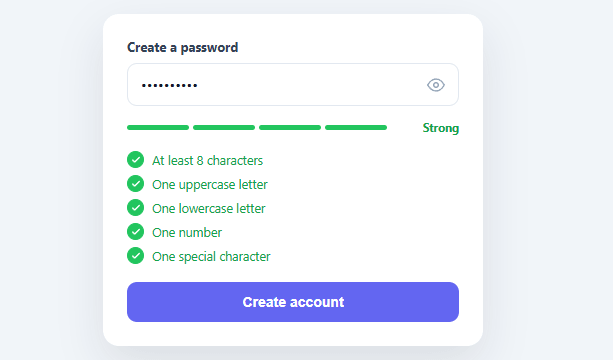
Screenshot of the Password Requirements Checklist snippet rendered live

Telling a user their password is "invalid" only after they hit submit is one of the most frustrating patterns in sign-up forms. A live requirements checklist fixes it by showing every rule up front and ticking each one off the instant it's satisfied, so the user always knows exactly what's left. This snippet builds that real-time validation in plain HTML, CSS, and vanilla JavaScript, paired with a strength meter and a show/hide toggle — the complete modern password field.

Every rule, checked on every keystroke

The requirements live in a RULES array, each with a label and a test function — at least 8 characters, an uppercase letter, a lowercase letter, a number, and a special character. On every input event, evaluate() runs all the tests and toggles a .met class on the matching list item, which flips its icon from an empty gray circle to a green checkmark and turns the text green. The user watches the list complete itself as they type, which is far less frustrating than discovering one missed rule at submit time. Adding or changing a rule is a one-line data edit — the list renders from the array.

A strength meter that reflects real coverage

Above the list, a four-segment bar shows password strength derived from how many rules pass: weak (red) when only one or two are met, up through strong (green) when all are satisfied. Crucially, the meter and the checklist agree because both read the same rule results — the bar can't say "strong" while a rule is still unchecked. The label ("Weak / Fair / Good / Strong") and the bar fill share one tier value, so they always move together.

Submit gated on every rule

The "Create account" button stays disabled until *all* rules pass, giving the user a clear finish line and preventing a doomed submit. This is the honest version of password validation: the form tells you what it wants, shows your progress, and only lets you proceed when you've actually met the policy — no surprise server-side rejection.

Show/hide toggle, done right

An eye button toggles the input's type between password and text and swaps the icon between "eye" and "eye-off", so users can verify what they typed — which research consistently shows reduces errors and abandonment more than it risks shoulder-surfing on a personal device. The toggle is a real button with an aria-label, not a click target bolted onto an icon.

Strength meter vs. checklist — why both

A strength meter alone is vague ("why is it only 'fair'?"), and a checklist alone doesn't convey overall quality at a glance. Together they cover both: the checklist tells the user *exactly* what to fix, while the meter gives an at-a-glance sense of how strong the result is. For a production system you'd also want to reject common/breached passwords (a strength meter can pass "Password1!" which is in every breach list) — the FAQs cover layering a library like zxcvbn or a breached-password check on top of these structural rules.

Accessible and portable

The checklist is a real <ul>, the rules read as plain text, and the whole component is driven by one evaluate() function with no framework dependency — so it ports cleanly to React, Vue, or Angular by moving the rule evaluation into reactive state.

Step by step

How to Use

  1. 1
    Paste HTML, CSS, and JSA password field renders with five unchecked requirements, a strength meter, and a disabled "Create account" button.
  2. 2
    Start typingEach requirement ticks green the moment it's satisfied, and the strength bar fills from red toward green as more rules pass.
  3. 3
    Watch the gateThe submit button stays disabled until every requirement is met, then enables — a clear finish line.
  4. 4
    Toggle visibilityClick the eye icon to reveal the password as plain text and verify what you typed; click again to hide it.
  5. 5
    Edit the rulesAdd, remove, or change entries in the RULES array (label + test function) — the checklist and gating update automatically.
  6. 6
    Add breached-password checksLayer a library like zxcvbn or a Have I Been Pwned check on top of these structural rules for real-world strength.

Real-world uses

Common Use Cases

Sign-up and registration forms
The standard new-password field that shows its policy up front — pair with a conditional form fields flow for the rest of signup.
Password reset and change
Reuse the same checklist when users set a new password, with an optional "must differ from current" rule.
Account security settings
Show requirements when a user strengthens their password from settings, pairing with a password generator option.
Admin and team onboarding
Enforce an organization's password policy visibly during member invitation acceptance.
Compliance-driven products
Make a required complexity policy explicit and auditable for regulated industries.
Learning real-time validation
A reference for per-rule live feedback and gated submission — compare with a password strength meter for the score-only approach.

Got questions?

Frequently Asked Questions

Edit the RULES array — each entry has a label and a test(value) function returning true when satisfied. Add a minimum length of 12, a "no spaces" rule, or a "not your email" check by adding entries; the checklist renders from the array and the submit gate requires all of them, so no other code changes.

No — structural rules (length, character classes) can pass weak, common passwords like "Password1!" that appear in every breach list. For real strength, layer a library like zxcvbn (which scores against common patterns and dictionary words) or check the password against a breached-password API such as Have I Been Pwned's k-anonymity endpoint, and treat those as additional gates.

Showing the rules up front (rather than only erroring after submit) lets users compose a valid password on the first try instead of guessing and retrying. Real-time ticking turns an opaque policy into visible progress, which measurably reduces sign-up friction and abandonment.

Gate submission on the checklist (every required rule met), not the strength meter — the meter is a guide, but "submit only when all rules pass" is the enforceable policy. The meter communicates overall quality at a glance; the checklist communicates the exact, must-pass requirements.

In React, hold the password in useState and derive each rule's met state and the overall validity with useMemo, rendering the list and disabling submit from that; in Vue, use ref()/computed(); in Angular, use a reactive form with custom validators per rule. The RULES array and test functions port unchanged — only the per-keystroke evaluation moves into reactive state.

Password Requirements Checklist — Export as HTML, React, Vue, Angular & Tailwind

HTML
<!DOCTYPE html>
<html lang="en">
<head>
  <meta charset="UTF-8" />
  <meta name="viewport" content="width=device-width, initial-scale=1.0" />
  <title>Password Requirements Checklist</title>
  <style>
    *{box-sizing:border-box;margin:0;padding:0}
    body{font-family:system-ui,-apple-system,sans-serif;background:#f1f5f9;min-height:100vh;display:flex;align-items:flex-start;justify-content:center;padding:50px 24px}
    
    .prc-card{background:#fff;border-radius:16px;padding:24px;width:100%;max-width:380px;box-shadow:0 18px 44px rgba(15,23,42,.1)}
    .prc-label{display:block;font-size:13px;font-weight:700;color:#334155;margin-bottom:8px}
    
    .prc-field{position:relative;display:flex;align-items:center;margin-bottom:14px}
    .prc-field input{width:100%;border:1.5px solid #e2e8f0;border-radius:10px;padding:11px 42px 11px 13px;font-size:14px;font-family:inherit;color:#0f172a;transition:border-color .15s,box-shadow .15s}
    .prc-field input:focus{outline:none;border-color:#6366f1;box-shadow:0 0 0 3px rgba(99,102,241,.15)}
    .prc-eye{position:absolute;right:8px;width:30px;height:30px;border:none;background:none;color:#94a3b8;cursor:pointer;display:flex;align-items:center;justify-content:center}
    .prc-eye:hover{color:#475569}
    
    .prc-strength{display:flex;align-items:center;gap:10px;margin-bottom:16px}
    .prc-bars{display:flex;gap:4px;flex:1}
    .prc-bars i{flex:1;height:5px;border-radius:999px;background:#e2e8f0;transition:background .25s}
    .prc-bars.s1 i:nth-child(-n+1){background:#ef4444}
    .prc-bars.s2 i:nth-child(-n+2){background:#f59e0b}
    .prc-bars.s3 i:nth-child(-n+3){background:#eab308}
    .prc-bars.s4 i{background:#22c55e}
    .prc-strength-label{font-size:11.5px;font-weight:700;color:#94a3b8;min-width:62px;text-align:right}
    .prc-strength-label.s1{color:#ef4444}.prc-strength-label.s2{color:#f59e0b}.prc-strength-label.s3{color:#eab308}.prc-strength-label.s4{color:#16a34a}
    
    .prc-list{list-style:none;display:flex;flex-direction:column;gap:7px;margin-bottom:18px}
    .prc-rule{display:flex;align-items:center;gap:8px;font-size:12.5px;color:#94a3b8;transition:color .2s}
    .prc-rule.met{color:#16a34a}
    .prc-rule-icon{width:17px;height:17px;border-radius:50%;border:1.5px solid #cbd5e1;display:flex;align-items:center;justify-content:center;flex-shrink:0;transition:background .2s,border-color .2s}
    .prc-rule.met .prc-rule-icon{background:#22c55e;border-color:#22c55e}
    .prc-rule-icon svg{width:10px;height:10px;stroke:#fff;opacity:0;transition:opacity .2s}
    .prc-rule.met .prc-rule-icon svg{opacity:1}
    
    .prc-submit{width:100%;background:#6366f1;color:#fff;border:none;border-radius:10px;padding:12px;font-size:14px;font-weight:700;cursor:pointer;transition:background .15s,opacity .15s}
    .prc-submit:hover:not(:disabled){background:#4f46e5}
    .prc-submit:disabled{opacity:.45;cursor:not-allowed}
  </style>
</head>
<body>
  <div class="prc-card">
    <label class="prc-label" for="prcInput">Create a password</label>
    <div class="prc-field">
      <input type="password" id="prcInput" placeholder="Enter a password" autocomplete="new-password">
      <button type="button" class="prc-eye" id="prcEye" aria-label="Show password">
        <svg id="prcEyeIcon" width="18" height="18" viewBox="0 0 24 24" fill="none" stroke="currentColor" stroke-width="2" stroke-linecap="round" stroke-linejoin="round"><path d="M1 12s4-8 11-8 11 8 11 8-4 8-11 8-11-8-11-8z"/><circle cx="12" cy="12" r="3"/></svg>
      </button>
    </div>
  
    <div class="prc-strength">
      <div class="prc-bars" id="prcBars"><i></i><i></i><i></i><i></i></div>
      <span class="prc-strength-label" id="prcStrengthLabel">Enter a password</span>
    </div>
  
    <ul class="prc-list" id="prcList"></ul>
  
    <button type="button" class="prc-submit" id="prcSubmit" disabled>Create account</button>
  </div>
  <script>
    var RULES = [
      { id: 'len',   label: 'At least 8 characters',    test: function (v) { return v.length >= 8; } },
      { id: 'upper', label: 'One uppercase letter',      test: function (v) { return /[A-Z]/.test(v); } },
      { id: 'lower', label: 'One lowercase letter',      test: function (v) { return /[a-z]/.test(v); } },
      { id: 'num',   label: 'One number',                test: function (v) { return /[0-9]/.test(v); } },
      { id: 'sym',   label: 'One special character',     test: function (v) { return /[^A-Za-z0-9]/.test(v); } },
    ];
    var LABELS = ['', 'Weak', 'Fair', 'Good', 'Strong'];
    
    var input = document.getElementById('prcInput');
    var listEl = document.getElementById('prcList');
    var bars = document.getElementById('prcBars');
    var strengthLabel = document.getElementById('prcStrengthLabel');
    var submit = document.getElementById('prcSubmit');
    
    listEl.innerHTML = RULES.map(function (r) {
      return '<li class="prc-rule" data-rule="' + r.id + '">' +
        '<span class="prc-rule-icon"><svg viewBox="0 0 24 24" fill="none" stroke="currentColor" stroke-width="3.5" stroke-linecap="round" stroke-linejoin="round"><polyline points="20 6 9 17 4 12"/></svg></span>' +
        r.label + '</li>';
    }).join('');
    
    function evaluate() {
      var v = input.value;
      var passed = 0;
      RULES.forEach(function (r) {
        var ok = r.test(v);
        if (ok) passed++;
        document.querySelector('[data-rule="' + r.id + '"]').classList.toggle('met', ok);
      });
    
      // Strength tier 1–4 from how many rules pass (and length bonus).
      var tier = 0;
      if (v.length > 0) {
        tier = passed <= 2 ? 1 : passed === 3 ? 2 : passed === 4 ? 3 : 4;
      }
      bars.className = 'prc-bars' + (tier ? ' s' + tier : '');
      strengthLabel.className = 'prc-strength-label' + (tier ? ' s' + tier : '');
      strengthLabel.textContent = v.length === 0 ? 'Enter a password' : LABELS[tier];
    
      // Require every rule to enable submit.
      submit.disabled = passed !== RULES.length;
    }
    
    document.getElementById('prcEye').addEventListener('click', function () {
      var show = input.type === 'password';
      input.type = show ? 'text' : 'password';
      document.getElementById('prcEyeIcon').innerHTML = show
        ? '<path d="M17.94 17.94A10.07 10.07 0 0 1 12 20c-7 0-11-8-11-8a18.45 18.45 0 0 1 5.06-5.94M9.9 4.24A9.12 9.12 0 0 1 12 4c7 0 11 8 11 8a18.5 18.5 0 0 1-2.16 3.19m-6.72-1.07a3 3 0 1 1-4.24-4.24"/><line x1="1" y1="1" x2="23" y2="23"/>'
        : '<path d="M1 12s4-8 11-8 11 8 11 8-4 8-11 8-11-8-11-8z"/><circle cx="12" cy="12" r="3"/>';
    });
    
    input.addEventListener('input', evaluate);
    evaluate();
  </script>
</body>
</html>
Tailwind
<!DOCTYPE html>
<html lang="en">
<head>
  <meta charset="UTF-8" />
  <meta name="viewport" content="width=device-width, initial-scale=1.0" />
  <title>Password Requirements Checklist</title>
  <!-- Tailwind CSS v3+ — arbitrary value classes (e.g. bg-[#0f172a]) are valid -->
  <script src="https://cdn.tailwindcss.com"></script>
  <style>
    * {
      box-sizing:border-box;margin:0;padding:0
    }

    body {
      font-family:system-ui,-apple-system,sans-serif;background:#f1f5f9;min-height:100vh;display:flex;align-items:flex-start;justify-content:center;padding:50px 24px
    }

    .prc-field input {
      width:100%;border:1.5px solid #e2e8f0;border-radius:10px;padding:11px 42px 11px 13px;font-size:14px;font-family:inherit;color:#0f172a;transition:border-color .15s,box-shadow .15s
    }

    .prc-field input:focus {
      outline:none;border-color:#6366f1;box-shadow:0 0 0 3px rgba(99,102,241,.15)
    }

    .prc-bars {
      display:flex;gap:4px;flex:1
    }

    .prc-bars i {
      flex:1;height:5px;border-radius:999px;background:#e2e8f0;transition:background .25s
    }

    .prc-bars.s1 i:nth-child(-n+1) {
      background:#ef4444
    }

    .prc-bars.s2 i:nth-child(-n+2) {
      background:#f59e0b
    }

    .prc-bars.s3 i:nth-child(-n+3) {
      background:#eab308
    }

    .prc-bars.s4 i {
      background:#22c55e
    }

    .prc-strength-label {
      font-size:11.5px;font-weight:700;color:#94a3b8;min-width:62px;text-align:right
    }

    .prc-strength-label.s1 {
      color:#ef4444
    }

    .prc-strength-label.s2 {
      color:#f59e0b
    }

    .prc-strength-label.s3 {
      color:#eab308
    }

    .prc-strength-label.s4 {
      color:#16a34a
    }

    .prc-rule {
      display:flex;align-items:center;gap:8px;font-size:12.5px;color:#94a3b8;transition:color .2s
    }

    .prc-rule.met {
      color:#16a34a
    }

    .prc-rule-icon {
      width:17px;height:17px;border-radius:50%;border:1.5px solid #cbd5e1;display:flex;align-items:center;justify-content:center;flex-shrink:0;transition:background .2s,border-color .2s
    }

    .prc-rule.met .prc-rule-icon {
      background:#22c55e;border-color:#22c55e
    }

    .prc-rule-icon svg {
      width:10px;height:10px;stroke:#fff;opacity:0;transition:opacity .2s
    }

    .prc-rule.met .prc-rule-icon svg {
      opacity:1
    }

    .prc-submit:hover:not(:disabled) {
      background:#4f46e5
    }

    .prc-submit:disabled {
      opacity:.45;cursor:not-allowed
    }
  </style>
</head>
<body>
  <div class="bg-[#fff] rounded-2xl p-6 w-full max-w-[380px] shadow-[0_18px_44px_rgba(15,23,42,.1)]">
    <label class="block text-[13px] font-bold text-[#334155] mb-2" for="prcInput">Create a password</label>
    <div class="prc-field relative flex items-center mb-3.5">
      <input type="password" id="prcInput" placeholder="Enter a password" autocomplete="new-password">
      <button type="button" class="absolute right-2 w-[30px] h-[30px] border-0 bg-transparent text-[#94a3b8] cursor-pointer flex items-center justify-center hover:text-[#475569]" id="prcEye" aria-label="Show password">
        <svg id="prcEyeIcon" width="18" height="18" viewBox="0 0 24 24" fill="none" stroke="currentColor" stroke-width="2" stroke-linecap="round" stroke-linejoin="round"><path d="M1 12s4-8 11-8 11 8 11 8-4 8-11 8-11-8-11-8z"/><circle cx="12" cy="12" r="3"/></svg>
      </button>
    </div>
  
    <div class="flex items-center gap-2.5 mb-4">
      <div class="prc-bars" id="prcBars"><i></i><i></i><i></i><i></i></div>
      <span class="prc-strength-label" id="prcStrengthLabel">Enter a password</span>
    </div>
  
    <ul class="[list-style:none] flex flex-col gap-[7px] mb-[18px]" id="prcList"></ul>
  
    <button type="button" class="prc-submit w-full bg-[#6366f1] text-[#fff] border-0 rounded-[10px] p-3 text-sm font-bold cursor-pointer [transition:background_.15s,opacity_.15s]" id="prcSubmit" disabled>Create account</button>
  </div>
  <script>
    var RULES = [
      { id: 'len',   label: 'At least 8 characters',    test: function (v) { return v.length >= 8; } },
      { id: 'upper', label: 'One uppercase letter',      test: function (v) { return /[A-Z]/.test(v); } },
      { id: 'lower', label: 'One lowercase letter',      test: function (v) { return /[a-z]/.test(v); } },
      { id: 'num',   label: 'One number',                test: function (v) { return /[0-9]/.test(v); } },
      { id: 'sym',   label: 'One special character',     test: function (v) { return /[^A-Za-z0-9]/.test(v); } },
    ];
    var LABELS = ['', 'Weak', 'Fair', 'Good', 'Strong'];
    
    var input = document.getElementById('prcInput');
    var listEl = document.getElementById('prcList');
    var bars = document.getElementById('prcBars');
    var strengthLabel = document.getElementById('prcStrengthLabel');
    var submit = document.getElementById('prcSubmit');
    
    listEl.innerHTML = RULES.map(function (r) {
      return '<li class="prc-rule" data-rule="' + r.id + '">' +
        '<span class="prc-rule-icon"><svg viewBox="0 0 24 24" fill="none" stroke="currentColor" stroke-width="3.5" stroke-linecap="round" stroke-linejoin="round"><polyline points="20 6 9 17 4 12"/></svg></span>' +
        r.label + '</li>';
    }).join('');
    
    function evaluate() {
      var v = input.value;
      var passed = 0;
      RULES.forEach(function (r) {
        var ok = r.test(v);
        if (ok) passed++;
        document.querySelector('[data-rule="' + r.id + '"]').classList.toggle('met', ok);
      });
    
      // Strength tier 1–4 from how many rules pass (and length bonus).
      var tier = 0;
      if (v.length > 0) {
        tier = passed <= 2 ? 1 : passed === 3 ? 2 : passed === 4 ? 3 : 4;
      }
      bars.className = 'prc-bars' + (tier ? ' s' + tier : '');
      strengthLabel.className = 'prc-strength-label' + (tier ? ' s' + tier : '');
      strengthLabel.textContent = v.length === 0 ? 'Enter a password' : LABELS[tier];
    
      // Require every rule to enable submit.
      submit.disabled = passed !== RULES.length;
    }
    
    document.getElementById('prcEye').addEventListener('click', function () {
      var show = input.type === 'password';
      input.type = show ? 'text' : 'password';
      document.getElementById('prcEyeIcon').innerHTML = show
        ? '<path d="M17.94 17.94A10.07 10.07 0 0 1 12 20c-7 0-11-8-11-8a18.45 18.45 0 0 1 5.06-5.94M9.9 4.24A9.12 9.12 0 0 1 12 4c7 0 11 8 11 8a18.5 18.5 0 0 1-2.16 3.19m-6.72-1.07a3 3 0 1 1-4.24-4.24"/><line x1="1" y1="1" x2="23" y2="23"/>'
        : '<path d="M1 12s4-8 11-8 11 8 11 8-4 8-11 8-11-8-11-8z"/><circle cx="12" cy="12" r="3"/>';
    });
    
    input.addEventListener('input', evaluate);
    evaluate();
  </script>
</body>
</html>
React
import React, { useEffect } from 'react';

// CSS — optionally move to PasswordRequirementsChecklist.module.css
const css = `
*{box-sizing:border-box;margin:0;padding:0}
body{font-family:system-ui,-apple-system,sans-serif;background:#f1f5f9;min-height:100vh;display:flex;align-items:flex-start;justify-content:center;padding:50px 24px}

.prc-card{background:#fff;border-radius:16px;padding:24px;width:100%;max-width:380px;box-shadow:0 18px 44px rgba(15,23,42,.1)}
.prc-label{display:block;font-size:13px;font-weight:700;color:#334155;margin-bottom:8px}

.prc-field{position:relative;display:flex;align-items:center;margin-bottom:14px}
.prc-field input{width:100%;border:1.5px solid #e2e8f0;border-radius:10px;padding:11px 42px 11px 13px;font-size:14px;font-family:inherit;color:#0f172a;transition:border-color .15s,box-shadow .15s}
.prc-field input:focus{outline:none;border-color:#6366f1;box-shadow:0 0 0 3px rgba(99,102,241,.15)}
.prc-eye{position:absolute;right:8px;width:30px;height:30px;border:none;background:none;color:#94a3b8;cursor:pointer;display:flex;align-items:center;justify-content:center}
.prc-eye:hover{color:#475569}

.prc-strength{display:flex;align-items:center;gap:10px;margin-bottom:16px}
.prc-bars{display:flex;gap:4px;flex:1}
.prc-bars i{flex:1;height:5px;border-radius:999px;background:#e2e8f0;transition:background .25s}
.prc-bars.s1 i:nth-child(-n+1){background:#ef4444}
.prc-bars.s2 i:nth-child(-n+2){background:#f59e0b}
.prc-bars.s3 i:nth-child(-n+3){background:#eab308}
.prc-bars.s4 i{background:#22c55e}
.prc-strength-label{font-size:11.5px;font-weight:700;color:#94a3b8;min-width:62px;text-align:right}
.prc-strength-label.s1{color:#ef4444}.prc-strength-label.s2{color:#f59e0b}.prc-strength-label.s3{color:#eab308}.prc-strength-label.s4{color:#16a34a}

.prc-list{list-style:none;display:flex;flex-direction:column;gap:7px;margin-bottom:18px}
.prc-rule{display:flex;align-items:center;gap:8px;font-size:12.5px;color:#94a3b8;transition:color .2s}
.prc-rule.met{color:#16a34a}
.prc-rule-icon{width:17px;height:17px;border-radius:50%;border:1.5px solid #cbd5e1;display:flex;align-items:center;justify-content:center;flex-shrink:0;transition:background .2s,border-color .2s}
.prc-rule.met .prc-rule-icon{background:#22c55e;border-color:#22c55e}
.prc-rule-icon svg{width:10px;height:10px;stroke:#fff;opacity:0;transition:opacity .2s}
.prc-rule.met .prc-rule-icon svg{opacity:1}

.prc-submit{width:100%;background:#6366f1;color:#fff;border:none;border-radius:10px;padding:12px;font-size:14px;font-weight:700;cursor:pointer;transition:background .15s,opacity .15s}
.prc-submit:hover:not(:disabled){background:#4f46e5}
.prc-submit:disabled{opacity:.45;cursor:not-allowed}
`;

export default function PasswordRequirementsChecklist() {
  // Auto-generated escape hatch: the original snippet's vanilla JS runs once
  // after mount and queries the rendered DOM. For idiomatic React, lift this
  // into state + handlers.
  useEffect(() => {
    const _listeners = [];
    const _originalAddEventListener = EventTarget.prototype.addEventListener;
    EventTarget.prototype.addEventListener = function(type, listener, options) {
      _listeners.push({ target: this, type, listener, options });
      return _originalAddEventListener.call(this, type, listener, options);
    };
    var RULES = [
      { id: 'len',   label: 'At least 8 characters',    test: function (v) { return v.length >= 8; } },
      { id: 'upper', label: 'One uppercase letter',      test: function (v) { return /[A-Z]/.test(v); } },
      { id: 'lower', label: 'One lowercase letter',      test: function (v) { return /[a-z]/.test(v); } },
      { id: 'num',   label: 'One number',                test: function (v) { return /[0-9]/.test(v); } },
      { id: 'sym',   label: 'One special character',     test: function (v) { return /[^A-Za-z0-9]/.test(v); } },
    ];
    var LABELS = ['', 'Weak', 'Fair', 'Good', 'Strong'];
    
    var input = document.getElementById('prcInput');
    var listEl = document.getElementById('prcList');
    var bars = document.getElementById('prcBars');
    var strengthLabel = document.getElementById('prcStrengthLabel');
    var submit = document.getElementById('prcSubmit');
    
    listEl.innerHTML = RULES.map(function (r) {
      return '<li class="prc-rule" data-rule="' + r.id + '">' +
        '<span class="prc-rule-icon"><svg viewBox="0 0 24 24" fill="none" stroke="currentColor" stroke-width="3.5" stroke-linecap="round" stroke-linejoin="round"><polyline points="20 6 9 17 4 12"/></svg></span>' +
        r.label + '</li>';
    }).join('');
    
    function evaluate() {
      var v = input.value;
      var passed = 0;
      RULES.forEach(function (r) {
        var ok = r.test(v);
        if (ok) passed++;
        document.querySelector('[data-rule="' + r.id + '"]').classList.toggle('met', ok);
      });
    
      // Strength tier 1–4 from how many rules pass (and length bonus).
      var tier = 0;
      if (v.length > 0) {
        tier = passed <= 2 ? 1 : passed === 3 ? 2 : passed === 4 ? 3 : 4;
      }
      bars.className = 'prc-bars' + (tier ? ' s' + tier : '');
      strengthLabel.className = 'prc-strength-label' + (tier ? ' s' + tier : '');
      strengthLabel.textContent = v.length === 0 ? 'Enter a password' : LABELS[tier];
    
      // Require every rule to enable submit.
      submit.disabled = passed !== RULES.length;
    }
    
    document.getElementById('prcEye').addEventListener('click', function () {
      var show = input.type === 'password';
      input.type = show ? 'text' : 'password';
      document.getElementById('prcEyeIcon').innerHTML = show
        ? '<path d="M17.94 17.94A10.07 10.07 0 0 1 12 20c-7 0-11-8-11-8a18.45 18.45 0 0 1 5.06-5.94M9.9 4.24A9.12 9.12 0 0 1 12 4c7 0 11 8 11 8a18.5 18.5 0 0 1-2.16 3.19m-6.72-1.07a3 3 0 1 1-4.24-4.24"/><line x1="1" y1="1" x2="23" y2="23"/>'
        : '<path d="M1 12s4-8 11-8 11 8 11 8-4 8-11 8-11-8-11-8z"/><circle cx="12" cy="12" r="3"/>';
    });
    
    input.addEventListener('input', evaluate);
    evaluate();
    // Cleanup: restore addEventListener and remove all listeners
    return () => {
      EventTarget.prototype.addEventListener = _originalAddEventListener;
      for (const { target, type, listener, options } of _listeners) {
        target.removeEventListener(type, listener, options);
      }
    };
  }, []);

  return (
    <>
      <style>{css}</style>
      <div className="prc-card">
        <label className="prc-label" htmlFor="prcInput">Create a password</label>
        <div className="prc-field">
          <input type="password" id="prcInput" placeholder="Enter a password" autocomplete="new-password" />
          <button type="button" className="prc-eye" id="prcEye" aria-label="Show password">
            <svg id="prcEyeIcon" width="18" height="18" viewBox="0 0 24 24" fill="none" stroke="currentColor" strokeWidth="2" strokeLinecap="round" stroke-linejoin="round"><path d="M1 12s4-8 11-8 11 8 11 8-4 8-11 8-11-8-11-8z"/><circle cx="12" cy="12" r="3"/></svg>
          </button>
        </div>
      
        <div className="prc-strength">
          <div className="prc-bars" id="prcBars"><i></i><i></i><i></i><i></i></div>
          <span className="prc-strength-label" id="prcStrengthLabel">Enter a password</span>
        </div>
      
        <ul className="prc-list" id="prcList"></ul>
      
        <button type="button" className="prc-submit" id="prcSubmit" defaultDisabled>Create account</button>
      </div>
    </>
  );
}
React + Tailwind
import React, { useEffect } from 'react';
// Requires Tailwind CSS v3+ — https://tailwindcss.com/docs/installation
// Arbitrary value classes (e.g. bg-[#0f172a]) are valid Tailwind v3+

export default function PasswordRequirementsChecklist() {
  // Auto-generated escape hatch: the original snippet's vanilla JS runs once
  // after mount and queries the rendered DOM. For idiomatic React, lift this
  // into state + handlers.
  useEffect(() => {
    const _listeners = [];
    const _originalAddEventListener = EventTarget.prototype.addEventListener;
    EventTarget.prototype.addEventListener = function(type, listener, options) {
      _listeners.push({ target: this, type, listener, options });
      return _originalAddEventListener.call(this, type, listener, options);
    };
    var RULES = [
      { id: 'len',   label: 'At least 8 characters',    test: function (v) { return v.length >= 8; } },
      { id: 'upper', label: 'One uppercase letter',      test: function (v) { return /[A-Z]/.test(v); } },
      { id: 'lower', label: 'One lowercase letter',      test: function (v) { return /[a-z]/.test(v); } },
      { id: 'num',   label: 'One number',                test: function (v) { return /[0-9]/.test(v); } },
      { id: 'sym',   label: 'One special character',     test: function (v) { return /[^A-Za-z0-9]/.test(v); } },
    ];
    var LABELS = ['', 'Weak', 'Fair', 'Good', 'Strong'];
    
    var input = document.getElementById('prcInput');
    var listEl = document.getElementById('prcList');
    var bars = document.getElementById('prcBars');
    var strengthLabel = document.getElementById('prcStrengthLabel');
    var submit = document.getElementById('prcSubmit');
    
    listEl.innerHTML = RULES.map(function (r) {
      return '<li class="prc-rule" data-rule="' + r.id + '">' +
        '<span class="prc-rule-icon"><svg viewBox="0 0 24 24" fill="none" stroke="currentColor" stroke-width="3.5" stroke-linecap="round" stroke-linejoin="round"><polyline points="20 6 9 17 4 12"/></svg></span>' +
        r.label + '</li>';
    }).join('');
    
    function evaluate() {
      var v = input.value;
      var passed = 0;
      RULES.forEach(function (r) {
        var ok = r.test(v);
        if (ok) passed++;
        document.querySelector('[data-rule="' + r.id + '"]').classList.toggle('met', ok);
      });
    
      // Strength tier 1–4 from how many rules pass (and length bonus).
      var tier = 0;
      if (v.length > 0) {
        tier = passed <= 2 ? 1 : passed === 3 ? 2 : passed === 4 ? 3 : 4;
      }
      bars.className = 'prc-bars' + (tier ? ' s' + tier : '');
      strengthLabel.className = 'prc-strength-label' + (tier ? ' s' + tier : '');
      strengthLabel.textContent = v.length === 0 ? 'Enter a password' : LABELS[tier];
    
      // Require every rule to enable submit.
      submit.disabled = passed !== RULES.length;
    }
    
    document.getElementById('prcEye').addEventListener('click', function () {
      var show = input.type === 'password';
      input.type = show ? 'text' : 'password';
      document.getElementById('prcEyeIcon').innerHTML = show
        ? '<path d="M17.94 17.94A10.07 10.07 0 0 1 12 20c-7 0-11-8-11-8a18.45 18.45 0 0 1 5.06-5.94M9.9 4.24A9.12 9.12 0 0 1 12 4c7 0 11 8 11 8a18.5 18.5 0 0 1-2.16 3.19m-6.72-1.07a3 3 0 1 1-4.24-4.24"/><line x1="1" y1="1" x2="23" y2="23"/>'
        : '<path d="M1 12s4-8 11-8 11 8 11 8-4 8-11 8-11-8-11-8z"/><circle cx="12" cy="12" r="3"/>';
    });
    
    input.addEventListener('input', evaluate);
    evaluate();
    // Cleanup: restore addEventListener and remove all listeners
    return () => {
      EventTarget.prototype.addEventListener = _originalAddEventListener;
      for (const { target, type, listener, options } of _listeners) {
        target.removeEventListener(type, listener, options);
      }
    };
  }, []);

  return (
    <>
      <style>{`
* {
  box-sizing:border-box;margin:0;padding:0
}

body {
  font-family:system-ui,-apple-system,sans-serif;background:#f1f5f9;min-height:100vh;display:flex;align-items:flex-start;justify-content:center;padding:50px 24px
}

.prc-field input {
  width:100%;border:1.5px solid #e2e8f0;border-radius:10px;padding:11px 42px 11px 13px;font-size:14px;font-family:inherit;color:#0f172a;transition:border-color .15s,box-shadow .15s
}

.prc-field input:focus {
  outline:none;border-color:#6366f1;box-shadow:0 0 0 3px rgba(99,102,241,.15)
}

.prc-bars {
  display:flex;gap:4px;flex:1
}

.prc-bars i {
  flex:1;height:5px;border-radius:999px;background:#e2e8f0;transition:background .25s
}

.prc-bars.s1 i:nth-child(-n+1) {
  background:#ef4444
}

.prc-bars.s2 i:nth-child(-n+2) {
  background:#f59e0b
}

.prc-bars.s3 i:nth-child(-n+3) {
  background:#eab308
}

.prc-bars.s4 i {
  background:#22c55e
}

.prc-strength-label {
  font-size:11.5px;font-weight:700;color:#94a3b8;min-width:62px;text-align:right
}

.prc-strength-label.s1 {
  color:#ef4444
}

.prc-strength-label.s2 {
  color:#f59e0b
}

.prc-strength-label.s3 {
  color:#eab308
}

.prc-strength-label.s4 {
  color:#16a34a
}

.prc-rule {
  display:flex;align-items:center;gap:8px;font-size:12.5px;color:#94a3b8;transition:color .2s
}

.prc-rule.met {
  color:#16a34a
}

.prc-rule-icon {
  width:17px;height:17px;border-radius:50%;border:1.5px solid #cbd5e1;display:flex;align-items:center;justify-content:center;flex-shrink:0;transition:background .2s,border-color .2s
}

.prc-rule.met .prc-rule-icon {
  background:#22c55e;border-color:#22c55e
}

.prc-rule-icon svg {
  width:10px;height:10px;stroke:#fff;opacity:0;transition:opacity .2s
}

.prc-rule.met .prc-rule-icon svg {
  opacity:1
}

.prc-submit:hover:not(:disabled) {
  background:#4f46e5
}

.prc-submit:disabled {
  opacity:.45;cursor:not-allowed
}
      `}</style>
      <div className="bg-[#fff] rounded-2xl p-6 w-full max-w-[380px] shadow-[0_18px_44px_rgba(15,23,42,.1)]">
        <label className="block text-[13px] font-bold text-[#334155] mb-2" htmlFor="prcInput">Create a password</label>
        <div className="prc-field relative flex items-center mb-3.5">
          <input type="password" id="prcInput" placeholder="Enter a password" autocomplete="new-password" />
          <button type="button" className="absolute right-2 w-[30px] h-[30px] border-0 bg-transparent text-[#94a3b8] cursor-pointer flex items-center justify-center hover:text-[#475569]" id="prcEye" aria-label="Show password">
            <svg id="prcEyeIcon" width="18" height="18" viewBox="0 0 24 24" fill="none" stroke="currentColor" strokeWidth="2" strokeLinecap="round" stroke-linejoin="round"><path d="M1 12s4-8 11-8 11 8 11 8-4 8-11 8-11-8-11-8z"/><circle cx="12" cy="12" r="3"/></svg>
          </button>
        </div>
      
        <div className="flex items-center gap-2.5 mb-4">
          <div className="prc-bars" id="prcBars"><i></i><i></i><i></i><i></i></div>
          <span className="prc-strength-label" id="prcStrengthLabel">Enter a password</span>
        </div>
      
        <ul className="[list-style:none] flex flex-col gap-[7px] mb-[18px]" id="prcList"></ul>
      
        <button type="button" className="prc-submit w-full bg-[#6366f1] text-[#fff] border-0 rounded-[10px] p-3 text-sm font-bold cursor-pointer [transition:background_.15s,opacity_.15s]" id="prcSubmit" defaultDisabled>Create account</button>
      </div>
    </>
  );
}
Vue
<template>
  <div class="prc-card">
    <label class="prc-label" for="prcInput">Create a password</label>
    <div class="prc-field">
      <input type="password" id="prcInput" placeholder="Enter a password" autocomplete="new-password">
      <button type="button" class="prc-eye" id="prcEye" aria-label="Show password">
        <svg id="prcEyeIcon" width="18" height="18" viewBox="0 0 24 24" fill="none" stroke="currentColor" stroke-width="2" stroke-linecap="round" stroke-linejoin="round"><path d="M1 12s4-8 11-8 11 8 11 8-4 8-11 8-11-8-11-8z"/><circle cx="12" cy="12" r="3"/></svg>
      </button>
    </div>
  
    <div class="prc-strength">
      <div class="prc-bars" id="prcBars"><i></i><i></i><i></i><i></i></div>
      <span class="prc-strength-label" id="prcStrengthLabel">Enter a password</span>
    </div>
  
    <ul class="prc-list" id="prcList"></ul>
  
    <button type="button" class="prc-submit" id="prcSubmit" disabled>Create account</button>
  </div>
</template>

<script setup>
import { onMounted } from 'vue';

var RULES = [
  { id: 'len',   label: 'At least 8 characters',    test: function (v) { return v.length >= 8; } },
  { id: 'upper', label: 'One uppercase letter',      test: function (v) { return /[A-Z]/.test(v); } },
  { id: 'lower', label: 'One lowercase letter',      test: function (v) { return /[a-z]/.test(v); } },
  { id: 'num',   label: 'One number',                test: function (v) { return /[0-9]/.test(v); } },
  { id: 'sym',   label: 'One special character',     test: function (v) { return /[^A-Za-z0-9]/.test(v); } },
];
var LABELS = ['', 'Weak', 'Fair', 'Good', 'Strong'];
let input;
let listEl;
let bars;
let strengthLabel;
let submit;
function evaluate() {
  var v = input.value;
  var passed = 0;
  RULES.forEach(function (r) {
    var ok = r.test(v);
    if (ok) passed++;
    document.querySelector('[data-rule="' + r.id + '"]').classList.toggle('met', ok);
  });

  // Strength tier 1–4 from how many rules pass (and length bonus).
  var tier = 0;
  if (v.length > 0) {
    tier = passed <= 2 ? 1 : passed === 3 ? 2 : passed === 4 ? 3 : 4;
  }
  bars.className = 'prc-bars' + (tier ? ' s' + tier : '');
  strengthLabel.className = 'prc-strength-label' + (tier ? ' s' + tier : '');
  strengthLabel.textContent = v.length === 0 ? 'Enter a password' : LABELS[tier];

  // Require every rule to enable submit.
  submit.disabled = passed !== RULES.length;
}

onMounted(() => {
  input = document.getElementById('prcInput');
  listEl = document.getElementById('prcList');
  bars = document.getElementById('prcBars');
  strengthLabel = document.getElementById('prcStrengthLabel');
  submit = document.getElementById('prcSubmit');
  listEl.innerHTML = RULES.map(function (r) {
    return '<li class="prc-rule" data-rule="' + r.id + '">' +
      '<span class="prc-rule-icon"><svg viewBox="0 0 24 24" fill="none" stroke="currentColor" stroke-width="3.5" stroke-linecap="round" stroke-linejoin="round"><polyline points="20 6 9 17 4 12"/></svg></span>' +
      r.label + '</li>';
  }).join('');
  document.getElementById('prcEye').addEventListener('click', function () {
    var show = input.type === 'password';
    input.type = show ? 'text' : 'password';
    document.getElementById('prcEyeIcon').innerHTML = show
      ? '<path d="M17.94 17.94A10.07 10.07 0 0 1 12 20c-7 0-11-8-11-8a18.45 18.45 0 0 1 5.06-5.94M9.9 4.24A9.12 9.12 0 0 1 12 4c7 0 11 8 11 8a18.5 18.5 0 0 1-2.16 3.19m-6.72-1.07a3 3 0 1 1-4.24-4.24"/><line x1="1" y1="1" x2="23" y2="23"/>'
      : '<path d="M1 12s4-8 11-8 11 8 11 8-4 8-11 8-11-8-11-8z"/><circle cx="12" cy="12" r="3"/>';
  });
  input.addEventListener('input', evaluate);
  evaluate();
});
</script>

<style scoped>
*{box-sizing:border-box;margin:0;padding:0}
body{font-family:system-ui,-apple-system,sans-serif;background:#f1f5f9;min-height:100vh;display:flex;align-items:flex-start;justify-content:center;padding:50px 24px}

.prc-card{background:#fff;border-radius:16px;padding:24px;width:100%;max-width:380px;box-shadow:0 18px 44px rgba(15,23,42,.1)}
.prc-label{display:block;font-size:13px;font-weight:700;color:#334155;margin-bottom:8px}

.prc-field{position:relative;display:flex;align-items:center;margin-bottom:14px}
.prc-field input{width:100%;border:1.5px solid #e2e8f0;border-radius:10px;padding:11px 42px 11px 13px;font-size:14px;font-family:inherit;color:#0f172a;transition:border-color .15s,box-shadow .15s}
.prc-field input:focus{outline:none;border-color:#6366f1;box-shadow:0 0 0 3px rgba(99,102,241,.15)}
.prc-eye{position:absolute;right:8px;width:30px;height:30px;border:none;background:none;color:#94a3b8;cursor:pointer;display:flex;align-items:center;justify-content:center}
.prc-eye:hover{color:#475569}

.prc-strength{display:flex;align-items:center;gap:10px;margin-bottom:16px}
.prc-bars{display:flex;gap:4px;flex:1}
.prc-bars i{flex:1;height:5px;border-radius:999px;background:#e2e8f0;transition:background .25s}
.prc-bars.s1 i:nth-child(-n+1){background:#ef4444}
.prc-bars.s2 i:nth-child(-n+2){background:#f59e0b}
.prc-bars.s3 i:nth-child(-n+3){background:#eab308}
.prc-bars.s4 i{background:#22c55e}
.prc-strength-label{font-size:11.5px;font-weight:700;color:#94a3b8;min-width:62px;text-align:right}
.prc-strength-label.s1{color:#ef4444}.prc-strength-label.s2{color:#f59e0b}.prc-strength-label.s3{color:#eab308}.prc-strength-label.s4{color:#16a34a}

.prc-list{list-style:none;display:flex;flex-direction:column;gap:7px;margin-bottom:18px}
.prc-rule{display:flex;align-items:center;gap:8px;font-size:12.5px;color:#94a3b8;transition:color .2s}
.prc-rule.met{color:#16a34a}
.prc-rule-icon{width:17px;height:17px;border-radius:50%;border:1.5px solid #cbd5e1;display:flex;align-items:center;justify-content:center;flex-shrink:0;transition:background .2s,border-color .2s}
.prc-rule.met .prc-rule-icon{background:#22c55e;border-color:#22c55e}
.prc-rule-icon svg{width:10px;height:10px;stroke:#fff;opacity:0;transition:opacity .2s}
.prc-rule.met .prc-rule-icon svg{opacity:1}

.prc-submit{width:100%;background:#6366f1;color:#fff;border:none;border-radius:10px;padding:12px;font-size:14px;font-weight:700;cursor:pointer;transition:background .15s,opacity .15s}
.prc-submit:hover:not(:disabled){background:#4f46e5}
.prc-submit:disabled{opacity:.45;cursor:not-allowed}
</style>
Angular
// @ts-nocheck
// Note: vanilla JS DOM manipulation is preserved as-is inside ngAfterViewInit().
// For idiomatic Angular, replace document.getElementById() with @ViewChild() refs
// and move state into component properties with two-way binding.
import { Component, AfterViewInit, ViewEncapsulation } from '@angular/core';
import { CommonModule } from '@angular/common';

@Component({
  selector: 'app-password-requirements-checklist',
  standalone: true,
  imports: [CommonModule],
  encapsulation: ViewEncapsulation.None,
  template: `
    <div class="prc-card">
      <label class="prc-label" for="prcInput">Create a password</label>
      <div class="prc-field">
        <input type="password" id="prcInput" placeholder="Enter a password" autocomplete="new-password">
        <button type="button" class="prc-eye" id="prcEye" aria-label="Show password">
          <svg id="prcEyeIcon" width="18" height="18" viewBox="0 0 24 24" fill="none" stroke="currentColor" stroke-width="2" stroke-linecap="round" stroke-linejoin="round"><path d="M1 12s4-8 11-8 11 8 11 8-4 8-11 8-11-8-11-8z"/><circle cx="12" cy="12" r="3"/></svg>
        </button>
      </div>
    
      <div class="prc-strength">
        <div class="prc-bars" id="prcBars"><i></i><i></i><i></i><i></i></div>
        <span class="prc-strength-label" id="prcStrengthLabel">Enter a password</span>
      </div>
    
      <ul class="prc-list" id="prcList"></ul>
    
      <button type="button" class="prc-submit" id="prcSubmit" disabled>Create account</button>
    </div>
  `,
  styles: [`
    *{box-sizing:border-box;margin:0;padding:0}
    body{font-family:system-ui,-apple-system,sans-serif;background:#f1f5f9;min-height:100vh;display:flex;align-items:flex-start;justify-content:center;padding:50px 24px}
    
    .prc-card{background:#fff;border-radius:16px;padding:24px;width:100%;max-width:380px;box-shadow:0 18px 44px rgba(15,23,42,.1)}
    .prc-label{display:block;font-size:13px;font-weight:700;color:#334155;margin-bottom:8px}
    
    .prc-field{position:relative;display:flex;align-items:center;margin-bottom:14px}
    .prc-field input{width:100%;border:1.5px solid #e2e8f0;border-radius:10px;padding:11px 42px 11px 13px;font-size:14px;font-family:inherit;color:#0f172a;transition:border-color .15s,box-shadow .15s}
    .prc-field input:focus{outline:none;border-color:#6366f1;box-shadow:0 0 0 3px rgba(99,102,241,.15)}
    .prc-eye{position:absolute;right:8px;width:30px;height:30px;border:none;background:none;color:#94a3b8;cursor:pointer;display:flex;align-items:center;justify-content:center}
    .prc-eye:hover{color:#475569}
    
    .prc-strength{display:flex;align-items:center;gap:10px;margin-bottom:16px}
    .prc-bars{display:flex;gap:4px;flex:1}
    .prc-bars i{flex:1;height:5px;border-radius:999px;background:#e2e8f0;transition:background .25s}
    .prc-bars.s1 i:nth-child(-n+1){background:#ef4444}
    .prc-bars.s2 i:nth-child(-n+2){background:#f59e0b}
    .prc-bars.s3 i:nth-child(-n+3){background:#eab308}
    .prc-bars.s4 i{background:#22c55e}
    .prc-strength-label{font-size:11.5px;font-weight:700;color:#94a3b8;min-width:62px;text-align:right}
    .prc-strength-label.s1{color:#ef4444}.prc-strength-label.s2{color:#f59e0b}.prc-strength-label.s3{color:#eab308}.prc-strength-label.s4{color:#16a34a}
    
    .prc-list{list-style:none;display:flex;flex-direction:column;gap:7px;margin-bottom:18px}
    .prc-rule{display:flex;align-items:center;gap:8px;font-size:12.5px;color:#94a3b8;transition:color .2s}
    .prc-rule.met{color:#16a34a}
    .prc-rule-icon{width:17px;height:17px;border-radius:50%;border:1.5px solid #cbd5e1;display:flex;align-items:center;justify-content:center;flex-shrink:0;transition:background .2s,border-color .2s}
    .prc-rule.met .prc-rule-icon{background:#22c55e;border-color:#22c55e}
    .prc-rule-icon svg{width:10px;height:10px;stroke:#fff;opacity:0;transition:opacity .2s}
    .prc-rule.met .prc-rule-icon svg{opacity:1}
    
    .prc-submit{width:100%;background:#6366f1;color:#fff;border:none;border-radius:10px;padding:12px;font-size:14px;font-weight:700;cursor:pointer;transition:background .15s,opacity .15s}
    .prc-submit:hover:not(:disabled){background:#4f46e5}
    .prc-submit:disabled{opacity:.45;cursor:not-allowed}
  `]
})
export class PasswordRequirementsChecklistComponent implements AfterViewInit {
  ngAfterViewInit(): void {
    var RULES = [
      { id: 'len',   label: 'At least 8 characters',    test: function (v) { return v.length >= 8; } },
      { id: 'upper', label: 'One uppercase letter',      test: function (v) { return /[A-Z]/.test(v); } },
      { id: 'lower', label: 'One lowercase letter',      test: function (v) { return /[a-z]/.test(v); } },
      { id: 'num',   label: 'One number',                test: function (v) { return /[0-9]/.test(v); } },
      { id: 'sym',   label: 'One special character',     test: function (v) { return /[^A-Za-z0-9]/.test(v); } },
    ];
    var LABELS = ['', 'Weak', 'Fair', 'Good', 'Strong'];
    
    var input = document.getElementById('prcInput');
    var listEl = document.getElementById('prcList');
    var bars = document.getElementById('prcBars');
    var strengthLabel = document.getElementById('prcStrengthLabel');
    var submit = document.getElementById('prcSubmit');
    
    listEl.innerHTML = RULES.map(function (r) {
      return '<li class="prc-rule" data-rule="' + r.id + '">' +
        '<span class="prc-rule-icon"><svg viewBox="0 0 24 24" fill="none" stroke="currentColor" stroke-width="3.5" stroke-linecap="round" stroke-linejoin="round"><polyline points="20 6 9 17 4 12"/></svg></span>' +
        r.label + '</li>';
    }).join('');
    
    function evaluate() {
      var v = input.value;
      var passed = 0;
      RULES.forEach(function (r) {
        var ok = r.test(v);
        if (ok) passed++;
        document.querySelector('[data-rule="' + r.id + '"]').classList.toggle('met', ok);
      });
    
      // Strength tier 1–4 from how many rules pass (and length bonus).
      var tier = 0;
      if (v.length > 0) {
        tier = passed <= 2 ? 1 : passed === 3 ? 2 : passed === 4 ? 3 : 4;
      }
      bars.className = 'prc-bars' + (tier ? ' s' + tier : '');
      strengthLabel.className = 'prc-strength-label' + (tier ? ' s' + tier : '');
      strengthLabel.textContent = v.length === 0 ? 'Enter a password' : LABELS[tier];
    
      // Require every rule to enable submit.
      submit.disabled = passed !== RULES.length;
    }
    
    document.getElementById('prcEye').addEventListener('click', function () {
      var show = input.type === 'password';
      input.type = show ? 'text' : 'password';
      document.getElementById('prcEyeIcon').innerHTML = show
        ? '<path d="M17.94 17.94A10.07 10.07 0 0 1 12 20c-7 0-11-8-11-8a18.45 18.45 0 0 1 5.06-5.94M9.9 4.24A9.12 9.12 0 0 1 12 4c7 0 11 8 11 8a18.5 18.5 0 0 1-2.16 3.19m-6.72-1.07a3 3 0 1 1-4.24-4.24"/><line x1="1" y1="1" x2="23" y2="23"/>'
        : '<path d="M1 12s4-8 11-8 11 8 11 8-4 8-11 8-11-8-11-8z"/><circle cx="12" cy="12" r="3"/>';
    });
    
    input.addEventListener('input', evaluate);
    evaluate();

    // Bind inline-handler functions to the component so the template can call them
    Object.assign(this, { evaluate });
  }
}