Source Code
<div class="wrap">
  <div class="gen-card">
    <h2 class="gen-title">Password Generator</h2>
    <p class="gen-sub">Generate a strong, random password instantly.</p>

    <!-- Password output -->
    <div class="output-row">
      <div class="password-display" id="pw-display">Click Generate</div>
      <button class="copy-btn" id="copy-btn" onclick="copyPw()" title="Copy password" disabled>
        <svg width="14" height="14" viewBox="0 0 24 24" fill="none" stroke="currentColor" stroke-width="2.2" stroke-linecap="round"><rect x="9" y="9" width="13" height="13" rx="2"/><path d="M5 15H4a2 2 0 0 1-2-2V4a2 2 0 0 1 2-2h9a2 2 0 0 1 2 2v1"/></svg>
        <span id="copy-label">Copy</span>
      </button>
    </div>

    <!-- Strength meter -->
    <div class="strength-wrap" id="strength-wrap" style="display:none">
      <div class="strength-bar"><div class="strength-fill" id="strength-fill"></div></div>
      <span class="strength-label" id="strength-label"></span>
    </div>

    <!-- Settings -->
    <div class="settings">
      <div class="setting-row">
        <label class="setting-label">Length: <strong id="len-val">16</strong></label>
        <input type="range" class="len-range" id="len-range" min="8" max="32" value="16" oninput="updateLen(this.value)">
      </div>

      <div class="options-grid">
        <label class="opt"><input type="checkbox" id="opt-upper" checked onchange="regen()"> Uppercase A–Z</label>
        <label class="opt"><input type="checkbox" id="opt-lower" checked onchange="regen()"> Lowercase a–z</label>
        <label class="opt"><input type="checkbox" id="opt-num"   checked onchange="regen()"> Numbers 0–9</label>
        <label class="opt"><input type="checkbox" id="opt-sym"         onchange="regen()"> Symbols !@#$</label>
        <label class="opt"><input type="checkbox" id="opt-ambig"       onchange="regen()"> Exclude similar (0OIl)</label>
      </div>
    </div>

    <!-- Generate button -->
    <button class="gen-btn" onclick="generate()">
      <svg width="15" height="15" viewBox="0 0 24 24" fill="none" stroke="currentColor" stroke-width="2.2" stroke-linecap="round"><path d="M4.5 9A8 8 0 0 1 19 8"/><path d="M19.5 15A8 8 0 0 1 5 16"/><path d="M19 5v4h-4"/><path d="M5 19v-4h4"/></svg>
      Generate password
    </button>

    <!-- History -->
    <div class="history-wrap" id="history-wrap" style="display:none">
      <div class="history-head">Recent <button class="clear-hist" onclick="clearHistory()">Clear</button></div>
      <ul class="history-list" id="history-list"></ul>
    </div>
  </div>
</div>
* { box-sizing: border-box; margin: 0; padding: 0; }
body { font-family: system-ui, sans-serif; background: #f8fafc; min-height: 100vh; display: flex; align-items: center; justify-content: center; padding: 32px 24px; }
.wrap { width: 100%; max-width: 440px; }
.gen-card { background: #fff; border-radius: 18px; padding: 28px; box-shadow: 0 2px 16px rgba(0,0,0,0.07); border: 1px solid #e2e8f0; display: flex; flex-direction: column; gap: 18px; }
.gen-title { font-size: 18px; font-weight: 800; color: #0f172a; }
.gen-sub { font-size: 13px; color: #64748b; margin-top: -10px; }
/* Output */
.output-row { display: flex; gap: 8px; }
.password-display { flex: 1; font-family: 'Fira Code','Consolas',monospace; font-size: 14px; font-weight: 600; color: #0f172a; background: #f8fafc; border: 1.5px solid #e2e8f0; border-radius: 10px; padding: 11px 14px; letter-spacing: 0.5px; overflow: hidden; text-overflow: ellipsis; white-space: nowrap; cursor: default; }
.copy-btn { display: flex; align-items: center; gap: 5px; background: #6366f1; color: #fff; border: none; border-radius: 10px; padding: 0 14px; font-size: 13px; font-weight: 700; cursor: pointer; white-space: nowrap; transition: background 0.15s; flex-shrink: 0; font-family: inherit; }
.copy-btn:hover:not(:disabled) { background: #4f46e5; }
.copy-btn:disabled { background: #e2e8f0; color: #94a3b8; cursor: default; }
.copy-btn.copied { background: #16a34a; }
/* Strength */
.strength-wrap { display: flex; align-items: center; gap: 10px; }
.strength-bar { flex: 1; height: 5px; background: #e2e8f0; border-radius: 3px; overflow: hidden; }
.strength-fill { height: 100%; border-radius: 3px; transition: width 0.3s, background 0.3s; width: 0%; }
.strength-label { font-size: 11px; font-weight: 700; width: 52px; text-align: right; flex-shrink: 0; }
/* Settings */
.setting-row { display: flex; justify-content: space-between; align-items: center; gap: 12px; }
.setting-label { font-size: 13px; font-weight: 600; color: #374151; white-space: nowrap; }
.len-range { flex: 1; -webkit-appearance: none; height: 4px; border-radius: 2px; background: #e2e8f0; outline: none; cursor: pointer; accent-color: #6366f1; }
.options-grid { display: grid; grid-template-columns: 1fr 1fr; gap: 6px; }
.opt { display: flex; align-items: center; gap: 7px; font-size: 12px; color: #475569; cursor: pointer; }
.opt input { accent-color: #6366f1; cursor: pointer; }
/* Generate button */
.gen-btn { display: flex; align-items: center; justify-content: center; gap: 8px; background: #6366f1; color: #fff; border: none; border-radius: 12px; padding: 13px; font-size: 14px; font-weight: 700; cursor: pointer; width: 100%; transition: background 0.15s; font-family: inherit; }
.gen-btn:hover { background: #4f46e5; }
/* History */
.history-wrap { border-top: 1px solid #f1f5f9; padding-top: 14px; display: flex; flex-direction: column; gap: 8px; }
.history-head { display: flex; justify-content: space-between; align-items: center; font-size: 12px; font-weight: 700; color: #64748b; text-transform: uppercase; letter-spacing: 0.6px; }
.clear-hist { background: none; border: none; font-size: 11px; color: #94a3b8; cursor: pointer; transition: color 0.12s; }
.clear-hist:hover { color: #dc2626; }
.history-list { list-style: none; display: flex; flex-direction: column; gap: 4px; }
.hist-item { display: flex; align-items: center; gap: 8px; font-family: monospace; font-size: 12px; color: #475569; background: #f8fafc; border-radius: 7px; padding: 7px 10px; }
.hist-item span { flex: 1; overflow: hidden; text-overflow: ellipsis; white-space: nowrap; }
.hist-copy { background: none; border: none; color: #94a3b8; cursor: pointer; font-size: 12px; flex-shrink: 0; }
.hist-copy:hover { color: #6366f1; }const UPPER = 'ABCDEFGHIJKLMNOPQRSTUVWXYZ';
const LOWER = 'abcdefghijklmnopqrstuvwxyz';
const NUMS = '0123456789';
const SYMS = '!@#$%^&*()_+-=[]{}|;:,.<>?';
const AMBIG = new Set([...'0O1IlB8']);
let history = [];
let currentPw = '';
function generate() {
let charset = '';
if (document.getElementById('opt-upper').checked) charset += UPPER;
if (document.getElementById('opt-lower').checked) charset += LOWER;
if (document.getElementById('opt-num').checked) charset += NUMS;
if (document.getElementById('opt-sym').checked) charset += SYMS;
if (!charset) charset = LOWER;
const excludeAmbig = document.getElementById('opt-ambig').checked;
if (excludeAmbig) charset = [...charset].filter(c => !AMBIG.has(c)).join('');
const len = +document.getElementById('len-range').value;
const arr = new Uint32Array(len);
crypto.getRandomValues(arr);
currentPw = [...arr].map(n => charset[n % charset.length]).join('');
document.getElementById('pw-display').textContent = currentPw;
document.getElementById('copy-btn').disabled = false;
document.getElementById('strength-wrap').style.display = 'flex';
updateStrength(currentPw);
addHistory(currentPw);
resetCopyBtn();
}
function updateLen(v) {
document.getElementById('len-val').textContent = v;
if (currentPw) generate();
}
function regen() { if (currentPw) generate(); }
function updateStrength(pw) {
let score = 0;
if (pw.length >= 12) score++;
if (pw.length >= 16) score++;
if (/[A-Z]/.test(pw)) score++;
if (/[a-z]/.test(pw)) score++;
if (/[0-9]/.test(pw)) score++;
if (/[^A-Za-z0-9]/.test(pw)) score++;
const pct = Math.round((score / 6) * 100);
const fill = document.getElementById('strength-fill');
const label = document.getElementById('strength-label');
const levels = [
{ max: 33, color: '#ef4444', text: 'Weak' },
{ max: 66, color: '#f59e0b', text: 'Fair' },
{ max: 85, color: '#10b981', text: 'Good' },
{ max: 100, color: '#6366f1', text: 'Strong' },
];
const lvl = levels.find(l => pct <= l.max) || levels[3];
fill.style.width = pct + '%';
fill.style.background = lvl.color;
label.textContent = lvl.text;
label.style.color = lvl.color;
}
function _clipWrite(text, cb) {
if (navigator.clipboard && navigator.clipboard.writeText) {
navigator.clipboard.writeText(text).then(cb).catch(function() { _execCopy(text); cb && cb(); });
} else { _execCopy(text); cb && cb(); }
}
function _execCopy(text) {
var ta = document.createElement('textarea'); ta.value = text;
ta.style.cssText = 'position:fixed;opacity:0'; document.body.appendChild(ta);
ta.select(); try { document.execCommand('copy'); } catch(e) {} document.body.removeChild(ta);
}
function copyPw() {
if (!currentPw) return;
_clipWrite(currentPw, function() {
const btn = document.getElementById('copy-btn');
document.getElementById('copy-label').textContent = 'Copied!';
btn.classList.add('copied');
setTimeout(() => { document.getElementById('copy-label').textContent = 'Copy'; btn.classList.remove('copied'); }, 2000);
});
}
function resetCopyBtn() {
document.getElementById('copy-label').textContent = 'Copy';
document.getElementById('copy-btn').classList.remove('copied');
}
function addHistory(pw) {
history.unshift(pw);
if (history.length > 5) history.pop();
const wrap = document.getElementById('history-wrap');
const list = document.getElementById('history-list');
wrap.style.display = 'flex';
list.innerHTML = history.map((p,i) =>
'<li class="hist-item"><span>' + p + '</span><button class="hist-copy" onclick="_clipWrite(history[' + i + '])">copy</button></li>'
).join('');
}
function clearHistory() {
history = [];
document.getElementById('history-wrap').style.display = 'none';
}Learn Coding Visually
Learn to code with interactive, live-preview playgrounds — HTML, CSS, JavaScript, React & more.
 HTML Playground42 lessons · Click-based · Live preview
 CSS PlaygroundLearn CSS with a live editor
 JavaScript Playground60 lessons · DOM · Async · Canvas
 React PlaygroundLearn React with a live code editor
 GSAP PlaygroundLearn GSAP animation interactively
 SVG Playground44 lessons · shapes · paths · animation
 SCSS Playground45 lessons · Sass modules · tokens
 Tailwind PlaygroundLearn Tailwind CSS with a live editor
 Bootstrap 5 Playground50 lessons · live preview
Password Generator — Free HTML CSS JS Snippet
Password Generator · Forms · Plain HTML, CSS & JS · Live preview
What's included
Features
About this UI Snippet
Password Generator — Cryptographic Randomness, Strength Meter, Options & Copy History
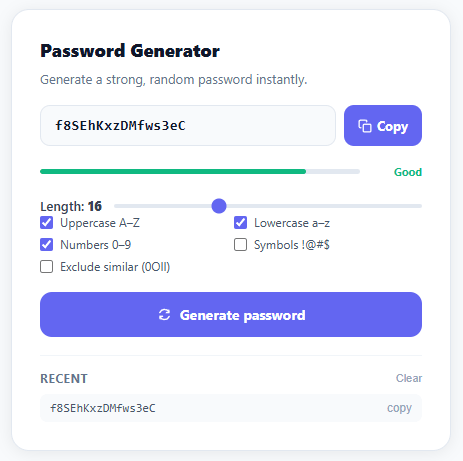
Ask a hundred people to "type a random password" and you'll get a hundred passwords shaped by human habit — favourite numbers, keyboard patterns, a capital letter only at the start. Computers are much better at *actually* random, which is the entire reason password generators exist: they remove the human from the one step where humans are predictably bad. This snippet builds a complete one — cryptographically secure generation, an 8–32 character length slider, checkboxes for each character class plus an "exclude look-alike characters" option, a live strength meter, one-click clipboard copy, and a five-item history so a regenerated password isn't lost forever.
Why `crypto.getRandomValues()` and not `Math.random()`
This is the one decision in the whole snippet that actually matters for security, so it's worth understanding precisely *why*. Math.random() is a pseudo-random number generator — deterministic math seeded from an internal state, which means that given enough observed outputs, an attacker can reconstruct the seed and predict every value that comes next. That's a frightening property for something protecting an account. crypto.getRandomValues(new Uint32Array(length)) instead draws from the operating system's entropy pool — noise gathered from hardware events like disk timing and interrupt jitter — producing numbers that are genuinely unpredictable, not just statistically scattered. Each 32-bit integer is then mapped onto the chosen character set with charset[n % charset.length], a modulo operation that wraps a huge number down into a small alphabet while preserving its randomness.
Scoring strength as a sum of small truths
Rather than a single opaque "strength score," the meter adds up six independent yes/no checks — is it at least 12 characters? At least 16? Does it contain an uppercase letter, a lowercase letter, a digit, a symbol? Each "yes" contributes one point out of six, the total becomes a percentage, and that percentage drives both the fill width and colour of .strength-fill through four bands: Weak (red), Fair (amber), Good (green), Strong (indigo). Building the meter from named, inspectable conditions rather than a black-box formula means anyone reading the code — or extending it — can see *exactly* what separates a "Fair" password from a "Strong" one, the same transparency the Password Strength Meter snippet applies to user-typed input.
A `Set` that filters out the characters people mistype
The digits 0 and 1, the letters O, I, and l, and a handful of others look nearly identical in many fonts — exactly the characters someone squints at when copying a password by hand onto a sticky note or a phone keyboard. The "Exclude similar" option collects them into a Set (for constant-time .has() lookups) and, when checked, filters the active character set with [...charset].filter(c => !AMBIG.has(c)). It's a small accessibility courtesy that trades a sliver of entropy for a meaningfully lower chance of a frustrated retry-and-lockout cycle.
A five-item history that survives "oops, I meant the last one"
Every freshly generated password is unshifted onto the front of a history array, then the array is trimmed to five with .pop() — the same newest-first, fixed-length pattern used by the Emoji Picker's recent tab. It solves a real annoyance: clicking "Generate" one too many times no longer means the good password is gone forever, since each entry in the list carries its own copy button.
Build with AI
Build, Understand, Optimize, and Extend It With AI
You don't have to work out the entropy math in your head. Paste this snippet's HTML, CSS, and JS into an AI coding assistant like Claude and ask it to explain precisely why crypto.getRandomValues feeding a Uint32Array is safe for password generation while Math.random is not, and how the modulo mapping charset[n % charset.length] can introduce a small bias when the charset length doesn't evenly divide the integer range. The same assistant can help optimize it, for example checking whether the ambiguous-character Set lookup is the cheapest way to filter the charset on every regenerate, or whether the six-point strength scoring should weight character-class diversity more heavily than raw length. It's also useful for extending the effect: ask it to add a passphrase mode built from a wordlist, a pattern-based mode for PINs or invite codes, or a strength check against a breached-password list. Treat the code less like a finished artifact and more like a starting point for a conversation.
Prompt to recreate it
Copy this into your AI assistant of choice to build the effect from scratch, or as a jumping-off point for your own variant:
Build a password generator in plain HTML, CSS, and vanilla JavaScript that uses only the Web Crypto API for randomness — never Math.random — plus a live strength meter and a short history list.

Requirements:
- Character-class checkboxes for uppercase, lowercase, numbers, and symbols, plus an "exclude similar characters" checkbox that filters out visually ambiguous characters like 0, O, 1, I, l, B, 8 from whichever charset is active.
- A length slider (roughly 8 to 32 characters) whose value is displayed live and, if a password already exists, triggers an automatic regeneration when moved.
- Generate the password by filling a Uint32Array of the chosen length with crypto.getRandomValues, then mapping each random integer to a character via modulo against the active charset's length — do not use Math.random anywhere in the generation path.
- Compute a strength score out of six independent boolean checks (length at least 12, length at least 16, contains uppercase, contains lowercase, contains a digit, contains a symbol), convert it to a percentage, and drive both the fill width and the color of a strength bar plus a text label (Weak/Fair/Good/Strong) from that percentage.
- A copy-to-clipboard button using the async Clipboard API with a textarea-based execCommand fallback for browsers that lack it, giving visual "Copied!" confirmation that reverts after about two seconds.
- Maintain a rolling history of the 5 most recently generated passwords (newest first, oldest dropped) each with its own copy button, and a control to clear the history entirely.
Want to tighten it up first? Run this prompt through the AI Prompt Studio to score it across 8 quality dimensions, catch anti-patterns, and tune the wording for Claude, ChatGPT, or Gemini before you paste it in.
Step by step
How to Use
- 1Click "Generate password" to create a random passwordA cryptographically random password appears in the monospace output field. The strength meter updates immediately. The password is added to the recent history list below.
- 2Adjust the length slider and checkboxesMove the slider between 8 and 32 characters. Check or uncheck uppercase, lowercase, numbers, symbols, and exclude-similar. Each checkbox change regenerates the current password automatically.
- 3Click Copy to copy to clipboardThe Copy button copies the displayed password. It turns green and shows "Copied!" for 2 seconds. Each history item also has its own copy button.
- 4Use the history to recover a previous passwordThe 5 most recent passwords appear below the generator. Click any copy button to copy a previous password. Clear all history with the Clear button.
- 5Use for a registration form default passwordCall generate() on page load to pre-fill a suggested password in a registration form. Wire the generated value to a hidden input that submits with the form.
- 6Export in your formatClick "HTML" for a standalone page, "JSX" for a React component with useState for password and options, or "Tailwind" for a Tailwind CSS version.
Real-world uses
Common Use Cases
Got questions?
Frequently Asked Questions
Math.random() uses a deterministic pseudo-random number generator (PRNG) — given the initial seed value, an attacker who observes several outputs can predict future values. crypto.getRandomValues() reads from the operating system entropy pool, which gathers entropy from hardware events (disk timing, network packet timing, mouse movement). This makes the output genuinely unpredictable and safe for cryptographic use. Always use crypto.getRandomValues() for passwords, tokens, keys, and any security-sensitive random generation.
crypto.getRandomValues(new Uint32Array(length)) fills an array with random 32-bit unsigned integers (0 to 4,294,967,295). Each integer is mapped to a character via charset[n % charset.length]. Modulo is used because it wraps the large integer into the charset range. The distribution is not perfectly uniform (there is a slight bias if 4,294,967,295 is not divisible by charset.length), but for practical password lengths and charsets, the bias is negligible — less than 0.000001%.
Add an input for the password: <input type="password" id="pw-field">. After generating: document.getElementById("pw-field").value = currentPw. Fire an input event so any listeners (React, validators) see the change: field.dispatchEvent(new Event("input", { bubbles: true })). If using a confirm-password field, set both fields to the same value. The user can then edit the suggested password or accept it as-is.
Save the options (length, character set checkboxes) to localStorage: function saveOptions() { localStorage.setItem("pwgen_opts", JSON.stringify({ len: +lenRange.value, upper: upperCheck.checked, ...}) }. Call saveOptions() on every option change. On page load: const saved = JSON.parse(localStorage.getItem("pwgen_opts")); if (saved) restoreOptions(saved). The history array can also be persisted: localStorage.setItem("pwgen_history", JSON.stringify(history)).