Conditional Form Fields — Dynamic Form HTML CSS JS

Conditional Form Fields · Forms · Plain HTML, CSS & JS · Live preview

Share & Support

What's included

Features

Declarative data-when conditions
Each group names the value that reveals it via data-when, so adding a branch is markup-only with no new logic.
Visibility-scoped validation
Only [data-req] fields inside currently-shown groups can block submission — hidden required fields never trap the form.
Live submit-button readiness
The submit button enables exactly when every visible required field has a value, giving constant honest feedback.
Height-measurement-free reveal
The grid-template-rows 0fr→1fr trick animates each section to its natural height with zero JavaScript measurement.
Values preserved across switches
Hidden fields keep their values in the DOM, so switching back to a branch restores what was typed.
Two-listener simplicity
A change handler on the selector and an input handler for validation drive the entire form — easy to follow and port.
Always-on shared fields
The message box shows for every topic, demonstrating mixing conditional and always-present fields.
Confirmation and lock on submit
Submitting disables the form and shows a success message, ready to wire to a real endpoint.

About this UI Snippet

Conditional Form Fields — Show/Hide Inputs by Choice with Scoped Validation
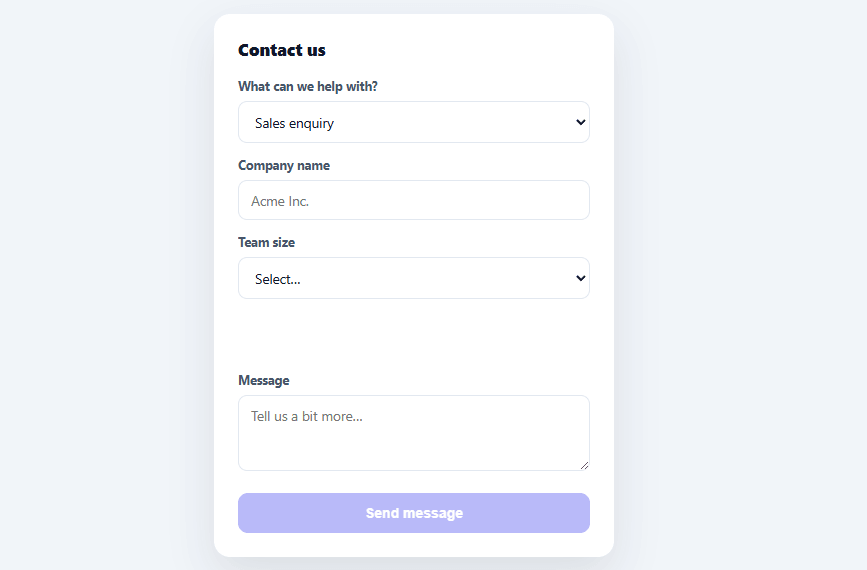
Screenshot of the Conditional Form Fields snippet rendered live

Long forms that ask everyone every question are a leading cause of abandonment. Conditional fields fix that by revealing only the inputs relevant to the path a user chose — a sales enquiry asks for company size, a support request asks for an order ID, and neither shows the other's fields. This snippet builds that dynamic-form pattern in plain HTML, CSS, and vanilla JavaScript, with the one detail most implementations get wrong: validating only the fields that are actually visible.

Declarative conditions in the markup

Each conditional group carries a data-when attribute naming the dropdown value that reveals it (data-when="sales", data-when="support"). When the topic changes, applyConditions() simply toggles a .show class on each group based on whether its data-when matches the current value — there's no per-group if statement to maintain. Adding a new branch is a markup change (a new group with the right data-when), not a JavaScript change, which keeps the logic flat no matter how many paths the form grows.

Validation that follows visibility

The critical correctness detail: a required field that's hidden must not block submission. visibleRequiredFields() collects [data-req] inputs *only* from groups currently showing (plus the always-on message box), so the submit button enables when the relevant fields are filled — and a hidden support field never traps a sales enquiry. Tying required-ness to visibility is the difference between a form that submits and one that's mysteriously stuck because an off-screen field is empty. The submit button stays disabled until every *visible* required field has a value, giving constant, honest readiness feedback.

A smooth reveal without measuring height

Animating a collapsible section open has historically meant measuring its content height in JavaScript. This snippet uses the modern CSS grid trick instead: the group is a grid with grid-template-rows: 0fr collapsed and 1fr expanded, with the inner content set to overflow: hidden; min-height: 0. Transitioning between 0fr and 1fr animates the section to exactly its natural height with no JavaScript measurement at all — clean, content-agnostic, and smooth. Opacity fades alongside it for polish.

Reset behaviour that prevents stale data

Switching topics hides the previous branch's fields. Those inputs keep their values in the DOM (so switching back restores them), but because validation only counts visible fields, a half-filled hidden branch never affects the current submission. On submit, you collect only the fields relevant to the chosen topic — the FAQs cover scoping the payload so you don't send a support form's empty company-name field to your sales endpoint.

Accessible and progressive

The conditional groups are real form elements that exist in the DOM whether shown or not, so the markup stays simple and the form degrades gracefully. For full accessibility you'd also toggle aria-hidden and the disabled attribute on hidden inputs (so they leave the tab order entirely) — the FAQs explain how to layer that on. The whole form is driven by two listeners (change on the selector, input for live validation), keeping the behaviour easy to follow and port.

Step by step

How to Use

  1. 1
    Paste HTML, CSS, and JSA contact form renders with a topic dropdown and no extra fields until you choose a topic.
  2. 2
    Pick a topicChoose "Sales enquiry" — company and team-size fields glide open; choose "Technical support" and order-ID/urgent fields appear instead.
  3. 3
    Watch scoped validationThe Send button stays disabled until every visible required field is filled — hidden branches never block it.
  4. 4
    Switch topicsChange the dropdown — the previous branch collapses and the new one reveals; the button re-evaluates against the now-visible fields.
  5. 5
    SubmitWith all visible required fields filled, Send enables; submitting shows a confirmation and locks the form.
  6. 6
    Add your own branchesAdd a new <div class="cff-cond" data-when="yourvalue"> group and a matching <option> — no JavaScript changes needed.

Real-world uses

Common Use Cases

Contact and support forms
Ask topic-specific questions (order ID for support, company for sales) without overwhelming every visitor — pair with a contact form.
Multi-path signup and onboarding
Show different fields for "individual" vs "team" accounts, or business vs personal, in a multi-step form.
Checkout and shipping
Reveal a "gift message" field only when "this is a gift" is checked, or business-tax fields for company orders.
Surveys and applications
Branch follow-up questions based on a prior answer so respondents only see relevant items.
Booking and quote requests
Show service-specific fields after the user picks a service type, keeping the initial form short.
Learning dynamic-form patterns
A reference for the modern grid-rows reveal and visibility-scoped validation — compare with a progress wizard for sequential multi-step flows.

Got questions?

Frequently Asked Questions

Tie required-ness to visibility: only validate [data-req] fields inside groups that currently have the .show class (plus any always-on fields), as visibleRequiredFields() does here. A hidden field's value is irrelevant to the current path, so it must be excluded from the readiness check — this is the single most common bug in conditional forms.

Beyond hiding them visually, set the disabled attribute and aria-hidden="true" on inputs inside collapsed groups (and remove those when shown). Disabled fields skip the tab order and aren't submitted, and aria-hidden keeps screen readers from announcing off-screen inputs. Toggle both alongside the .show class in applyConditions().

On submit, read the selected topic and collect values only from the visible groups (and shared fields), building a payload scoped to that path — don't send a support form's empty company field to your sales endpoint. Iterate the .show groups' inputs, or maintain a per-topic field map.

Animating max-height requires guessing a value larger than any content (which makes the timing feel off and clips tall content), while measuring exact height needs JavaScript. The grid 0fr→1fr transition animates to the content's true natural height automatically, with no measurement and no magic numbers — it adapts to any content length.

In React, hold the selected value in useState and conditionally render each group with {value === 'sales' && <SalesFields/>}, computing form validity from the currently-rendered required fields; in Vue, use v-if with a computed valid flag; in Angular, use *ngIf and reactive-forms validators toggled per branch. The framework's conditional rendering replaces the .show class, and validity follows what's rendered.

Conditional Form Fields — Export as HTML, React, Vue, Angular & Tailwind

HTML
<!DOCTYPE html>
<html lang="en">
<head>
  <meta charset="UTF-8" />
  <meta name="viewport" content="width=device-width, initial-scale=1.0" />
  <title>Conditional Form Fields</title>
  <style>
    *{box-sizing:border-box;margin:0;padding:0}
    body{font-family:system-ui,-apple-system,sans-serif;background:#f1f5f9;min-height:100vh;display:flex;align-items:flex-start;justify-content:center;padding:40px 24px}
    
    .cff-card{background:#fff;border-radius:16px;padding:24px;width:100%;max-width:400px;box-shadow:0 18px 44px rgba(15,23,42,.1)}
    .cff-card h3{font-size:17px;font-weight:800;color:#0f172a;margin-bottom:18px}
    
    .cff-field{margin-bottom:14px}
    .cff-field label{display:block;font-size:12.5px;font-weight:700;color:#475569;margin-bottom:7px}
    .cff-field input,.cff-field select,.cff-field textarea{width:100%;border:1.5px solid #e2e8f0;border-radius:9px;padding:10px 12px;font-size:13.5px;font-family:inherit;color:#0f172a;background:#fff;transition:border-color .15s,box-shadow .15s;resize:vertical}
    .cff-field input:focus,.cff-field select:focus,.cff-field textarea:focus{outline:none;border-color:#6366f1;box-shadow:0 0 0 3px rgba(99,102,241,.15)}
    
    /* Conditional groups: hidden by default, revealed via .show with a height/opacity glide.
       The single .cff-cond-inner wrapper is the one collapsible grid row — wrapping is
       required so groups with multiple fields collapse fully (a bare multi-child grid
       leaves extra children in auto implicit rows that never collapse). */
    .cff-cond{display:grid;grid-template-rows:0fr;opacity:0;transition:grid-template-rows .28s ease,opacity .2s ease}
    .cff-cond-inner{overflow:hidden;min-height:0}
    .cff-cond.show{grid-template-rows:1fr;opacity:1}
    
    .cff-check{display:flex;align-items:center;gap:8px;font-size:13px;color:#475569;font-weight:600;cursor:pointer;margin-bottom:14px}
    .cff-check input{width:16px;height:16px;accent-color:#6366f1}
    
    .cff-submit{width:100%;background:#6366f1;color:#fff;border:none;border-radius:10px;padding:12px;font-size:14px;font-weight:700;cursor:pointer;transition:background .15s,opacity .15s;margin-top:4px}
    .cff-submit:hover:not(:disabled){background:#4f46e5}
    .cff-submit:disabled{opacity:.45;cursor:not-allowed}
    
    .cff-done{margin-top:12px;text-align:center;font-size:13px;font-weight:700;color:#16a34a;background:#ecfdf5;border:1px solid #a7f3d0;border-radius:9px;padding:10px}
  </style>
</head>
<body>
  <form class="cff-card" id="cffForm" novalidate>
    <h3>Contact us</h3>
  
    <div class="cff-field">
      <label for="cffReason">What can we help with?</label>
      <select id="cffReason">
        <option value="">Choose a topic…</option>
        <option value="sales">Sales enquiry</option>
        <option value="support">Technical support</option>
        <option value="billing">Billing question</option>
        <option value="other">Something else</option>
      </select>
    </div>
  
    <!-- Shown only for: sales -->
    <div class="cff-cond" data-when="sales">
      <div class="cff-cond-inner">
        <div class="cff-field">
          <label for="cffCompany">Company name</label>
          <input type="text" id="cffCompany" data-req placeholder="Acme Inc.">
        </div>
        <div class="cff-field">
          <label for="cffSeats">Team size</label>
          <select id="cffSeats" data-req>
            <option value="">Select…</option>
            <option>1–10</option><option>11–50</option><option>51–200</option><option>200+</option>
          </select>
        </div>
      </div>
    </div>
  
    <!-- Shown only for: support -->
    <div class="cff-cond" data-when="support">
      <div class="cff-cond-inner">
        <div class="cff-field">
          <label for="cffOrder">Account / order ID</label>
          <input type="text" id="cffOrder" data-req placeholder="e.g. ACC-10293">
        </div>
        <label class="cff-check"><input type="checkbox" id="cffUrgent"> This is blocking my work (urgent)</label>
      </div>
    </div>
  
    <!-- Shown only for: billing -->
    <div class="cff-cond" data-when="billing">
      <div class="cff-cond-inner">
        <div class="cff-field">
          <label for="cffInvoice">Invoice number</label>
          <input type="text" id="cffInvoice" data-req placeholder="INV-0000">
        </div>
      </div>
    </div>
  
    <div class="cff-field" id="cffMsgWrap" hidden>
      <label for="cffMessage">Message</label>
      <textarea id="cffMessage" rows="3" data-req placeholder="Tell us a bit more…"></textarea>
    </div>
  
    <button type="submit" class="cff-submit" id="cffSubmit" disabled>Send message</button>
    <p class="cff-done" id="cffDone" hidden>✓ Thanks — we'll reply within one business day.</p>
  </form>
  <script>
    var form = document.getElementById('cffForm');
    var reason = document.getElementById('cffReason');
    var conds = Array.prototype.slice.call(document.querySelectorAll('.cff-cond'));
    var msgWrap = document.getElementById('cffMsgWrap');
    var submit = document.getElementById('cffSubmit');
    
    function visibleRequiredFields() {
      var fields = [];
      conds.forEach(function (group) {
        if (group.classList.contains('show')) {
          group.querySelectorAll('[data-req]').forEach(function (f) { fields.push(f); });
        }
      });
      // The message box is shown for every chosen topic.
      if (!msgWrap.hidden) {
        msgWrap.querySelectorAll('[data-req]').forEach(function (f) { fields.push(f); });
      }
      return fields;
    }
    
    function validate() {
      var value = reason.value;
      var ready = value !== '';
      visibleRequiredFields().forEach(function (f) {
        if (!f.value.trim()) ready = false;
      });
      submit.disabled = !ready;
    }
    
    function applyConditions() {
      var value = reason.value;
      conds.forEach(function (group) {
        group.classList.toggle('show', group.dataset.when === value);
      });
      // Message box appears once any topic is chosen.
      msgWrap.hidden = value === '';
      validate();
    }
    
    reason.addEventListener('change', applyConditions);
    form.addEventListener('input', validate);
    
    form.addEventListener('submit', function (e) {
      e.preventDefault();
      if (submit.disabled) return;
      // Collect only the relevant fields for the chosen topic here.
      form.querySelectorAll('select, input, textarea, button').forEach(function (el) { el.disabled = true; });
      document.getElementById('cffDone').hidden = false;
    });
    
    applyConditions();
  </script>
</body>
</html>
Tailwind
<!DOCTYPE html>
<html lang="en">
<head>
  <meta charset="UTF-8" />
  <meta name="viewport" content="width=device-width, initial-scale=1.0" />
  <title>Conditional Form Fields</title>
  <!-- Tailwind CSS v3+ — arbitrary value classes (e.g. bg-[#0f172a]) are valid -->
  <script src="https://cdn.tailwindcss.com"></script>
  <style>
    * {
      box-sizing:border-box;margin:0;padding:0
    }

    body {
      font-family:system-ui,-apple-system,sans-serif;background:#f1f5f9;min-height:100vh;display:flex;align-items:flex-start;justify-content:center;padding:40px 24px
    }

    .cff-card h3 {
      font-size:17px;font-weight:800;color:#0f172a;margin-bottom:18px
    }

    .cff-field label {
      display:block;font-size:12.5px;font-weight:700;color:#475569;margin-bottom:7px
    }

    .cff-field input,.cff-field select,.cff-field textarea {
      width:100%;border:1.5px solid #e2e8f0;border-radius:9px;padding:10px 12px;font-size:13.5px;font-family:inherit;color:#0f172a;background:#fff;transition:border-color .15s,box-shadow .15s;resize:vertical
    }

    .cff-field input:focus,.cff-field select:focus,.cff-field textarea:focus {
      outline:none;border-color:#6366f1;box-shadow:0 0 0 3px rgba(99,102,241,.15)
    }

    .cff-cond.show {
      grid-template-rows:1fr;opacity:1
    }

    .cff-check input {
      width:16px;height:16px;accent-color:#6366f1
    }

    .cff-submit:hover:not(:disabled) {
      background:#4f46e5
    }

    .cff-submit:disabled {
      opacity:.45;cursor:not-allowed
    }
  </style>
</head>
<body>
  <form class="cff-card bg-[#fff] rounded-2xl p-6 w-full max-w-[400px] shadow-[0_18px_44px_rgba(15,23,42,.1)]" id="cffForm" novalidate>
    <h3>Contact us</h3>
  
    <div class="cff-field mb-3.5">
      <label for="cffReason">What can we help with?</label>
      <select id="cffReason">
        <option value="">Choose a topic…</option>
        <option value="sales">Sales enquiry</option>
        <option value="support">Technical support</option>
        <option value="billing">Billing question</option>
        <option value="other">Something else</option>
      </select>
    </div>
  
    <!-- Shown only for: sales -->
    <div class="cff-cond grid grid-rows-[0fr] opacity-0 [transition:grid-template-rows_.28s_ease,opacity_.2s_ease]" data-when="sales">
      <div class="overflow-hidden min-h-0">
        <div class="cff-field mb-3.5">
          <label for="cffCompany">Company name</label>
          <input type="text" id="cffCompany" data-req placeholder="Acme Inc.">
        </div>
        <div class="cff-field mb-3.5">
          <label for="cffSeats">Team size</label>
          <select id="cffSeats" data-req>
            <option value="">Select…</option>
            <option>1–10</option><option>11–50</option><option>51–200</option><option>200+</option>
          </select>
        </div>
      </div>
    </div>
  
    <!-- Shown only for: support -->
    <div class="cff-cond grid grid-rows-[0fr] opacity-0 [transition:grid-template-rows_.28s_ease,opacity_.2s_ease]" data-when="support">
      <div class="overflow-hidden min-h-0">
        <div class="cff-field mb-3.5">
          <label for="cffOrder">Account / order ID</label>
          <input type="text" id="cffOrder" data-req placeholder="e.g. ACC-10293">
        </div>
        <label class="cff-check flex items-center gap-2 text-[13px] text-[#475569] font-semibold cursor-pointer mb-3.5"><input type="checkbox" id="cffUrgent"> This is blocking my work (urgent)</label>
      </div>
    </div>
  
    <!-- Shown only for: billing -->
    <div class="cff-cond grid grid-rows-[0fr] opacity-0 [transition:grid-template-rows_.28s_ease,opacity_.2s_ease]" data-when="billing">
      <div class="overflow-hidden min-h-0">
        <div class="cff-field mb-3.5">
          <label for="cffInvoice">Invoice number</label>
          <input type="text" id="cffInvoice" data-req placeholder="INV-0000">
        </div>
      </div>
    </div>
  
    <div class="cff-field mb-3.5" id="cffMsgWrap" hidden>
      <label for="cffMessage">Message</label>
      <textarea id="cffMessage" rows="3" data-req placeholder="Tell us a bit more…"></textarea>
    </div>
  
    <button type="submit" class="cff-submit w-full bg-[#6366f1] text-[#fff] border-0 rounded-[10px] p-3 text-sm font-bold cursor-pointer [transition:background_.15s,opacity_.15s] mt-1" id="cffSubmit" disabled>Send message</button>
    <p class="mt-3 text-center text-[13px] font-bold text-[#16a34a] bg-[#ecfdf5] border border-[#a7f3d0] rounded-[9px] p-2.5" id="cffDone" hidden>✓ Thanks — we'll reply within one business day.</p>
  </form>
  <script>
    var form = document.getElementById('cffForm');
    var reason = document.getElementById('cffReason');
    var conds = Array.prototype.slice.call(document.querySelectorAll('.cff-cond'));
    var msgWrap = document.getElementById('cffMsgWrap');
    var submit = document.getElementById('cffSubmit');
    
    function visibleRequiredFields() {
      var fields = [];
      conds.forEach(function (group) {
        if (group.classList.contains('show')) {
          group.querySelectorAll('[data-req]').forEach(function (f) { fields.push(f); });
        }
      });
      // The message box is shown for every chosen topic.
      if (!msgWrap.hidden) {
        msgWrap.querySelectorAll('[data-req]').forEach(function (f) { fields.push(f); });
      }
      return fields;
    }
    
    function validate() {
      var value = reason.value;
      var ready = value !== '';
      visibleRequiredFields().forEach(function (f) {
        if (!f.value.trim()) ready = false;
      });
      submit.disabled = !ready;
    }
    
    function applyConditions() {
      var value = reason.value;
      conds.forEach(function (group) {
        group.classList.toggle('show', group.dataset.when === value);
      });
      // Message box appears once any topic is chosen.
      msgWrap.hidden = value === '';
      validate();
    }
    
    reason.addEventListener('change', applyConditions);
    form.addEventListener('input', validate);
    
    form.addEventListener('submit', function (e) {
      e.preventDefault();
      if (submit.disabled) return;
      // Collect only the relevant fields for the chosen topic here.
      form.querySelectorAll('select, input, textarea, button').forEach(function (el) { el.disabled = true; });
      document.getElementById('cffDone').hidden = false;
    });
    
    applyConditions();
  </script>
</body>
</html>
React
import React, { useEffect } from 'react';

// CSS — optionally move to ConditionalFormFields.module.css
const css = `
*{box-sizing:border-box;margin:0;padding:0}
body{font-family:system-ui,-apple-system,sans-serif;background:#f1f5f9;min-height:100vh;display:flex;align-items:flex-start;justify-content:center;padding:40px 24px}

.cff-card{background:#fff;border-radius:16px;padding:24px;width:100%;max-width:400px;box-shadow:0 18px 44px rgba(15,23,42,.1)}
.cff-card h3{font-size:17px;font-weight:800;color:#0f172a;margin-bottom:18px}

.cff-field{margin-bottom:14px}
.cff-field label{display:block;font-size:12.5px;font-weight:700;color:#475569;margin-bottom:7px}
.cff-field input,.cff-field select,.cff-field textarea{width:100%;border:1.5px solid #e2e8f0;border-radius:9px;padding:10px 12px;font-size:13.5px;font-family:inherit;color:#0f172a;background:#fff;transition:border-color .15s,box-shadow .15s;resize:vertical}
.cff-field input:focus,.cff-field select:focus,.cff-field textarea:focus{outline:none;border-color:#6366f1;box-shadow:0 0 0 3px rgba(99,102,241,.15)}

/* Conditional groups: hidden by default, revealed via .show with a height/opacity glide.
   The single .cff-cond-inner wrapper is the one collapsible grid row — wrapping is
   required so groups with multiple fields collapse fully (a bare multi-child grid
   leaves extra children in auto implicit rows that never collapse). */
.cff-cond{display:grid;grid-template-rows:0fr;opacity:0;transition:grid-template-rows .28s ease,opacity .2s ease}
.cff-cond-inner{overflow:hidden;min-height:0}
.cff-cond.show{grid-template-rows:1fr;opacity:1}

.cff-check{display:flex;align-items:center;gap:8px;font-size:13px;color:#475569;font-weight:600;cursor:pointer;margin-bottom:14px}
.cff-check input{width:16px;height:16px;accent-color:#6366f1}

.cff-submit{width:100%;background:#6366f1;color:#fff;border:none;border-radius:10px;padding:12px;font-size:14px;font-weight:700;cursor:pointer;transition:background .15s,opacity .15s;margin-top:4px}
.cff-submit:hover:not(:disabled){background:#4f46e5}
.cff-submit:disabled{opacity:.45;cursor:not-allowed}

.cff-done{margin-top:12px;text-align:center;font-size:13px;font-weight:700;color:#16a34a;background:#ecfdf5;border:1px solid #a7f3d0;border-radius:9px;padding:10px}
`;

export default function ConditionalFormFields() {
  // Auto-generated escape hatch: the original snippet's vanilla JS runs once
  // after mount and queries the rendered DOM. For idiomatic React, lift this
  // into state + handlers.
  useEffect(() => {
    const _listeners = [];
    const _originalAddEventListener = EventTarget.prototype.addEventListener;
    EventTarget.prototype.addEventListener = function(type, listener, options) {
      _listeners.push({ target: this, type, listener, options });
      return _originalAddEventListener.call(this, type, listener, options);
    };
    var form = document.getElementById('cffForm');
    var reason = document.getElementById('cffReason');
    var conds = Array.prototype.slice.call(document.querySelectorAll('.cff-cond'));
    var msgWrap = document.getElementById('cffMsgWrap');
    var submit = document.getElementById('cffSubmit');
    
    function visibleRequiredFields() {
      var fields = [];
      conds.forEach(function (group) {
        if (group.classList.contains('show')) {
          group.querySelectorAll('[data-req]').forEach(function (f) { fields.push(f); });
        }
      });
      // The message box is shown for every chosen topic.
      if (!msgWrap.hidden) {
        msgWrap.querySelectorAll('[data-req]').forEach(function (f) { fields.push(f); });
      }
      return fields;
    }
    
    function validate() {
      var value = reason.value;
      var ready = value !== '';
      visibleRequiredFields().forEach(function (f) {
        if (!f.value.trim()) ready = false;
      });
      submit.disabled = !ready;
    }
    
    function applyConditions() {
      var value = reason.value;
      conds.forEach(function (group) {
        group.classList.toggle('show', group.dataset.when === value);
      });
      // Message box appears once any topic is chosen.
      msgWrap.hidden = value === '';
      validate();
    }
    
    reason.addEventListener('change', applyConditions);
    form.addEventListener('input', validate);
    
    form.addEventListener('submit', function (e) {
      e.preventDefault();
      if (submit.disabled) return;
      // Collect only the relevant fields for the chosen topic here.
      form.querySelectorAll('select, input, textarea, button').forEach(function (el) { el.disabled = true; });
      document.getElementById('cffDone').hidden = false;
    });
    
    applyConditions();
    // Cleanup: restore addEventListener and remove all listeners
    return () => {
      EventTarget.prototype.addEventListener = _originalAddEventListener;
      for (const { target, type, listener, options } of _listeners) {
        target.removeEventListener(type, listener, options);
      }
    };
  }, []);

  return (
    <>
      <style>{css}</style>
      <form className="cff-card" id="cffForm" novalidate>
        <h3>Contact us</h3>
      
        <div className="cff-field">
          <label htmlFor="cffReason">What can we help with?</label>
          <select id="cffReason">
            <option value="">Choose a topic…</option>
            <option value="sales">Sales enquiry</option>
            <option value="support">Technical support</option>
            <option value="billing">Billing question</option>
            <option value="other">Something else</option>
          </select>
        </div>
      
        
        <div className="cff-cond" data-when="sales">
          <div className="cff-cond-inner">
            <div className="cff-field">
              <label htmlFor="cffCompany">Company name</label>
              <input type="text" id="cffCompany" data-req placeholder="Acme Inc." />
            </div>
            <div className="cff-field">
              <label htmlFor="cffSeats">Team size</label>
              <select id="cffSeats" data-req>
                <option value="">Select…</option>
                <option>1–10</option><option>11–50</option><option>51–200</option><option>200+</option>
              </select>
            </div>
          </div>
        </div>
      
        
        <div className="cff-cond" data-when="support">
          <div className="cff-cond-inner">
            <div className="cff-field">
              <label htmlFor="cffOrder">Account / order ID</label>
              <input type="text" id="cffOrder" data-req placeholder="e.g. ACC-10293" />
            </div>
            <label className="cff-check"><input type="checkbox" id="cffUrgent" /> This is blocking my work (urgent)</label>
          </div>
        </div>
      
        
        <div className="cff-cond" data-when="billing">
          <div className="cff-cond-inner">
            <div className="cff-field">
              <label htmlFor="cffInvoice">Invoice number</label>
              <input type="text" id="cffInvoice" data-req placeholder="INV-0000" />
            </div>
          </div>
        </div>
      
        <div className="cff-field" id="cffMsgWrap" hidden>
          <label htmlFor="cffMessage">Message</label>
          <textarea id="cffMessage" rows="3" data-req placeholder="Tell us a bit more…"></textarea>
        </div>
      
        <button type="submit" className="cff-submit" id="cffSubmit" defaultDisabled>Send message</button>
        <p className="cff-done" id="cffDone" hidden>✓ Thanks — we'll reply within one business day.</p>
      </form>
    </>
  );
}
React + Tailwind
import React, { useEffect } from 'react';
// Requires Tailwind CSS v3+ — https://tailwindcss.com/docs/installation
// Arbitrary value classes (e.g. bg-[#0f172a]) are valid Tailwind v3+

export default function ConditionalFormFields() {
  // Auto-generated escape hatch: the original snippet's vanilla JS runs once
  // after mount and queries the rendered DOM. For idiomatic React, lift this
  // into state + handlers.
  useEffect(() => {
    const _listeners = [];
    const _originalAddEventListener = EventTarget.prototype.addEventListener;
    EventTarget.prototype.addEventListener = function(type, listener, options) {
      _listeners.push({ target: this, type, listener, options });
      return _originalAddEventListener.call(this, type, listener, options);
    };
    var form = document.getElementById('cffForm');
    var reason = document.getElementById('cffReason');
    var conds = Array.prototype.slice.call(document.querySelectorAll('.cff-cond'));
    var msgWrap = document.getElementById('cffMsgWrap');
    var submit = document.getElementById('cffSubmit');
    
    function visibleRequiredFields() {
      var fields = [];
      conds.forEach(function (group) {
        if (group.classList.contains('show')) {
          group.querySelectorAll('[data-req]').forEach(function (f) { fields.push(f); });
        }
      });
      // The message box is shown for every chosen topic.
      if (!msgWrap.hidden) {
        msgWrap.querySelectorAll('[data-req]').forEach(function (f) { fields.push(f); });
      }
      return fields;
    }
    
    function validate() {
      var value = reason.value;
      var ready = value !== '';
      visibleRequiredFields().forEach(function (f) {
        if (!f.value.trim()) ready = false;
      });
      submit.disabled = !ready;
    }
    
    function applyConditions() {
      var value = reason.value;
      conds.forEach(function (group) {
        group.classList.toggle('show', group.dataset.when === value);
      });
      // Message box appears once any topic is chosen.
      msgWrap.hidden = value === '';
      validate();
    }
    
    reason.addEventListener('change', applyConditions);
    form.addEventListener('input', validate);
    
    form.addEventListener('submit', function (e) {
      e.preventDefault();
      if (submit.disabled) return;
      // Collect only the relevant fields for the chosen topic here.
      form.querySelectorAll('select, input, textarea, button').forEach(function (el) { el.disabled = true; });
      document.getElementById('cffDone').hidden = false;
    });
    
    applyConditions();
    // Cleanup: restore addEventListener and remove all listeners
    return () => {
      EventTarget.prototype.addEventListener = _originalAddEventListener;
      for (const { target, type, listener, options } of _listeners) {
        target.removeEventListener(type, listener, options);
      }
    };
  }, []);

  return (
    <>
      <style>{`
* {
  box-sizing:border-box;margin:0;padding:0
}

body {
  font-family:system-ui,-apple-system,sans-serif;background:#f1f5f9;min-height:100vh;display:flex;align-items:flex-start;justify-content:center;padding:40px 24px
}

.cff-card h3 {
  font-size:17px;font-weight:800;color:#0f172a;margin-bottom:18px
}

.cff-field label {
  display:block;font-size:12.5px;font-weight:700;color:#475569;margin-bottom:7px
}

.cff-field input,.cff-field select,.cff-field textarea {
  width:100%;border:1.5px solid #e2e8f0;border-radius:9px;padding:10px 12px;font-size:13.5px;font-family:inherit;color:#0f172a;background:#fff;transition:border-color .15s,box-shadow .15s;resize:vertical
}

.cff-field input:focus,.cff-field select:focus,.cff-field textarea:focus {
  outline:none;border-color:#6366f1;box-shadow:0 0 0 3px rgba(99,102,241,.15)
}

.cff-cond.show {
  grid-template-rows:1fr;opacity:1
}

.cff-check input {
  width:16px;height:16px;accent-color:#6366f1
}

.cff-submit:hover:not(:disabled) {
  background:#4f46e5
}

.cff-submit:disabled {
  opacity:.45;cursor:not-allowed
}
      `}</style>
      <form className="cff-card bg-[#fff] rounded-2xl p-6 w-full max-w-[400px] shadow-[0_18px_44px_rgba(15,23,42,.1)]" id="cffForm" novalidate>
        <h3>Contact us</h3>
      
        <div className="cff-field mb-3.5">
          <label htmlFor="cffReason">What can we help with?</label>
          <select id="cffReason">
            <option value="">Choose a topic…</option>
            <option value="sales">Sales enquiry</option>
            <option value="support">Technical support</option>
            <option value="billing">Billing question</option>
            <option value="other">Something else</option>
          </select>
        </div>
      
        
        <div className="cff-cond grid grid-rows-[0fr] opacity-0 [transition:grid-template-rows_.28s_ease,opacity_.2s_ease]" data-when="sales">
          <div className="overflow-hidden min-h-0">
            <div className="cff-field mb-3.5">
              <label htmlFor="cffCompany">Company name</label>
              <input type="text" id="cffCompany" data-req placeholder="Acme Inc." />
            </div>
            <div className="cff-field mb-3.5">
              <label htmlFor="cffSeats">Team size</label>
              <select id="cffSeats" data-req>
                <option value="">Select…</option>
                <option>1–10</option><option>11–50</option><option>51–200</option><option>200+</option>
              </select>
            </div>
          </div>
        </div>
      
        
        <div className="cff-cond grid grid-rows-[0fr] opacity-0 [transition:grid-template-rows_.28s_ease,opacity_.2s_ease]" data-when="support">
          <div className="overflow-hidden min-h-0">
            <div className="cff-field mb-3.5">
              <label htmlFor="cffOrder">Account / order ID</label>
              <input type="text" id="cffOrder" data-req placeholder="e.g. ACC-10293" />
            </div>
            <label className="cff-check flex items-center gap-2 text-[13px] text-[#475569] font-semibold cursor-pointer mb-3.5"><input type="checkbox" id="cffUrgent" /> This is blocking my work (urgent)</label>
          </div>
        </div>
      
        
        <div className="cff-cond grid grid-rows-[0fr] opacity-0 [transition:grid-template-rows_.28s_ease,opacity_.2s_ease]" data-when="billing">
          <div className="overflow-hidden min-h-0">
            <div className="cff-field mb-3.5">
              <label htmlFor="cffInvoice">Invoice number</label>
              <input type="text" id="cffInvoice" data-req placeholder="INV-0000" />
            </div>
          </div>
        </div>
      
        <div className="cff-field mb-3.5" id="cffMsgWrap" hidden>
          <label htmlFor="cffMessage">Message</label>
          <textarea id="cffMessage" rows="3" data-req placeholder="Tell us a bit more…"></textarea>
        </div>
      
        <button type="submit" className="cff-submit w-full bg-[#6366f1] text-[#fff] border-0 rounded-[10px] p-3 text-sm font-bold cursor-pointer [transition:background_.15s,opacity_.15s] mt-1" id="cffSubmit" defaultDisabled>Send message</button>
        <p className="mt-3 text-center text-[13px] font-bold text-[#16a34a] bg-[#ecfdf5] border border-[#a7f3d0] rounded-[9px] p-2.5" id="cffDone" hidden>✓ Thanks — we'll reply within one business day.</p>
      </form>
    </>
  );
}
Vue
<template>
  <form class="cff-card" id="cffForm" novalidate>
    <h3>Contact us</h3>
  
    <div class="cff-field">
      <label for="cffReason">What can we help with?</label>
      <select id="cffReason">
        <option value="">Choose a topic…</option>
        <option value="sales">Sales enquiry</option>
        <option value="support">Technical support</option>
        <option value="billing">Billing question</option>
        <option value="other">Something else</option>
      </select>
    </div>
  
    <!-- Shown only for: sales -->
    <div class="cff-cond" data-when="sales">
      <div class="cff-cond-inner">
        <div class="cff-field">
          <label for="cffCompany">Company name</label>
          <input type="text" id="cffCompany" data-req placeholder="Acme Inc.">
        </div>
        <div class="cff-field">
          <label for="cffSeats">Team size</label>
          <select id="cffSeats" data-req>
            <option value="">Select…</option>
            <option>1–10</option><option>11–50</option><option>51–200</option><option>200+</option>
          </select>
        </div>
      </div>
    </div>
  
    <!-- Shown only for: support -->
    <div class="cff-cond" data-when="support">
      <div class="cff-cond-inner">
        <div class="cff-field">
          <label for="cffOrder">Account / order ID</label>
          <input type="text" id="cffOrder" data-req placeholder="e.g. ACC-10293">
        </div>
        <label class="cff-check"><input type="checkbox" id="cffUrgent"> This is blocking my work (urgent)</label>
      </div>
    </div>
  
    <!-- Shown only for: billing -->
    <div class="cff-cond" data-when="billing">
      <div class="cff-cond-inner">
        <div class="cff-field">
          <label for="cffInvoice">Invoice number</label>
          <input type="text" id="cffInvoice" data-req placeholder="INV-0000">
        </div>
      </div>
    </div>
  
    <div class="cff-field" id="cffMsgWrap" hidden>
      <label for="cffMessage">Message</label>
      <textarea id="cffMessage" rows="3" data-req placeholder="Tell us a bit more…"></textarea>
    </div>
  
    <button type="submit" class="cff-submit" id="cffSubmit" disabled>Send message</button>
    <p class="cff-done" id="cffDone" hidden>✓ Thanks — we'll reply within one business day.</p>
  </form>
</template>

<script setup>
import { onMounted } from 'vue';

let form;
let reason;
var conds = Array.prototype.slice.call(document.querySelectorAll('.cff-cond'));
let msgWrap;
let submit;
function visibleRequiredFields() {
  var fields = [];
  conds.forEach(function (group) {
    if (group.classList.contains('show')) {
      group.querySelectorAll('[data-req]').forEach(function (f) { fields.push(f); });
    }
  });
  // The message box is shown for every chosen topic.
  if (!msgWrap.hidden) {
    msgWrap.querySelectorAll('[data-req]').forEach(function (f) { fields.push(f); });
  }
  return fields;
}
function validate() {
  var value = reason.value;
  var ready = value !== '';
  visibleRequiredFields().forEach(function (f) {
    if (!f.value.trim()) ready = false;
  });
  submit.disabled = !ready;
}
function applyConditions() {
  var value = reason.value;
  conds.forEach(function (group) {
    group.classList.toggle('show', group.dataset.when === value);
  });
  // Message box appears once any topic is chosen.
  msgWrap.hidden = value === '';
  validate();
}

onMounted(() => {
  form = document.getElementById('cffForm');
  reason = document.getElementById('cffReason');
  msgWrap = document.getElementById('cffMsgWrap');
  submit = document.getElementById('cffSubmit');
  reason.addEventListener('change', applyConditions);
  form.addEventListener('input', validate);
  form.addEventListener('submit', function (e) {
    e.preventDefault();
    if (submit.disabled) return;
    // Collect only the relevant fields for the chosen topic here.
    form.querySelectorAll('select, input, textarea, button').forEach(function (el) { el.disabled = true; });
    document.getElementById('cffDone').hidden = false;
  });
  applyConditions();
});
</script>

<style scoped>
*{box-sizing:border-box;margin:0;padding:0}
body{font-family:system-ui,-apple-system,sans-serif;background:#f1f5f9;min-height:100vh;display:flex;align-items:flex-start;justify-content:center;padding:40px 24px}

.cff-card{background:#fff;border-radius:16px;padding:24px;width:100%;max-width:400px;box-shadow:0 18px 44px rgba(15,23,42,.1)}
.cff-card h3{font-size:17px;font-weight:800;color:#0f172a;margin-bottom:18px}

.cff-field{margin-bottom:14px}
.cff-field label{display:block;font-size:12.5px;font-weight:700;color:#475569;margin-bottom:7px}
.cff-field input,.cff-field select,.cff-field textarea{width:100%;border:1.5px solid #e2e8f0;border-radius:9px;padding:10px 12px;font-size:13.5px;font-family:inherit;color:#0f172a;background:#fff;transition:border-color .15s,box-shadow .15s;resize:vertical}
.cff-field input:focus,.cff-field select:focus,.cff-field textarea:focus{outline:none;border-color:#6366f1;box-shadow:0 0 0 3px rgba(99,102,241,.15)}

/* Conditional groups: hidden by default, revealed via .show with a height/opacity glide.
   The single .cff-cond-inner wrapper is the one collapsible grid row — wrapping is
   required so groups with multiple fields collapse fully (a bare multi-child grid
   leaves extra children in auto implicit rows that never collapse). */
.cff-cond{display:grid;grid-template-rows:0fr;opacity:0;transition:grid-template-rows .28s ease,opacity .2s ease}
.cff-cond-inner{overflow:hidden;min-height:0}
.cff-cond.show{grid-template-rows:1fr;opacity:1}

.cff-check{display:flex;align-items:center;gap:8px;font-size:13px;color:#475569;font-weight:600;cursor:pointer;margin-bottom:14px}
.cff-check input{width:16px;height:16px;accent-color:#6366f1}

.cff-submit{width:100%;background:#6366f1;color:#fff;border:none;border-radius:10px;padding:12px;font-size:14px;font-weight:700;cursor:pointer;transition:background .15s,opacity .15s;margin-top:4px}
.cff-submit:hover:not(:disabled){background:#4f46e5}
.cff-submit:disabled{opacity:.45;cursor:not-allowed}

.cff-done{margin-top:12px;text-align:center;font-size:13px;font-weight:700;color:#16a34a;background:#ecfdf5;border:1px solid #a7f3d0;border-radius:9px;padding:10px}
</style>
Angular
// @ts-nocheck
// Note: vanilla JS DOM manipulation is preserved as-is inside ngAfterViewInit().
// For idiomatic Angular, replace document.getElementById() with @ViewChild() refs
// and move state into component properties with two-way binding.
import { Component, AfterViewInit, ViewEncapsulation } from '@angular/core';
import { CommonModule } from '@angular/common';

@Component({
  selector: 'app-conditional-form-fields',
  standalone: true,
  imports: [CommonModule],
  encapsulation: ViewEncapsulation.None,
  template: `
    <form class="cff-card" id="cffForm" novalidate>
      <h3>Contact us</h3>
    
      <div class="cff-field">
        <label for="cffReason">What can we help with?</label>
        <select id="cffReason">
          <option value="">Choose a topic…</option>
          <option value="sales">Sales enquiry</option>
          <option value="support">Technical support</option>
          <option value="billing">Billing question</option>
          <option value="other">Something else</option>
        </select>
      </div>
    
      <!-- Shown only for: sales -->
      <div class="cff-cond" data-when="sales">
        <div class="cff-cond-inner">
          <div class="cff-field">
            <label for="cffCompany">Company name</label>
            <input type="text" id="cffCompany" data-req placeholder="Acme Inc.">
          </div>
          <div class="cff-field">
            <label for="cffSeats">Team size</label>
            <select id="cffSeats" data-req>
              <option value="">Select…</option>
              <option>1–10</option><option>11–50</option><option>51–200</option><option>200+</option>
            </select>
          </div>
        </div>
      </div>
    
      <!-- Shown only for: support -->
      <div class="cff-cond" data-when="support">
        <div class="cff-cond-inner">
          <div class="cff-field">
            <label for="cffOrder">Account / order ID</label>
            <input type="text" id="cffOrder" data-req placeholder="e.g. ACC-10293">
          </div>
          <label class="cff-check"><input type="checkbox" id="cffUrgent"> This is blocking my work (urgent)</label>
        </div>
      </div>
    
      <!-- Shown only for: billing -->
      <div class="cff-cond" data-when="billing">
        <div class="cff-cond-inner">
          <div class="cff-field">
            <label for="cffInvoice">Invoice number</label>
            <input type="text" id="cffInvoice" data-req placeholder="INV-0000">
          </div>
        </div>
      </div>
    
      <div class="cff-field" id="cffMsgWrap" hidden>
        <label for="cffMessage">Message</label>
        <textarea id="cffMessage" rows="3" data-req placeholder="Tell us a bit more…"></textarea>
      </div>
    
      <button type="submit" class="cff-submit" id="cffSubmit" disabled>Send message</button>
      <p class="cff-done" id="cffDone" hidden>✓ Thanks — we'll reply within one business day.</p>
    </form>
  `,
  styles: [`
    *{box-sizing:border-box;margin:0;padding:0}
    body{font-family:system-ui,-apple-system,sans-serif;background:#f1f5f9;min-height:100vh;display:flex;align-items:flex-start;justify-content:center;padding:40px 24px}
    
    .cff-card{background:#fff;border-radius:16px;padding:24px;width:100%;max-width:400px;box-shadow:0 18px 44px rgba(15,23,42,.1)}
    .cff-card h3{font-size:17px;font-weight:800;color:#0f172a;margin-bottom:18px}
    
    .cff-field{margin-bottom:14px}
    .cff-field label{display:block;font-size:12.5px;font-weight:700;color:#475569;margin-bottom:7px}
    .cff-field input,.cff-field select,.cff-field textarea{width:100%;border:1.5px solid #e2e8f0;border-radius:9px;padding:10px 12px;font-size:13.5px;font-family:inherit;color:#0f172a;background:#fff;transition:border-color .15s,box-shadow .15s;resize:vertical}
    .cff-field input:focus,.cff-field select:focus,.cff-field textarea:focus{outline:none;border-color:#6366f1;box-shadow:0 0 0 3px rgba(99,102,241,.15)}
    
    /* Conditional groups: hidden by default, revealed via .show with a height/opacity glide.
       The single .cff-cond-inner wrapper is the one collapsible grid row — wrapping is
       required so groups with multiple fields collapse fully (a bare multi-child grid
       leaves extra children in auto implicit rows that never collapse). */
    .cff-cond{display:grid;grid-template-rows:0fr;opacity:0;transition:grid-template-rows .28s ease,opacity .2s ease}
    .cff-cond-inner{overflow:hidden;min-height:0}
    .cff-cond.show{grid-template-rows:1fr;opacity:1}
    
    .cff-check{display:flex;align-items:center;gap:8px;font-size:13px;color:#475569;font-weight:600;cursor:pointer;margin-bottom:14px}
    .cff-check input{width:16px;height:16px;accent-color:#6366f1}
    
    .cff-submit{width:100%;background:#6366f1;color:#fff;border:none;border-radius:10px;padding:12px;font-size:14px;font-weight:700;cursor:pointer;transition:background .15s,opacity .15s;margin-top:4px}
    .cff-submit:hover:not(:disabled){background:#4f46e5}
    .cff-submit:disabled{opacity:.45;cursor:not-allowed}
    
    .cff-done{margin-top:12px;text-align:center;font-size:13px;font-weight:700;color:#16a34a;background:#ecfdf5;border:1px solid #a7f3d0;border-radius:9px;padding:10px}
  `]
})
export class ConditionalFormFieldsComponent implements AfterViewInit {
  ngAfterViewInit(): void {
    var form = document.getElementById('cffForm');
    var reason = document.getElementById('cffReason');
    var conds = Array.prototype.slice.call(document.querySelectorAll('.cff-cond'));
    var msgWrap = document.getElementById('cffMsgWrap');
    var submit = document.getElementById('cffSubmit');
    
    function visibleRequiredFields() {
      var fields = [];
      conds.forEach(function (group) {
        if (group.classList.contains('show')) {
          group.querySelectorAll('[data-req]').forEach(function (f) { fields.push(f); });
        }
      });
      // The message box is shown for every chosen topic.
      if (!msgWrap.hidden) {
        msgWrap.querySelectorAll('[data-req]').forEach(function (f) { fields.push(f); });
      }
      return fields;
    }
    
    function validate() {
      var value = reason.value;
      var ready = value !== '';
      visibleRequiredFields().forEach(function (f) {
        if (!f.value.trim()) ready = false;
      });
      submit.disabled = !ready;
    }
    
    function applyConditions() {
      var value = reason.value;
      conds.forEach(function (group) {
        group.classList.toggle('show', group.dataset.when === value);
      });
      // Message box appears once any topic is chosen.
      msgWrap.hidden = value === '';
      validate();
    }
    
    reason.addEventListener('change', applyConditions);
    form.addEventListener('input', validate);
    
    form.addEventListener('submit', function (e) {
      e.preventDefault();
      if (submit.disabled) return;
      // Collect only the relevant fields for the chosen topic here.
      form.querySelectorAll('select, input, textarea, button').forEach(function (el) { el.disabled = true; });
      document.getElementById('cffDone').hidden = false;
    });
    
    applyConditions();

    // Bind inline-handler functions to the component so the template can call them
    Object.assign(this, { visibleRequiredFields, validate, applyConditions });
  }
}