Source Code
<div class="mei-card">
  <label class="mei-label" for="meiInput">Invite teammates</label>
  <div class="mei-box" id="meiBox">
    <span class="mei-chips" id="meiChips"></span>
    <input type="text" id="meiInput" placeholder="Add emails, separated by Enter or comma" autocomplete="off">
  </div>
  <p class="mei-hint" id="meiHint">Press Enter, comma, or paste a list to add multiple at once.</p>
  <button type="button" class="mei-send" id="meiSend" disabled>Send <span id="meiCount"></span> invites</button>
</div>*{box-sizing:border-box;margin:0;padding:0}
body{font-family:system-ui,-apple-system,sans-serif;background:#f1f5f9;min-height:100vh;display:flex;align-items:flex-start;justify-content:center;padding:50px 24px}
.mei-card{background:#fff;border-radius:16px;padding:22px;width:100%;max-width:440px;box-shadow:0 18px 44px rgba(15,23,42,.1)}
.mei-label{display:block;font-size:13px;font-weight:700;color:#334155;margin-bottom:8px}
.mei-box{display:flex;flex-wrap:wrap;align-items:center;gap:6px;border:1.5px solid #e2e8f0;border-radius:11px;padding:8px 10px;min-height:46px;cursor:text;transition:border-color .15s,box-shadow .15s}
.mei-box.focus{border-color:#6366f1;box-shadow:0 0 0 3px rgba(99,102,241,.15)}
.mei-chips{display:contents}
.mei-input-grow{flex:1;min-width:140px}
.mei-box input{flex:1;min-width:140px;border:none;outline:none;font-size:13.5px;font-family:inherit;color:#0f172a;padding:5px 2px}
.mei-chip{display:inline-flex;align-items:center;gap:6px;background:#eef2ff;border:1px solid #e0e7ff;border-radius:7px;padding:4px 7px 4px 9px;font-size:12.5px;font-weight:600;color:#4338ca;max-width:100%}
.mei-chip.invalid{background:#fef2f2;border-color:#fecaca;color:#b91c1c}
.mei-chip span{overflow:hidden;text-overflow:ellipsis;white-space:nowrap}
.mei-chip button{border:none;background:none;color:inherit;cursor:pointer;font-size:13px;line-height:1;opacity:.65;padding:0}
.mei-chip button:hover{opacity:1}
.mei-hint{font-size:11.5px;color:#94a3b8;margin:9px 0 16px}
.mei-hint.error{color:#dc2626;font-weight:600}
.mei-send{width:100%;background:#6366f1;color:#fff;border:none;border-radius:10px;padding:12px;font-size:14px;font-weight:700;cursor:pointer;transition:background .15s,opacity .15s}
.mei-send:hover:not(:disabled){background:#4f46e5}
.mei-send:disabled{opacity:.45;cursor:not-allowed}var EMAIL_RE = /^[^\s@]+@[^\s@]+\.[^\s@]+$/;
var box = document.getElementById('meiBox');
var input = document.getElementById('meiInput');
var chipsEl = document.getElementById('meiChips');
var emails = []; // { value, valid }
function addEmail(raw) {
var v = raw.trim().replace(/[,;]$/, '');
if (!v) return;
if (emails.some(function (e) { return e.value.toLowerCase() === v.toLowerCase(); })) return; // dedupe
emails.push({ value: v, valid: EMAIL_RE.test(v) });
}
function commit(text) {
// Split on commas, semicolons, spaces, and newlines so a pasted list works.
text.split(/[\s,;]+/).forEach(addEmail);
input.value = '';
render();
}
function render() {
chipsEl.innerHTML = emails.map(function (e, i) {
return '<span class="mei-chip' + (e.valid ? '' : ' invalid') + '" title="' + e.value + (e.valid ? '' : ' (invalid)') + '">' +
'<span>' + e.value + '</span>' +
'<button type="button" data-i="' + i + '" aria-label="Remove">✕</button></span>';
}).join('');
var valid = emails.filter(function (e) { return e.valid; });
var invalid = emails.length - valid.length;
var send = document.getElementById('meiSend');
send.disabled = valid.length === 0 || invalid > 0;
document.getElementById('meiCount').textContent = valid.length ? valid.length : '';
var hint = document.getElementById('meiHint');
if (invalid > 0) { hint.textContent = invalid + ' address' + (invalid > 1 ? 'es are' : ' is') + ' invalid — fix or remove to continue.'; hint.className = 'mei-hint error'; }
else { hint.textContent = 'Press Enter, comma, or paste a list to add multiple at once.'; hint.className = 'mei-hint'; }
}
input.addEventListener('keydown', function (e) {
if (e.key === 'Enter' || e.key === ',' || e.key === ';') { e.preventDefault(); commit(input.value); }
else if (e.key === 'Backspace' && input.value === '' && emails.length) { emails.pop(); render(); }
});
input.addEventListener('blur', function () { if (input.value.trim()) commit(input.value); box.classList.remove('focus'); });
input.addEventListener('focus', function () { box.classList.add('focus'); });
input.addEventListener('paste', function (e) {
e.preventDefault();
commit((e.clipboardData || window.clipboardData).getData('text'));
});
chipsEl.addEventListener('click', function (e) {
var btn = e.target.closest('button[data-i]');
if (!btn) return;
emails.splice(+btn.dataset.i, 1);
render();
});
box.addEventListener('click', function (e) { if (e.target === box || e.target === chipsEl) input.focus(); });
document.getElementById('meiSend').addEventListener('click', function () {
var list = emails.filter(function (e) { return e.valid; }).map(function (e) { return e.value; });
// Send invites to the addresses in the list array here.
this.textContent = '✓ ' + list.length + ' invites sent';
});
render();Learn Coding Visually
Learn to code with interactive, live-preview playgrounds — HTML, CSS, JavaScript, React & more.
 HTML Playground42 lessons · Click-based · Live preview
 CSS PlaygroundLearn CSS with a live editor
 JavaScript Playground60 lessons · DOM · Async · Canvas
 React PlaygroundLearn React with a live code editor
 GSAP PlaygroundLearn GSAP animation interactively
 SVG Playground44 lessons · shapes · paths · animation
 SCSS Playground45 lessons · Sass modules · tokens
 Tailwind PlaygroundLearn Tailwind CSS with a live editor
 Bootstrap 5 Playground50 lessons · live preview
Multi Email Input — Recipient Chips HTML CSS JS
Multi Email Input · Forms · Plain HTML, CSS & JS · Live preview
What's included
Features
About this UI Snippet
Multi Email Input — Validated Recipient Chips with Paste-to-Split
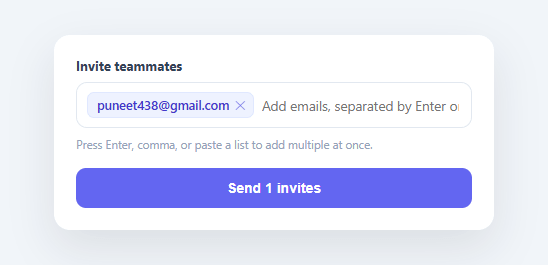
Any "invite teammates," "share with," or "CC" field needs to accept several email addresses and treat each as a distinct, removable token — not a comma-soup string the user has to edit by hand. This snippet builds that multi-email recipient input in plain HTML, CSS, and vanilla JavaScript: type or paste addresses, each becomes a chip, invalid ones are flagged in red, duplicates are dropped, and the send button gates on a clean list.
Chips instead of a comma string
As the user types and presses Enter, comma, or semicolon, the current text is committed as a chip. Each chip shows the address with a remove (✕) button, so editing the list means clicking one token — not finding and deleting the right substring in a long comma-separated value. This is the interaction pattern everyone knows from email clients' To/CC fields, and it's far less error-prone than a raw text field for entering several values.
Paste a whole list, get a whole list
The most valuable behavior is paste handling: commit() splits the input on commas, semicolons, spaces, *and* newlines, so pasting "alice@x.com, bob@y.com; carol@z.com" or a column of addresses copied from a spreadsheet instantly becomes three chips. This is the difference between a usable invite field and one where the user has to add addresses one at a time — and it's the feature most hand-built multi-inputs forget.
Per-chip validation, not all-or-nothing
Each address is validated against a pragmatic email regex as it's added, and invalid ones render as red chips you can see and fix individually rather than a single "one or more emails are invalid" error that doesn't tell you which. The send button disables while any invalid chip exists and shows the valid count ("Send 3 invites"), and the hint line names exactly how many are wrong. Validating per-token is what lets the user correct a single typo'd address in a list of twenty without re-entering everything.
Dedupe and backspace-to-edit
Adding an address that's already present is silently ignored (case-insensitively), so pasting overlapping lists doesn't create duplicate invites. And pressing Backspace in an empty input removes the last chip — the standard quick-edit gesture from real recipient fields — so correcting the most recent entry doesn't require reaching for the mouse.
Focus and click behavior that feels native
The whole box acts like one input: clicking anywhere in it (including the empty space around the chips) focuses the text field, and a focus ring wraps the entire control rather than just the inner input, so it reads as a single cohesive field. A pending value is also committed on blur, so clicking away doesn't silently lose a half-typed address.
Accessible and ready to wire up
Each remove button has an aria-label, chips carry the full address as a title for truncated values, and the component exposes the clean valid list on send — the single hook where you'd POST the invites to your API. For full accessibility you'd announce additions/removals via an ARIA live region (covered in the FAQs), but the structure is correct and keyboard-operable from the start.
Build with AI
Build, Understand, Optimize, and Extend It With AI
Rather than tracing the tokenizing logic by eye, paste this snippet's HTML, CSS, and JS into an AI coding assistant like Claude and ask it to explain exactly how the commit() function's split regex handles a pasted block of addresses separated by mixed commas, semicolons, spaces, and newlines, and why addEmail() checks for an existing case-insensitive match before pushing a new chip. The same assistant can help optimize it, for example checking whether rebuilding the entire chipsEl.innerHTML on every keystroke could get slow with hundreds of recipients, or whether the EMAIL_RE regex is too permissive or too strict for real-world addresses. It's also handy for extending the input: ask it to add a hard cap on the number of recipients with a friendly message, integrate an autocomplete suggestion list from existing contacts, or announce added/removed chips through an ARIA live region for screen reader users. Treat the code less like a finished artifact and more like a starting point for a conversation.
Prompt to recreate it
Copy this into your AI assistant of choice to build the effect from scratch, or as a jumping-off point for your own variant:
Build a "multi-email recipient input" in plain HTML, CSS, and JavaScript using only a text input and rendered chip elements — no tag-input library.

Requirements:
- A bordered box containing rendered chips for already-added emails plus a plain text input for typing the next one; clicking anywhere in the empty space of the box must focus the text input.
- Pressing Enter, comma, or semicolon while typing must commit the current text as a new chip and clear the input; pressing Backspace while the input is empty must remove the most recently added chip instead.
- Pasting text into the input must be intercepted (preventing the raw paste) and instead split on commas, semicolons, whitespace, and newlines, adding one chip per resulting non-empty piece — so a comma-separated list or a newline-separated column copied from a spreadsheet both expand into individual chips in one paste.
- Before adding any address, check it case-insensitively against already-added addresses and silently skip it if it's a duplicate.
- Validate every added address against a practical email regex and visually distinguish invalid ones (e.g. a red-tinted chip) from valid ones, without removing them automatically.
- Each chip needs its own remove (x) button that deletes just that entry and re-renders.
- A submit/send button must stay disabled whenever there are zero valid addresses or at least one invalid address present, and must display the current valid count when enabled (e.g. "Send 3 invites"); a status line below the input must name how many addresses are currently invalid when that's blocking submission.
- Losing focus on the input while it still has unsubmitted text must commit that text as a chip rather than silently discarding it.
Want to tighten it up first? Run this prompt through the AI Prompt Studio to score it across 8 quality dimensions, catch anti-patterns, and tune the wording for Claude, ChatGPT, or Gemini before you paste it in.
Step by step
How to Use
- 1Paste HTML, CSS, and JSAn invite field renders. Type an email and press Enter or comma to turn it into a chip.
- 2Paste a listPaste several addresses separated by commas, spaces, or newlines — each becomes its own chip at once.
- 3See invalid flaggingAdd a malformed address — it shows as a red chip, and the send button disables until it's fixed or removed.
- 4Remove and editClick a chip's ✕ to remove it, or press Backspace in the empty input to delete the last one.
- 5SendWith a valid, duplicate-free list, the button shows the count ("Send 3 invites") and submits the clean array.
- 6Wire up your APIIn the send handler, POST the valid email array to your invite endpoint instead of the demo confirmation.
Real-world uses
Common Use Cases
Got questions?
Frequently Asked Questions
The paste handler intercepts the clipboard text and runs it through commit(), which splits on commas, semicolons, spaces, and newlines — so a comma-separated string or a column copied from a spreadsheet both expand into individual chips. Each split piece is validated and deduped as it's added, so a messy pasted list becomes a clean set of recipient chips.
Per-token validation lets the user see and fix exactly which address is wrong (a red chip) without disturbing the others — critical when entering many recipients, where re-typing the whole list to correct one typo is unacceptable. A single field-level "invalid" error can't point at the offending address among twenty.
Add an ARIA live region (aria-live="polite") that announces "Added alice@x.com" and "Removed bob@y.com" as chips change, give the input an aria-describedby pointing at the hint, and ensure each remove button's aria-label includes the address it removes. The chips and buttons are already keyboard-operable; the live region conveys the dynamic changes.
Add a max check in addEmail() that ignores new entries (and shows a message) once emails.length reaches your limit, and reflect the remaining count in the hint. For per-plan limits, pass the cap in and disable the input once reached.
In React, hold the emails array in useState and render chips with .map(), handling key events to commit/remove; in Vue, use a reactive array with v-for; in Angular, use a component array with *ngFor. The validation, paste-split, and dedupe functions are plain JavaScript that port unchanged — only the per-change re-render moves into the framework.