You Might Also Like
Learn Coding Visually
Learn to code with interactive, live-preview playgrounds — HTML, CSS, JavaScript, React & more.
 HTML Playground42 lessons · Click-based · Live preview
 CSS PlaygroundLearn CSS with a live editor
 JavaScript Playground60 lessons · DOM · Async · Canvas
 React PlaygroundLearn React with a live code editor
 GSAP PlaygroundLearn GSAP animation interactively
 SVG Playground44 lessons · shapes · paths · animation
 SCSS Playground45 lessons · Sass modules · tokens
 Tailwind PlaygroundLearn Tailwind CSS with a live editor
 Bootstrap 5 Playground50 lessons · live preview
Podcast Episode Chapters — Free Timestamped Chapter List HTML CSS JS
Podcast Episode Chapters · Dashboards · Plain HTML, CSS & JS · Live preview
What's included
Features
About this UI Snippet
Podcast Episode Chapters — A Timestamped List That Tracks Simulated Playback
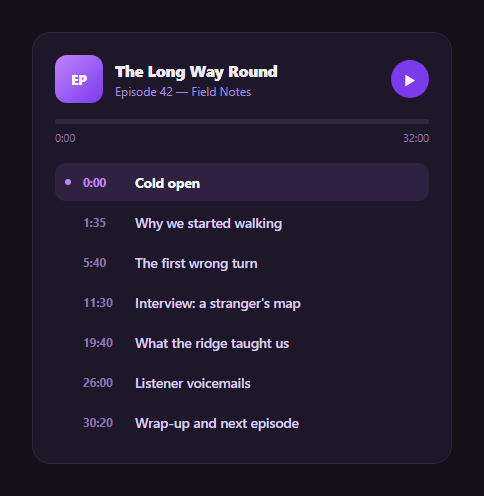
Long-form audio content benefits enormously from chapters — a scannable list of what's covered and when, with the currently playing section highlighted so listeners always know where they are. This snippet builds that pattern in plain HTML, CSS, and vanilla JavaScript, using a simulated elapsed-time ticker rather than a real <audio> element, so the chapter-highlighting logic is easy to read, test, and drop into any player.
A simulated clock, not a real audio element
Instead of wiring up <audio> playback, a setInterval ticker advances an elapsed seconds counter every 200ms (at roughly 5x speed, so you can watch chapters change without waiting through a real 32-minute episode). This keeps the snippet's logic focused on the part that's reusable regardless of your actual audio backend: given an elapsed time, which chapter is active, and how full is the overall progress bar.
Finding the active chapter with a simple scan
currentChapterIndex() walks the chapters in order and keeps advancing its answer as long as elapsed has passed that chapter's start time — the last chapter whose start time is at or before the current elapsed time is the active one. This is a linear scan rather than a binary search because chapter lists are short (a handful to a few dozen), and it reads unambiguously.
Re-rendering only when the chapter actually changes
On every tick, the code compares the currently-rendered active element against what the chapter list *should* show, and only calls renderChapters() (which rebuilds the whole list's HTML) when they differ — so during the many ticks within a single chapter, only the lightweight renderProgress() call runs, keeping the interaction cheap even at a fast simulated tick rate.
Two ways to jump: click a chapter, or click the bar
Clicking any chapter row sets elapsed straight to that chapter's start time; clicking anywhere on the progress track computes the proportional position from the click's x-coordinate and seeks there — both call the same render functions, so jumping by either method keeps the chapter highlight and progress bar in lockstep.
Customizing it
Swap the simulated ticker for a real timeupdate listener on an <audio> element (the chapter-highlighting and progress logic ports unchanged — just replace where elapsed comes from), edit CHAPTERS for your episode, or pair it with a full podcast player or music player for real playback controls.
Build with AI
Build, Understand, Optimize, and Extend It With AI
Rather than tracing the elapsed-time logic by hand, paste this snippet's HTML, CSS, and JS into an AI coding assistant like Claude and ask it to explain exactly how currentChapterIndex() derives the active chapter from a single elapsed-seconds number, and why the tick handler compares the currently-rendered active element before deciding whether to re-render the whole chapter list. The same assistant can help optimize it — for example asking whether a binary search would matter for a chapter list with hundreds of entries, or how to debounce progress-bar rendering if driven by a real audio element's very frequent timeupdate event. It's also useful for extending the widget: ask it to wire it to a real <audio> element with play/pause/seek synced both ways, add chapter thumbnail images, or persist playback position in localStorage across visits. Treat the code less like a finished artifact and more like a starting point for a conversation.
Prompt to recreate it
Copy this into your AI assistant of choice to build the effect from scratch, or as a jumping-off point for your own variant:
Build a "podcast episode chapters" list widget in plain HTML, CSS, and JavaScript with no library.

Requirements:
- An array of chapter objects, each with a title and a start time in seconds, plus a total episode duration in seconds.
- A simulated playback clock (a setInterval-driven elapsed-seconds counter, standing in for a real audio element, advancing faster than real time so the demo is easy to observe) with play and pause controls that start and stop the ticker.
- A function that, given the current elapsed time, determines which chapter is currently "playing" by finding the last chapter in order whose start time is at or before the elapsed time.
- The chapter list rendered so the currently active chapter is visually distinguished (background, text weight, and a colored dot indicator) from the others, re-rendering the list only when the active chapter actually changes rather than on every single clock tick, to avoid unnecessary DOM rebuilding at a fast tick rate.
- Clicking any chapter row must jump the elapsed time directly to that chapter's start time and immediately update both the active-chapter highlight and the overall progress bar.
- A slim overall progress bar above the chapter list whose fill width reflects elapsed time divided by total duration, which must also be clickable/seekable: clicking anywhere on the bar computes the proportional time from the click's horizontal position within the bar's bounding rectangle and seeks playback there.
- Timestamps and the elapsed/total time display formatted as minutes:seconds with tabular number formatting so digits don't visually jitter as they update.
Want to tighten it up first? Run this prompt through the AI Prompt Studio to score it across 8 quality dimensions, catch anti-patterns, and tune the wording for Claude, ChatGPT, or Gemini before you paste it in.
Step by step
How to Use
- 1Paste HTML, CSS, and JSA chapter list renders with the first chapter active and the progress bar at 0.
- 2Click the play buttonA simulated ticker advances elapsed time at roughly 5x speed.
- 3Watch the active chapter changeThe highlighted row updates as simulated playback crosses each chapter's start time.
- 4Click a chapterElapsed time jumps straight to that chapter's start and the progress bar updates.
- 5Click the progress barSeek to any point proportionally along the track.
- 6Swap in real audioReplace the setInterval ticker with an audio element's timeupdate event.
Real-world uses
Common Use Cases
Got questions?
Frequently Asked Questions
currentChapterIndex() scans the CHAPTERS array in order and keeps updating its answer to the current index as long as the elapsed time has reached or passed that chapter\'s start time, stopping as soon as it finds one that hasn\'t started yet. The last chapter whose start time has been reached is the active one — a simple, unambiguous linear scan since chapter lists are short.
Simulating elapsed time with a fast setInterval isolates the reusable part of this pattern — the active-chapter detection and progress rendering — from any specific audio backend, and lets you see the full chapter cycle in seconds instead of waiting through a real episode. Swapping in real audio only requires replacing where the elapsed variable gets its value (an audio element\'s timeupdate event instead of a timer tick); every rendering function stays the same.
Every tick recalculates the elapsed time and updates the progress bar (cheap), but the code compares the DOM element currently marked active against what should be active and only calls the more expensive renderChapters() — which rebuilds the whole list\'s HTML — when they differ. This keeps a fast simulated tick rate (or a real audio timeupdate, which can fire many times per second) from wastefully re-rendering the full list on every single tick.
Add mousedown/touchstart, mousemove/touchmove, and mouseup/touchend listeners on the track: on mousedown set a dragging flag and immediately seek (reusing the click handler\'s math), on mousemove continue seeking to the pointer position only while dragging, and on mouseup clear the flag. The click-to-seek math (proportional x-coordinate against the track\'s bounding rect) is already the core of what dragging needs.
Hold elapsed in component state, updated either by a timer effect (for the demo) or a real audio element\'s timeupdate handler, and derive the active chapter index with a memoized/computed value so React/Vue/Angular\'s own diffing handles the "only re-render when it changes" optimization for you — you don\'t need to hand-roll the comparison the vanilla version does.