You Might Also Like
Learn Coding Visually
Learn to code with interactive, live-preview playgrounds — HTML, CSS, JavaScript, React & more.
 HTML Playground42 lessons · Click-based · Live preview
 CSS PlaygroundLearn CSS with a live editor
 JavaScript Playground60 lessons · DOM · Async · Canvas
 React PlaygroundLearn React with a live code editor
 GSAP PlaygroundLearn GSAP animation interactively
 SVG Playground44 lessons · shapes · paths · animation
 SCSS Playground45 lessons · Sass modules · tokens
 Tailwind PlaygroundLearn Tailwind CSS with a live editor
 Bootstrap 5 Playground50 lessons · live preview
Podcast Player — Speed & Skip Controls Snippet
Podcast Player with Speed & Skip Controls · Cards · Plain HTML, CSS & JS · Live preview
What's included
Features
About this UI Snippet
Podcast Player — Custom Seek Bar, Skip Controls, and a Playback-Speed Cycler
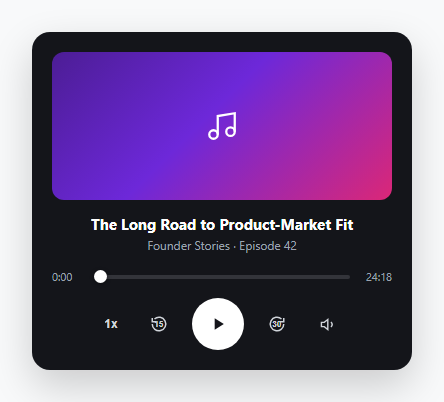
Browsers already ship a native <audio> element with default controls, but every podcast app replaces it with a custom player for the same three reasons: the native seek bar can't be restyled cross-browser, skip-15/skip-30 buttons aren't a native feature, and there's no built-in speed cycler. This snippet demonstrates the UI layer of that custom player, wired against a simulated timeline so it works standalone with no audio file required.
Styling a native range input as a seek bar
The seek bar is a real <input type="range">, not a custom-built div, which gets keyboard operability (arrow keys move it once focused) for free. Its default styling is stripped with appearance: none, and the filled portion is drawn using a linear-gradient background with a CSS custom property: background: linear-gradient(to right, #db2777 var(--p, 0%), #33343a var(--p, 0%)). JavaScript updates only the --p custom property on every tick — seek.style.setProperty('--p', pct + '%') — rather than rewriting the whole gradient string, which is a cheap single-property update instead of a full style recalculation. The thumb is restyled separately for WebKit (::-webkit-slider-thumb) and Firefox (::-moz-range-thumb), since range-input pseudo-elements have never been unified across browsers.
Simulated playback timeline
Since there's no audio file, togglePlay() starts a setInterval that increments a current seconds counter by 0.25 × speeds[speedIndex] every 250ms — multiplying the tick size by the active speed multiplier is what makes the timeline visibly race ahead at 2x and crawl at 0.75x, rather than just changing a label. Wiring this to a real <audio> element means deleting the interval entirely and instead listening to audio.ontimeupdate for current, calling audio.play()/audio.pause() from togglePlay(), and setting audio.playbackRate directly in cycleSpeed().
Skip buttons with an inline number
The 15-second-back and 30-second-forward buttons overlay a small <span class="ctrl-num"> with the number directly on top of the rounded-arrow icon — the same visual convention every major podcast app uses instead of a plain "-15s" text button, because the icon plus overlaid number reads faster at a glance than a text label would.
Speed cycler
cycleSpeed() steps through a fixed array [1, 1.25, 1.5, 2, 0.75] with (speedIndex + 1) % speeds.length, wrapping back to 1x after 0.75x. The array order is deliberate — it visits the most commonly used speeds (1x, 1.25x, 1.5x) before the extremes, so a user who only ever wants "a bit faster" doesn't have to cycle through every increment to get there.
Time formatting
formatTime() converts raw seconds into m:ss, zero-padding the seconds with a manual r < 10 ? '0' : '' check rather than padStart, which keeps the function dependency-free and trivially portable into older environments if needed. font-variant-numeric: tabular-nums on the time labels prevents the digits from shifting width as they change — without it, a "9" next to a "1" occupies different horizontal space in most fonts, making the countdown visibly jitter.
Wiring to a real audio file
Add a hidden <audio id="track" src="episode.mp3"> element, set duration from its loadedmetadata event (audio.duration) instead of the hardcoded value, and replace every manual current update with reads from audio.currentTime. The seek bar's input event should set audio.currentTime = (seek.value / 100) * audio.duration directly.
See also the audio waveform visualizer for a variant that reacts to real frequency data, and the flip clock for another tabular-nums time-display use case.
Build with AI
Build, Understand, Optimize, and Extend It With AI
Paste this podcast player's HTML, CSS, and JS into an AI coding assistant like Claude and ask it to explain how the seek bar's fill is driven by a single CSS custom property instead of rewriting the whole gradient, and why the simulated timeline multiplies its tick size by the active speed rather than just changing a label. The most useful thing to ask for next is the real wiring: describe your actual episode source (a static mp3 URL, or a streaming endpoint) and have the assistant replace the setInterval simulation with a genuine <audio> element bound to play/pause, timeupdate, playbackRate, and currentTime. Beyond that, ask it to add a volume slider instead of the current mute-only toggle, or a chapters list that lets tapping a chapter jump the seek position directly.
Prompt to recreate it
Copy this into your AI assistant of choice to build the effect from scratch, or as a jumping-off point for your own variant:
Build a custom podcast/audio player UI in plain HTML, CSS, and JavaScript, no framework, no libraries, no external audio file — simulate playback with a timer.

Requirements:
- A dark card containing cover art, an episode title and subtitle, a seek bar with current-time and total-duration labels on either side, and a row of playback controls: a playback-speed button, a skip-back-15-seconds button, a large central play/pause button, a skip-forward-30-seconds button, and a mute toggle.
- The seek bar must be a real native range input restyled with appearance:none, whose filled portion is drawn with a CSS linear-gradient background driven by a single CSS custom property that JavaScript updates on every tick, not by rewriting the entire gradient string. It must also support the user dragging it directly to seek.
- Since there is no real audio file, simulate playback with a repeating timer that advances a current-time counter, and make the speed control cycle through at least four speed multipliers (for example 1x, 1.25x, 1.5x, 2x, 0.75x) that visibly change how fast the simulated timeline advances.
- The skip buttons must visually overlay a small number (15 and 30 respectively) on top of a rounded circular-arrow icon rather than using plain text buttons.
- The play button must swap between a play triangle icon and a pause bars icon depending on state, and update its accessible label to match.
- Time values must be formatted as minutes:seconds with zero-padded seconds, and the time labels must use a numeric font style that prevents the digits from changing width as the counter updates, so the layout does not jitter during playback.
Want to tighten it up first? Run this prompt through the AI Prompt Studio to score it across 8 quality dimensions, catch anti-patterns, and tune the wording for Claude, ChatGPT, or Gemini before you paste it in.
Step by step
How to Use
- 1Copy the player markupThe .player card contains a cover art block, episode title/subtitle, a range-input seek bar with time labels, and a row of control buttons.
- 2Connect a real audio elementAdd a hidden <audio> element with your episode's src, set duration from its loadedmetadata event, and drive current from its timeupdate event instead of the demo's setInterval.
- 3Wire play/pause to the audio elementIn togglePlay(), call audio.play() and audio.pause() instead of starting/clearing the simulated interval.
- 4Wire the speed cycler to playbackRateIn cycleSpeed(), set audio.playbackRate = speeds[speedIndex] directly after updating the button label.
- 5Wire skip buttons to currentTimeIn skip(sec), set audio.currentTime = Math.max(0, Math.min(audio.duration, audio.currentTime + sec)) instead of updating the local current variable.
Real-world uses
Common Use Cases
Got questions?
Frequently Asked Questions
Add a hidden <audio src="episode.mp3"> element. Set duration from its loadedmetadata event, drive the UI from its timeupdate event instead of the demo setInterval, and call audio.play()/audio.pause() from togglePlay().
A native range input is keyboard-operable (arrow keys after focus) and gets built-in accessibility semantics for free. Restyling it with appearance:none and a gradient background achieves the same custom look while keeping that native behavior.
Set audio.playbackRate = speeds[speedIndex] inside cycleSpeed() once you have a real <audio> element — the HTMLMediaElement API applies the rate change immediately without needing to restart playback.
Updating a single custom property (--p) is a lighter-weight style change than rewriting the entire background gradient string on every playback tick, and it keeps the gradient definition in one place in the CSS rather than duplicated in JavaScript.
Open the Export menu on the snippet page for a React component wrapping a real <audio> ref with the same controls, a React + Tailwind version, a Vue 3 SFC, or an Angular standalone component — each preserves the seek bar styling and skip/speed logic.