More Forms Snippets
Front-End Coding Playgrounds
Learn to code with interactive, live-preview playgrounds — HTML, CSS, JavaScript, React & more.
 HTML Playground42 lessons · Click-based · Live preview
 CSS PlaygroundLearn CSS with a live editor
 JavaScript Playground60 lessons · DOM · Async · Canvas
 React PlaygroundLearn React with a live code editor
 GSAP PlaygroundLearn GSAP animation interactively
 SVG Playground44 lessons · shapes · paths · animation
 SCSS Playground45 lessons · Sass modules · tokens
 Tailwind PlaygroundLearn Tailwind CSS with a live editor
 Bootstrap 5 Playground50 lessons · live preview
Signature Pad — Free HTML CSS JS Canvas Snippet
Signature Pad · Forms · Plain HTML, CSS & JS · Live preview
What's included
Features
quadraticCurveTo() rendering turns raw pointer samples into a continuous, natural-looking line instead of a faceted polylineredraw() function can rebuild the entire drawing from scratch after any changestrokes.pop() plus redraw removes the last stroke; emptying the array and clearing the canvas resets everything, both with zero pixel manipulationwindow.devicePixelRatio so signatures stay sharp on Retina displays and modern phones instead of rendering softcolor variable so new strokes pick up whichever ink is active, with an animated active-state ringpos() helper normalizes both pointer families into canvas coordinates, with touch-action: none so signing on mobile does not scroll the pagecanvas.toDataURL("image/png") plus a programmatic <a download> click saves the finished signature as an image with no server or library involvedAbout this UI Snippet
How this signature pad was built — smoothed canvas strokes and a stroke-based undo stack
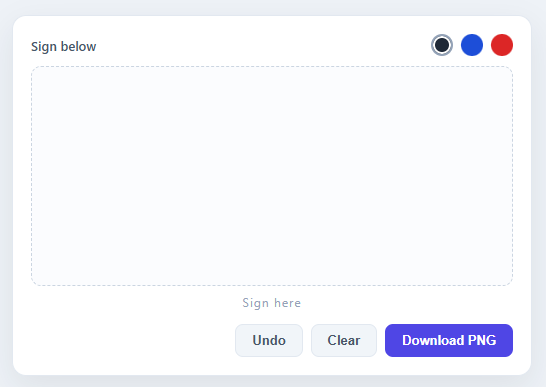
This snippet recreates the "sign here" widget you find in contract tools, delivery confirmations, and onboarding forms — draw with a mouse or finger and the line comes out smooth, not jagged, with undo, clear, multiple ink colours, and a one-click PNG export. It runs on a single <canvas> and about 90 lines of vanilla JavaScript, with no signature library required.
Smoothing strokes with quadratic curves
The naive way to draw a freehand line is to connect every raw pointer position with straight lineTo segments — which looks visibly faceted at normal drawing speeds. Instead, this snippet stores each stroke as an array of points and redraws it with ctx.quadraticCurveTo(), using the *midpoint* between each pair of consecutive points as the curve's end coordinate and the point itself as the control point. That midpoint trick is the classic technique behind smooth freehand drawing — it threads a continuous curve through a series of raw samples so corners round off naturally, a related idea to the particle-trajectory smoothing you'll find in our Floating Particles snippet — both threading continuous motion through a series of raw, jittery samples.
Strokes as data, not pixels — which makes undo trivial
Rather than drawing directly onto the canvas and leaving permanent pixels behind, every pen-down starts a new { color, points: [] } object pushed onto a strokes array, and a single redraw() function clears the canvas and replays every stroke from scratch on each pointer move. Because the drawing is *data-driven*, "Undo" is just strokes.pop() followed by a redraw — popping the most recent stroke off the array and re-rendering everything that's left. "Clear" is the same idea taken to its conclusion: empty the array, wipe the canvas. There's no pixel manipulation involved in either action, which keeps the code short and the behavior perfectly predictable.
High-DPI canvas and unified pointer handling
The canvas is sized using window.devicePixelRatio, scaling the drawing buffer up and calling ctx.scale(ratio, ratio) so strokes stay crisp on Retina and high-density mobile screens instead of looking soft and blurry. A small pos() helper normalizes mousedown/mousemove and touchstart/touchmove into the same {x, y} shape via getBoundingClientRect(), so the exact same start/move/end functions drive both desktop and touch input — paired with touch-action: none on the canvas so signing on a phone doesn't also scroll the page.
Exporting as a PNG
The "Download PNG" button is a one-liner: canvas.toDataURL('image/png') returns a base64-encoded image of the current canvas, which gets assigned to a temporary <a download> link and clicked programmatically — the same export pattern used by the QR Code Generator snippet. No server round-trip, no image-processing library — the browser does all the encoding.
Build with AI
Build, Understand, Optimize, and Extend It With AI
You do not have to trace the stroke-smoothing math by hand. Paste this snippet's HTML, CSS, and JS into an AI coding assistant like Claude and ask it to walk through why quadraticCurveTo is called with the midpoint between consecutive points rather than the raw point itself, or why storing strokes as an array of point objects instead of drawing straight to the canvas is what makes undo a one-line operation. The same assistant can help optimize it, for instance checking whether redrawing every stroke from scratch on each pointermove becomes a bottleneck with very long signatures, or whether the devicePixelRatio scaling needs to account for window resizes. It is just as useful for extending the pad: ask it to add a redo stack alongside undo, support variable stroke width based on drawing speed, or export the signature as an SVG path instead of a PNG. Treat the code less like a finished artifact and more like a starting point for a conversation.
Prompt to recreate it
Copy this into your AI assistant of choice to build the effect from scratch, or as a jumping-off point for your own variant:
Build a canvas-based "signature pad" in plain HTML, CSS, and JavaScript using only the Canvas 2D API — no signature library, no dependencies.

Requirements:
- A canvas element scaled for high-DPI screens: multiply its width and height by window.devicePixelRatio and call ctx.scale(ratio, ratio) so strokes render crisply on Retina and high-density mobile displays.
- Store drawing as data, not pixels: every pointer-down must start a new stroke object holding a color and an array of points, pushed onto a shared strokes array. Every pointer-move must append the current position to that stroke's points array — never draw directly to the canvas from a single move event.
- A single redraw function must clear the entire canvas and replay every stroke in the strokes array from scratch, smoothing each one with ctx.quadraticCurveTo, using the midpoint between each pair of consecutive points as the curve's endpoint and the point itself as the control point, so the line looks continuously curved instead of a faceted polyline of straight segments.
- Implement Undo as popping the most recently added stroke off the strokes array and calling redraw — no separate undo history or canvas snapshots. Implement Clear as emptying the strokes array and clearing the canvas.
- Normalize mouse and touch input through one helper function that returns the same {x, y} shape for both mousedown/mousemove and touchstart/touchmove, using getBoundingClientRect for coordinate translation, and set touch-action: none on the canvas so signing on a touchscreen does not also scroll the page.
- Support switchable ink colors via clickable swatch buttons that update a shared color variable used only when a new stroke begins.
- Add a "Download PNG" action that calls canvas.toDataURL("image/png") and triggers a programmatic download via a temporary anchor element — no server round-trip.
Step by step
How to Use
- 1Set up a high-DPI canvasMultiply the canvas's width and height by
window.devicePixelRatioand callctx.scale(ratio, ratio)so strokes render crisply on Retina and high-density mobile displays instead of looking blurry. - 2Record strokes as point arrays, not pixelsOn pointer-down, push a new
{ color, points: [pos(e)] }object onto astrokesarray. On every pointer-move, append the new position tocurrent.points— the canvas never gets drawn on directly during input. - 3Smooth the line with quadraticCurveToIn
redraw(), walk each stroke's points and callctx.quadraticCurveTo(point, midpoint)between consecutive samples — using the midpoint as the curve endpoint rounds off the line instead of leaving visible facets. - 4Make undo and clear pure array operationsImplement "Undo" as
strokes.pop()followed byredraw(), and "Clear" as emptying the array and callingctx.clearRect()— both actions stay perfectly in sync because the canvas always reflects exactly what is instrokes. - 5Wire ink colour swatchesGive each swatch button a
data-colorattribute; on click, toggle an.activeclass and update a sharedcolorvariable that gets assigned to new strokes as they start. - 6Export with toDataURLOn the download button's click handler, set a temporary
<a>element'shreftocanvas.toDataURL("image/png")and itsdownloadattribute to a filename, then call.click()to trigger the browser's save dialog.
Real-world uses
Common Use Cases
strokes data model with variable line widths, eraser strokes, or a redo stack — because every action is just an array operation followed by a redraw, new features compose cleanly on top.toDataURL() + programmatic-download pattern here is the same one used by the QR Code Generator — copy it any time you need to let users save canvas content as an image file.Got questions?
Frequently Asked Questions
Avoid connecting raw pointer samples with straight lineTo segments — at normal drawing speed that produces a visibly faceted line. Instead, store each stroke as an array of points and render it with ctx.quadraticCurveTo(), using the midpoint between each consecutive pair of points as the curve's endpoint and the point itself as the control point. That threads a continuous curve through the samples and rounds off corners naturally — exactly what this signature pad does in its redraw() function.
By treating each stroke as data rather than pixels. Every pen-down pushes a new { color, points: [] } object onto a strokes array, and the canvas is always rebuilt from that array via a redraw() call. "Undo" is therefore just strokes.pop() (remove the most recent stroke) followed by a redraw — no pixel snapshots, no memory-heavy history stack, just one array operation.
On Retina and most modern phone screens, one CSS pixel maps to two or three physical device pixels. If the canvas's internal resolution matches only its CSS size, strokes render at a lower resolution than the screen and look soft or blurry. Multiplying the canvas's width/height by window.devicePixelRatio and calling ctx.scale(ratio, ratio) renders at full device resolution while keeping coordinates in familiar CSS-pixel units — so signatures stay crisp.
Yes — a pos() helper reads e.touches?.[0] ?? e so the same coordinate math drives both mousemove and touchmove. The canvas also sets touch-action: none, which prevents the browser from interpreting a finger drag as a page-scroll gesture, so signing on a phone or tablet feels natural rather than fighting the scroll.
Call canvas.toDataURL("image/png"), which returns a base64-encoded PNG of the canvas's current contents. Assign that string to a temporary <a> element's href, set its download attribute to a filename like signature.png, and call .click() programmatically — the browser handles the save dialog with no server round-trip or image library required.
Yes — copy the HTML, CSS, and JS with the buttons on this page and use them anywhere, including commercial products, with no attribution required. It is built entirely on the native Canvas 2D API and vanilla JavaScript, so there are no licensing terms or third-party dependencies to track.