More Forms Snippets
Front-End Coding Playgrounds
Learn to code with interactive, live-preview playgrounds — HTML, CSS, JavaScript, React & more.
 HTML Playground42 lessons · Click-based · Live preview
 CSS PlaygroundLearn CSS with a live editor
 JavaScript Playground60 lessons · DOM · Async · Canvas
 React PlaygroundLearn React with a live code editor
 GSAP PlaygroundLearn GSAP animation interactively
 SVG Playground44 lessons · shapes · paths · animation
 SCSS Playground45 lessons · Sass modules · tokens
 Tailwind PlaygroundLearn Tailwind CSS with a live editor
 Bootstrap 5 Playground50 lessons · live preview
QR Code Generator — Free HTML CSS JS Snippet
QR Code Generator · Forms · Plain HTML, CSS & JS · Live preview
What's included
Features
QRCode.toCanvas's color option directly, recolouring the entire matrix in real time as you dragcanvas.toDataURL("image/png") plus a programmatic <a download> click exports the finished code as a standalone image with no server involvedAbout this UI Snippet
How this QR code generator was built — qrcode.js, debounced rendering, and canvas export
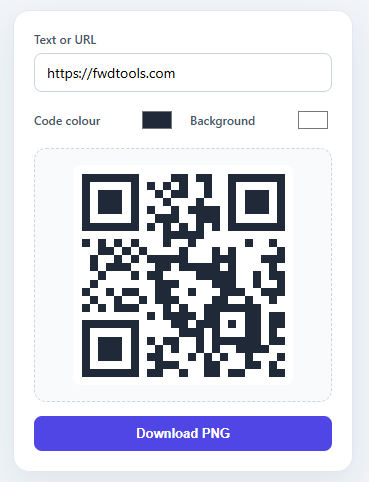
This snippet recreates the "type a link, get a scannable code" widget you see on share pages, business-card tools, and Wi-Fi-login screens — every keystroke redraws a real, scannable QR code on canvas, with adjustable foreground/background colours and a one-click PNG download. Rather than computing QR matrices by hand (a genuinely fiddly bit of error-correction math), it loads the small, focused qrcode.js library from a CDN and wires it up to a live form with about 35 lines of glue code.
Why reach for a CDN library here
QR codes are not just a pattern of black and white squares — they encode data with Reed–Solomon error correction so a scanner can still read the code even if part of it is smudged, printed small, or partially obscured by a logo. Implementing that correctly from scratch is a project in itself, so this snippet pulls in [email protected] from jsDelivr and calls its single QRCode.toCanvas() method — the same "load a focused library, then build your UI around it" approach used by the Theme Palette Generator for colour math, just applied to a domain where hand-rolling the algorithm would be wasted effort.
Live rendering with a debounce
The text input fires QRCode.toCanvas(canvas, text, options, callback) on every keystroke, but redrawing on *every single character* would be wasteful and can visibly stutter on slower devices — so the snippet wraps the call in a scheduleRender() function that clears any pending setTimeout and queues a fresh one 200ms later. Type continuously and only the final pause triggers a render; the colour pickers call render() directly since dragging a colour wheel naturally produces fewer, more deliberate updates. This debounce pattern is a small but important detail any time you're rendering something non-trivial in response to rapid input events.
Live colour customization
Two native <input type="color"> swatches feed straight into QRCode.toCanvas's color: { dark, light } option — the library redraws the entire matrix in the chosen foreground and background colours on every input event, so the preview updates in real time as you drag the colour wheel. No extra canvas manipulation is needed; the library handles the recoloring as part of its normal render path.
Exporting the finished code
"Download PNG" reuses the same canvas.toDataURL('image/png') plus programmatic <a download> click pattern as the Signature Pad snippet — because QRCode.toCanvas draws onto a real <canvas> element, the resulting image is just standard canvas content, exportable with the browser's built-in encoding and no extra image-processing step.
Build with AI
Build, Understand, Optimize, and Extend It With AI
You do not need to reverse-engineer the timing choices here by hand. Paste this snippet's HTML, CSS, and JS into an AI coding assistant like Claude and ask it to explain exactly why scheduleRender debounces the text input at 200ms but wires the color pickers straight to render, and what would break if the QRCode.toCanvas call ran synchronously on every keystroke instead. The same assistant is useful for optimizing it — ask whether the 200ms debounce window is too long or short for the target audience, or whether re-encoding the entire matrix on every color change is wasted work that could be replaced with a canvas recolor pass. It also helps with extending the tool: ask it to add SVG export alongside the PNG download, support embedding a logo in the code's center safely within the error-correction budget, or add an error-correction-level selector. Treat the code less like a finished artifact and more like a starting point for a conversation.
Prompt to recreate it
Copy this into your AI assistant of choice to build the effect from scratch, or as a jumping-off point for your own variant:
Build a live QR code generator in plain HTML, CSS, and JavaScript using the qrcode.js library loaded from a CDN (via its global QRCode object and toCanvas method) — no hand-rolled QR matrix math, no build step.

Requirements:
- A text input for the content to encode, two native color inputs for the foreground (dark modules) and background, a canvas element for the rendered code, and a download button.
- Call QRCode.toCanvas(canvas, text, { width, margin, color: { dark, light } }, callback) to render, and fall back to a single space character if the input is empty so the canvas never errors out on blank text.
- The text input must be debounced: wrap the render call in a function that clears any pending setTimeout and schedules a new one roughly 200ms later, so rapid typing produces one render per pause rather than one per keystroke.
- The two color inputs must call the render function directly on every input event, with no debounce, since dragging a color wheel produces fewer and more deliberate changes.
- The download button must export the canvas exactly as displayed using canvas.toDataURL("image/png"), assign it to a temporary anchor element's href with a download attribute set, and trigger it with a programmatic click — no server round trip.
- Render once immediately on page load using the default input values so a valid, scannable code is visible before the user interacts with anything.
Step by step
How to Use
- 1Load the qrcode.js library from a CDNAdd
https://cdn.jsdelivr.net/npm/[email protected]/build/qrcode.min.jsto the page — it exposes a globalQRCodeobject with atoCanvas()method that handles the encoding and error-correction math for you. - 2Build the form: text input + two colour pickersAdd a text
<input>for the content to encode and two<input type="color">swatches bound todark(foreground) andlight(background), plus a<canvas>to render into. - 3Render with QRCode.toCanvasCall
QRCode.toCanvas(canvas, text, { width, margin, color: { dark, light } }, callback)— the library draws the full QR matrix directly onto the canvas element you pass it. - 4Debounce text input, render colours immediatelyWrap the text-input handler in a
scheduleRender()that clears and resets asetTimeout(render, 200)so rapid typing only triggers one render per pause; callrender()directly from the colour inputs'inputevents. - 5Add PNG exportOn the download button, set a temporary
<a>'sdownloadattribute andhref = canvas.toDataURL("image/png"), then call.click()— the canvas content (the QR code) saves as a standard image file. - 6Render once on loadCall
render()immediately after wiring up the listeners so the canvas shows a live, scannable code with the default text and colours before the visitor types anything.
Real-world uses
Common Use Cases
WIFI: connection string and let the generator render a printable, on-brand code with custom colours that match your venue or packaging.scheduleRender() debounce is a reusable pattern for any input-driven preview — search-as-you-type, live markdown rendering (see the Markdown Live Preview snippet), or canvas-based tools that redraw on every keystroke.Got questions?
Frequently Asked Questions
A QR code is not just a grid of black and white squares — it encodes data using Reed–Solomon error correction so the code stays scannable even when partly damaged, small, or covered by a logo. Computing that matrix correctly is a non-trivial algorithm in its own right, so this snippet loads the small, focused qrcode.js library from a CDN and calls its toCanvas() method, which produces a fully spec-compliant, scannable code in one call.
Typing produces many rapid input events — re-rendering the QR matrix on every keystroke would be wasteful and can visibly stutter. scheduleRender() clears any pending setTimeout and queues a new 200ms-delayed render, so only the pause after typing triggers a redraw. Dragging a colour wheel, by contrast, naturally produces fewer and more deliberate change events, so the colour inputs call render() directly for instant visual feedback.
The two <input type="color"> swatches are passed straight into QRCode.toCanvas's color: { dark: fg.value, light: bg.value } option. The dark value colours the QR modules (the foreground pattern) and light colours the background — the library redraws the entire matrix in those colours on every input event, so the preview updates live as you pick.
Yes, as long as there is enough contrast between the foreground and background colours for a scanner's camera to distinguish the modules — very low-contrast combinations (e.g. two similar pastel shades) can make scanning unreliable on some devices. The size set via the width option does not affect scannability; it only changes how large the rendered canvas is.
Click "Download PNG" — it calls canvas.toDataURL("image/png") to get a base64-encoded image of the canvas, assigns it to a temporary <a download="qr-code.png"> link, and clicks it programmatically. The browser handles the save dialog, producing a standalone PNG file with no server round-trip.
Yes — the HTML, CSS, and JS on this page are free to copy and adapt anywhere, including commercial products. The qrcode.js library it loads from jsDelivr is published under the MIT license, so there are no usage restrictions or attribution requirements to worry about.
Yes. Use the export buttons on this page: JSX downloads a React component, Vue a Vue 3 SFC, Angular a standalone component, and Tailwind a utility-class version. In React, load the qrcode.js script inside useEffect and generate the code after the library resolves; in Vue use onMounted.