More Forms Snippets
Front-End Coding Playgrounds
Learn to code with interactive, live-preview playgrounds — HTML, CSS, JavaScript, React & more.
 HTML Playground42 lessons · Click-based · Live preview
 CSS PlaygroundLearn CSS with a live editor
 JavaScript Playground60 lessons · DOM · Async · Canvas
 React PlaygroundLearn React with a live code editor
 GSAP PlaygroundLearn GSAP animation interactively
 SVG Playground44 lessons · shapes · paths · animation
 SCSS Playground45 lessons · Sass modules · tokens
 Tailwind PlaygroundLearn Tailwind CSS with a live editor
 Bootstrap 5 Playground50 lessons · live preview
Theme Palette Generator — Free HTML CSS JS Snippet
Theme Palette Generator · Forms · Plain HTML, CSS & JS · Live preview
What's included
Features
hexToHsl() and hslToHex() implement the standard textbook formulas from scratch, a genuinely useful reference for understanding how colour pickers and design-token systems convert between representationsSTEPS array spaces values more tightly at the light and dark extremes, where small lightness changes read as more visually significant, producing a more natural-feeling rampMath.max(s, 35) guarantees a minimum vibrancy even when the chosen base colour is pale or near-grey, so the generated shades stay usable as design coloursnavigator.clipboard.writeText() plus a CSS ::after pseudo-element confirmation that self-removes after 1.1 seconds via setTimeoutAbout this UI Snippet
How this theme palette generator was built — RGB-to-HSL conversion and lightness-step interpolation
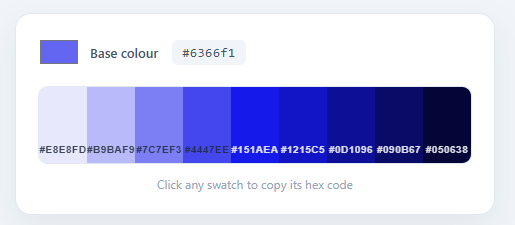
This snippet recreates the "pick one colour, get a full design-system ramp" tool found in design tools like Tailwind's colour generator and Material Design's palette builder — choose a base colour and instantly see nine coordinated tints and shades (the kind of 50/100/200…900 scale used for buttons, backgrounds, borders, and text), each one click-to-copy as a hex code. It runs on roughly 70 lines of vanilla JavaScript implementing real colour-space conversion math — no design-tooling library involved.
Why convert to HSL instead of just lightening/darkening RGB values
Naively brightening a colour by adding to its R, G, and B channels produces washed-out, desaturated results — colours drift toward grey rather than staying vibrant as they lighten or darken. This snippet instead converts the chosen hex colour into HSL (hue, saturation, lightness) via hexToHsl(), which separates *what colour it is* (hue), *how vivid it is* (saturation), and *how light or dark it is* (lightness) into independent values. That separation is exactly what makes a coherent ramp possible: keep the hue and a healthy minimum saturation constant, and vary only the lightness — the same separation-of-concerns idea that powers the colour math behind the QR Code Generator's colour customization, just applied to ramp generation instead of direct colour selection.
Generating the ramp with a fixed lightness scale
A constant array STEPS = [95, 85, 72, 60, 50, 42, 32, 22, 12] defines nine target lightness percentages, deliberately spaced unevenly — closer together in the lighter and darker extremes, where small lightness changes are visually more dramatic, and wider in the midtones. For each step, hslToHex(h, Math.max(s, 35), lightness) rebuilds a hex colour at that lightness while clamping saturation to a minimum of 35% — preventing washed-out, low-saturation base colours from producing a grey, lifeless ramp. The result is nine swatches that all clearly belong to the same colour family yet span from near-white to near-black.
Implementing real colour-space conversion math
hexToHsl() and hslToHex() are textbook implementations of the standard RGB↔HSL conversion formulas: computing max/min/delta across the three channels, deriving hue from which channel is dominant (with the classic six-case switch and 60°-segment multiplication), and reconstructing RGB from HSL via the chroma/intermediate/match-lightness (c/x/m) decomposition before converting back to a two-digit hex string per channel with toString(16).padStart(2, '0'). Seeing both directions implemented side by side is a genuinely useful reference for understanding how colour pickers, theme systems, and design tokens convert between colour representations.
Click-to-copy with a transient confirmation
Each generated swatch is a real <button> with its hex code rendered as a label; clicking it calls navigator.clipboard.writeText() and toggles a .copied class that displays a "Copied!" badge via a CSS ::after pseudo-element, automatically removed after 1.1 seconds with setTimeout. The .catch(() => {}) on the clipboard promise quietly handles browsers or contexts where clipboard access is unavailable, so the interaction never throws a visible error — it simply skips the copy.
Build with AI
Build, Understand, Optimize, and Extend It With AI
Have an AI coding assistant like Claude walk through the six-case switch inside hexToHsl() line by line — it is exactly the kind of dense conversion math that is much faster to understand with someone explaining the dominant-channel logic than by staring at it cold. It is also worth asking whether Math.max(s, 35) is the right floor for every hue, since very light or very dark base colors might need a different saturation clamp to avoid looking muddy. For extending the generator, ask it to add a "copy all nine as CSS custom properties" button, a mode that also outputs the ramp in OKLCH for better perceptual evenness, or a second ramp generated from a complementary or triadic hue computed from the same base color. Treat the code less like a finished artifact and more like a starting point for a conversation.
Prompt to recreate it
Copy this into your AI assistant of choice to build the effect from scratch, or as a jumping-off point for your own variant:
Build a "one base color in, nine-step tint/shade ramp out" theme palette generator in plain HTML, CSS, and JavaScript, implementing the color-space math from scratch with no color library.

Requirements:
- A native input type="color" for picking the base color, and a container that renders nine swatches in a CSS grid.
- Write a hexToHsl function that manually parses the R, G, B channels from a hex string, computes the max, min, and delta across the three channels, and derives hue using the standard six-case dominant-channel formula (with 60-degree segment multiplication) plus saturation and lightness from the max/min average and spread.
- Write the inverse hslToHex function using the chroma/intermediate/match-lightness (c/x/m) decomposition to reconstruct RGB from HSL, converting each channel to a two-digit hex string.
- Define a fixed array of nine target lightness percentages that are spaced unevenly — closer together near the light and dark extremes and wider in the midtones — and generate each ramp swatch by converting the base hue and saturation back to hex at each lightness step.
- Clamp the saturation to a minimum floor (such as 35%) before generating every ramp swatch, so a pale or desaturated base color still produces a vibrant, usable ramp instead of a washed-out gray scale.
- Make every swatch a real button that copies its own hex code to the clipboard via the Clipboard API on click, shows a brief "Copied!" confirmation badge, and automatically picks readable dark or light label text based on whether its own lightness is above or below 55%.
Step by step
How to Use
- 1Add a colour input and a ramp containerUse a native
<input type="color">for picking the base colour, a<code>element to echo its hex value, and an empty.rampdiv with adisplay: grid; grid-template-columns: repeat(9, 1fr)layout to hold the generated swatches. - 2Convert the chosen hex colour to HSLWrite
hexToHsl(hex): parse the R, G, B channels from the hex string, computemax,min, and their difference, then derive hue via the standard six-case dominant-channel formula and lightness/saturation from the max/min average and spread. - 3Define a fixed lightness scale for the rampCreate a
STEPSarray of nine target lightness percentages (e.g.[95, 85, 72, 60, 50, 42, 32, 22, 12]) — spaced to emphasize visual differences at the light and dark extremes of the ramp. - 4Rebuild a hex colour at each lightness stepWrite
hslToHex(h, s, l)using the chroma/intermediate/match (c/x/m) decomposition to reconstruct RGB from HSL, then format each channel as a two-digit hex string withtoString(16).padStart(2, "0"). - 5Render swatches and clamp saturationFor each
STEPSvalue, callhslToHex(h, Math.max(s, 35), lightness)— clamping saturation to a minimum keeps low-saturation base colours from producing a flat, grey ramp — and create a labelled<button class="swatch">with that background colour. - 6Wire click-to-copy with a transient confirmationOn each swatch's click, call
navigator.clipboard.writeText(hex), add a.copiedclass that reveals a "Copied!" badge via CSS, and remove the class withsetTimeout(..., 1100)so the confirmation fades after just over a second.
Real-world uses
Common Use Cases
hexToHsl() and hslToHex() implemented side by side and applied to a practical problem — directly transferable to building colour pickers, gradient tools, or accessibility-contrast checkers.navigator.clipboard.writeText() plus transient-badge pattern here is directly reusable any time you need a "click to copy this value" affordance — code snippets, API keys, share links, or generated configuration values.Got questions?
Frequently Asked Questions
Brightening or darkening a colour by adding to its R, G, and B channels equally tends to wash it out toward grey rather than producing a clean tint or shade — because RGB mixes "how light" and "what colour" together in a way that is hard to separate. HSL (hue, saturation, lightness) keeps those concerns independent: by holding hue and saturation steady and only varying lightness, the generator can produce nine shades that all clearly belong to the same colour family, from near-white to near-black.
It clamps the saturation to a minimum of 35% before converting back to hex. Without this floor, choosing a pale or near-grey base colour would produce a ramp where every shade looks flat and lifeless, since low original saturation would carry through to every step. The clamp guarantees the generated palette stays usable and vibrant even when the starting colour itself is muted.
Human perception of lightness is not linear — small changes near pure white or pure black look more dramatic than the same numeric change in the midtones. The chosen values (95, 85, 72, 60, 50, 42, 32, 22, 12) bunch more tightly at the light and dark extremes and spread out in the middle, producing a ramp where each step feels like a meaningfully distinct shade rather than several near-duplicates clustered in the middle.
Each swatch button calls navigator.clipboard.writeText(swatchHex), which writes the hex string to the system clipboard, then toggles a .copied class that displays a "Copied!" badge via a CSS ::after pseudo-element for 1.1 seconds. The call is chained with .catch(() => {}), so in browsers or contexts where clipboard access is restricted (e.g. insecure origins or missing permissions), the copy attempt simply fails silently rather than throwing a visible error.
Each swatch's text colour is set conditionally — lightness > 55 ? "#1e293b" : "#fff" — based on the same lightness value used to generate its background. Light shades (lightness above 55%) get dark slate text, and darker shades get white text, so the hex-code label always has enough contrast to read clearly regardless of where it falls on the ramp.
Yes — copy the HTML, CSS, and JS with the buttons on this page and use them anywhere, including commercial design tools and products, with no attribution required. The colour-conversion math is implemented from scratch in vanilla JavaScript using only the native Clipboard API — no third-party colour library or licensing to track.