

Learn Coding Visually
Learn to code with interactive, live-preview playgrounds — HTML, CSS, JavaScript, React & more.
 HTML Playground42 lessons · Click-based · Live preview
 CSS PlaygroundLearn CSS with a live editor
 JavaScript Playground60 lessons · DOM · Async · Canvas
 React PlaygroundLearn React with a live code editor
 GSAP PlaygroundLearn GSAP animation interactively
 SVG Playground44 lessons · shapes · paths · animation
 SCSS Playground45 lessons · Sass modules · tokens
 Tailwind PlaygroundLearn Tailwind CSS with a live editor
 Bootstrap 5 Playground50 lessons · live preview
Markdown Live Preview — Free HTML CSS JS Snippet
Markdown Live Preview · Forms · Plain HTML, CSS & JS · Live preview
What's included
Features
escapeHtml() before any markdown pattern is matched, making it safe to render the parser's output directly via innerHTML without risking injected markup.replace() calls handle inline code, bold, italic, and links, with code spans converted first so embedded asterisks are never mistaken for emphasis markerslistOpen boolean and a closeList() helper are enough to correctly group consecutive list items into one <ul> and separate adjacent lists from surrounding content#/##/###), bold, italic, inline code, links, bullet lists, and blockquotes, covering the core of nearly every note, README, or commentinput listener re-runs the parser and updates innerHTML on every keystroke, with no debounce needed because the regex-based parse runs in well under a millisecondAbout this UI Snippet
How this markdown live preview was built — a line-by-line regex parser with safe HTML escaping
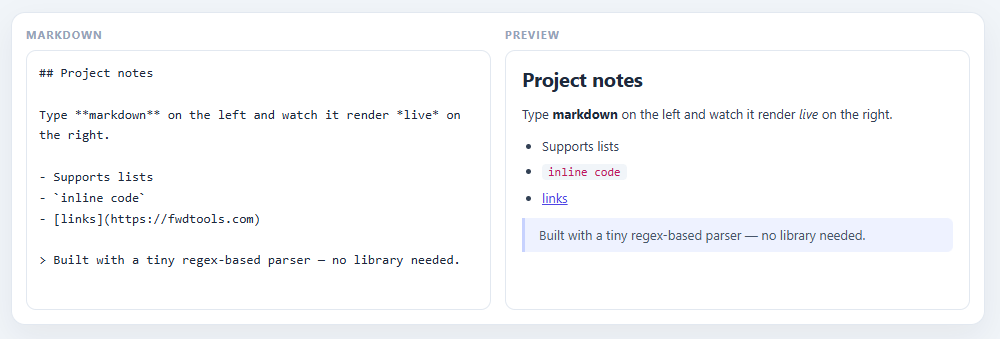
This snippet recreates the split-pane "type markdown on the left, see formatted HTML on the right" editor found in note-taking apps, README editors, and CMS content fields — every keystroke re-renders headings, bold/italic text, inline code, links, lists, and blockquotes into live HTML. Rather than pulling in a markdown library, it implements a deliberately small parser in roughly 60 lines of vanilla JavaScript built entirely on regular expressions and string processing.
Escaping first, formatting second
Before any markdown pattern is matched, every line passes through escapeHtml(), which converts &, <, and > into their HTML entity equivalents. This single step is what makes it *safe* to drop the parser's output directly into innerHTML — without it, someone typing <script> or any HTML-looking text into the editor could have it interpreted as real markup rather than displayed as text. Escape-then-format is the standard order of operations any time user-entered text becomes rendered HTML; reversing the order (formatting first, escaping second) would corrupt the very tags the parser just generated.
Inline formatting via chained regex replacements
The inline() function runs a line through five sequential .replace() calls — one regex each for inline code (``code), bold (text), italic (*text*), and links (text) — each one wrapping its match in the corresponding HTML tag. The order matters: code spans are converted first so that asterisks *inside* a code span (like *args``) don't get mistaken for italic markers by the patterns that run afterward. This "chain of small, ordered transformations" approach is a common and effective way to handle layered text formatting without building a full tokenizer.
Line-by-line block parsing with a small state machine
render() splits the input into lines and walks them one at a time, matching each against patterns for headings (^(#{1,3})\s+(.*)), blockquotes (^>\s?(.*)), and list items (^[-*]\s+(.*)) — falling through to a plain paragraph if nothing matches. The only piece of state it tracks is a listOpen boolean: consecutive list-item lines accumulate inside one <ul>, and a closeList() helper closes that tag the moment a non-list line, blank line, or different block type appears. This tiny state machine is enough to correctly group adjacent list items into a single list — the trickiest part of line-based markdown parsing — without any lookahead or backtracking.
Live re-render on every keystroke
A single input listener calls update(), which re-runs the entire parse-and-render pipeline and replaces preview.innerHTML on every keystroke. Because the parser runs in well under a millisecond on typical note-length text, there's no need for the debouncing seen in heavier live-preview tools like the QR Code Generator — the rendering itself is cheap enough to simply run synchronously and immediately, keeping the preview perfectly in sync with the input at all times.
Build with AI
Build, Understand, Optimize, and Extend It With AI
You do not need to trace every regex in the inline() chain by hand. Paste this snippet's HTML, CSS, and JS into an AI coding assistant like Claude and ask it to explain precisely why escapeHtml runs before any markdown pattern is matched, and why the inline code replacement happens before the bold and italic replacements rather than after. The same assistant can help optimize it, for instance asking whether the current line-by-line render() function would need restructuring to support multi-line constructs like fenced code blocks or nested lists without breaking the single listOpen boolean's state tracking. It is also useful for extending the parser: ask it to add support for numbered lists, task-list checkboxes, or tables, following the same escape-then-match-then-wrap pattern the existing code already establishes. Treat the code less like a finished artifact and more like a starting point for a conversation.
Prompt to recreate it
Copy this into your AI assistant of choice to build the effect from scratch, or as a jumping-off point for your own variant:
Build a "markdown live preview" split-pane editor in plain HTML, CSS, and JavaScript with no markdown library or parsing dependency.

Requirements:
- A two-pane layout with a textarea for markdown input on one side and an empty container for rendered HTML output on the other, updating on every input event with no debounce.
- An escapeHtml function that converts ampersands, less-than, and greater-than characters to their HTML entity equivalents, and every line of input must pass through this function before any markdown pattern is matched against it, so that HTML-looking text typed by the user is always displayed literally rather than being interpreted as real markup when the result is assigned to innerHTML.
- An inline-formatting function that applies a fixed, ordered sequence of regex replacements on already-escaped text: inline code spans (single backticks) must be converted to code tags before bold (double asterisks) and italic (single asterisks) are processed, specifically so that literal asterisk characters inside a code span are never mistaken for emphasis markers by the patterns that run afterward. Also support markdown links in the form [text](url), rendered as anchor tags with target="_blank" and rel="noopener".
- A block-level render function that splits the input into lines and, for each line, checks in order: is it blank (close any open list), is it a heading (one to three leading hash characters), is it a blockquote (a leading greater-than sign), is it a list item (a leading dash or asterisk), falling through to a plain paragraph if none match.
- Track list state with exactly one boolean flag: opening a list tag when the first consecutive list-item line is seen, and closing it via a shared helper the moment a non-list-item line, blank line, or different block type appears, so consecutive list items group into one list and separate lists never merge together.
- The whole parse-and-render pipeline must run synchronously on every keystroke with no debounce timer, since the regex-based parsing on typical note-length text is fast enough not to need one.
Want to tighten it up first? Run this prompt through the AI Prompt Studio to score it across 8 quality dimensions, catch anti-patterns, and tune the wording for Claude, ChatGPT, or Gemini before you paste it in.
Source Code
<div class="demo">
  <div class="md-card">
    <div class="md-pane">
      <span class="pane-title">Markdown</span>
      <textarea class="md-input" spellcheck="false">## Project notes

Type **markdown** on the left and watch it render *live* on the right.

- Supports lists
- `inline code`
- [links](https://fwdtools.com)

> Built with a tiny regex-based parser — no library needed.</textarea>
    </div>
    <div class="md-pane">
      <span class="pane-title">Preview</span>
      <div class="md-preview"></div>
    </div>
  </div>
</div>
.demo {
font-family: 'Segoe UI', system-ui, sans-serif;
padding: 26px;
background: #f1f5f9;
}
.md-card {
display: grid;
grid-template-columns: 1fr 1fr;
gap: 14px;
background: #fff;
border: 1px solid #e2e8f0;
border-radius: 14px;
padding: 14px;
box-shadow: 0 12px 32px rgba(15,23,42,0.06);
}
.md-pane {
display: flex;
flex-direction: column;
gap: 8px;
min-width: 0;
}
.pane-title {
font-size: 11px;
font-weight: 700;
letter-spacing: 1px;
text-transform: uppercase;
color: #94a3b8;
}
.md-input {
width: 100%;
height: 260px;
resize: none;
border: 1px solid #e2e8f0;
border-radius: 10px;
padding: 12px;
font: 13px/1.6 ui-monospace, 'SFMono-Regular', Menlo, monospace;
color: #1e293b;
outline: none;
box-sizing: border-box;
}
.md-input:focus { border-color: #6366f1; box-shadow: 0 0 0 3px rgba(99,102,241,0.12); }
.md-preview {
height: 260px;
overflow-y: auto;
border: 1px solid #e2e8f0;
border-radius: 10px;
padding: 12px 16px;
font-size: 13px;
line-height: 1.65;
color: #334155;
box-sizing: border-box;
}
.md-preview h1, .md-preview h2, .md-preview h3 {
margin: 0 0 8px;
color: #1e293b;
}
.md-preview p { margin: 0 0 10px; }
.md-preview ul { margin: 0 0 10px; padding-left: 20px; }
.md-preview li { margin-bottom: 4px; }
.md-preview code {
background: #f1f5f9;
color: #be185d;
padding: 1px 6px;
border-radius: 4px;
font-size: 12px;
font-family: ui-monospace, monospace;
}
.md-preview a { color: #4f46e5; }
.md-preview blockquote {
margin: 0 0 10px;
padding: 6px 14px;
border-left: 3px solid #c7d2fe;
background: #eef2ff;
color: #475569;
border-radius: 0 6px 6px 0;
}
.md-preview strong { color: #1e293b; }const input = document.querySelector('.md-input');
const preview = document.querySelector('.md-preview');
function escapeHtml(str) {
return str
.replace(/&/g, '&')
.replace(/</g, '<')
.replace(/>/g, '>');
}
function inline(text) {
return escapeHtml(text)
.replace(/`([^`]+)`/g, '<code>$1</code>')
.replace(/\*\*([^*]+)\*\*/g, '<strong>$1</strong>')
.replace(/\*([^*]+)\*/g, '<em>$1</em>')
.replace(/\[([^\]]+)\]\(([^)]+)\)/g, '<a href="$2" target="_blank" rel="noopener">$1</a>');
}
function render(markdown) {
const lines = markdown.split('\n');
const html = [];
let listOpen = false;
function closeList() {
if (listOpen) { html.push('</ul>'); listOpen = false; }
}
lines.forEach((raw) => {
const line = raw.trimEnd();
if (!line.trim()) { closeList(); return; }
const heading = line.match(/^(#{1,3})\s+(.*)/);
if (heading) {
closeList();
const level = heading[1].length;
html.push('<h' + level + '>' + inline(heading[2]) + '</h' + level + '>');
return;
}
const quote = line.match(/^>\s?(.*)/);
if (quote) {
closeList();
html.push('<blockquote>' + inline(quote[1]) + '</blockquote>');
return;
}
const item = line.match(/^[-*]\s+(.*)/);
if (item) {
if (!listOpen) { html.push('<ul>'); listOpen = true; }
html.push('<li>' + inline(item[1]) + '</li>');
return;
}
closeList();
html.push('<p>' + inline(line) + '</p>');
});
closeList();
return html.join('');
}
function update() {
preview.innerHTML = render(input.value);
}
input.addEventListener('input', update);
update();Step by step
How to Use
- 1Build a two-pane editor layoutUse CSS Grid (
grid-template-columns: 1fr 1fr) to place a<textarea class="md-input">beside an empty<div class="md-preview">that will receive the rendered HTML. - 2Escape HTML before anything elseWrite
escapeHtml(str)that replaces&,<, and>with their entity equivalents — run every line through this *first*, so any HTML-looking text the user types is displayed literally rather than executed. - 3Chain regex replacements for inline formattingIn an
inline(text)function, run the escaped text through ordered.replace()calls for inline code, bold, italic, and links — converting code spans first so embedded*characters are not mistaken for emphasis markers later in the chain. - 4Walk lines with a small block-level state machineSplit the input on
\nand match each line against heading (^#{1,3}\s+), blockquote (^>\s?), and list-item (^[-*]\s+) patterns in order, falling through to a<p>wrapper — track only one boolean,listOpen, to group consecutive list items into a shared<ul>. - 5Close open blocks at the right momentsWrite a
closeList()helper that appends</ul>and resetslistOpenwhenever a blank line, heading, quote, or paragraph appears after a run of list items — this is what correctly separates adjacent lists from each other. - 6Re-render on every keystrokeAttach a single
inputlistener to the textarea that callsupdate(), which re-runsrender()on the current value and assigns the result topreview.innerHTML— keeping the preview perfectly in sync without any debounce, since the parse is fast enough to run synchronously.
Real-world uses
Common Use Cases
Got questions?
Frequently Asked Questions
Because the rendered output gets assigned directly to preview.innerHTML. If raw user input were inserted without escaping, typing something that looks like an HTML tag (e.g. <img src=x onerror=...>) could be interpreted as real markup by the browser — a classic injection risk. Running every line through escapeHtml() first converts &, <, and > into their entity forms, so any HTML-looking text displays literally as text. Only *after* that does the parser wrap matched markdown patterns in real <strong>, <code>, <a>, etc. tags — formatting that the parser itself controls and trusts.
Because code spans often contain literal asterisks — for example ` **kwargs or *args in Python documentation. If the bold/italic regexes ran first, they would match those asterisks inside the backticks and incorrectly wrap part of the code span in <strong> or <em> tags. Converting code into <code>` first removes those asterisks from consideration (they become part of an already-formed HTML tag's content) before the emphasis patterns get a chance to misfire on them.
It tracks one boolean, listOpen. When a line matches the list-item pattern (^[-*]\s+) and no list is currently open, it pushes an opening <ul> and sets listOpen = true; subsequent matching lines just become <li> entries inside that same list. The moment a line of any other type appears — a blank line, heading, quote, or paragraph — closeList() runs, appending </ul> and resetting the flag. That single piece of state is sufficient to correctly group consecutive items and keep separate lists from merging into one.
The parser is a handful of regex passes over a typical note's worth of text — it runs in well under a millisecond, far faster than a human can type. Heavier live-render operations, like the QR Code Generator's canvas redraw, debounce because *their* per-keystroke cost is high enough to cause visible stutter. Here, the cost is negligible, so the snippet keeps things simple: re-run the parser and swap innerHTML directly, keeping the preview perfectly synchronized with no added latency.
It supports the syntax used in the overwhelming majority of everyday writing: headings (#, ##, ###), bold, *italic*, inline code, links, bullet lists, and blockquotes. It deliberately omits less common features — tables, nested lists, numbered lists, images, code fences, and footnotes — to stay small, fast, and easy to read end to end. Adding any of those is a matter of inserting another pattern into the existing chain, following the same escape-then-match-then-wrap structure.
Yes — copy the HTML, CSS, and JS with the buttons on this page and use them anywhere, including commercial products, with no attribution required. It is built entirely with vanilla JavaScript regular expressions and string processing — no markdown library, parser dependency, or licensing to track.