Source Code
<section class="ssf-hero">
  <div class="ssf-left">
    <span class="ssf-eyebrow">Free 14-day trial</span>
    <h1 class="ssf-h1">Run your whole team from one dashboard</h1>
    <p class="ssf-sub">Plan sprints, track time, and ship releases without switching tabs. No credit card required to start.</p>
    <ul class="ssf-benefits">
      <li><span class="ssf-check">✓</span>Unlimited projects on every plan</li>
      <li><span class="ssf-check">✓</span>Real-time collaboration, built in</li>
      <li><span class="ssf-check">✓</span>Cancel anytime, no lock-in contracts</li>
    </ul>
    <div class="ssf-avatars">
      <div class="ssf-av" style="background:linear-gradient(135deg,#f472b6,#fb7185)">K</div>
      <div class="ssf-av" style="background:linear-gradient(135deg,#818cf8,#6366f1)">R</div>
      <div class="ssf-av" style="background:linear-gradient(135deg,#34d399,#10b981)">T</div>
      <span class="ssf-av-text">Joined by 8,400+ teams this year</span>
    </div>
  </div>

  <div class="ssf-right">
    <form class="ssf-form" id="ssfForm" novalidate>
      <h2 class="ssf-form-title">Create your account</h2>
      <p class="ssf-form-sub">Start your free trial in under a minute.</p>

      <label class="ssf-field">
        <span>Full name</span>
        <input type="text" id="ssfName" name="name" placeholder="Alex Rivera" autocomplete="name">
        <small class="ssf-error" id="ssfNameErr"></small>
      </label>

      <label class="ssf-field">
        <span>Work email</span>
        <input type="email" id="ssfEmail" name="email" placeholder="alex@company.com" autocomplete="email">
        <small class="ssf-error" id="ssfEmailErr"></small>
      </label>

      <label class="ssf-field">
        <span>Password</span>
        <input type="password" id="ssfPassword" name="password" placeholder="At least 8 characters" autocomplete="new-password">
        <small class="ssf-error" id="ssfPasswordErr"></small>
        <div class="ssf-strength" id="ssfStrength"><i></i><i></i><i></i></div>
      </label>

      <button type="submit" class="ssf-submit">Create free account</button>
      <p class="ssf-legal">By continuing you agree to our Terms and Privacy Policy.</p>
      <p class="ssf-success" id="ssfSuccess" role="status"></p>
    </form>
  </div>
</section>*{box-sizing:border-box;margin:0;padding:0}
body{font-family:system-ui,-apple-system,sans-serif;background:#0c0f1a;color:#f1f5f9}
.ssf-hero{min-height:100vh;display:grid;grid-template-columns:1.1fr 1fr}
.ssf-left{display:flex;flex-direction:column;justify-content:center;gap:20px;padding:clamp(32px,6vw,90px);background:radial-gradient(circle at 30% 20%,rgba(99,102,241,.16),transparent 55%),#0c0f1a}
.ssf-eyebrow{display:inline-flex;align-self:flex-start;background:rgba(99,102,241,.12);border:1px solid rgba(99,102,241,.3);color:#a5b4fc;font-size:12px;font-weight:700;padding:6px 14px;border-radius:20px}
.ssf-h1{font-size:clamp(30px,4.4vw,48px);font-weight:800;line-height:1.15;letter-spacing:-.02em;max-width:480px}
.ssf-sub{font-size:15.5px;color:#94a3b8;line-height:1.7;max-width:440px}
.ssf-benefits{list-style:none;display:flex;flex-direction:column;gap:10px;margin-top:6px}
.ssf-benefits li{display:flex;align-items:center;gap:10px;font-size:14.5px;color:#cbd5e1}
.ssf-check{width:20px;height:20px;border-radius:50%;background:rgba(99,102,241,.18);color:#a5b4fc;display:flex;align-items:center;justify-content:center;font-size:11px;font-weight:800;flex-shrink:0}
.ssf-avatars{display:flex;align-items:center;gap:8px;margin-top:14px}
.ssf-av{width:30px;height:30px;border-radius:50%;display:flex;align-items:center;justify-content:center;font-size:11px;font-weight:700;color:#fff;margin-left:-8px;border:2px solid #0c0f1a}
.ssf-av:first-child{margin-left:0}
.ssf-av-text{font-size:12.5px;color:#64748b;margin-left:8px}
.ssf-right{display:flex;align-items:center;justify-content:center;padding:40px 24px;background:#10131f;border-left:1px solid rgba(255,255,255,.06)}
.ssf-form{width:100%;max-width:380px;display:flex;flex-direction:column;gap:16px;background:#151827;border:1px solid rgba(255,255,255,.08);border-radius:16px;padding:28px}
.ssf-form-title{font-size:20px;font-weight:800}
.ssf-form-sub{font-size:13px;color:#64748b;margin-top:-8px}
.ssf-field{display:flex;flex-direction:column;gap:6px;font-size:13px;color:#94a3b8;font-weight:600}
.ssf-field input{font:inherit;font-size:14px;padding:11px 13px;border-radius:9px;border:1px solid rgba(255,255,255,.12);background:#0c0f1a;color:#f1f5f9;outline:none;transition:border-color .15s,box-shadow .15s}
.ssf-field input:focus{border-color:#6366f1;box-shadow:0 0 0 3px rgba(99,102,241,.2)}
.ssf-field input.ssf-invalid{border-color:#f87171}
.ssf-error{color:#f87171;font-size:12px;font-weight:500;min-height:14px}
.ssf-strength{display:flex;gap:4px;margin-top:2px}
.ssf-strength i{height:4px;flex:1;border-radius:2px;background:rgba(255,255,255,.1);transition:background .2s}
.ssf-strength.weak i:nth-child(1){background:#f87171}
.ssf-strength.medium i:nth-child(1),.ssf-strength.medium i:nth-child(2){background:#facc15}
.ssf-strength.strong i{background:#34d399}
.ssf-submit{margin-top:4px;background:#6366f1;color:#fff;font-weight:700;font-size:15px;padding:12px;border:none;border-radius:9px;cursor:pointer;transition:background .15s,transform .15s}
.ssf-submit:hover{background:#4f46e5;transform:translateY(-1px)}
.ssf-legal{font-size:11.5px;color:#475569;text-align:center;line-height:1.5}
.ssf-success{font-size:13px;color:#34d399;font-weight:600;text-align:center;min-height:16px}
@media (max-width:860px){.ssf-hero{grid-template-columns:1fr}.ssf-right{border-left:none;border-top:1px solid rgba(255,255,255,.06)}}// Real client-side validation for the embedded signup form — no fake success state.
const form = document.getElementById('ssfForm');
const nameInput = document.getElementById('ssfName');
const emailInput = document.getElementById('ssfEmail');
const passwordInput = document.getElementById('ssfPassword');
const strengthBar = document.getElementById('ssfStrength');
const successMsg = document.getElementById('ssfSuccess');
function setError(input, errEl, message) {
errEl.textContent = message;
input.classList.toggle('ssf-invalid', Boolean(message));
}
function scorePassword(value) {
let score = 0;
if (value.length >= 8) score++;
if (/[A-Z]/.test(value) && /[a-z]/.test(value)) score++;
if (/\d/.test(value) || /[^A-Za-z0-9]/.test(value)) score++;
return score; // 0-3
}
passwordInput.addEventListener('input', () => {
const score = scorePassword(passwordInput.value);
strengthBar.classList.remove('weak', 'medium', 'strong');
if (!passwordInput.value) return;
if (score <= 1) strengthBar.classList.add('weak');
else if (score === 2) strengthBar.classList.add('medium');
else strengthBar.classList.add('strong');
});
form.addEventListener('submit', (e) => {
e.preventDefault();
successMsg.textContent = '';
const name = nameInput.value.trim();
const email = emailInput.value.trim();
const password = passwordInput.value;
let valid = true;
if (name.length < 2) {
setError(nameInput, document.getElementById('ssfNameErr'), 'Enter your full name.');
valid = false;
} else {
setError(nameInput, document.getElementById('ssfNameErr'), '');
}
const emailOk = /^[^\s@]+@[^\s@]+\.[^\s@]+$/.test(email);
if (!emailOk) {
setError(emailInput, document.getElementById('ssfEmailErr'), 'Enter a valid email address.');
valid = false;
} else {
setError(emailInput, document.getElementById('ssfEmailErr'), '');
}
if (password.length < 8) {
setError(passwordInput, document.getElementById('ssfPasswordErr'), 'Password must be at least 8 characters.');
valid = false;
} else {
setError(passwordInput, document.getElementById('ssfPasswordErr'), '');
}
if (!valid) return;
successMsg.textContent = 'Account created — check your inbox to confirm.';
form.reset();
strengthBar.classList.remove('weak', 'medium', 'strong');
});Learn Coding Visually
Learn to code with interactive, live-preview playgrounds — HTML, CSS, JavaScript, React & more.
 HTML Playground42 lessons · Click-based · Live preview
 CSS PlaygroundLearn CSS with a live editor
 JavaScript Playground60 lessons · DOM · Async · Canvas
 React PlaygroundLearn React with a live code editor
 GSAP PlaygroundLearn GSAP animation interactively
 SVG Playground44 lessons · shapes · paths · animation
 SCSS Playground45 lessons · Sass modules · tokens
 Tailwind PlaygroundLearn Tailwind CSS with a live editor
 Bootstrap 5 Playground50 lessons · live preview
Split-Screen Hero with Signup Form — Free HTML CSS JS Snippet
Split-Screen Hero with Embedded Signup Form · Heroes · Plain HTML, CSS & JS · Live preview
What's included
Features
About this UI Snippet
Split-Screen Hero with Embedded Signup Form — Real Multi-Field Validation
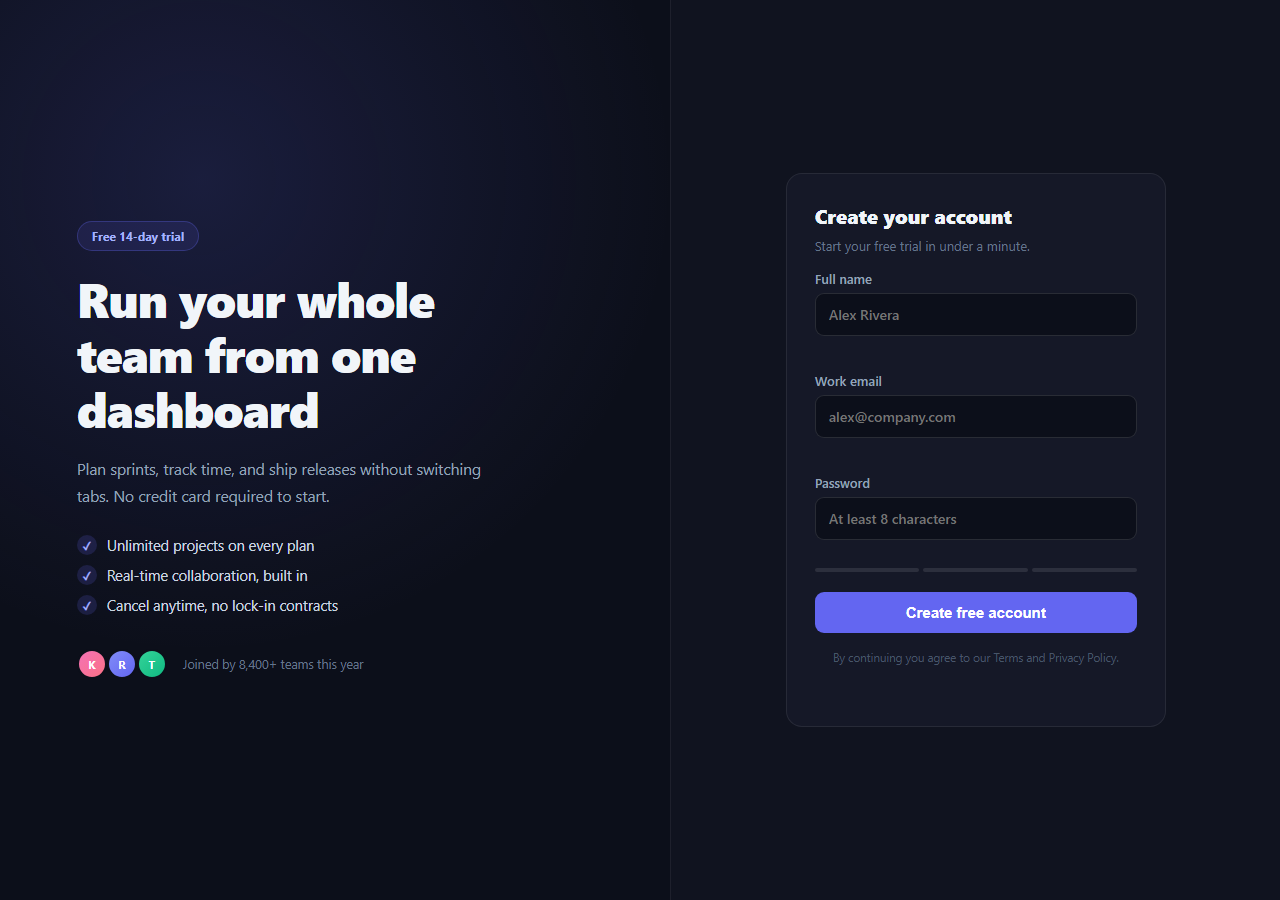
Most hero sections that claim to have a "signup form" actually have a single email input — this snippet builds a genuine multi-field account creation form (name, email, password) directly into a split-screen hero, with real client-side validation and a live password-strength meter, not just an email-capture teaser.
Why split-screen, and why a real form
The left column carries the pitch: eyebrow label, headline, subheading, a short benefit list, and a social-proof avatar row. The right column is the conversion surface — a bordered card containing the actual form a visitor fills in to create an account. Putting the form directly in the hero, rather than behind a "Sign up" button that navigates away, removes a click and lets a visitor complete the whole action without ever leaving the page.
Real validation, not a fake success state
The JavaScript listens for the form's submit event, calls preventDefault(), and runs three checks: name length, an email-shape regex, and an 8-character minimum on the password. Each field gets its own inline error message and an .ssf-invalid border state — nothing submits, and no success message appears, until all three checks pass. This is deliberately not a decorative form; wire the same submit handler to a real fetch() call against your signup endpoint and the validation logic stays exactly as-is.
Live password strength meter
As the visitor types into the password field, an input listener recomputes a 0–3 score from length, mixed case, and digit/symbol presence, then toggles a weak/medium/strong class on a three-segment bar — genuine feedback computed from the current value on every keystroke, not a static illustration.
Benefit bullets over generic copy
Rather than one long paragraph, the left column uses a short checklist of concrete benefits ("Unlimited projects on every plan") with a circular checkmark icon — scannable in under two seconds, which matters because a visitor filling out a form on the right needs quick reassurance on the left, not another paragraph to read.
Responsive collapse
At 860px the grid collapses from two columns to one, with the form card stacking beneath the pitch copy and a top border replacing the left border — so the form remains the clear focal point on mobile rather than being squeezed into a narrow sidebar.
Customizing it
Swap the field set for your own signup requirements (add a company field, a plan selector), replace the regex-based email check with your backend's validation rules, and wire the submit handler to a real endpoint. Pair it with hero email capture for a lighter-weight variant, or startup hero for a single-column alternative.
Build with AI
Build, Understand, Optimize, and Extend It With AI
Rather than reverse-engineering the validation flow by hand, paste this snippet's HTML, CSS, and JS into an AI coding assistant like Claude and ask it to walk through exactly how the submit handler blocks submission until all three fields pass, and how the password strength meter's scorePassword function turns length, case, and character-type checks into a 0-3 score. The same assistant is useful for hardening it further — ask whether the email regex is permissive enough for real-world addresses, or whether the password rule should also block common weak passwords via a denylist. It's also a good way to extend the form: ask it to wire the submit handler to a real fetch() call with loading and error states, add a confirm-password field with a match check, or convert the whole thing into a controlled React form with the same validation rules preserved. Treat the code less like a finished artifact and more like a starting point for a conversation.
Prompt to recreate it
Copy this into your AI assistant of choice to build the effect from scratch, or as a jumping-off point for your own variant:
Build a split-screen SaaS hero section in plain HTML, CSS, and vanilla JavaScript (no framework, no form library).

Requirements:
- A two-column layout: the left column has an eyebrow label, a large headline, a subheading, a short checklist of 3 benefit bullets each with a small checkmark icon, and a row of overlapping circular avatars next to a "joined by X teams" line; the right column contains a bordered card with a real signup form.
- The form must have three real fields — full name, email, and password — each with its own label, input, and an empty inline error element below it, plus a submit button.
- Add a password strength indicator below the password field made of three small segments that are unfilled by default and fill in with a weak/medium/strong color scheme as the user types, computed live from the actual password value (length, mixed case, and digit-or-symbol presence) via an input event listener — not a static decoration.
- On form submit, prevent the default page navigation, validate all three fields (name at least 2 characters, email matching a standard email-shape regex, password at least 8 characters), and for each field independently show or clear its own inline error message and a red invalid border state on the input.
- Only when every field passes should a green success message appear and the form reset; if any field fails, submission must be blocked and no success message shown.
- Make the two-column grid collapse to a single stacked column below roughly 860px, with the form card remaining the visually prioritized element even when stacked below the pitch copy.
Want to tighten it up first? Run this prompt through the AI Prompt Studio to score it across 8 quality dimensions, catch anti-patterns, and tune the wording for Claude, ChatGPT, or Gemini before you paste it in.
Step by step
How to Use
- 1Paste HTML, CSS, and JSThe split-screen hero and form render; validation is wired to the form's submit event.
- 2Try submitting emptyEach field shows its own inline error and a red border.
- 3Type a passwordWatch the three-segment strength bar update live as you type.
- 4Submit valid valuesA green success message replaces the form's placeholder state.
- 5Edit the benefit bulletsUpdate the ssf-benefits list items to your own value props.
- 6Wire a real endpointReplace the success-message branch with a fetch() call to your signup API.
Real-world uses
Common Use Cases
Got questions?
Frequently Asked Questions
Not by default — the submit handler calls preventDefault(), runs validation, and shows a success message locally so you can see the full interaction. Replace the success-message block with a fetch() POST to your real signup endpoint; the validation logic that gates the submission stays unchanged.
An input listener on the password field runs scorePassword(), which checks three conditions — length of at least 8, presence of both upper and lower case letters, and presence of a digit or symbol — awarding one point each for a 0-3 score. That score maps to a weak/medium/strong class on a three-segment bar, so the meter reflects the password actually typed, recalculated on every keystroke.
On submit, the name field requires at least 2 characters, the email field is tested against a standard email-shape regex (something@something.something), and the password field requires at least 8 characters. Each check independently sets or clears an inline error message and a red .ssf-invalid border on its own input — submission is blocked until all three pass.
Every extra click between a visitor deciding to sign up and completing the form is a chance to lose them. Embedding real fields directly in the hero removes that navigation step entirely — the visitor can go from reading the pitch on the left to a validated account on the right without a page load in between.
Copy an existing .ssf-field label block, give the input a new id, and add a matching small.ssf-error element with its own id. In the JS, add the same setError() pattern inside the submit handler for your new field's validation rule before the final valid check.