Source Code
<section class="hero">
  <span class="eyebrow">✦ Trusted by teams worldwide</span>
  <h1>The workspace <span class="grad">38,000+ teams</span> run their day on</h1>
  <p>Docs, tasks and reporting in one place — join the teams switching every day.</p>

  <div class="counter-row">
    <div class="counter-block">
      <span class="counter-num" id="userCounter">38,412</span>
      <span class="counter-label">active teams</span>
    </div>
    <div class="counter-divider"></div>
    <div class="counter-block">
      <span class="counter-num" id="taskCounter">1.2M</span>
      <span class="counter-label">tasks completed today</span>
    </div>
  </div>

  <div class="hero-cta">
    <button class="btn primary">Start free trial</button>
    <button class="btn ghost">See pricing</button>
  </div>
  <p class="live-note"><span class="live-dot"></span>Updating in real time</p>
</section>
* { box-sizing: border-box; margin: 0; padding: 0; }
body { font-family: system-ui, sans-serif; background: #f8fafc; }
.hero { max-width: 560px; margin: 0 auto; padding: 70px 24px; display: flex; flex-direction: column; align-items: center; gap: 18px; text-align: center; }
.eyebrow { font-size: 11px; font-weight: 700; color: #7c3aed; background: rgba(124,58,237,0.1); border: 1px solid rgba(124,58,237,0.2); padding: 5px 14px; border-radius: 999px; }
h1 { font-size: clamp(26px,4.4vw,38px); font-weight: 800; color: #0f172a; line-height: 1.22; letter-spacing: -0.5px; }
.grad { background: linear-gradient(90deg,#6366f1,#a855f7); -webkit-background-clip: text; -webkit-text-fill-color: transparent; background-clip: text; }
.hero p { font-size: 14.5px; color: #64748b; line-height: 1.6; max-width: 420px; }
.counter-row { display: flex; align-items: center; gap: 24px; background: #fff; border: 1px solid #e2e8f0; border-radius: 16px; padding: 18px 28px; margin-top: 6px; }
.counter-block { display: flex; flex-direction: column; align-items: center; gap: 2px; }
.counter-num { font-size: 22px; font-weight: 800; color: #111827; font-variant-numeric: tabular-nums; }
.counter-label { font-size: 10.5px; color: #94a3b8; font-weight: 600; }
.counter-divider { width: 1px; height: 32px; background: #e2e8f0; }
.hero-cta { display: flex; gap: 10px; margin-top: 4px; }
.btn { border: none; padding: 11px 20px; border-radius: 10px; font-size: 13.5px; font-weight: 700; cursor: pointer; font-family: inherit; }
.btn.primary { background: #4f46e5; color: #fff; }
.btn.primary:hover { background: #4338ca; }
.btn.ghost { background: #fff; color: #334155; border: 1px solid #e2e8f0; }
.btn.ghost:hover { background: #f8fafc; }
.live-note { display: flex; align-items: center; gap: 6px; font-size: 11px; color: #94a3b8; font-weight: 600; }
.live-dot { width: 6px; height: 6px; border-radius: 50%; background: #22c55e; animation: pulse 1.6s ease infinite; }
@keyframes pulse { 0%,100% { opacity: 1; } 50% { opacity: 0.35; } }const userCounterEl = document.getElementById('userCounter');
const taskCounterEl = document.getElementById('taskCounter');
let userCount = 38412;
let taskCount = 1200000;
function formatUsers(n) {
return n.toLocaleString('en-US');
}
function formatTasks(n) {
return (n / 1000000).toFixed(1).replace(/\.0$/, '') + 'M';
}
// Ticks the counters up by a small, randomized amount at randomized intervals,
// so the increase looks organic rather than a robotic fixed-step timer.
function scheduleNextTick() {
const delay = 1800 + Math.random() * 2800;
setTimeout(() => {
userCount += Math.floor(Math.random() * 2) + 1; // +1 or +2 teams
taskCount += Math.floor(Math.random() * 40) + 10; // +10 to +49 tasks
userCounterEl.textContent = formatUsers(userCount);
taskCounterEl.textContent = formatTasks(taskCount);
scheduleNextTick();
}, delay);
}
scheduleNextTick();Learn Coding Visually
Learn to code with interactive, live-preview playgrounds — HTML, CSS, JavaScript, React & more.
 HTML Playground42 lessons · Click-based · Live preview
 CSS PlaygroundLearn CSS with a live editor
 JavaScript Playground60 lessons · DOM · Async · Canvas
 React PlaygroundLearn React with a live code editor
 GSAP PlaygroundLearn GSAP animation interactively
 SVG Playground44 lessons · shapes · paths · animation
 SCSS Playground45 lessons · Sass modules · tokens
 Tailwind PlaygroundLearn Tailwind CSS with a live editor
 Bootstrap 5 Playground50 lessons · live preview
Hero with Live Ticking User Counter — Organic Randomized Increment Social Proof
Hero with Live Ticking User Counter · Heroes · Plain HTML, CSS & JS · Live preview
What's included
Features
About this UI Snippet
Hero with a Live Ticking Counter — Randomized, Not Robotic
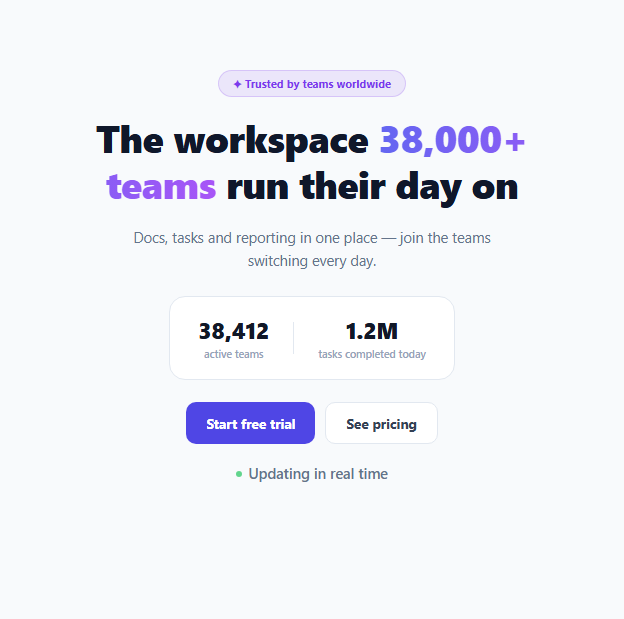
A hero section stating "38,000+ teams" once, as static text, makes a claim. The same number visibly incrementing while a visitor reads the page makes the same claim feel alive and current — implying real, ongoing activity rather than a number someone typed into the HTML once and forgot about. The core engineering challenge is making the increments look organic rather than obviously mechanical.
Why a fixed setInterval would look fake
A naive version might use setInterval(() => count++, 1000) — incrementing by exactly 1 every exact second. That's precisely the kind of regularity a human eye picks up on almost immediately, and once a visitor notices the tick is perfectly metronomic, the "live" framing collapses into an obvious animation rather than a believable signal of real activity.
Randomizing both the interval and the increment amount
This snippet instead calls scheduleNextTick() recursively via setTimeout, with each call computing a fresh randomized delay (1800 + Math.random() * 2800, so roughly 1.8–4.6 seconds) before the *next* tick — no two gaps between updates are the same length. The increment amount is randomized too: +1 or +2 teams, +10 to +49 tasks — different ranges for the two counters, since a "tasks completed" figure realistically moves in much bigger jumps than an "active teams" figure would.
Recursive setTimeout instead of setInterval, and why that distinction matters here
Using setTimeout that reschedules itself (rather than a single repeating setInterval) is what makes a genuinely *different* random delay possible on every tick — setInterval locks in one fixed period for its entire lifetime, while a self-rescheduling setTimeout chain can compute a brand new random delay value each time it fires, which is exactly the mechanism needed to avoid visible regularity.
Formatting large numbers for readability, not just displaying raw integers
formatUsers() uses toLocaleString('en-US') to insert thousands separators (38,412 rather than 38412), and formatTasks() converts a raw integer count into a rounded "1.2M" style abbreviation, stripping a trailing ".0" when the value rounds to a whole number. Both formatting functions run on every tick, so the displayed text always reflects the current underlying count correctly formatted, rather than the initial format going stale as the numbers grow.
Build with AI
Build, Understand, Optimize, and Extend It With AI
Ask an AI assistant to explain precisely why a self-rescheduling setTimeout enables per-tick delay randomization in a way a single setInterval call cannot, and to discuss the ethical considerations of simulated versus real live-activity counters on a marketing page. It's also worth asking for a version that fetches a real count from an API on an interval and only animates the visual transition between old and new values, or one that pauses ticking when the browser tab is not visible using the Page Visibility API to avoid wasted work.
Prompt to recreate it
Copy this into your AI assistant of choice to build the effect from scratch, or as a jumping-off point for your own variant:
Build a SaaS hero section in HTML, CSS and vanilla JavaScript featuring a live-updating statistics counter that increments at randomized intervals to feel organic rather than mechanical — no external libraries.

Requirements:
- A centered hero with an eyebrow badge, a headline highlighting a specific number (e.g. active teams) in gradient text, supporting copy, and two call-to-action buttons.
- Below the copy, a card showing at least two live counters (e.g. "active teams" and "tasks completed today") with correctly formatted numbers — one with thousands separators, one abbreviated (e.g. "1.2M").
- Implement the live-updating behavior using a self-rescheduling setTimeout chain (not a fixed-period setInterval), where each scheduled delay before the next update is itself randomized within a reasonable range, so ticks never happen at perfectly regular intervals.
- Each counter's increment amount per tick must also be randomized within a range appropriate to that specific metric (e.g. small increments for a team count, larger increments for a task-completion count), and both counters must re-render their formatted text correctly on every update.
- Include a small pulsing "live" indicator near the counters to visually reinforce that the numbers are actively updating.
- Ensure the counters begin ticking automatically as soon as the page loads and continue indefinitely.
Want to tighten it up first? Run this prompt through the AI Prompt Studio to score it across 8 quality dimensions, catch anti-patterns, and tune the wording for Claude, ChatGPT, or Gemini before you paste it in.
Step by step
How to Use
- 1Edit the starting countsChange the initial userCount and taskCount values in the JS panel to match your real current numbers.
- 2Adjust the increment rangesTune the Math.floor(Math.random() * N) + M expressions to control how much each counter jumps per tick.
- 3Adjust the tick interval rangeChange the 1800 and 2800 values in scheduleNextTick to make ticks happen more or less frequently.
- 4Connect to a real live metric (optional)Replace the randomized increment logic with periodic polling of a real analytics endpoint if you want the number to reflect actual live activity rather than a believable simulation.
- 5Update the headline and copyEdit the h1 and supporting paragraph in the HTML panel to match your own product's positioning.
Real-world uses
Common Use Cases
Got questions?
Frequently Asked Questions
A fixed-period setInterval produces perfectly regular, evenly-spaced updates, which is a pattern the human eye notices quickly and reads as an obviously fake animation rather than a believable signal of real activity. Randomizing the delay on every tick avoids that mechanical regularity.
A single setInterval call locks in one fixed period for its entire lifetime — you cannot change the delay between individual firings. A setTimeout that calls itself again at the end of its callback can compute a brand new random delay value every single time, which is the specific mechanism that makes per-tick randomization possible.
Not in this demo — the counts are simulated locally with randomized increments for a believable live-feeling effect. For a genuinely accurate live counter, replace the increment logic with periodic polling of a real backend analytics endpoint instead.
The two metrics realistically move at very different rates — an "active teams" count grows slowly (a team or two at a time), while a "tasks completed" count across an entire user base naturally jumps by much larger amounts per interval — so each counter's increment range is scaled to feel proportionate to what it represents.
formatTasks() divides the raw integer by one million, rounds to one decimal place, and strips a trailing ".0" if the result is a whole number — so 1200000 displays as "1.2M" while a value like 2000000 would correctly display as "2M" without an unnecessary ".0".
No — scheduleNextTick() recursively reschedules itself indefinitely, so the counters continue incrementing for as long as the page remains open, with no built-in stopping point.