You Might Also Like
Learn Coding Visually
Learn to code with interactive, live-preview playgrounds — HTML, CSS, JavaScript, React & more.
 HTML Playground42 lessons · Click-based · Live preview
 CSS PlaygroundLearn CSS with a live editor
 JavaScript Playground60 lessons · DOM · Async · Canvas
 React PlaygroundLearn React with a live code editor
 GSAP PlaygroundLearn GSAP animation interactively
 SVG Playground44 lessons · shapes · paths · animation
 SCSS Playground45 lessons · Sass modules · tokens
 Tailwind PlaygroundLearn Tailwind CSS with a live editor
 Bootstrap 5 Playground50 lessons · live preview
Live Match Scoreboard — Free Sports Scoreboard HTML CSS JS
Live Match Scoreboard · Dashboards · Plain HTML, CSS & JS · Live preview
What's included
Features
About this UI Snippet
Live Match Scoreboard — Two Teams, a Clock, and a Flash on Every Score Change
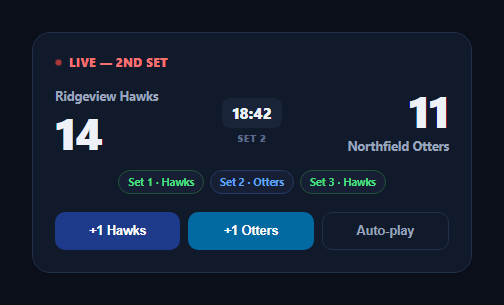
A good live scoreboard needs to answer three questions at a glance — who's ahead, how far into the match are we, and did something just happen — without the viewer having to stare and compare numbers. This snippet builds that in plain HTML, CSS, and vanilla JavaScript: two team scores, a running match clock, a row of completed-set history pills, and a genuine flash animation the instant either score changes.
A flash that restarts even on rapid updates
The signature detail is flash(): it removes the .lms-flash class, forces a synchronous reflow with void el.offsetWidth, and *then* re-adds the class. That reflow-forcing line matters — without it, if a score updates again while the previous flash animation is still finishing, simply re-adding a class that's already present does nothing, because the browser has no new state change to animate from. Forcing a reflow in between guarantees the flash restarts cleanly every single time, even during a burst of rapid scoring.
Tabular numbers keep the layout stable
Both the score and the clock use font-variant-numeric: tabular-nums, so digits don't shift the surrounding layout as they change width (a "1" next to an "11" would otherwise nudge things around) — small, but it's the difference between a scoreboard that feels solid and one that visibly jitters on every update.
Two independent timers, cleanly started and stopped
Auto-play runs two separate setInterval timers — one incrementing a random team's score every 1.8s, one advancing the match clock every second — started together and both cleared together by stopAuto(). Keeping them as two separate intervals (rather than one interval doing both jobs) means the scoring cadence and the clock cadence can be tuned independently, which matches how a real match actually behaves: the clock runs continuously while scoring is sporadic.
Set history as a simple derived row
setsWon is just an ordered array of 'A'/'B' characters, and renderSets() maps it straight to a row of colored pills — a lightweight way to show match history (who won set 1, set 2, and so on) without a heavier stats table.
Manual and automatic controls coexist
The "+1 Hawks" / "+1 Otters" buttons and the auto-play toggle both call the same addPoint() function, so manual scoring during a live event and a demo/simulated auto-play mode share identical logic — there's no separate code path to keep in sync.
Customizing it
Replace the auto-play random scoring with a real WebSocket or polling feed calling addPoint() on genuine score events, add a period/quarter indicator instead of sets for other sports, or extend setsWon with actual set scores. Pair it with a tournament match bracket for the full event, or a live vote bar race for a different kind of live-updating comparison.
Build with AI
Build, Understand, Optimize, and Extend It With AI
Rather than debugging a flash animation that silently fails to restart, paste this snippet's HTML, CSS, and JS into an AI coding assistant like Claude and ask it to explain exactly why forcing a reflow with void el.offsetWidth between removing and re-adding the flash class is necessary for the highlight to restart on rapid, consecutive score changes. The same assistant can help optimize it — for example asking whether the clock and scoring intervals should be replaced with a single requestAnimationFrame-based loop for tighter timing accuracy, or how to handle the auto-play timers correctly if the browser tab is backgrounded and setInterval gets throttled. It's also useful for extending the scoreboard: ask it to add a possession/serve indicator, a period or quarter structure instead of sets, or a subtle sound effect on score changes. Treat the code less like a finished artifact and more like a starting point for a conversation.
Prompt to recreate it
Copy this into your AI assistant of choice to build the effect from scratch, or as a jumping-off point for your own variant:
Build a "live match scoreboard" for a two-team sports match in plain HTML, CSS, and JavaScript with no library.

Requirements:
- Two team score displays and a match clock, all using tabular number formatting so digit width changes never shift the surrounding layout, plus a row of pills showing which team won each previously completed set/period.
- A live status indicator (for example a pulsing animated dot plus a "LIVE" label) always visible while the match is in progress.
- A single function that increments a given team's score, updates its displayed number, and triggers a brief flash-highlight animation on that score element — the flash must be implemented so that it reliably restarts even if the same team scores again while the previous flash animation is still playing, which requires explicitly forcing a synchronous browser reflow between removing and re-adding the animation class rather than simply toggling the class.
- Manual "+1" buttons for each team that call this shared scoring function, plus a separate auto-play toggle that starts two independent timers when activated — one that randomly increments either team's score every couple of seconds, and one that advances the match clock display once per second — both of which must be fully and cleanly stopped (no leaked timers) when auto-play is toggled off.
- The match clock must be formatted as minutes:seconds and increment correctly, including rolling over seconds into minutes.
- The set-history pills must be generated from a simple ordered array of which team won each set, rendered as colored badges distinguishing the two teams.
Want to tighten it up first? Run this prompt through the AI Prompt Studio to score it across 8 quality dimensions, catch anti-patterns, and tune the wording for Claude, ChatGPT, or Gemini before you paste it in.
Step by step
How to Use
- 1Paste HTML, CSS, and JSA scoreboard renders mid-match with two team scores, a clock, and set history pills.
- 2Click "+1 Hawks" or "+1 Otters"That team's score increments with a brief green flash-highlight.
- 3Click "Auto-play"Scores update randomly every 1.8s and the clock advances every second.
- 4Click "Stop auto-play"Both timers clear immediately.
- 5Score rapidlyNotice the flash animation restarts cleanly even on back-to-back updates.
- 6Connect a real feedCall addPoint('A') or addPoint('B') from your live-scoring WebSocket or API poll.
Real-world uses
Common Use Cases
Got questions?
Frequently Asked Questions
If a score updates again while the previous flash animation is still playing, simply removing and immediately re-adding the same CSS class does nothing visually, because the browser batches the class changes and never sees the class actually leave and return. Reading el.offsetWidth between the remove and the re-add forces the browser to synchronously recalculate layout at that point, which flushes the class removal before the class is re-added — guaranteeing the animation restarts cleanly every time, even during a fast scoring streak.
A real match's clock runs continuously and predictably (once per second) while scoring happens sporadically and at a different rhythm, so using two independent setInterval calls lets each cadence be tuned without affecting the other. It also means the clock keeps ticking accurately even while, in a real integration, score updates might arrive irregularly from a WebSocket rather than on a fixed timer.
Replace the auto-play interval\'s random selection with your WebSocket message handler or polling logic, calling addPoint(\'A\') or addPoint(\'B\') whenever a real point is scored for that team — addPoint() already handles incrementing the score, updating the DOM, and triggering the flash animation, so no other changes are needed. Drive clockSeconds from your feed\'s authoritative match time in the same way, calling renderClock() after updating it.
Most fonts render digits at different widths (a "1" is narrower than a "4"), so without tabular-nums a score changing from 9 to 10, or a clock ticking from 19:59 to 20:00, would cause the surrounding layout to visibly shift as the digit count or digit widths change. Tabular-nums forces every digit to the same fixed width, keeping the scoreboard\'s layout perfectly stable through every update.
Hold scoreA, scoreB, clockSeconds, and setsWon in component state, and trigger the flash animation with a short-lived state flag toggled on and off (or by keying the score element with a changing key prop in React to force a remount) rather than manually manipulating classList — frameworks generally handle "restart an animation on repeated state changes" via key-based remounting instead of the manual reflow trick this vanilla version uses.