You Might Also Like
Learn Coding Visually
Learn to code with interactive, live-preview playgrounds — HTML, CSS, JavaScript, React & more.
 HTML Playground42 lessons · Click-based · Live preview
 CSS PlaygroundLearn CSS with a live editor
 JavaScript Playground60 lessons · DOM · Async · Canvas
 React PlaygroundLearn React with a live code editor
 GSAP PlaygroundLearn GSAP animation interactively
 SVG Playground44 lessons · shapes · paths · animation
 SCSS Playground45 lessons · Sass modules · tokens
 Tailwind PlaygroundLearn Tailwind CSS with a live editor
 Bootstrap 5 Playground50 lessons · live preview
Loyalty Program Tier Progress — Free Multi-Tier Rewards Widget
Loyalty Program Tier Progress · Dashboards · Plain HTML, CSS & JS · Live preview
What's included
Features
About this UI Snippet
Loyalty Program Tier Progress — Beyond a Single Points Bar
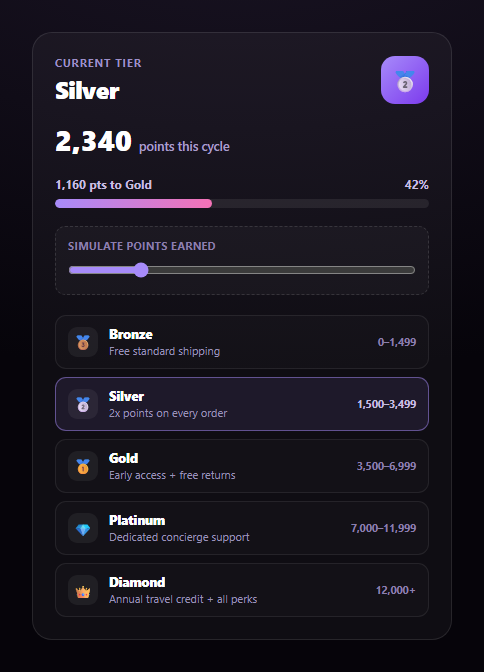
A points balance and a progress bar tell you how close you are to *something*, but not what that something actually unlocks. This widget is built around the full tier ladder: five named tiers, each with a real point range and a distinct benefit, with the current tier highlighted in context so the progress bar means something concrete.
A tier lookup, not a raw percentage
TIERS is an ordered array of { name, min, icon, benefit } objects. tierIndexFor(points) walks the list and returns the highest tier whose min threshold the current points have crossed — the same logic a real loyalty backend would use to assign a member's tier. Everything else in the widget derives from that one lookup.
Progress scoped to the current tier's span, not the whole scale
The progress bar doesn't measure points against some fixed maximum — it measures progress *within the current tier's range*: (points - current.min) / (next.min - current.min). That's why the bar resets to a fresh 0-100% at each tier boundary instead of slowly creeping across a single giant scale, and why the "points to next tier" label always shows the exact, correct gap regardless of which tier you're in.
The full ladder, always visible
Below the progress bar, every tier renders as its own row — icon, name, real benefit text, and its point range — with the current tier's row visually highlighted. This is the core difference from a simple points bar: a member can see not just how far they are from the next tier, but exactly what every tier above and below unlocks, which is what actually motivates progress. Drag the demo slider to watch the highlighted row, progress bar, and "points to next tier" label all update together at every tier boundary. Pair this with a quota usage meter for a broader account-status dashboard.
Build with AI
Build, Understand, Optimize, and Extend It With AI
Paste this snippet's HTML, CSS, and JS into an AI coding assistant like Claude and ask it to explain why the progress bar is scoped to the span between the current and next tier rather than measuring against the entire point scale, and why that distinction matters for how motivating the bar feels near a tier boundary versus in the middle of a large tier's range. It's also useful for reasoning about the tier lookup — ask how tierIndexFor() correctly handles a points value that falls exactly on a tier's minimum threshold, and what would need to change to support tiers that expire or reset on a billing cycle. For extensions, ask it to add a countdown showing days left in the current earning cycle, animate a confetti burst when a tier-up crossing happens, or add a "what you'd need to do" estimate (e.g. "3 more orders at your average spend") to reach the next tier. Treat the code less like a finished artifact and more like a starting point for a conversation.
Prompt to recreate it
Copy this into your AI assistant of choice to build the effect from scratch, or as a jumping-off point for your own variant:
Build a "loyalty program tier progress" widget in plain HTML, CSS, and JavaScript — no libraries.

Requirements:
- Define an ordered array of tiers (e.g. Bronze, Silver, Gold, Platinum, Diamond), each with a name, a minimum point threshold, an icon, and a short real benefit description (e.g. "2x points on every order", "Dedicated concierge support").
- A function that, given a points value, finds the current tier (the highest tier whose minimum threshold the points have reached or exceeded) and the next tier above it (if any).
- Display the current tier's name and icon prominently, the member's points earned this cycle, and a progress bar whose fill percentage is scoped to progress WITHIN the current tier specifically — computed as (points - currentTier.min) / (nextTier.min - currentTier.min), not as a fraction of some overall maximum — along with a label showing the exact number of points remaining to the next tier (e.g. "1,160 pts to Gold"). If there is no next tier (the member is at the top), fill the bar to 100% and show a "top tier reached" message instead of dividing by an undefined threshold.
- Below the progress bar, render every tier in the ladder as its own row showing its icon, name, benefit text, and point range, with the row for the member's current tier visually highlighted so the whole tier structure — not just the immediate next step — is visible at once.
- Include a range slider (0 to comfortably above the top tier's threshold) that lets a user simulate different point totals, live-updating the current tier, progress bar, next-tier label, and highlighted row — all driven through the same single render function so it could later be called with a real member's point balance instead.
Want to tighten it up first? Run this prompt through the AI Prompt Studio to score it across 8 quality dimensions, catch anti-patterns, and tune the wording for Claude, ChatGPT, or Gemini before you paste it in.
Step by step
How to Use
- 1Paste HTML, CSS, and JSRenders at 2,340 points — Silver tier, 67% to Gold.
- 2Drag the demo sliderPoints update live from 0 to 12,000.
- 3Cross a tier boundaryThe badge, name, and highlighted row all switch instantly.
- 4Reach the top tierThe progress bar fills and shows "Top tier reached."
- 5Read the tier listEvery tier shows its real point range and unlocked benefit.
- 6Wire up real dataCall render(points) with a member's actual point balance.
Real-world uses
Common Use Cases
Got questions?
Frequently Asked Questions
A single points bar only shows how far a value is toward one fixed target. This widget is built around a full ordered tier ladder (five tiers, each with a real point range and a distinct benefit) — the current tier is looked up from that ladder, the progress bar is scoped to just the span between the current and next tier, and every tier's benefits are always visible in a list with the active one highlighted, so the member can see the whole path, not just the next checkpoint.
Rather than measuring points against a single overall maximum, the bar measures (points - currentTier.min) / (nextTier.min - currentTier.min). That means the bar resets to a fresh 0% right after crossing into a new tier and reaches 100% exactly at the next tier's threshold, so the visual progress always reflects standing within the current tier rather than an oddly compressed fraction of the entire five-tier range.
tierIndexFor() returns the highest tier whose minimum the points have crossed, so once points reach the top tier's threshold, there is no "next" tier to measure against. The code detects this (next is undefined) and fills the bar to 100% with a "Top tier reached" label instead of trying to divide by a nonexistent next threshold.
Yes — the slider just calls the same render(points) function that does everything: finding the current tier, computing progress within it, and re-rendering the highlighted tier list. Call render(memberPointsFromYourBackend) whenever the member's balance loads or changes, and remove the slider if manual demoing isn't needed.
Keep the raw points value in state, derive the current tier index and the next tier's threshold with the same lookup logic, and bind the progress bar's width, the points-to-next label, and the tier list's "active" class to those derived values — the TIERS array itself is static configuration and doesn't need to live in state.