You Might Also Like
Learn Coding Visually
Learn to code with interactive, live-preview playgrounds — HTML, CSS, JavaScript, React & more.
 HTML Playground42 lessons · Click-based · Live preview
 CSS PlaygroundLearn CSS with a live editor
 JavaScript Playground60 lessons · DOM · Async · Canvas
 React PlaygroundLearn React with a live code editor
 GSAP PlaygroundLearn GSAP animation interactively
 SVG Playground44 lessons · shapes · paths · animation
 SCSS Playground45 lessons · Sass modules · tokens
 Tailwind PlaygroundLearn Tailwind CSS with a live editor
 Bootstrap 5 Playground50 lessons · live preview
JSON Diff Viewer — Free Recursive Structural JSON Comparator
JSON Diff Viewer · Dashboards · Plain HTML, CSS & JS · Live preview
What's included
Features
About this UI Snippet
JSON Diff Viewer — A Real Structural Diff, Not a Text Diff
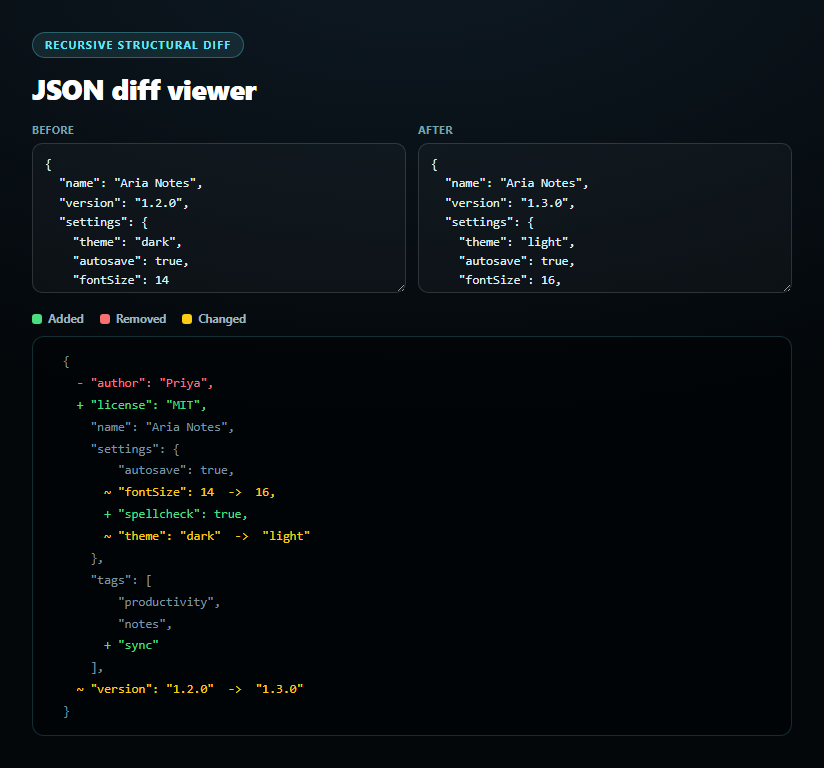
A text/line diff on two pretty-printed JSON blobs is famously misleading — reordering keys or reformatting whitespace produces a wall of red and green even when the data is identical. This tool instead parses both inputs and walks them recursively as JavaScript values, so the diff reflects actual structural differences.
The recursive comparison: diffValue()
diffValue(a, b) branches on the actual types of both values. If both are plain objects, it unions their key sets, sorts them for stable output, and recurses into diffValue for every key present in both — keys only in a are tagged removed, keys only in b are tagged added. If both are arrays, it walks index by index the same way, tagging extra trailing indices as added or removed. For anything else (primitives, or mismatched types like a number replaced by an object), it falls back to a value comparison via JSON.stringify equality and tags the result changed with both the old and new value preserved, or same if they're identical.
A diff tree, not a flat list
Every recursive call returns a node describing its own status — added, removed, changed, same, or nested (an object/array that contains changes somewhere inside it) — plus, for objects and arrays, a children/items structure holding the same kind of node for every key or index. renderDiff() then walks that tree and prints indented, properly bracketed JSON, coloring each line by its node's status: green + for added, red - for removed, yellow ~ with an old → new pair for changed, and neutral gray for unchanged context — so nested changes stay visually anchored inside their real object/array structure instead of flattening into an unreadable list.
Handles nesting correctly, at any depth
Because diffValue calls itself for every object/array value, a change three levels deep inside a nested settings object is caught and reported at exactly that depth, with every ancestor object correctly marked nested so it still renders (unchanged siblings included) rather than being collapsed away. Pair this with a code diff viewer for comparing raw text, or a JSON tree viewer for exploring a single document.
Build with AI
Build, Understand, Optimize, and Extend It With AI
Paste this snippet's HTML, CSS, and JS into an AI coding assistant like Claude and ask it to trace through diffValue() for a specific nested example — e.g. a key that's added at the top level and a value that changes three levels deep inside a nested object in the same comparison — and explain exactly how the returned diff tree represents both changes simultaneously. It's also useful for reasoning about edge cases — ask what happens when comparing an array to an object at the same key, or when one side has a key whose value is undefined versus the key being entirely absent, since JSON.stringify treats those differently. For extensions, ask it to add an "ignore key order" toggle for arrays (treating them as unordered sets for comparison), add a summary count of total additions/removals/changes at the top, or add a button to copy just the changed subset as a JSON patch. Treat the code less like a finished artifact and more like a starting point for a conversation.
Prompt to recreate it
Copy this into your AI assistant of choice to build the effect from scratch, or as a jumping-off point for your own variant:
Build a "JSON diff viewer" in plain HTML, CSS, and JavaScript — no diff library, implement the comparison logic yourself.

Requirements:
- Two textareas ("Before" and "After") pre-filled with sample JSON objects that have some overlapping keys, some added/removed keys, some changed values, and at least one nested object and one array, so the demo shows every diff type at once.
- CRITICAL: implement a genuine recursive structural diff function, not a text/line diff. Given two parsed JSON values, it should: for two plain objects, union their key sets and recursively diff every shared key, tagging keys present only in the first as "removed" and only in the second as "added"; for two arrays, walk index by index the same way; for anything else (primitives, or mismatched types like an object replaced by a number), compare by value equality and tag the result "changed" (keeping both the old and new value) or "same". Each recursive call should return a small descriptive node (its status, and for objects/arrays, the same kind of node for every child) so the overall result is a full diff tree mirroring the input's shape, correctly handling any nesting depth.
- Render the diff as formatted, properly indented JSON output (not a flat list) by walking that diff tree: added values shown in green with a "+" marker, removed values in red with a "-" marker, changed primitive values in yellow showing "oldValue -> newValue", and unchanged values in neutral gray as context — with objects and arrays rendering their real brackets/braces and nested children indented correctly, mirroring how the JSON would normally pretty-print.
- Recompute the diff live as either textarea is edited, debounced by roughly 200ms. Wrap each JSON.parse call in its own try/catch and show a clear error message naming which input (Before or After) failed to parse and why, without crashing the diff for valid input.
- If the two documents are structurally identical, show an explicit "no differences" message rather than an empty output area.
Want to tighten it up first? Run this prompt through the AI Prompt Studio to score it across 8 quality dimensions, catch anti-patterns, and tune the wording for Claude, ChatGPT, or Gemini before you paste it in.
Step by step
How to Use
- 1Paste HTML, CSS, and JSTwo sample JSON documents load and diff immediately.
- 2Edit the "Before" JSONThe diff recomputes live, debounced by 200ms.
- 3Edit the "After" JSONAdded, removed, and changed keys highlight instantly.
- 4Read the output+ green additions, - red removals, ~ yellow old → new changes.
- 5Try nested changesEdit a value inside settings to see depth-correct diffing.
- 6Break the JSON syntaxA parse error names exactly which side and why.
Real-world uses
Common Use Cases
Got questions?
Frequently Asked Questions
A text diff compares two strings line by line, so reordering keys, changing indentation, or reformatting whitespace produces spurious differences even when the underlying data is identical. This tool instead parses both inputs with JSON.parse and recursively compares the resulting JavaScript objects and arrays by key and index, so only genuine structural differences — a key that's actually missing, added, or holds a different value — are reported.
diffValue(a, b) checks the types of both values. For two plain objects, it unions and sorts their key sets, then recursively calls diffValue on every shared key (tagging keys only in one side as added or removed). For two arrays, it walks index by index the same way. For anything else — primitives or mismatched types — it compares via JSON.stringify equality and returns either "same" or "changed" with both the old and new value attached. Every recursive call returns a small "node" describing its own status, which the renderer later walks to produce the formatted output.
Yes — because diffValue calls itself for every object or array value it encounters, a change buried inside a deeply nested object is detected and reported at its exact location, while every ancestor object along the way is marked "nested" (meaning it contains a change somewhere inside) so it still renders fully, including its unchanged sibling keys, rather than being flattened or collapsed.
diffValue only recurses when both sides are objects, or both sides are arrays. If the types don't match that way — for example a key that was an object in "Before" and a plain number in "After" — it falls through to the primitive comparison path, which correctly reports the whole value as "changed" with the old object and new primitive both shown, rather than trying to diff incompatible structures key by key.
The diffValue and renderDiff functions have no DOM dependency until the final render step, so you can keep them as-is and swap only the rendering: instead of building DOM line elements directly, walk the same returned diff tree recursively in your framework's template syntax, mapping each node's status to a CSS class the same way. Keep the JSON.parse calls in a try/catch tied to your input state so parse errors surface the same way.