More Tables Snippets
Front-End Coding Playgrounds
Learn to code with interactive, live-preview playgrounds — HTML, CSS, JavaScript, React & more.
 HTML Playground42 lessons · Click-based · Live preview
 CSS PlaygroundLearn CSS with a live editor
 JavaScript Playground60 lessons · DOM · Async · Canvas
 React PlaygroundLearn React with a live code editor
 GSAP PlaygroundLearn GSAP animation interactively
 SVG Playground44 lessons · shapes · paths · animation
 SCSS Playground45 lessons · Sass modules · tokens
 Tailwind PlaygroundLearn Tailwind CSS with a live editor
 Bootstrap 5 Playground50 lessons · live preview
JSON Tree Viewer — Collapsible JSON Explorer
JSON Tree Viewer · Tables · Plain HTML, CSS & JS · Live preview
What's included
Features
About this UI Snippet
JSON Tree Viewer — Collapsible, Syntax-Colored JSON Explorer
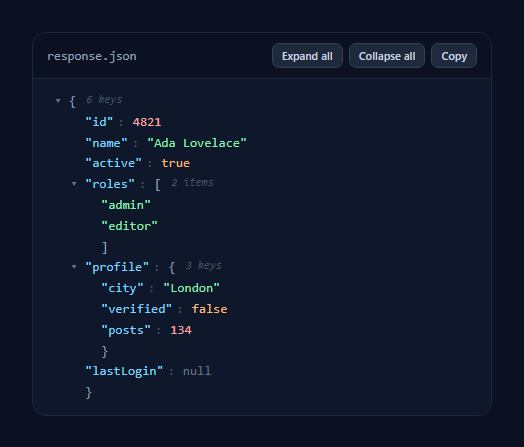
A JSON tree viewer turns a raw JSON blob into an explorable, collapsible tree with syntax colouring — the view behind API consoles, debuggers, and config editors. This snippet recursively renders any JSON value into expandable nodes with type-based colours, per-node toggles, expand/collapse-all, and copy, in plain HTML, CSS, and vanilla JavaScript with no JSON-viewer library.
Recursive rendering
The core is a single build(value, key) function that inspects a value's type and returns a DOM node. Primitives (string, number, boolean, null) render as a coloured leaf; objects and arrays render an opening brace, a child container, and a closing brace, recursing into each entry. Because it's recursive, it handles arbitrary nesting depth — objects in arrays in objects — without any special-casing, and it works on any JSON you feed it by swapping the DATA constant.
Type-aware syntax colouring
Each value type gets its own colour the way a code editor does: keys in blue, strings in green, numbers in red, booleans in orange, null in grey, and structural braces in muted slate. A correct typeOf helper distinguishes null and arrays from plain objects (since typeof null is "object" and arrays are objects too), so the colouring and the { } vs [ ] braces are always right.
Collapsible nodes with previews
Every object and array has a ▾/▸ toggle that collapses its children. When collapsed, the node shows a compact … } preview plus a count ("3 keys", "2 items"), so you can see the shape of a large payload at a glance and drill in only where you need to. Expand-all and Collapse-all buttons operate on the whole tree at once (keeping the root open), which is invaluable for big API responses.
Copy and reuse
A Copy button writes the pretty-printed JSON to the clipboard via the Clipboard API, so the viewer doubles as a formatter. The data lives as a normal JavaScript object, so you can wire it to a fetch response, a textarea, or a file drop with one line — the renderer doesn't care where the JSON comes from.
Lightweight and themeable
Rows highlight on hover for easy scanning, the monospace type and dark palette read like a real console, and the whole thing is a couple of hundred lines with no dependencies. It's a clean, drop-in reference for the collapsible JSON-tree pattern that you'd otherwise pull a library in for.
Build with AI
Build, Understand, Optimize, and Extend It With AI
You do not have to trace the recursive build function by hand to see exactly how it works. Paste this snippet's HTML, CSS, and JS into an AI coding assistant like Claude and ask it to explain why the typeOf helper special-cases null and arrays before falling back to the plain JavaScript typeof operator, and what would render incorrectly if that check were removed. The same assistant can help optimize it too, for example asking whether building the entire DOM tree eagerly is wasteful for a very large or deeply nested payload, and whether lazily rendering a node's children only on first expand would keep huge API responses responsive. It is just as useful for extending the viewer, such as adding a search box that highlights matching keys or values across the whole tree, supporting inline editing of leaf values with a callback on change, or adding keyboard navigation so arrow keys walk the tree instead of requiring clicks on every toggle. Treat the code less like a finished artifact and more like a starting point for a conversation.
Prompt to recreate it
Copy this into your AI assistant of choice to build the effect from scratch, or as a jumping-off point for your own variant:
Build a collapsible "JSON tree viewer" in plain HTML, CSS, and JavaScript using only recursive DOM construction — no JSON-viewer library, no framework.

Requirements:
- A single recursive function that accepts a JavaScript value (and its key name, if any) and returns a DOM node: primitive values render as a coloured leaf span, and objects or arrays render an opening brace, a child container built by calling the same function on every entry, and a closing brace.
- A type-detection helper that correctly distinguishes null from a plain object (since typeof null is "object" in JavaScript) and distinguishes arrays from plain objects (since arrays are also objects), so braces render as square brackets for arrays and curly braces for objects, and null renders as its own type rather than being mistaken for an object.
- Give each primitive type its own CSS color class: strings, numbers, booleans, and null must all look visually distinct, similar to a code editor's syntax highlighting.
- Every object or array node needs a clickable toggle (e.g. a triangle character) that collapses or expands only its own children by toggling a class on its wrapper element. When collapsed, show a compact inline preview (like an ellipsis and the closing brace) plus a count of how many keys or items are inside.
- Add "Expand all" and "Collapse all" buttons that walk every collapsible node in the tree and set its collapsed state in one action, while leaving the root node itself always expanded.
- Add a Copy button that writes the pretty-printed (indented) JSON string of the underlying data object to the clipboard using the Clipboard API, independent of however the tree is currently collapsed or expanded.
Step by step
How to Use
- 1Paste HTML, CSS, and JSA sample JSON object renders as a colored, collapsible tree.
- 2Feed your JSONReplace the DATA object with your own — any nesting works.
- 3Drill inClick a ▾ toggle to collapse or expand any object or array.
- 4Expand or collapse allUse the toolbar buttons to open or close the whole tree.
- 5Read the shape fastCollapsed nodes show a count like "3 keys" or "2 items".
- 6Copy itThe Copy button writes pretty-printed JSON to the clipboard.
Real-world uses
Common Use Cases
Got questions?
Frequently Asked Questions
The build function is recursive: for every object or array it creates a container and calls itself on each child, so nesting depth is unlimited and needs no special handling. Each level adds indentation and its own collapse toggle, so even a deeply nested API response stays navigable.
Pretty-printing gives you text, but not interactivity — you cannot collapse a noisy branch, scan counts, or color by type. A tree viewer lets you fold away the parts you do not care about and drill into the parts you do, which is essential when a payload is hundreds of lines. The Copy button still gives you the stringified version when you want it.
A typeOf helper returns "null" for null, "array" for arrays, and otherwise the JavaScript typeof. This matters because typeof null is "object" and arrays are objects too, so a naive check would mis-render both. Each resolved type maps to a CSS class, giving editor-style colors for keys, strings, numbers, booleans, and null.
Yes. The DATA constant is a normal JavaScript value, so assign it the parsed result of a fetch (await res.json()), a JSON.parse of a textarea, or a dropped file, then call build and append it. The renderer is agnostic about the source — it only needs a JavaScript object, array, or primitive.
Recreate the recursion as a component that renders itself for child nodes (a JsonNode that maps over entries and renders JsonNode again), holding each node's collapsed state locally. Pass the parsed JSON as a prop and color leaves by type. Expand/collapse-all can broadcast via context or a key. Tailwind users swap the classes for utilities; the recursive structure is the same.