Terminal Window — Free HTML CSS JS Snippet

Terminal Window · Cards · Plain HTML, CSS & JS · Live preview

Share & Support

What's included

Features

macOS-style chrome: traffic-light dots, centred title, dark body
Character-by-character typing with randomised 45-85ms human rhythm
Blinking cursor that follows typing and clears on command completion
Declarative script array — data-driven, trivial to repurpose
Colour-coded output: success, info, warn, muted classes
Multi-part coloured prompt (green user, blue path, grey symbols)
Replay button with full timeout cleanup to prevent overlap
Auto-scroll to keep the latest output line in view

About this UI Snippet

Terminal Window — Animated Typing Effect, Command Output & Blinking Cursor
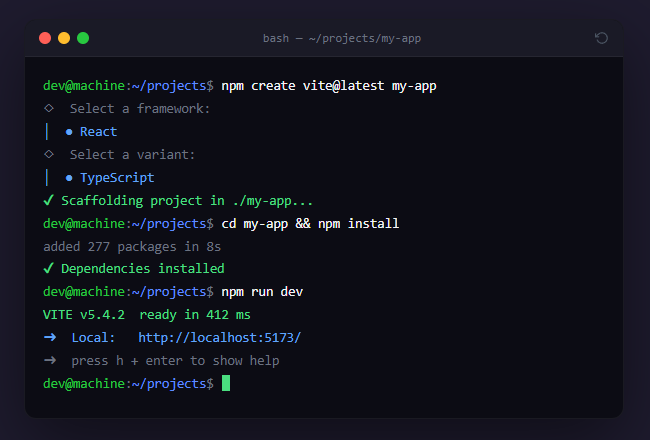
Screenshot of the Terminal Window snippet rendered live

An animated terminal window is a signature element on developer-focused landing pages (often inside a split hero), CLI tool documentation, and SaaS hero sections — it demonstrates a product's command-line workflow in a way static code blocks cannot. This snippet provides a polished macOS-style terminal with traffic-light window controls, a realistic character-by-character typing animation, colour-coded command output, a blinking cursor, and a replay button.

The window chrome

The terminal frame mimics macOS Terminal: a title bar with three traffic-light dots (red, yellow, green), a centred path title in a monospace font, and a dark body with a subtle border and deep shadow. This instantly-recognisable styling signals "developer tool" without any explanation.

The typing engine

Commands type out one character at a time via a recursive setTimeout loop — the same typewriter technique. Each keystroke is delayed by a randomised 45-85ms, which simulates human typing rhythm far more convincingly than a fixed interval — uniform timing reads as robotic. A blinking cursor follows the text as it types and is removed once the command completes, mirroring how a real shell behaves.

The script model

The terminal plays a declarative script: an array of steps, each tagged as a typed command or a printed output line with a colour class. The run() function processes the script sequentially, calling the typing animation for commands and an instant print for output, with each step invoking the next as its completion callback. This data-driven approach makes the terminal trivial to repurpose — change the script array to show any installation flow, deployment, or demo.

Colour-coded output

Output lines carry semantic classes (success green, info blue, warn amber, muted grey) that match the conventions of modern CLI tools like Vite, npm, and pnpm. The command prompt itself is styled in parts — a green user, a blue path, and grey symbols — replicating a typical coloured shell prompt.

Replay and cleanup

The replay button clears all pending timeouts before restarting, preventing overlapping animations if the user replays mid-sequence. Every setTimeout id is tracked in an array so restart() can cancel them all — a small but important detail that avoids the ghost-typing bug where a stale animation continues after a reset.

Auto-scroll

As output exceeds the visible height, the body auto-scrolls to the bottom (scrollTop = scrollHeight) so the latest line is always in view, exactly like a real terminal session.

Step by step

How to Use

  1. 1
    Watch the sequence playOn load, the terminal types out commands character by character, prints colour-coded output, and ends with a blinking prompt cursor — just like a real shell session.
  2. 2
    Replay the animationClick the replay icon in the top-right of the title bar to clear the terminal and run the sequence again from the start.
  3. 3
    Customise the scriptEdit the script array in the JS. Each entry is either { type: "cmd", text: "..." } for a typed command or { type: "out", cls: "success", text: "..." } for output. Reorder, add, or remove steps to show your own workflow.
  4. 4
    Change colours and promptEdit the output classes (success, info, warn, muted) in the CSS to match your brand. Change the PROMPT variable to set the username, path, and symbol of the shell prompt.
  5. 5
    Adjust typing speedIn typeCmd, change the 45 + Math.random() * 40 delay to speed up or slow down typing. Increase the randomness range for a more human feel, or fix it for a uniform pace.
  6. 6
    Export for your frameworkClick "JSX" for a React component using useEffect to run the typing sequence with timeout cleanup. Click "Vue" for a Vue 3 SFC with onMounted and onUnmounted cleanup.

Real-world uses

Common Use Cases

CLI tool and developer-product landing page
Show your tool's install-and-run flow in the hero section. A prospective user watches "npm install your-cli" type out and succeed, conveying the developer experience instantly. Far more persuasive than a static code block — the motion draws the eye and the realistic output builds credibility.
Documentation quickstart and onboarding
Replace static getting-started code blocks with an animated terminal that walks through setup step by step. Pair it with a copy-the-real-command button so users can both watch the flow and grab the exact commands to paste into their own shell.
Portfolio and personal site signature element
Developers use animated terminals as a personality statement on their portfolio — type out "whoami", "ls skills/", or a fake deploy. It signals craft and command-line fluency to anyone reviewing the site, and the replay button invites interaction.
Demo and screencast alternative
Instead of recording a screencast that goes stale when your CLI output changes, drive a scripted terminal from a data array you keep in version control. Update the script when the tool changes and the "recording" updates itself — no re-recording, no video hosting.
Study typewriter animation and script-driven UI
The snippet teaches recursive setTimeout typing with randomised cadence, declarative animation scripts with completion callbacks, and proper timeout cleanup to avoid overlapping runs. These patterns apply to any sequenced animation — chat simulations, guided tours, and step-through demos.
Status and deployment visualisation
Drive the terminal from real data: feed it the output lines of an actual build or deploy log, replaying them with typing animation for a dramatic status display on a dashboard or release page. The colour classes map cleanly to log levels.

Got questions?

Frequently Asked Questions

Edit the script array at the top of the JavaScript. Each element is an object: { type: "cmd", text: "your command" } renders as a typed-out command with the prompt, and { type: "out", cls: "success", text: "output line" } renders as instant output with a colour (success, info, warn, or muted). The terminal plays the array in order, so reordering, adding, or removing entries changes the whole sequence without touching the animation logic.

A fixed per-character delay looks mechanical and immediately reads as fake. Real human typing has natural variation in keystroke timing. The snippet adds Math.random() * 40 to a 45ms base, so each character lands 45-85ms after the last. This irregularity is what makes the effect feel like someone is actually typing. You can widen the random range for an even more organic feel or narrow it for a faster, more deliberate pace.

Each character and output line is scheduled with setTimeout, which returns an id. These ids are collected in an array. When the user clicks replay, restart() loops through the array and calls clearTimeout on every pending id before resetting. Without this, clicking replay mid-animation would leave the old sequence running alongside the new one, producing overlapping ghost typing. Tracking and cancelling timeouts is essential for any replayable timed animation.

Keep the script as a constant array. In a useEffect, run the sequence by chaining timeouts, storing each id in a ref array. Append lines to state (or imperatively to a ref-held DOM node for performance). Return a cleanup function from the effect that clears all tracked timeouts, so unmounting or replaying cancels pending animation. For replay, reset the line state and re-run the effect via a key change or a manual trigger.

Terminal Window — Export as HTML, React, Vue, Angular & Tailwind

HTML
<!DOCTYPE html>
<html lang="en">
<head>
  <meta charset="UTF-8" />
  <meta name="viewport" content="width=device-width, initial-scale=1.0" />
  <title>Terminal Window</title>
  <style>
    * { box-sizing: border-box; margin: 0; padding: 0; }
    body { font-family: system-ui, sans-serif; background: #1e1b2e; min-height: 100vh; display: flex; align-items: center; justify-content: center; padding: 24px; }
    .wrap { width: 100%; max-width: 600px; }
    .terminal { background: #0c0c14; border-radius: 12px; overflow: hidden; box-shadow: 0 24px 70px rgba(0,0,0,0.5); border: 1px solid rgba(255,255,255,0.06); }
    .term-bar { display: flex; align-items: center; gap: 12px; background: #1a1a26; padding: 11px 14px; border-bottom: 1px solid rgba(255,255,255,0.05); }
    .dots { display: flex; gap: 7px; }
    .dot { width: 12px; height: 12px; border-radius: 50%; }
    .dot.red { background: #ff5f57; }
    .dot.yellow { background: #febc2e; }
    .dot.green { background: #28c840; }
    .term-title { flex: 1; text-align: center; font-size: 12px; color: #6b7280; font-family: ui-monospace, monospace; }
    .copy-cmd { background: none; border: none; color: #4b5563; cursor: pointer; display: flex; align-items: center; transition: color 0.15s; }
    .copy-cmd:hover { color: #9ca3af; }
    .term-body { padding: 18px 18px 22px; font-family: 'SF Mono', 'Roboto Mono', ui-monospace, monospace; font-size: 13.5px; line-height: 1.7; min-height: 280px; color: #d1d5db; }
    .line { white-space: pre-wrap; word-break: break-word; }
    .prompt-user { color: #28c840; }
    .prompt-path { color: #5e8bff; }
    .prompt-sym { color: #6b7280; }
    .cmd { color: #f3f4f6; }
    .out { color: #9ca3af; }
    .out.success { color: #4ade80; }
    .out.info { color: #60a5fa; }
    .out.warn { color: #fbbf24; }
    .out.muted { color: #6b7280; }
    .cursor { display: inline-block; width: 8px; height: 16px; background: #4ade80; vertical-align: text-bottom; animation: blink 1s steps(1) infinite; margin-left: 1px; }
    @keyframes blink { 50% { opacity: 0; } }
  </style>
</head>
<body>
  <div class="wrap">
    <div class="terminal">
      <div class="term-bar">
        <div class="dots"><span class="dot red"></span><span class="dot yellow"></span><span class="dot green"></span></div>
        <div class="term-title">bash — ~/projects/my-app</div>
        <button class="copy-cmd" onclick="restart()" title="Replay">
          <svg width="14" height="14" viewBox="0 0 24 24" fill="none" stroke="currentColor" stroke-width="2"><path d="M1 4v6h6"/><path d="M3.51 15a9 9 0 1 0 2.13-9.36L1 10"/></svg>
        </button>
      </div>
      <div class="term-body" id="body"></div>
    </div>
  </div>
  <script>
    var script = [
      { type: 'cmd', text: 'npm create vite@latest my-app' },
      { type: 'out', cls: 'muted', text: '◇  Select a framework:' },
      { type: 'out', cls: 'info', text: '│  ● React' },
      { type: 'out', cls: 'muted', text: '◇  Select a variant:' },
      { type: 'out', cls: 'info', text: '│  ● TypeScript' },
      { type: 'out', cls: 'success', text: '✔ Scaffolding project in ./my-app...' },
      { type: 'cmd', text: 'cd my-app && npm install' },
      { type: 'out', cls: 'muted', text: 'added 277 packages in 8s' },
      { type: 'out', cls: 'success', text: '✔ Dependencies installed' },
      { type: 'cmd', text: 'npm run dev' },
      { type: 'out', cls: 'success', text: 'VITE v5.4.2  ready in 412 ms' },
      { type: 'out', cls: 'info', text: '➜  Local:   http://localhost:5173/' },
      { type: 'out', cls: 'muted', text: '➜  press h + enter to show help' }
    ];
    
    var PROMPT = '<span class="prompt-user">dev@machine</span><span class="prompt-sym">:</span><span class="prompt-path">~/projects</span><span class="prompt-sym">$</span> ';
    var body = document.getElementById('body');
    var idx = 0;
    var timeouts = [];
    
    function typeCmd(text, done) {
      var line = document.createElement('div');
      line.className = 'line';
      line.innerHTML = PROMPT + '<span class="cmd"></span><span class="cursor"></span>';
      body.appendChild(line);
      var cmdSpan = line.querySelector('.cmd');
      var cursor = line.querySelector('.cursor');
      var i = 0;
      function step() {
        if (i < text.length) {
          cmdSpan.textContent += text[i++];
          timeouts.push(setTimeout(step, 45 + Math.random() * 40));
        } else {
          cursor.remove();
          timeouts.push(setTimeout(done, 350));
        }
      }
      step();
    }
    
    function printOut(cls, text, done) {
      var line = document.createElement('div');
      line.className = 'line out ' + (cls || '');
      line.textContent = text;
      body.appendChild(line);
      body.scrollTop = body.scrollHeight;
      timeouts.push(setTimeout(done, 180));
    }
    
    function run() {
      if (idx >= script.length) {
        var line = document.createElement('div');
        line.className = 'line';
        line.innerHTML = PROMPT + '<span class="cursor"></span>';
        body.appendChild(line);
        body.scrollTop = body.scrollHeight;
        return;
      }
      var item = script[idx++];
      if (item.type === 'cmd') { typeCmd(item.text, run); }
      else { printOut(item.cls, item.text, run); }
    }
    
    function restart() {
      timeouts.forEach(clearTimeout);
      timeouts = [];
      body.innerHTML = '';
      idx = 0;
      run();
    }
    
    run();
  </script>
</body>
</html>
Tailwind
<!DOCTYPE html>
<html lang="en">
<head>
  <meta charset="UTF-8" />
  <meta name="viewport" content="width=device-width, initial-scale=1.0" />
  <title>Terminal Window</title>
  <!-- Tailwind CSS v3+ — arbitrary value classes (e.g. bg-[#0f172a]) are valid -->
  <script src="https://cdn.tailwindcss.com"></script>
  <style>
    @keyframes blink { 50% { opacity: 0; } }

    * {
      box-sizing: border-box; margin: 0; padding: 0;
    }

    body {
      font-family: system-ui, sans-serif; background: #1e1b2e; min-height: 100vh; display: flex; align-items: center; justify-content: center; padding: 24px;
    }

    .dot.red {
      background: #ff5f57;
    }

    .dot.yellow {
      background: #febc2e;
    }

    .dot.green {
      background: #28c840;
    }

    .line {
      white-space: pre-wrap; word-break: break-word;
    }

    .prompt-user {
      color: #28c840;
    }

    .prompt-path {
      color: #5e8bff;
    }

    .prompt-sym {
      color: #6b7280;
    }

    .cmd {
      color: #f3f4f6;
    }

    .out {
      color: #9ca3af;
    }

    .out.success {
      color: #4ade80;
    }

    .out.info {
      color: #60a5fa;
    }

    .out.warn {
      color: #fbbf24;
    }

    .out.muted {
      color: #6b7280;
    }

    .cursor {
      display: inline-block; width: 8px; height: 16px; background: #4ade80; vertical-align: text-bottom; animation: blink 1s steps(1) infinite; margin-left: 1px;
    }
  </style>
</head>
<body>
  <div class="w-full max-w-[600px]">
    <div class="bg-[#0c0c14] rounded-xl overflow-hidden shadow-[0_24px_70px_rgba(0,0,0,0.5)] border border-[rgba(255,255,255,0.06)]">
      <div class="flex items-center gap-3 bg-[#1a1a26] py-[11px] px-3.5 border-b border-b-[rgba(255,255,255,0.05)]">
        <div class="flex gap-[7px]"><span class="dot w-3 h-3 rounded-full red"></span><span class="dot w-3 h-3 rounded-full yellow"></span><span class="dot w-3 h-3 rounded-full green"></span></div>
        <div class="flex-1 text-center text-xs text-[#6b7280] font-mono">bash — ~/projects/my-app</div>
        <button class="bg-transparent border-0 text-[#4b5563] cursor-pointer flex items-center [transition:color_0.15s] hover:text-[#9ca3af]" onclick="restart()" title="Replay">
          <svg width="14" height="14" viewBox="0 0 24 24" fill="none" stroke="currentColor" stroke-width="2"><path d="M1 4v6h6"/><path d="M3.51 15a9 9 0 1 0 2.13-9.36L1 10"/></svg>
        </button>
      </div>
      <div class="pt-[18px] px-[18px] pb-[22px] font-mono text-[13.5px] leading-[1.7] min-h-[280px] text-[#d1d5db]" id="body"></div>
    </div>
  </div>
  <script>
    var script = [
      { type: 'cmd', text: 'npm create vite@latest my-app' },
      { type: 'out', cls: 'muted', text: '◇  Select a framework:' },
      { type: 'out', cls: 'info', text: '│  ● React' },
      { type: 'out', cls: 'muted', text: '◇  Select a variant:' },
      { type: 'out', cls: 'info', text: '│  ● TypeScript' },
      { type: 'out', cls: 'success', text: '✔ Scaffolding project in ./my-app...' },
      { type: 'cmd', text: 'cd my-app && npm install' },
      { type: 'out', cls: 'muted', text: 'added 277 packages in 8s' },
      { type: 'out', cls: 'success', text: '✔ Dependencies installed' },
      { type: 'cmd', text: 'npm run dev' },
      { type: 'out', cls: 'success', text: 'VITE v5.4.2  ready in 412 ms' },
      { type: 'out', cls: 'info', text: '➜  Local:   http://localhost:5173/' },
      { type: 'out', cls: 'muted', text: '➜  press h + enter to show help' }
    ];
    
    var PROMPT = '<span class="prompt-user">dev@machine</span><span class="prompt-sym">:</span><span class="prompt-path">~/projects</span><span class="prompt-sym">$</span> ';
    var body = document.getElementById('body');
    var idx = 0;
    var timeouts = [];
    
    function typeCmd(text, done) {
      var line = document.createElement('div');
      line.className = 'line';
      line.innerHTML = PROMPT + '<span class="cmd"></span><span class="cursor"></span>';
      body.appendChild(line);
      var cmdSpan = line.querySelector('.cmd');
      var cursor = line.querySelector('.cursor');
      var i = 0;
      function step() {
        if (i < text.length) {
          cmdSpan.textContent += text[i++];
          timeouts.push(setTimeout(step, 45 + Math.random() * 40));
        } else {
          cursor.remove();
          timeouts.push(setTimeout(done, 350));
        }
      }
      step();
    }
    
    function printOut(cls, text, done) {
      var line = document.createElement('div');
      line.className = 'line out ' + (cls || '');
      line.textContent = text;
      body.appendChild(line);
      body.scrollTop = body.scrollHeight;
      timeouts.push(setTimeout(done, 180));
    }
    
    function run() {
      if (idx >= script.length) {
        var line = document.createElement('div');
        line.className = 'line';
        line.innerHTML = PROMPT + '<span class="cursor"></span>';
        body.appendChild(line);
        body.scrollTop = body.scrollHeight;
        return;
      }
      var item = script[idx++];
      if (item.type === 'cmd') { typeCmd(item.text, run); }
      else { printOut(item.cls, item.text, run); }
    }
    
    function restart() {
      timeouts.forEach(clearTimeout);
      timeouts = [];
      body.innerHTML = '';
      idx = 0;
      run();
    }
    
    run();
  </script>
</body>
</html>
React
import React, { useEffect } from 'react';

// CSS — optionally move to TerminalWindow.module.css
const css = `
* { box-sizing: border-box; margin: 0; padding: 0; }
body { font-family: system-ui, sans-serif; background: #1e1b2e; min-height: 100vh; display: flex; align-items: center; justify-content: center; padding: 24px; }
.wrap { width: 100%; max-width: 600px; }
.terminal { background: #0c0c14; border-radius: 12px; overflow: hidden; box-shadow: 0 24px 70px rgba(0,0,0,0.5); border: 1px solid rgba(255,255,255,0.06); }
.term-bar { display: flex; align-items: center; gap: 12px; background: #1a1a26; padding: 11px 14px; border-bottom: 1px solid rgba(255,255,255,0.05); }
.dots { display: flex; gap: 7px; }
.dot { width: 12px; height: 12px; border-radius: 50%; }
.dot.red { background: #ff5f57; }
.dot.yellow { background: #febc2e; }
.dot.green { background: #28c840; }
.term-title { flex: 1; text-align: center; font-size: 12px; color: #6b7280; font-family: ui-monospace, monospace; }
.copy-cmd { background: none; border: none; color: #4b5563; cursor: pointer; display: flex; align-items: center; transition: color 0.15s; }
.copy-cmd:hover { color: #9ca3af; }
.term-body { padding: 18px 18px 22px; font-family: 'SF Mono', 'Roboto Mono', ui-monospace, monospace; font-size: 13.5px; line-height: 1.7; min-height: 280px; color: #d1d5db; }
.line { white-space: pre-wrap; word-break: break-word; }
.prompt-user { color: #28c840; }
.prompt-path { color: #5e8bff; }
.prompt-sym { color: #6b7280; }
.cmd { color: #f3f4f6; }
.out { color: #9ca3af; }
.out.success { color: #4ade80; }
.out.info { color: #60a5fa; }
.out.warn { color: #fbbf24; }
.out.muted { color: #6b7280; }
.cursor { display: inline-block; width: 8px; height: 16px; background: #4ade80; vertical-align: text-bottom; animation: blink 1s steps(1) infinite; margin-left: 1px; }
@keyframes blink { 50% { opacity: 0; } }
`;

export default function TerminalWindow() {
  // Auto-generated escape hatch: the original snippet's vanilla JS runs once
  // after mount and queries the rendered DOM. For idiomatic React, lift this
  // into state + handlers.
  useEffect(() => {
    const _listeners = [];
    const _originalAddEventListener = EventTarget.prototype.addEventListener;
    EventTarget.prototype.addEventListener = function(type, listener, options) {
      _listeners.push({ target: this, type, listener, options });
      return _originalAddEventListener.call(this, type, listener, options);
    };
    var script = [
      { type: 'cmd', text: 'npm create vite@latest my-app' },
      { type: 'out', cls: 'muted', text: '◇  Select a framework:' },
      { type: 'out', cls: 'info', text: '│  ● React' },
      { type: 'out', cls: 'muted', text: '◇  Select a variant:' },
      { type: 'out', cls: 'info', text: '│  ● TypeScript' },
      { type: 'out', cls: 'success', text: '✔ Scaffolding project in ./my-app...' },
      { type: 'cmd', text: 'cd my-app && npm install' },
      { type: 'out', cls: 'muted', text: 'added 277 packages in 8s' },
      { type: 'out', cls: 'success', text: '✔ Dependencies installed' },
      { type: 'cmd', text: 'npm run dev' },
      { type: 'out', cls: 'success', text: 'VITE v5.4.2  ready in 412 ms' },
      { type: 'out', cls: 'info', text: '➜  Local:   http://localhost:5173/' },
      { type: 'out', cls: 'muted', text: '➜  press h + enter to show help' }
    ];
    
    var PROMPT = '<span class="prompt-user">dev@machine</span><span class="prompt-sym">:</span><span class="prompt-path">~/projects</span><span class="prompt-sym">$</span> ';
    var body = document.getElementById('body');
    var idx = 0;
    var timeouts = [];
    
    function typeCmd(text, done) {
      var line = document.createElement('div');
      line.className = 'line';
      line.innerHTML = PROMPT + '<span class="cmd"></span><span class="cursor"></span>';
      body.appendChild(line);
      var cmdSpan = line.querySelector('.cmd');
      var cursor = line.querySelector('.cursor');
      var i = 0;
      function step() {
        if (i < text.length) {
          cmdSpan.textContent += text[i++];
          timeouts.push(setTimeout(step, 45 + Math.random() * 40));
        } else {
          cursor.remove();
          timeouts.push(setTimeout(done, 350));
        }
      }
      step();
    }
    
    function printOut(cls, text, done) {
      var line = document.createElement('div');
      line.className = 'line out ' + (cls || '');
      line.textContent = text;
      body.appendChild(line);
      body.scrollTop = body.scrollHeight;
      timeouts.push(setTimeout(done, 180));
    }
    
    function run() {
      if (idx >= script.length) {
        var line = document.createElement('div');
        line.className = 'line';
        line.innerHTML = PROMPT + '<span class="cursor"></span>';
        body.appendChild(line);
        body.scrollTop = body.scrollHeight;
        return;
      }
      var item = script[idx++];
      if (item.type === 'cmd') { typeCmd(item.text, run); }
      else { printOut(item.cls, item.text, run); }
    }
    
    function restart() {
      timeouts.forEach(clearTimeout);
      timeouts = [];
      body.innerHTML = '';
      idx = 0;
      run();
    }
    
    run();
    // Cleanup: restore addEventListener and remove all listeners
    return () => {
      EventTarget.prototype.addEventListener = _originalAddEventListener;
      for (const { target, type, listener, options } of _listeners) {
        target.removeEventListener(type, listener, options);
      }
    };

    // Expose handlers used by inline JSX events to the global scope
    if (typeof restart === 'function') window.restart = restart;
  }, []);

  return (
    <>
      <style>{css}</style>
      <div className="wrap">
        <div className="terminal">
          <div className="term-bar">
            <div className="dots"><span className="dot red"></span><span className="dot yellow"></span><span className="dot green"></span></div>
            <div className="term-title">bash — ~/projects/my-app</div>
            <button className="copy-cmd" onClick={(event) => { restart() }} title="Replay">
              <svg width="14" height="14" viewBox="0 0 24 24" fill="none" stroke="currentColor" strokeWidth="2"><path d="M1 4v6h6"/><path d="M3.51 15a9 9 0 1 0 2.13-9.36L1 10"/></svg>
            </button>
          </div>
          <div className="term-body" id="body"></div>
        </div>
      </div>
    </>
  );
}
React + Tailwind
import React, { useEffect } from 'react';
// Requires Tailwind CSS v3+ — https://tailwindcss.com/docs/installation
// Arbitrary value classes (e.g. bg-[#0f172a]) are valid Tailwind v3+

export default function TerminalWindow() {
  // Auto-generated escape hatch: the original snippet's vanilla JS runs once
  // after mount and queries the rendered DOM. For idiomatic React, lift this
  // into state + handlers.
  useEffect(() => {
    const _listeners = [];
    const _originalAddEventListener = EventTarget.prototype.addEventListener;
    EventTarget.prototype.addEventListener = function(type, listener, options) {
      _listeners.push({ target: this, type, listener, options });
      return _originalAddEventListener.call(this, type, listener, options);
    };
    var script = [
      { type: 'cmd', text: 'npm create vite@latest my-app' },
      { type: 'out', cls: 'muted', text: '◇  Select a framework:' },
      { type: 'out', cls: 'info', text: '│  ● React' },
      { type: 'out', cls: 'muted', text: '◇  Select a variant:' },
      { type: 'out', cls: 'info', text: '│  ● TypeScript' },
      { type: 'out', cls: 'success', text: '✔ Scaffolding project in ./my-app...' },
      { type: 'cmd', text: 'cd my-app && npm install' },
      { type: 'out', cls: 'muted', text: 'added 277 packages in 8s' },
      { type: 'out', cls: 'success', text: '✔ Dependencies installed' },
      { type: 'cmd', text: 'npm run dev' },
      { type: 'out', cls: 'success', text: 'VITE v5.4.2  ready in 412 ms' },
      { type: 'out', cls: 'info', text: '➜  Local:   http://localhost:5173/' },
      { type: 'out', cls: 'muted', text: '➜  press h + enter to show help' }
    ];
    
    var PROMPT = '<span class="prompt-user">dev@machine</span><span class="prompt-sym">:</span><span class="prompt-path">~/projects</span><span class="prompt-sym">$</span> ';
    var body = document.getElementById('body');
    var idx = 0;
    var timeouts = [];
    
    function typeCmd(text, done) {
      var line = document.createElement('div');
      line.className = 'line';
      line.innerHTML = PROMPT + '<span class="cmd"></span><span class="cursor"></span>';
      body.appendChild(line);
      var cmdSpan = line.querySelector('.cmd');
      var cursor = line.querySelector('.cursor');
      var i = 0;
      function step() {
        if (i < text.length) {
          cmdSpan.textContent += text[i++];
          timeouts.push(setTimeout(step, 45 + Math.random() * 40));
        } else {
          cursor.remove();
          timeouts.push(setTimeout(done, 350));
        }
      }
      step();
    }
    
    function printOut(cls, text, done) {
      var line = document.createElement('div');
      line.className = 'line out ' + (cls || '');
      line.textContent = text;
      body.appendChild(line);
      body.scrollTop = body.scrollHeight;
      timeouts.push(setTimeout(done, 180));
    }
    
    function run() {
      if (idx >= script.length) {
        var line = document.createElement('div');
        line.className = 'line';
        line.innerHTML = PROMPT + '<span class="cursor"></span>';
        body.appendChild(line);
        body.scrollTop = body.scrollHeight;
        return;
      }
      var item = script[idx++];
      if (item.type === 'cmd') { typeCmd(item.text, run); }
      else { printOut(item.cls, item.text, run); }
    }
    
    function restart() {
      timeouts.forEach(clearTimeout);
      timeouts = [];
      body.innerHTML = '';
      idx = 0;
      run();
    }
    
    run();
    // Cleanup: restore addEventListener and remove all listeners
    return () => {
      EventTarget.prototype.addEventListener = _originalAddEventListener;
      for (const { target, type, listener, options } of _listeners) {
        target.removeEventListener(type, listener, options);
      }
    };

    // Expose handlers used by inline JSX events to the global scope
    if (typeof restart === 'function') window.restart = restart;
  }, []);

  return (
    <>
      <style>{`
@keyframes blink { 50% { opacity: 0; } }

* {
  box-sizing: border-box; margin: 0; padding: 0;
}

body {
  font-family: system-ui, sans-serif; background: #1e1b2e; min-height: 100vh; display: flex; align-items: center; justify-content: center; padding: 24px;
}

.dot.red {
  background: #ff5f57;
}

.dot.yellow {
  background: #febc2e;
}

.dot.green {
  background: #28c840;
}

.line {
  white-space: pre-wrap; word-break: break-word;
}

.prompt-user {
  color: #28c840;
}

.prompt-path {
  color: #5e8bff;
}

.prompt-sym {
  color: #6b7280;
}

.cmd {
  color: #f3f4f6;
}

.out {
  color: #9ca3af;
}

.out.success {
  color: #4ade80;
}

.out.info {
  color: #60a5fa;
}

.out.warn {
  color: #fbbf24;
}

.out.muted {
  color: #6b7280;
}

.cursor {
  display: inline-block; width: 8px; height: 16px; background: #4ade80; vertical-align: text-bottom; animation: blink 1s steps(1) infinite; margin-left: 1px;
}
      `}</style>
      <div className="w-full max-w-[600px]">
        <div className="bg-[#0c0c14] rounded-xl overflow-hidden shadow-[0_24px_70px_rgba(0,0,0,0.5)] border border-[rgba(255,255,255,0.06)]">
          <div className="flex items-center gap-3 bg-[#1a1a26] py-[11px] px-3.5 border-b border-b-[rgba(255,255,255,0.05)]">
            <div className="flex gap-[7px]"><span className="dot w-3 h-3 rounded-full red"></span><span className="dot w-3 h-3 rounded-full yellow"></span><span className="dot w-3 h-3 rounded-full green"></span></div>
            <div className="flex-1 text-center text-xs text-[#6b7280] font-mono">bash — ~/projects/my-app</div>
            <button className="bg-transparent border-0 text-[#4b5563] cursor-pointer flex items-center [transition:color_0.15s] hover:text-[#9ca3af]" onClick={(event) => { restart() }} title="Replay">
              <svg width="14" height="14" viewBox="0 0 24 24" fill="none" stroke="currentColor" strokeWidth="2"><path d="M1 4v6h6"/><path d="M3.51 15a9 9 0 1 0 2.13-9.36L1 10"/></svg>
            </button>
          </div>
          <div className="pt-[18px] px-[18px] pb-[22px] font-mono text-[13.5px] leading-[1.7] min-h-[280px] text-[#d1d5db]" id="body"></div>
        </div>
      </div>
    </>
  );
}
Vue
<template>
  <div class="wrap">
    <div class="terminal">
      <div class="term-bar">
        <div class="dots"><span class="dot red"></span><span class="dot yellow"></span><span class="dot green"></span></div>
        <div class="term-title">bash — ~/projects/my-app</div>
        <button class="copy-cmd" @click="restart()" title="Replay">
          <svg width="14" height="14" viewBox="0 0 24 24" fill="none" stroke="currentColor" stroke-width="2"><path d="M1 4v6h6"/><path d="M3.51 15a9 9 0 1 0 2.13-9.36L1 10"/></svg>
        </button>
      </div>
      <div class="term-body" id="body"></div>
    </div>
  </div>
</template>

<script setup>
import { onMounted } from 'vue';

var script = [
  { type: 'cmd', text: 'npm create vite@latest my-app' },
  { type: 'out', cls: 'muted', text: '◇  Select a framework:' },
  { type: 'out', cls: 'info', text: '│  ● React' },
  { type: 'out', cls: 'muted', text: '◇  Select a variant:' },
  { type: 'out', cls: 'info', text: '│  ● TypeScript' },
  { type: 'out', cls: 'success', text: '✔ Scaffolding project in ./my-app...' },
  { type: 'cmd', text: 'cd my-app && npm install' },
  { type: 'out', cls: 'muted', text: 'added 277 packages in 8s' },
  { type: 'out', cls: 'success', text: '✔ Dependencies installed' },
  { type: 'cmd', text: 'npm run dev' },
  { type: 'out', cls: 'success', text: 'VITE v5.4.2  ready in 412 ms' },
  { type: 'out', cls: 'info', text: '➜  Local:   http://localhost:5173/' },
  { type: 'out', cls: 'muted', text: '➜  press h + enter to show help' }
];
var PROMPT = '<span class="prompt-user">dev@machine</span><span class="prompt-sym">:</span><span class="prompt-path">~/projects</span><span class="prompt-sym">$</span> ';
let body;
var idx = 0;
var timeouts = [];
function typeCmd(text, done) {
  var line = document.createElement('div');
  line.className = 'line';
  line.innerHTML = PROMPT + '<span class="cmd"></span><span class="cursor"></span>';
  body.appendChild(line);
  var cmdSpan = line.querySelector('.cmd');
  var cursor = line.querySelector('.cursor');
  var i = 0;
  function step() {
    if (i < text.length) {
      cmdSpan.textContent += text[i++];
      timeouts.push(setTimeout(step, 45 + Math.random() * 40));
    } else {
      cursor.remove();
      timeouts.push(setTimeout(done, 350));
    }
  }
  step();
}
function printOut(cls, text, done) {
  var line = document.createElement('div');
  line.className = 'line out ' + (cls || '');
  line.textContent = text;
  body.appendChild(line);
  body.scrollTop = body.scrollHeight;
  timeouts.push(setTimeout(done, 180));
}
function run() {
  if (idx >= script.length) {
    var line = document.createElement('div');
    line.className = 'line';
    line.innerHTML = PROMPT + '<span class="cursor"></span>';
    body.appendChild(line);
    body.scrollTop = body.scrollHeight;
    return;
  }
  var item = script[idx++];
  if (item.type === 'cmd') { typeCmd(item.text, run); }
  else { printOut(item.cls, item.text, run); }
}
function restart() {
  timeouts.forEach(clearTimeout);
  timeouts = [];
  body.innerHTML = '';
  idx = 0;
  run();
}

onMounted(() => {
  body = document.getElementById('body');
  run();
});
</script>

<style scoped>
* { box-sizing: border-box; margin: 0; padding: 0; }
body { font-family: system-ui, sans-serif; background: #1e1b2e; min-height: 100vh; display: flex; align-items: center; justify-content: center; padding: 24px; }
.wrap { width: 100%; max-width: 600px; }
.terminal { background: #0c0c14; border-radius: 12px; overflow: hidden; box-shadow: 0 24px 70px rgba(0,0,0,0.5); border: 1px solid rgba(255,255,255,0.06); }
.term-bar { display: flex; align-items: center; gap: 12px; background: #1a1a26; padding: 11px 14px; border-bottom: 1px solid rgba(255,255,255,0.05); }
.dots { display: flex; gap: 7px; }
.dot { width: 12px; height: 12px; border-radius: 50%; }
.dot.red { background: #ff5f57; }
.dot.yellow { background: #febc2e; }
.dot.green { background: #28c840; }
.term-title { flex: 1; text-align: center; font-size: 12px; color: #6b7280; font-family: ui-monospace, monospace; }
.copy-cmd { background: none; border: none; color: #4b5563; cursor: pointer; display: flex; align-items: center; transition: color 0.15s; }
.copy-cmd:hover { color: #9ca3af; }
.term-body { padding: 18px 18px 22px; font-family: 'SF Mono', 'Roboto Mono', ui-monospace, monospace; font-size: 13.5px; line-height: 1.7; min-height: 280px; color: #d1d5db; }
.line { white-space: pre-wrap; word-break: break-word; }
.prompt-user { color: #28c840; }
.prompt-path { color: #5e8bff; }
.prompt-sym { color: #6b7280; }
.cmd { color: #f3f4f6; }
.out { color: #9ca3af; }
.out.success { color: #4ade80; }
.out.info { color: #60a5fa; }
.out.warn { color: #fbbf24; }
.out.muted { color: #6b7280; }
.cursor { display: inline-block; width: 8px; height: 16px; background: #4ade80; vertical-align: text-bottom; animation: blink 1s steps(1) infinite; margin-left: 1px; }
@keyframes blink { 50% { opacity: 0; } }
</style>
Angular
// @ts-nocheck
// Note: vanilla JS DOM manipulation is preserved as-is inside ngAfterViewInit().
// For idiomatic Angular, replace document.getElementById() with @ViewChild() refs
// and move state into component properties with two-way binding.
import { Component, AfterViewInit, ViewEncapsulation } from '@angular/core';
import { CommonModule } from '@angular/common';

@Component({
  selector: 'app-terminal-window',
  standalone: true,
  imports: [CommonModule],
  encapsulation: ViewEncapsulation.None,
  template: `
    <div class="wrap">
      <div class="terminal">
        <div class="term-bar">
          <div class="dots"><span class="dot red"></span><span class="dot yellow"></span><span class="dot green"></span></div>
          <div class="term-title">bash — ~/projects/my-app</div>
          <button class="copy-cmd" (click)="restart()" title="Replay">
            <svg width="14" height="14" viewBox="0 0 24 24" fill="none" stroke="currentColor" stroke-width="2"><path d="M1 4v6h6"/><path d="M3.51 15a9 9 0 1 0 2.13-9.36L1 10"/></svg>
          </button>
        </div>
        <div class="term-body" id="body"></div>
      </div>
    </div>
  `,
  styles: [`
    * { box-sizing: border-box; margin: 0; padding: 0; }
    body { font-family: system-ui, sans-serif; background: #1e1b2e; min-height: 100vh; display: flex; align-items: center; justify-content: center; padding: 24px; }
    .wrap { width: 100%; max-width: 600px; }
    .terminal { background: #0c0c14; border-radius: 12px; overflow: hidden; box-shadow: 0 24px 70px rgba(0,0,0,0.5); border: 1px solid rgba(255,255,255,0.06); }
    .term-bar { display: flex; align-items: center; gap: 12px; background: #1a1a26; padding: 11px 14px; border-bottom: 1px solid rgba(255,255,255,0.05); }
    .dots { display: flex; gap: 7px; }
    .dot { width: 12px; height: 12px; border-radius: 50%; }
    .dot.red { background: #ff5f57; }
    .dot.yellow { background: #febc2e; }
    .dot.green { background: #28c840; }
    .term-title { flex: 1; text-align: center; font-size: 12px; color: #6b7280; font-family: ui-monospace, monospace; }
    .copy-cmd { background: none; border: none; color: #4b5563; cursor: pointer; display: flex; align-items: center; transition: color 0.15s; }
    .copy-cmd:hover { color: #9ca3af; }
    .term-body { padding: 18px 18px 22px; font-family: 'SF Mono', 'Roboto Mono', ui-monospace, monospace; font-size: 13.5px; line-height: 1.7; min-height: 280px; color: #d1d5db; }
    .line { white-space: pre-wrap; word-break: break-word; }
    .prompt-user { color: #28c840; }
    .prompt-path { color: #5e8bff; }
    .prompt-sym { color: #6b7280; }
    .cmd { color: #f3f4f6; }
    .out { color: #9ca3af; }
    .out.success { color: #4ade80; }
    .out.info { color: #60a5fa; }
    .out.warn { color: #fbbf24; }
    .out.muted { color: #6b7280; }
    .cursor { display: inline-block; width: 8px; height: 16px; background: #4ade80; vertical-align: text-bottom; animation: blink 1s steps(1) infinite; margin-left: 1px; }
    @keyframes blink { 50% { opacity: 0; } }
  `]
})
export class TerminalWindowComponent implements AfterViewInit {
  ngAfterViewInit(): void {
    var script = [
      { type: 'cmd', text: 'npm create vite@latest my-app' },
      { type: 'out', cls: 'muted', text: '◇  Select a framework:' },
      { type: 'out', cls: 'info', text: '│  ● React' },
      { type: 'out', cls: 'muted', text: '◇  Select a variant:' },
      { type: 'out', cls: 'info', text: '│  ● TypeScript' },
      { type: 'out', cls: 'success', text: '✔ Scaffolding project in ./my-app...' },
      { type: 'cmd', text: 'cd my-app && npm install' },
      { type: 'out', cls: 'muted', text: 'added 277 packages in 8s' },
      { type: 'out', cls: 'success', text: '✔ Dependencies installed' },
      { type: 'cmd', text: 'npm run dev' },
      { type: 'out', cls: 'success', text: 'VITE v5.4.2  ready in 412 ms' },
      { type: 'out', cls: 'info', text: '➜  Local:   http://localhost:5173/' },
      { type: 'out', cls: 'muted', text: '➜  press h + enter to show help' }
    ];
    
    var PROMPT = '<span class="prompt-user">dev@machine</span><span class="prompt-sym">:</span><span class="prompt-path">~/projects</span><span class="prompt-sym">$</span> ';
    var body = document.getElementById('body');
    var idx = 0;
    var timeouts = [];
    
    function typeCmd(text, done) {
      var line = document.createElement('div');
      line.className = 'line';
      line.innerHTML = PROMPT + '<span class="cmd"></span><span class="cursor"></span>';
      body.appendChild(line);
      var cmdSpan = line.querySelector('.cmd');
      var cursor = line.querySelector('.cursor');
      var i = 0;
      function step() {
        if (i < text.length) {
          cmdSpan.textContent += text[i++];
          timeouts.push(setTimeout(step, 45 + Math.random() * 40));
        } else {
          cursor.remove();
          timeouts.push(setTimeout(done, 350));
        }
      }
      step();
    }
    
    function printOut(cls, text, done) {
      var line = document.createElement('div');
      line.className = 'line out ' + (cls || '');
      line.textContent = text;
      body.appendChild(line);
      body.scrollTop = body.scrollHeight;
      timeouts.push(setTimeout(done, 180));
    }
    
    function run() {
      if (idx >= script.length) {
        var line = document.createElement('div');
        line.className = 'line';
        line.innerHTML = PROMPT + '<span class="cursor"></span>';
        body.appendChild(line);
        body.scrollTop = body.scrollHeight;
        return;
      }
      var item = script[idx++];
      if (item.type === 'cmd') { typeCmd(item.text, run); }
      else { printOut(item.cls, item.text, run); }
    }
    
    function restart() {
      timeouts.forEach(clearTimeout);
      timeouts = [];
      body.innerHTML = '';
      idx = 0;
      run();
    }
    
    run();

    // Bind inline-handler functions to the component so the template can call them
    Object.assign(this, { typeCmd, printOut, run, restart });
  }
}