You Might Also Like
Learn Coding Visually
Learn to code with interactive, live-preview playgrounds — HTML, CSS, JavaScript, React & more.
 HTML Playground42 lessons · Click-based · Live preview
 CSS PlaygroundLearn CSS with a live editor
 JavaScript Playground60 lessons · DOM · Async · Canvas
 React PlaygroundLearn React with a live code editor
 GSAP PlaygroundLearn GSAP animation interactively
 SVG Playground44 lessons · shapes · paths · animation
 SCSS Playground45 lessons · Sass modules · tokens
 Tailwind PlaygroundLearn Tailwind CSS with a live editor
 Bootstrap 5 Playground50 lessons · live preview
Idle Callback Task Scheduler — Free requestIdleCallback Demo
Idle Callback Task Scheduler · Dashboards · Plain HTML, CSS & JS · Live preview
What's included
Features
About this UI Snippet
Idle Callback Task Scheduler — Proving Tasks Run During Real Idle Time
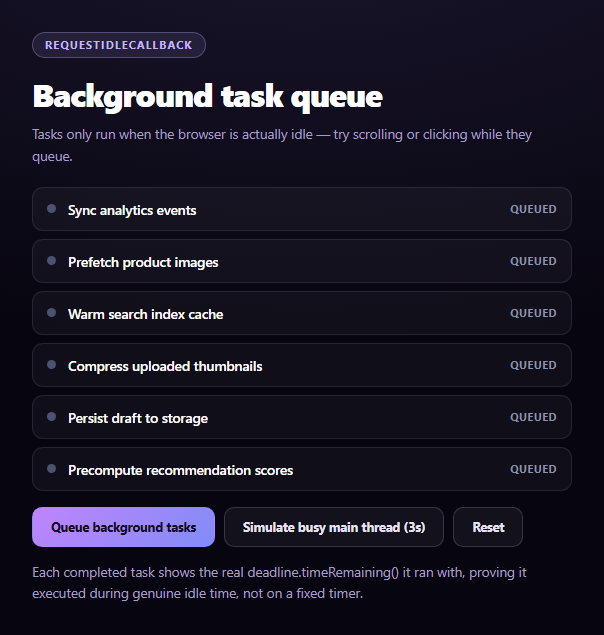
Most "background task" demos fake it with setTimeout and hope it looks convincing. This one uses the actual requestIdleCallback API and proves it — every completed task displays the real deadline.timeRemaining() value the browser handed it, which only exists because the callback genuinely ran during idle time.
The real API: requestIdleCallback and its deadline
requestIdleCallback(callback, { timeout }) asks the browser to invoke callback during a period when it has spare time before the next frame or user input — not on a fixed schedule. The callback receives a deadline object whose timeRemaining() method returns how many milliseconds of idle time are actually left right now. A "Simulate busy main thread" button lets you block the thread synchronously for 3 seconds; watch tasks queue and only start once that block clears, since requestIdleCallback genuinely cannot fire while the thread is busy.
A labeled fallback for Safari
requestIdleCallback has never shipped in Safari (desktop or iOS), so typeof window.requestIdleCallback === 'function' is feature-detected up front. When it's missing, ricPonyfill() substitutes a setTimeout-based approximation that calls back with a synthetic deadline object — but it cannot know true idle state, so its timeRemaining() reports a fixed conservative budget rather than a measured one. Every completed task's label is explicit about which mode produced it: "Ran with 34ms left" for the real API versus "~34ms (approx)" for the ponyfill.
Visible task lifecycle
Each task in the queue moves through three states — queued (gray dot), running (pulsing purple dot, currently inside its idle callback), and done (green dot, showing the deadline it ran with) — driven entirely by setTaskState(), so the UI is an honest reflection of when each callback actually fired, not a progress bar animated on a timer.
Why a timeout option matters
Each call passes { timeout: 4000 }, which tells the browser to force-run the callback after 4 seconds even without idle time, so low-priority work still eventually completes on a busy page instead of starving indefinitely. Pair this with a broader feature flag toggle panel dashboard for a "system internals" demo page.
Build with AI
Build, Understand, Optimize, and Extend It With AI
Paste this snippet's HTML, CSS, and JS into an AI coding assistant like Claude and ask it to explain what deadline.timeRemaining() actually measures inside a requestIdleCallback callback, and why that value can only exist for the real API — not for a setTimeout-based approximation. It's also useful for reasoning about the fallback: ask why Safari has never implemented requestIdleCallback despite it being a standard API, and what tradeoffs the setTimeout ponyfill makes by returning a fixed approximate budget instead of a measured one. For extensions, ask it to add a priority field so higher-priority tasks preempt lower ones, visualize actual idle-time windows on a timeline as the page runs, or add a "cancel individual task" control per queued item. Treat the code less like a finished artifact and more like a starting point for a conversation.
Prompt to recreate it
Copy this into your AI assistant of choice to build the effect from scratch, or as a jumping-off point for your own variant:
Build an "idle callback task scheduler" demo in plain HTML, CSS, and JavaScript using the real browser requestIdleCallback API — no libraries.

Requirements:
- A list of several low-priority background task names (e.g. "Sync analytics events", "Prefetch product images"), each starting in a "Queued" visual state (a status dot plus a text label).
- A "Queue background tasks" button that schedules each task sequentially via requestIdleCallback(callback, { timeout: 4000 }), where each callback marks its task "Running" immediately, reads and rounds deadline.timeRemaining() at the moment it was invoked, waits briefly to simulate doing work, then marks the task "Done" with a label showing the actual timeRemaining() value it ran with (e.g. "Ran with 34ms left") before scheduling the next task the same way.
- CRITICAL: feature-detect requestIdleCallback with typeof window.requestIdleCallback === 'function'. If unsupported (notably Safari, which has never implemented it), substitute a setTimeout-based ponyfill that invokes its callback with a synthetic deadline object whose timeRemaining() returns a fixed conservative approximate value (not a real measurement, since setTimeout cannot know actual browser idle state) — and label every task completed under this fallback differently (e.g. "~34ms (approx)") so it's never presented as a real measurement.
- A "Simulate busy main thread" button that synchronously blocks the main thread for about 3 seconds (e.g. via a tight loop driven by requestAnimationFrame checks against a target end time) so the user can visibly see queued idle tasks wait until the block clears, proving requestIdleCallback genuinely respects real idle time rather than firing on a fixed schedule.
- A "Reset" button that cancels any pending scheduled callbacks via cancelIdleCallback (or clearTimeout for the fallback) and restores every task to "Queued".
Want to tighten it up first? Run this prompt through the AI Prompt Studio to score it across 8 quality dimensions, catch anti-patterns, and tune the wording for Claude, ChatGPT, or Gemini before you paste it in.
Step by step
How to Use
- 1Paste HTML, CSS, and JSA six-task queue renders, all marked "Queued."
- 2Click "Queue background tasks"Tasks run one by one, only during idle time.
- 3Watch each task completeIts label shows the real deadline.timeRemaining().
- 4Click "Simulate busy main thread"Block the thread for 3s and watch tasks wait.
- 5Queue tasks during the blockThey visibly queue until the thread frees up.
- 6Click ResetCancels any pending idle callbacks and restarts.
Real-world uses
Common Use Cases
Got questions?
Frequently Asked Questions
Each completed task displays deadline.timeRemaining(), a value only requestIdleCallback's real callback receives — it reports how much idle time was actually left when the browser invoked it. Clicking "Simulate busy main thread" blocks the thread synchronously for 3 seconds; queued tasks visibly wait and only start once that block clears, which a fixed setTimeout schedule could never demonstrate since it would fire on its own clock regardless of thread load.
requestIdleCallback has never been implemented in Safari, on desktop or iOS, despite being a W3C spec supported by Chrome, Edge, and Firefox. The code feature-detects with typeof window.requestIdleCallback === 'function' and, when it's missing, substitutes a setTimeout-based ponyfill that calls back with a synthetic deadline object after a 1ms delay.
No, and the UI says so explicitly. The ponyfill has no way to measure genuine browser idle time the way native requestIdleCallback does, so it returns a fixed conservative budget (up to 50ms minus elapsed setup time) as an approximation. Completed tasks under the fallback are labeled "~Nms (approx)" rather than "Ran with Nms left," so the distinction from real measured idle time is never hidden.
It forces the browser to invoke the idle callback after 4 seconds even if no genuine idle period occurs, so low-priority work queued on a persistently busy page still eventually runs rather than being starved indefinitely. Without a timeout, a callback with no timeout option could theoretically wait a very long time on a page with constant animation or input.
Call requestIdleCallback (or the same feature-detected fallback) inside a mount effect for non-urgent setup work, store the returned handle, and cancel it with cancelIdleCallback in the cleanup function so an unmounted component doesn't run stale idle work. Avoid calling setState-equivalent updates from inside idle callbacks that fire after unmount, since the framework may warn or error.