You Might Also Like
Learn Coding Visually
Learn to code with interactive, live-preview playgrounds — HTML, CSS, JavaScript, React & more.
 HTML Playground42 lessons · Click-based · Live preview
 CSS PlaygroundLearn CSS with a live editor
 JavaScript Playground60 lessons · DOM · Async · Canvas
 React PlaygroundLearn React with a live code editor
 GSAP PlaygroundLearn GSAP animation interactively
 SVG Playground44 lessons · shapes · paths · animation
 SCSS Playground45 lessons · Sass modules · tokens
 Tailwind PlaygroundLearn Tailwind CSS with a live editor
 Bootstrap 5 Playground50 lessons · live preview
Video Call Hand-Raise Queue — Free Moderator Queue Panel HTML CSS JS
Video Call Hand-Raise Queue · Dashboards · Plain HTML, CSS & JS · Live preview
What's included
Features
About this UI Snippet
Video Call Hand-Raise Queue — An Ordered Moderator Panel
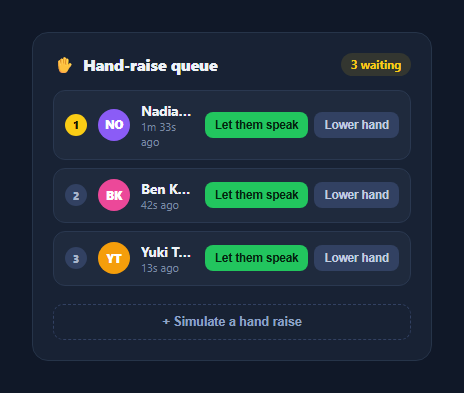
Once a video call passes a handful of participants, "unmute yourself when you want to talk" breaks down — people talk over each other, or the loudest voice wins by default. A hand-raise queue fixes that by giving the moderator an ordered, first-raised-first-served list with clear per-person actions. This snippet builds that panel in plain HTML, CSS, and vanilla JavaScript.
Ordered by raise time, not name or role
The queue is a plain array of { id, name, raisedAt } objects, and its array order *is* the display order — the person who raised their hand first sits at position one and gets a highlighted gold badge, distinguishing them as next up. There's no separate sort step because entries are pushed onto the array in the order hands go up, which is exactly the ordering a moderator needs.
Live "time since raised" without re-rendering everything
Each row's timestamp is stored as raw raisedAt data on the element (data-raised) and a lightweight setInterval updates just the text content of every .hrq-time element once a second — deliberately *not* calling the full render() function, which would rebuild every row's HTML including the buttons, just to update a clock. This separation keeps the always-running ticker cheap regardless of queue size.
Two actions, one outcome, different intent
Both "Let them speak" and "Lower hand" remove the person from the queue — the difference is what a real integration does *before* removing them: "Let them speak" would unmute and spotlight the participant, while "Lower hand" simply dismisses the request. Keeping both wired to the same filter()-based removal in the demo keeps the queue logic simple while leaving the natural extension point clearly commented.
New entries animate in
Each <li> carries a short hrqIn keyframe animation (a slight rise-and-fade) so a newly raised hand doesn't just pop into the list — useful feedback for a moderator glancing at the panel between other tasks, signaling "something changed here" without a loud notification.
Overflow-safe names, initials avatars
As with other roster-style widgets in this library, names truncate cleanly with an ellipsis and each row gets a colored initials avatar — no image dependency, so it works immediately with any real participant list.
Customizing it
Wire "Let them speak" to your video SDK's unmute/spotlight call, "Lower hand" to a dismissal-only event, and replace the simulate button with your platform's real hand-raise event. Pair it with video call grid for the main call layout.
Build with AI
Build, Understand, Optimize, and Extend It With AI
Rather than tracing the queue-ordering and timer logic by hand, paste this snippet's HTML, CSS, and JS into an AI coding assistant like Claude and ask it to explain exactly why array push order is used as the display order instead of sorting by raisedAt on every render, and how the separate setInterval for timestamps avoids rebuilding the whole list just to update a clock. The same assistant can help optimize it — for example asking whether the timestamp interval should pause when the browser tab is backgrounded, or how to handle two hands raised in the same millisecond. It's also useful for extending the panel: ask it to add a "raise your own hand" button for the current user's own row, a maximum queue size with an overflow message, or sound/visual notification when a new hand is raised while the moderator is looking elsewhere. Treat the code less like a finished artifact and more like a starting point for a conversation.
Prompt to recreate it
Copy this into your AI assistant of choice to build the effect from scratch, or as a jumping-off point for your own variant:
Build a "video call hand-raise queue" moderator panel in plain HTML, CSS, and JavaScript with no library.

Requirements:
- An array of participant objects each with an id, a name, and a raisedAt timestamp, where the array's own order is treated as the queue's display order (new raises are pushed to the end) rather than being separately sorted on every render.
- Each queue row rendered with an order-position badge (the first row visually distinguished as "next up"), a colored initials avatar generated from the name (no image assets), the name, a "time since raised" label, and two action buttons: "Let them speak" and "Lower hand".
- Both action buttons must remove that participant from the queue array and re-render the list, but the code should clearly distinguish their real-world intent (for example via a comment) since a production integration would unmute/spotlight the participant for one action but not the other.
- A separate, lightweight timer (not tied to the main render function) that updates every row's "time since raised" text once per second by reading a raw timestamp stored in a data attribute, without re-rendering the entire list's markup on every tick.
- New entries added to the queue must visually animate in (for example a brief rise-and-fade) rather than appearing instantly.
- An empty-state message shown only when the queue has zero entries, and a live count badge showing how many people are currently waiting.
Want to tighten it up first? Run this prompt through the AI Prompt Studio to score it across 8 quality dimensions, catch anti-patterns, and tune the wording for Claude, ChatGPT, or Gemini before you paste it in.
Step by step
How to Use
- 1Paste HTML, CSS, and JSA queue of three raised hands renders, ordered by raise time.
- 2Click "+ Simulate a hand raise"A new participant is added to the end of the queue with a rise-in animation.
- 3Watch the timestampsEach row's "time ago" label updates every second without re-rendering the list.
- 4Click "Let them speak" or "Lower hand"The person is removed from the queue and the remaining order updates.
- 5Empty the queueAn empty-state message appears once no one is waiting.
- 6Connect real eventsReplace the simulate button and demo actions with your video SDK's hand-raise API.
Real-world uses
Common Use Cases
Got questions?
Frequently Asked Questions
The queue array\'s own order is the display order — a new hand raise is pushed onto the end of the array, so the person who raised first naturally sits at index 0. The first row also gets a distinct gold order badge to make "who\'s next" visually unambiguous at a glance, without any separate sorting logic.
A dedicated setInterval running once a second selects every .hrq-time element directly and updates only its text content from the raw raisedAt value stored in a data attribute, deliberately avoiding a call to the full render() function that would rebuild every row\'s markup (including buttons and avatars) just to refresh a clock. This keeps the always-running ticker cheap no matter how long the queue gets.
In this demo both simply remove the person from the queue via the same filter() call, since the demo has no real audio/video backend — but they represent different real actions: "Let them speak" is where you\'d call your video SDK\'s unmute-and-spotlight API before removing the entry, while "Lower hand" is a moderator dismissing the request with no spotlight change. The comment in the click handler marks exactly where that distinction belongs.
Replace the simulate button\'s click handler with your SDK\'s hand-raise event listener (pushing a new { id, name, raisedAt } entry when it fires), and inside the "Let them speak" branch of the actions handler, call your SDK\'s unmute/spotlight method before filtering the person out of the queue array.
Hold the queue array in component state; pushing a new raise and filtering on an action both become standard state updates (setQueue in React, a mutated ref in Vue, or a component field in Angular). For the live timestamps, keep a separate "now" tick in state updated once a second and compute each row\'s time-ago string from it during render — the framework\'s own diffing avoids the manual DOM-only update this vanilla version does by hand.