You Might Also Like
Learn Coding Visually
Learn to code with interactive, live-preview playgrounds — HTML, CSS, JavaScript, React & more.
 HTML Playground42 lessons · Click-based · Live preview
 CSS PlaygroundLearn CSS with a live editor
 JavaScript Playground60 lessons · DOM · Async · Canvas
 React PlaygroundLearn React with a live code editor
 GSAP PlaygroundLearn GSAP animation interactively
 SVG Playground44 lessons · shapes · paths · animation
 SCSS Playground45 lessons · Sass modules · tokens
 Tailwind PlaygroundLearn Tailwind CSS with a live editor
 Bootstrap 5 Playground50 lessons · live preview
Code Diff Viewer — Free HTML CSS JS Snippet
Code Diff Viewer · Layouts · Plain HTML, CSS & JS · Live preview
What's included
Features
About this UI Snippet
Code Diff Viewer — LCS Line Diffing, Unified & Split Rendering, Intra-Line Highlights & Expandable Context Hunks
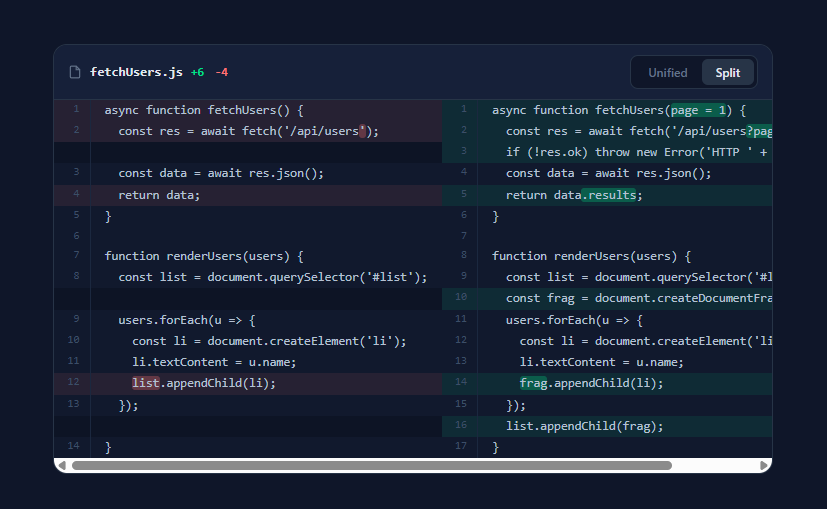
Every developer reads diffs daily, yet almost nobody builds one — the rendering lives inside GitHub, GitLab, and IDEs, and embedding a diff in your own product usually means importing a heavyweight library. This snippet implements the whole stack in vanilla JavaScript: a genuine LCS-based diff algorithm computing changes from two source strings (not pre-baked diff data), GitHub-style unified and side-by-side split renderings, word-level change highlights inside modified lines, collapsible unchanged-context hunks, and the familiar file header with +6/−4 stats. It is both a usable component and a readable explanation of how diff tools actually work.
The diff engine: longest common subsequence on lines
diffLines(a, b) is the textbook dynamic-programming LCS algorithm in ~20 lines. It fills an (m+1)×(n+1) table where dp[i][j] holds the length of the longest common subsequence of a[i..] and b[j..] — computed bottom-up, so each cell is either 1 + dp[i+1][j+1] when lines match or the max of skipping a line from either side. Walking the table from the top-left then *emits* the diff: matching lines become context ops, and at each mismatch the walk follows the larger neighbouring value, producing a del (line only in old) or add (line only in new). This is the same core that git diff builds on (git uses Myers' algorithm, an optimisation of the same problem that avoids the full table), and seeing it in 20 lines demystifies the whole category. Each op carries its original line number, which is what makes dual line-number gutters possible.
Pairing and intra-line highlights
Raw LCS output represents a changed line as a deletion plus an addition — but readers want to see *what changed within the line*. pairOps() scans for adjacent del-runs followed by add-runs and zips them into replacement pairs; charDiff() then trims the common prefix and common suffix of each pair and wraps only the differing middle in .hl-del/.hl-add marks. That prefix/suffix trim is a deliberately simple heuristic — it nails the common cases (a changed argument, a renamed variable, an added property) in six lines, where full word-level LCS would be overkill. All source text passes through an HTML escaper before markup injection, the non-negotiable step when rendering code into innerHTML.
Two renderings from one op stream
Unified view is a three-column table — old line number, new line number, code with a +/−/space sign column — where a replacement pair renders as a red row then a green row. Split view is four columns: old gutter and code on the left, new gutter and code on the right; context rows show both sides, pairs show del-left/add-right with their intra-line highlights aligned, and unpaired adds/dels leave a dimmed .row-empty cell opposite — exactly GitHub's alignment behaviour. Both renderers consume the same paired op stream, so the toggle is a pure re-render with no recomputation. Row colouring uses low-alpha green/red backgrounds with matching tinted gutters and slightly brightened text, tuned for dark UIs.
Hunk collapsing
Real diffs are mostly unchanged lines, so collapse() replaces context runs longer than a threshold with an "Expand N unchanged lines" bar, keeping two context lines on each side of every change — the same presentation as git diff's hunk headers. The bars are clickable table rows that re-render with collapsing disabled, revealing the full file. The stats in the header (+6 −4) are just counts over the op stream, and the horizontal-scroll container with white-space: pre preserves code formatting at any width.
Build with AI
Build, Understand, Optimize, and Extend It With AI
This file contains a complete diff implementation small enough to actually understand, and an AI assistant is the ideal study partner for it: paste the code into Claude and ask it to walk the dp table for two five-line files by hand, showing why the traceback emits dels before adds at a mismatch — then ask where the O(MN) cost bites and have it swap in Myers' O(ND) algorithm as a drop-in diffLines replacement, verifying both produce valid diffs. On the product side, the highest-value requests are integration-shaped: have it write the unified-diff parser that maps git patch text into this op format so you can render server-produced diffs byte-faithfully; ask for per-hunk accept/reject buttons that reconstruct the merged file from chosen ops (the core of any AI code-review UI); or have it layer a line-by-line syntax highlighter around the existing intra-line marks in the escape → diff-marks → syntax order the about section prescribes. And if the demo's word-level highlight underwhelms on heavily edited lines, ask it to re-run the same LCS over word tokens within each pair — the algorithm is already granularity-agnostic, which is the lesson worth extracting.
Prompt to recreate it
Copy this into your AI assistant of choice to build the effect from scratch, or as a jumping-off point for your own variant:
Build a GitHub-style code diff viewer in plain HTML, CSS, and JavaScript that COMPUTES the diff itself from two versions of a source file — no diff libraries, no pre-baked diff data.

Requirements:
- Implement line diffing with the classic LCS dynamic-programming algorithm: fill the (m+1)×(n+1) suffix table bottom-up, then walk it emitting typed ops — context lines carrying both original line numbers, deletions carrying old line numbers, additions carrying new ones.
- Add a pairing pass that zips adjacent deletion runs with following addition runs into replacement pairs, and an intra-line highlighter that trims each pair's common prefix and suffix, wrapping only the changed middle in stronger-tinted mark spans; all source text must pass through an HTML escaper before any markup injection.
- Render a Unified view as a table with two line-number gutters (old and new), a +/−/space sign column, and low-alpha green/red row tints with matching tinted gutters — replacement pairs appearing as a red row directly above its green counterpart.
- Render a Split view as a four-column table — old gutter and code left, new gutter and code right — where context rows fill both sides, pairs align del-left/add-right with their intra-line highlights, and unpaired lines leave a dimmed empty cell opposite; both views must consume the same op stream so toggling is a pure re-render.
- Collapse runs of unchanged lines longer than ~5 into clickable "Expand N unchanged lines" bars keeping two context lines around every change, expanding on click; include a header bar with a monospace filename, computed +added/−removed stats, and a Unified/Split segmented toggle.
- Wrap the table in a horizontal-scroll container with white-space: pre so long lines never wrap, and comment the algorithm generously — the dp recurrence, why the traceback direction choice matters, and where Myers' algorithm would substitute for large files.
Want to tighten it up first? Run this prompt through the AI Prompt Studio to score it across 8 quality dimensions, catch anti-patterns, and tune the wording for Claude, ChatGPT, or Gemini before you paste it in.
Step by step
How to Use
- 1Read the diff and switch viewsThe demo diffs two versions of a fetchUsers module. In Unified view, deletions (red, −) sit above their replacement additions (green, +), with the changed characters inside each line highlighted more strongly. Click Split for the side-by-side rendering — old file left, new file right, changes aligned row-by-row. Click an "Expand N unchanged lines" bar to reveal collapsed context.
- 2Diff your own contentReplace OLD_CODE and NEW_CODE with any two arrays of lines — split file contents with text.split("\n"). Everything downstream (algorithm, pairing, stats, both renderers) recomputes automatically. The viewer is language-agnostic: it diffs configuration files, JSON, SQL, or prose paragraphs exactly as happily as JavaScript.
- 3Feed it from real sourcesCommon integrations: two <textarea> inputs for a paste-and-compare tool; fetch two versions from your API (document revisions, config history); or parse existing unified-diff text from git by mapping +/-/space prefixed lines directly into the op shape { t, text } and skipping diffLines entirely. For PR-style multi-file views, render one diff-card per file and add a file-tree rail.
- 4Tune context and highlightsCONTEXT = 2 controls visible unchanged lines around each change; git's default is 3. Set it to Infinity to never collapse. The intra-line highlighter is the prefix/suffix trim in charDiff() — if you need true word-level marking for heavily rewritten lines, replace it with a token-level LCS over line.split(/(\W)/) reusing the same diffLines function on tokens instead of lines.
- 5Add syntax highlightingHighlight each code cell after diff markup: run a lightweight tokenizer over the escaped code and wrap keywords/strings in coloured spans, being careful to apply it around (not inside) the .hl-add/.hl-del marks. The practical order is: escape → intra-line diff marks → syntax spans on the remaining text nodes. For production, Shiki or highlight.js can process each line individually to keep the table structure.
- 6Export to your frameworkClick JSX for React — keep diffLines/pairOps/collapse as pure functions in a module (they are framework-free already), memoise the paired ops with useMemo on [oldText, newText], and render rows from the op array. Pairs with the Code Block Tabs for before/after file views, the Code Comparison for marketing-style comparisons, and the AI Streaming Response for AI code-review products that stream diff explanations.
Real-world uses
Common Use Cases
Got questions?
Frequently Asked Questions
The insight is that a diff is defined by what did NOT change: find the longest sequence of lines appearing in both files in the same order (the longest common subsequence), and everything outside it is, by definition, the changes — old-only lines are deletions, new-only lines are additions. The dp table computes LCS lengths for every pair of suffixes: dp[i][j] answers "how many lines can old-from-i and new-from-j still have in common?", built bottom-up so each cell needs only its three neighbours. The walk then re-traces the optimal path: when lines match, that line is part of the common spine (context); when they differ, the walk moves in whichever direction preserves the larger remaining LCS, emitting a del or add. Git's Myers algorithm solves the identical problem in O(ND) time and O(N) space instead of this O(MN) table — necessary for huge files, but the table version is the one you can hold in your head, and for the few-hundred-line inputs typical of embedded viewers it is plenty fast.
Line-based diffing has no concept of "modified" — a changed line is literally an old line that disappeared plus a new line that appeared, which is exactly how git stores it. The pairing pass reconstructs the human notion of modification: an unbroken run of deletions immediately followed by additions is almost always an edit, so pairOps zips them positionally into replacement pairs (surplus lines on either side stay as pure adds/dels). For each pair, charDiff finds what actually changed by trimming the longest common prefix and longest common suffix — everything between the trims gets the strong highlight. This heuristic is intentionally simple: for "return data;" → "return data.results;" it isolates ".results" perfectly. Its known weakness is multiple separated edits in one line (it will highlight the whole span between the first and last change); upgrading means running the same LCS algorithm over word tokens within the pair, which the code structure permits — diffLines works on any array, including line.split(/(\W)/).
Skip the algorithm and map the patch format straight into ops. A unified diff's body lines start with a space (context), "-" (deletion), or "+" (addition); hunk headers like @@ -12,6 +12,8 @@ carry the starting line numbers for each side. Parse line by line: maintain two counters seeded from the hunk header, and emit { t: "ctx", a, b, text } incrementing both, { t: "del", a, text } incrementing the old counter, or { t: "add", b, text } incrementing the new one, stripping the prefix character from text. Feed the result through pairOps() and either renderer works unchanged — the renderers only know about ops, not about how they were produced. This is the right architecture for PR-review tools where the server (or git itself) already produced the patch: never re-diff what git has diffed, since byte-identical rendering to git's decisions is what reviewers expect.
Tailwind: the card is bg-slate-900 border border-slate-700 rounded-xl overflow-hidden; gutters are w-10 px-2.5 text-right text-[11px] text-slate-600 select-none border-r border-slate-800 align-top; code cells are px-3.5 whitespace-pre font-mono text-[12.5px]; row tints are bg-green-400/10 for additions and bg-red-400/10 for deletions with the intra-line marks as bg-green-400/30 rounded-sm and bg-red-400/30. In React, keep diffLines, pairOps, charDiff, and collapse as pure functions in a diff.ts module — they have zero DOM dependencies — then const ops = useMemo(() => pairOps(diffLines(oldLines, newLines)), [oldText, newText]) and map ops to <tr> elements, replacing the innerHTML string-building with JSX (which also gives you escaping for free, so drop esc()). In Angular, the same pure module plus a component computing ops in a computed() signal, rendered with @for over the collapsed rows; the hunk-expand becomes a signal flip instead of a re-render call.